mirror of
https://github.com/pgsty/minio.git
synced 2026-11-02 22:02:06 +03:00
Compare commits
86 Commits
| Author | SHA1 | Date | |
|---|---|---|---|
 Harshavardhana |
b7c90751b0 | ||
|
Klaus Post
|
88fd1cba71 | ||
|
Harshavardhana
|
e43cc316ff | ||
|
Klaus Post
|
e3f24a29fa | ||
|
Harshavardhana
|
890e526bde | ||
|
Harshavardhana
|
16ce455fca | ||
|
Harshavardhana
|
29b7164468 | ||
|
Harshavardhana
|
acdd03f609 | ||
|
hellivan
|
03b35ecdd0 | ||
|
hellivan
|
5307e18085 | ||
|
Klaus Post
|
2cea944cdb | ||
|
Harshavardhana
|
c08540c7b7 | ||
|
Shireesh Anjal
|
3934700a08 | ||
|
hellivan
|
0913eb6655 | ||
|
Harshavardhana
|
1bfbe354f5 | ||
|
Harshavardhana
|
2d78e20120 | ||
|
Harshavardhana
|
77210513c9 | ||
|
Harshavardhana
|
2e6f8bdf19 | ||
|
Shireesh Anjal
|
25144fedd5 | ||
|
Krishnan Parthasarathi
|
27f64dd9a4 | ||
|
Harshavardhana
|
9d7648f02f | ||
|
Poorna
|
1ef8babfef | ||
|
Poorna
|
4ea7bf0510 | ||
|
Anis Elleuch
|
5dcf1d13a9 | ||
|
Shireesh Anjal
|
94d37d05e5 | ||
|
Harshavardhana
|
0cbdc458c5 | ||
|
Shireesh Anjal
|
c1437c7b46 | ||
|
Eric
|
f357f65d04 | ||
|
Harshavardhana
|
ef8e952fc4 | ||
|
Eric
|
a2bc383e15 | ||
|
Harshavardhana
|
23930355a7 | ||
|
Domonkos Cinke
|
bb9f41e613 | ||
|
Aditya Manthramurthy
|
bc110d8055 | ||
|
Minio Trusted
|
b23b19e5c3 | ||
|
Harshavardhana
|
65b1a4282e | ||
|
Minio Trusted
|
1dbb3f6f43 | ||
|
Harshavardhana
|
af3dc25dfe | ||
|
Krishnan Parthasarathi
|
5a0c0079a1 | ||
|
Harshavardhana
|
af8f563ed3 | ||
|
Poorna
|
93af4a4864 | ||
|
Shireesh Anjal
|
28f188e3ef | ||
|
Harshavardhana
|
b29224f62f | ||
|
Harshavardhana
|
d756da41b9 | ||
|
Krishnan Parthasarathi
|
cdab4a3b85 | ||
|
Klaus Post
|
b88c57ba93 | ||
|
Shireesh Anjal
|
1a5496eced | ||
|
Harshavardhana
|
b264e6a191 | ||
|
Harshavardhana
|
ae1b495262 | ||
|
Shireesh Anjal
|
16939ca192 | ||
|
Klaus Post
|
60cd513a33 | ||
|
Minio Trusted
|
27d94c64ed | ||
|
Harshavardhana
|
21a0f857d3 | ||
|
Harshavardhana
|
03a6e8aee2 | ||
|
Pierre Kancir
|
d0862ddf86 | ||
|
Anis Elleuch
|
4afbb89774 | ||
|
Klaus Post
|
5ec57a9533 | ||
|
Harshavardhana
|
f088e8960b | ||
|
Harshavardhana
|
27dec42ad6 | ||
|
jescalona-lf
|
b70053090c | ||
|
Harshavardhana
|
f10e2254ae | ||
|
Anis Elleuch
|
1f92fc3fc0 | ||
|
Minio Trusted
|
f71b114a84 | ||
|
Harshavardhana
|
e3e0532613 | ||
|
Harshavardhana
|
2c0f121550 | ||
|
Harshavardhana
|
6f41cff75a | ||
|
dependabot[bot]
|
9b39616c1b | ||
|
Harshavardhana
|
fad3d66093 | ||
|
Harshavardhana
|
ff99ef74c8 | ||
|
Harshavardhana
|
6990e73b11 | ||
|
Harshavardhana
|
860a1237ab | ||
|
Harshavardhana
|
97b5bf1fb7 | ||
|
Poorna
|
ed3418c046 | ||
|
Harshavardhana
|
a2230868e0 | ||
|
Anis Elleuch
|
71bab74148 | ||
|
Anis Elleuch
|
661ea57907 | ||
|
Anis Elleuch
|
1f18efb0ba | ||
|
Daniel
|
8ae46bce93 | ||
|
Harshavardhana
|
f19a414e09 | ||
|
Krishnan Parthasarathi
|
0ee2933234 | ||
|
Shireesh Anjal
|
9890f579f8 | ||
|
Anis Elleuch
|
2ee337ead5 | ||
|
Harshavardhana
|
362e14fa1a | ||
|
George Wilson
|
524fe62594 | ||
|
Harshavardhana
|
3c87e1e60d | ||
|
Harshavardhana
|
0cac868a36 | ||
|
Minio Trusted
|
2480c66857 |
@@ -0,0 +1,25 @@
|
||||
name: Markdown Linter
|
||||
|
||||
on:
|
||||
pull_request:
|
||||
branches:
|
||||
- master
|
||||
|
||||
# This ensures that previous jobs for the PR are canceled when the PR is
|
||||
# updated.
|
||||
concurrency:
|
||||
group: ${{ github.workflow }}-${{ github.head_ref }}
|
||||
cancel-in-progress: true
|
||||
|
||||
jobs:
|
||||
lint:
|
||||
name: Lint all docs
|
||||
runs-on: ubuntu-latest
|
||||
steps:
|
||||
- name: Check out code
|
||||
uses: actions/checkout@v2
|
||||
|
||||
- name: Lint all docs
|
||||
run: |
|
||||
npm install -g markdownlint-cli
|
||||
markdownlint --fix '**/*.md' --disable MD013 MD040
|
||||
@@ -1,4 +1,5 @@
|
||||
# AGPLv3 Compliance
|
||||
|
||||
We have designed MinIO as an Open Source software for the Open Source software community. This requires applications to consider whether their usage of MinIO is in compliance with the GNU AGPLv3 [license](https://github.com/minio/minio/blob/master/LICENSE).
|
||||
|
||||
MinIO cannot make the determination as to whether your application's usage of MinIO is in compliance with the AGPLv3 license requirements. You should instead rely on your own legal counsel or licensing specialists to audit and ensure your application is in compliance with the licenses of MinIO and all other open-source projects with which your application integrates or interacts. We understand that AGPLv3 licensing is complex and nuanced. It is for that reason we strongly encourage using experts in licensing to make any such determinations around compliance instead of relying on apocryphal or anecdotal advice.
|
||||
|
||||
+19
-6
@@ -7,15 +7,17 @@
|
||||
Start by forking the MinIO GitHub repository, make changes in a branch and then send a pull request. We encourage pull requests to discuss code changes. Here are the steps in details:
|
||||
|
||||
### Setup your MinIO GitHub Repository
|
||||
|
||||
Fork [MinIO upstream](https://github.com/minio/minio/fork) source repository to your own personal repository. Copy the URL of your MinIO fork (you will need it for the `git clone` command below).
|
||||
|
||||
```sh
|
||||
$ git clone https://github.com/minio/minio
|
||||
$ go install -v
|
||||
$ ls /go/bin/minio
|
||||
git clone https://github.com/minio/minio
|
||||
go install -v
|
||||
ls /go/bin/minio
|
||||
```
|
||||
|
||||
### Set up git remote as ``upstream``
|
||||
|
||||
```sh
|
||||
$ cd minio
|
||||
$ git remote add upstream https://github.com/minio/minio
|
||||
@@ -25,13 +27,15 @@ $ git merge upstream/master
|
||||
```
|
||||
|
||||
### Create your feature branch
|
||||
|
||||
Before making code changes, make sure you create a separate branch for these changes
|
||||
|
||||
```
|
||||
$ git checkout -b my-new-feature
|
||||
git checkout -b my-new-feature
|
||||
```
|
||||
|
||||
### Test MinIO server changes
|
||||
|
||||
After your code changes, make sure
|
||||
|
||||
- To add test cases for the new code. If you have questions about how to do it, please ask on our [Slack](https://slack.min.io) channel.
|
||||
@@ -40,29 +44,38 @@ After your code changes, make sure
|
||||
- To run `make test` and `make build` completes.
|
||||
|
||||
### Commit changes
|
||||
|
||||
After verification, commit your changes. This is a [great post](https://chris.beams.io/posts/git-commit/) on how to write useful commit messages
|
||||
|
||||
```
|
||||
$ git commit -am 'Add some feature'
|
||||
git commit -am 'Add some feature'
|
||||
```
|
||||
|
||||
### Push to the branch
|
||||
|
||||
Push your locally committed changes to the remote origin (your fork)
|
||||
|
||||
```
|
||||
$ git push origin my-new-feature
|
||||
git push origin my-new-feature
|
||||
```
|
||||
|
||||
### Create a Pull Request
|
||||
|
||||
Pull requests can be created via GitHub. Refer to [this document](https://help.github.com/articles/creating-a-pull-request/) for detailed steps on how to create a pull request. After a Pull Request gets peer reviewed and approved, it will be merged.
|
||||
|
||||
## FAQs
|
||||
|
||||
### How does ``MinIO`` manage dependencies?
|
||||
|
||||
``MinIO`` uses `go mod` to manage its dependencies.
|
||||
|
||||
- Run `go get foo/bar` in the source folder to add the dependency to `go.mod` file.
|
||||
|
||||
To remove a dependency
|
||||
|
||||
- Edit your code and remove the import reference.
|
||||
- Run `go mod tidy` in the source folder to remove dependency from `go.mod` file.
|
||||
|
||||
### What are the coding guidelines for MinIO?
|
||||
|
||||
``MinIO`` is fully conformant with Golang style. Refer: [Effective Go](https://github.com/golang/go/wiki/CodeReviewComments) article from Golang project. If you observe offending code, please feel free to send a pull request or ping us on [Slack](https://slack.min.io).
|
||||
|
||||
@@ -1,4 +1,5 @@
|
||||
# MinIO Quickstart Guide
|
||||
|
||||
[](https://slack.min.io) [](https://hub.docker.com/r/minio/minio/) [](https://github.com/minio/minio/blob/master/LICENSE)
|
||||
|
||||
[](https://min.io)
|
||||
@@ -7,7 +8,7 @@ MinIO is a High Performance Object Storage released under GNU Affero General Pub
|
||||
|
||||
This README provides quickstart instructions on running MinIO on bare metal hardware, including container-based installations. For Kubernetes environments, use the [MinIO Kubernetes Operator](https://github.com/minio/operator/blob/master/README.md).
|
||||
|
||||
# Container Installation
|
||||
## Container Installation
|
||||
|
||||
Use the following commands to run a standalone MinIO server as a container.
|
||||
|
||||
@@ -16,7 +17,7 @@ require distributed deploying MinIO with Erasure Coding. For extended developmen
|
||||
with a *minimum* of 4 drives per MinIO server. See [MinIO Erasure Code Quickstart Guide](https://docs.min.io/docs/minio-erasure-code-quickstart-guide.html)
|
||||
for more complete documentation.
|
||||
|
||||
## Stable
|
||||
### Stable
|
||||
|
||||
Run the following command to run the latest stable image of MinIO as a container using an ephemeral data volume:
|
||||
|
||||
@@ -26,22 +27,22 @@ podman run -p 9000:9000 -p 9001:9001 \
|
||||
```
|
||||
|
||||
The MinIO deployment starts using default root credentials `minioadmin:minioadmin`. You can test the deployment using the MinIO Console, an embedded
|
||||
object browser built into MinIO Server. Point a web browser running on the host machine to http://127.0.0.1:9000 and log in with the
|
||||
object browser built into MinIO Server. Point a web browser running on the host machine to <http://127.0.0.1:9000> and log in with the
|
||||
root credentials. You can use the Browser to create buckets, upload objects, and browse the contents of the MinIO server.
|
||||
|
||||
You can also connect using any S3-compatible tool, such as the MinIO Client `mc` commandline tool. See
|
||||
[Test using MinIO Client `mc`](#test-using-minio-client-mc) for more information on using the `mc` commandline tool. For application developers,
|
||||
see https://docs.min.io/docs/ and click **MinIO SDKs** in the navigation to view MinIO SDKs for supported languages.
|
||||
see <https://docs.min.io/docs/> and click **MinIO SDKs** in the navigation to view MinIO SDKs for supported languages.
|
||||
|
||||
> NOTE: To deploy MinIO on with persistent storage, you must map local persistent directories from the host OS to the container using the `podman -v` option. For example, `-v /mnt/data:/data` maps the host OS drive at `/mnt/data` to `/data` on the container.
|
||||
|
||||
# macOS
|
||||
## macOS
|
||||
|
||||
Use the following commands to run a standalone MinIO server on macOS.
|
||||
|
||||
Standalone MinIO servers are best suited for early development and evaluation. Certain features such as versioning, object locking, and bucket replication require distributed deploying MinIO with Erasure Coding. For extended development and production, deploy MinIO with Erasure Coding enabled - specifically, with a *minimum* of 4 drives per MinIO server. See [MinIO Erasure Code Quickstart Guide](https://docs.min.io/docs/minio-erasure-code-quickstart-guide.html) for more complete documentation.
|
||||
|
||||
## Homebrew (recommended)
|
||||
### Homebrew (recommended)
|
||||
|
||||
Run the following command to install the latest stable MinIO package using [Homebrew](https://brew.sh/). Replace ``/data`` with the path to the drive or directory in which you want MinIO to store data.
|
||||
|
||||
@@ -57,11 +58,11 @@ brew uninstall minio
|
||||
brew install minio/stable/minio
|
||||
```
|
||||
|
||||
The MinIO deployment starts using default root credentials `minioadmin:minioadmin`. You can test the deployment using the MinIO Console, an embedded web-based object browser built into MinIO Server. Point a web browser running on the host machine to http://127.0.0.1:9000 and log in with the root credentials. You can use the Browser to create buckets, upload objects, and browse the contents of the MinIO server.
|
||||
The MinIO deployment starts using default root credentials `minioadmin:minioadmin`. You can test the deployment using the MinIO Console, an embedded web-based object browser built into MinIO Server. Point a web browser running on the host machine to <http://127.0.0.1:9000> and log in with the root credentials. You can use the Browser to create buckets, upload objects, and browse the contents of the MinIO server.
|
||||
|
||||
You can also connect using any S3-compatible tool, such as the MinIO Client `mc` commandline tool. See [Test using MinIO Client `mc`](#test-using-minio-client-mc) for more information on using the `mc` commandline tool. For application developers, see https://docs.min.io/docs/ and click **MinIO SDKs** in the navigation to view MinIO SDKs for supported languages.
|
||||
You can also connect using any S3-compatible tool, such as the MinIO Client `mc` commandline tool. See [Test using MinIO Client `mc`](#test-using-minio-client-mc) for more information on using the `mc` commandline tool. For application developers, see <https://docs.min.io/docs/> and click **MinIO SDKs** in the navigation to view MinIO SDKs for supported languages.
|
||||
|
||||
## Binary Download
|
||||
### Binary Download
|
||||
|
||||
Use the following command to download and run a standalone MinIO server on macOS. Replace ``/data`` with the path to the drive or directory in which you want MinIO to store data.
|
||||
|
||||
@@ -71,11 +72,11 @@ chmod +x minio
|
||||
./minio server /data
|
||||
```
|
||||
|
||||
The MinIO deployment starts using default root credentials `minioadmin:minioadmin`. You can test the deployment using the MinIO Console, an embedded web-based object browser built into MinIO Server. Point a web browser running on the host machine to http://127.0.0.1:9000 and log in with the root credentials. You can use the Browser to create buckets, upload objects, and browse the contents of the MinIO server.
|
||||
The MinIO deployment starts using default root credentials `minioadmin:minioadmin`. You can test the deployment using the MinIO Console, an embedded web-based object browser built into MinIO Server. Point a web browser running on the host machine to <http://127.0.0.1:9000> and log in with the root credentials. You can use the Browser to create buckets, upload objects, and browse the contents of the MinIO server.
|
||||
|
||||
You can also connect using any S3-compatible tool, such as the MinIO Client `mc` commandline tool. See [Test using MinIO Client `mc`](#test-using-minio-client-mc) for more information on using the `mc` commandline tool. For application developers, see https://docs.min.io/docs/ and click **MinIO SDKs** in the navigation to view MinIO SDKs for supported languages.
|
||||
You can also connect using any S3-compatible tool, such as the MinIO Client `mc` commandline tool. See [Test using MinIO Client `mc`](#test-using-minio-client-mc) for more information on using the `mc` commandline tool. For application developers, see <https://docs.min.io/docs/> and click **MinIO SDKs** in the navigation to view MinIO SDKs for supported languages.
|
||||
|
||||
# GNU/Linux
|
||||
## GNU/Linux
|
||||
|
||||
Use the following command to run a standalone MinIO server on Linux hosts running 64-bit Intel/AMD architectures. Replace ``/data`` with the path to the drive or directory in which you want MinIO to store data.
|
||||
|
||||
@@ -91,18 +92,18 @@ The following table lists supported architectures. Replace the `wget` URL with t
|
||||
|
||||
| Architecture | URL |
|
||||
| -------- | ------ |
|
||||
| 64-bit Intel/AMD | https://dl.min.io/server/minio/release/linux-amd64/minio |
|
||||
| 64-bit ARM | https://dl.min.io/server/minio/release/linux-arm64/minio |
|
||||
| 64-bit PowerPC LE (ppc64le) | https://dl.min.io/server/minio/release/linux-ppc64le/minio |
|
||||
| IBM Z-Series (S390X) | https://dl.min.io/server/minio/release/linux-s390x/minio |
|
||||
| 64-bit Intel/AMD | <https://dl.min.io/server/minio/release/linux-amd64/minio> |
|
||||
| 64-bit ARM | <https://dl.min.io/server/minio/release/linux-arm64/minio> |
|
||||
| 64-bit PowerPC LE (ppc64le) | <https://dl.min.io/server/minio/release/linux-ppc64le/minio> |
|
||||
| IBM Z-Series (S390X) | <https://dl.min.io/server/minio/release/linux-s390x/minio> |
|
||||
|
||||
The MinIO deployment starts using default root credentials `minioadmin:minioadmin`. You can test the deployment using the MinIO Console, an embedded web-based object browser built into MinIO Server. Point a web browser running on the host machine to http://127.0.0.1:9000 and log in with the root credentials. You can use the Browser to create buckets, upload objects, and browse the contents of the MinIO server.
|
||||
The MinIO deployment starts using default root credentials `minioadmin:minioadmin`. You can test the deployment using the MinIO Console, an embedded web-based object browser built into MinIO Server. Point a web browser running on the host machine to <http://127.0.0.1:9000> and log in with the root credentials. You can use the Browser to create buckets, upload objects, and browse the contents of the MinIO server.
|
||||
|
||||
You can also connect using any S3-compatible tool, such as the MinIO Client `mc` commandline tool. See [Test using MinIO Client `mc`](#test-using-minio-client-mc) for more information on using the `mc` commandline tool. For application developers, see https://docs.min.io/docs/ and click **MinIO SDKs** in the navigation to view MinIO SDKs for supported languages.
|
||||
You can also connect using any S3-compatible tool, such as the MinIO Client `mc` commandline tool. See [Test using MinIO Client `mc`](#test-using-minio-client-mc) for more information on using the `mc` commandline tool. For application developers, see <https://docs.min.io/docs/> and click **MinIO SDKs** in the navigation to view MinIO SDKs for supported languages.
|
||||
|
||||
> NOTE: Standalone MinIO servers are best suited for early development and evaluation. Certain features such as versioning, object locking, and bucket replication require distributed deploying MinIO with Erasure Coding. For extended development and production, deploy MinIO with Erasure Coding enabled - specifically, with a *minimum* of 4 drives per MinIO server. See [MinIO Erasure Code Quickstart Guide](https://docs.min.io/docs/minio-erasure-code-quickstart-guide.html) for more complete documentation.
|
||||
|
||||
# Microsoft Windows
|
||||
## Microsoft Windows
|
||||
|
||||
To run MinIO on 64-bit Windows hosts, download the MinIO executable from the following URL:
|
||||
|
||||
@@ -116,13 +117,13 @@ Use the following command to run a standalone MinIO server on the Windows host.
|
||||
minio.exe server D:\
|
||||
```
|
||||
|
||||
The MinIO deployment starts using default root credentials `minioadmin:minioadmin`. You can test the deployment using the MinIO Console, an embedded web-based object browser built into MinIO Server. Point a web browser running on the host machine to http://127.0.0.1:9000 and log in with the root credentials. You can use the Browser to create buckets, upload objects, and browse the contents of the MinIO server.
|
||||
The MinIO deployment starts using default root credentials `minioadmin:minioadmin`. You can test the deployment using the MinIO Console, an embedded web-based object browser built into MinIO Server. Point a web browser running on the host machine to <http://127.0.0.1:9000> and log in with the root credentials. You can use the Browser to create buckets, upload objects, and browse the contents of the MinIO server.
|
||||
|
||||
You can also connect using any S3-compatible tool, such as the MinIO Client `mc` commandline tool. See [Test using MinIO Client `mc`](#test-using-minio-client-mc) for more information on using the `mc` commandline tool. For application developers, see https://docs.min.io/docs/ and click **MinIO SDKs** in the navigation to view MinIO SDKs for supported languages.
|
||||
You can also connect using any S3-compatible tool, such as the MinIO Client `mc` commandline tool. See [Test using MinIO Client `mc`](#test-using-minio-client-mc) for more information on using the `mc` commandline tool. For application developers, see <https://docs.min.io/docs/> and click **MinIO SDKs** in the navigation to view MinIO SDKs for supported languages.
|
||||
|
||||
> NOTE: Standalone MinIO servers are best suited for early development and evaluation. Certain features such as versioning, object locking, and bucket replication require distributed deploying MinIO with Erasure Coding. For extended development and production, deploy MinIO with Erasure Coding enabled - specifically, with a *minimum* of 4 drives per MinIO server. See [MinIO Erasure Code Quickstart Guide](https://docs.min.io/docs/minio-erasure-code-quickstart-guide.html) for more complete documentation.
|
||||
|
||||
# Install from Source
|
||||
## Install from Source
|
||||
|
||||
Use the following commands to compile and run a standalone MinIO server from source. Source installation is only intended for developers and advanced users. If you do not have a working Golang environment, please follow [How to install Golang](https://golang.org/doc/install). Minimum version required is [go1.17](https://golang.org/dl/#stable)
|
||||
|
||||
@@ -130,17 +131,17 @@ Use the following commands to compile and run a standalone MinIO server from sou
|
||||
GO111MODULE=on go install github.com/minio/minio@latest
|
||||
```
|
||||
|
||||
The MinIO deployment starts using default root credentials `minioadmin:minioadmin`. You can test the deployment using the MinIO Console, an embedded web-based object browser built into MinIO Server. Point a web browser running on the host machine to http://127.0.0.1:9000 and log in with the root credentials. You can use the Browser to create buckets, upload objects, and browse the contents of the MinIO server.
|
||||
The MinIO deployment starts using default root credentials `minioadmin:minioadmin`. You can test the deployment using the MinIO Console, an embedded web-based object browser built into MinIO Server. Point a web browser running on the host machine to <http://127.0.0.1:9000> and log in with the root credentials. You can use the Browser to create buckets, upload objects, and browse the contents of the MinIO server.
|
||||
|
||||
You can also connect using any S3-compatible tool, such as the MinIO Client `mc` commandline tool. See [Test using MinIO Client `mc`](#test-using-minio-client-mc) for more information on using the `mc` commandline tool. For application developers, see https://docs.min.io/docs/ and click **MinIO SDKs** in the navigation to view MinIO SDKs for supported languages.
|
||||
You can also connect using any S3-compatible tool, such as the MinIO Client `mc` commandline tool. See [Test using MinIO Client `mc`](#test-using-minio-client-mc) for more information on using the `mc` commandline tool. For application developers, see <https://docs.min.io/docs/> and click **MinIO SDKs** in the navigation to view MinIO SDKs for supported languages.
|
||||
|
||||
> NOTE: Standalone MinIO servers are best suited for early development and evaluation. Certain features such as versioning, object locking, and bucket replication require distributed deploying MinIO with Erasure Coding. For extended development and production, deploy MinIO with Erasure Coding enabled - specifically, with a *minimum* of 4 drives per MinIO server. See [MinIO Erasure Code Quickstart Guide](https://docs.min.io/docs/minio-erasure-code-quickstart-guide.html) for more complete documentation.
|
||||
|
||||
MinIO strongly recommends *against* using compiled-from-source MinIO servers for production environments.
|
||||
|
||||
# Deployment Recommendations
|
||||
## Deployment Recommendations
|
||||
|
||||
## Allow port access for Firewalls
|
||||
### Allow port access for Firewalls
|
||||
|
||||
By default MinIO uses the port 9000 to listen for incoming connections. If your platform blocks the port by default, you may need to enable access to the port.
|
||||
|
||||
@@ -196,18 +197,21 @@ service iptables restart
|
||||
```
|
||||
|
||||
## Pre-existing data
|
||||
|
||||
When deployed on a single drive, MinIO server lets clients access any pre-existing data in the data directory. For example, if MinIO is started with the command `minio server /mnt/data`, any pre-existing data in the `/mnt/data` directory would be accessible to the clients.
|
||||
|
||||
The above statement is also valid for all gateway backends.
|
||||
|
||||
# Test MinIO Connectivity
|
||||
## Test MinIO Connectivity
|
||||
|
||||
## Test using MinIO Console
|
||||
MinIO Server comes with an embedded web based object browser. Point your web browser to http://127.0.0.1:9000 to ensure your server has started successfully.
|
||||
### Test using MinIO Console
|
||||
|
||||
MinIO Server comes with an embedded web based object browser. Point your web browser to <http://127.0.0.1:9000> to ensure your server has started successfully.
|
||||
|
||||
> NOTE: MinIO runs console on random port by default if you wish choose a specific port use `--console-address` to pick a specific interface and port.
|
||||
|
||||
### Things to consider
|
||||
|
||||
MinIO redirects browser access requests to the configured server port (i.e. `127.0.0.1:9000`) to the configured Console port. MinIO uses the hostname or IP address specified in the request when building the redirect URL. The URL and port *must* be accessible by the client for the redirection to work.
|
||||
|
||||
For deployments behind a load balancer, proxy, or ingress rule where the MinIO host IP address or port is not public, use the `MINIO_BROWSER_REDIRECT_URL` environment variable to specify the external hostname for the redirect. The LB/Proxy must have rules for directing traffic to the Console port specifically.
|
||||
@@ -218,36 +222,40 @@ Similarly, if your TLS certificates do not have the IP SAN for the MinIO server
|
||||
|
||||
For example: `export MINIO_SERVER_URL="https://minio.example.net"`
|
||||
|
||||
|
||||
| Dashboard | Creating a bucket |
|
||||
| ------------- | ------------- |
|
||||
| 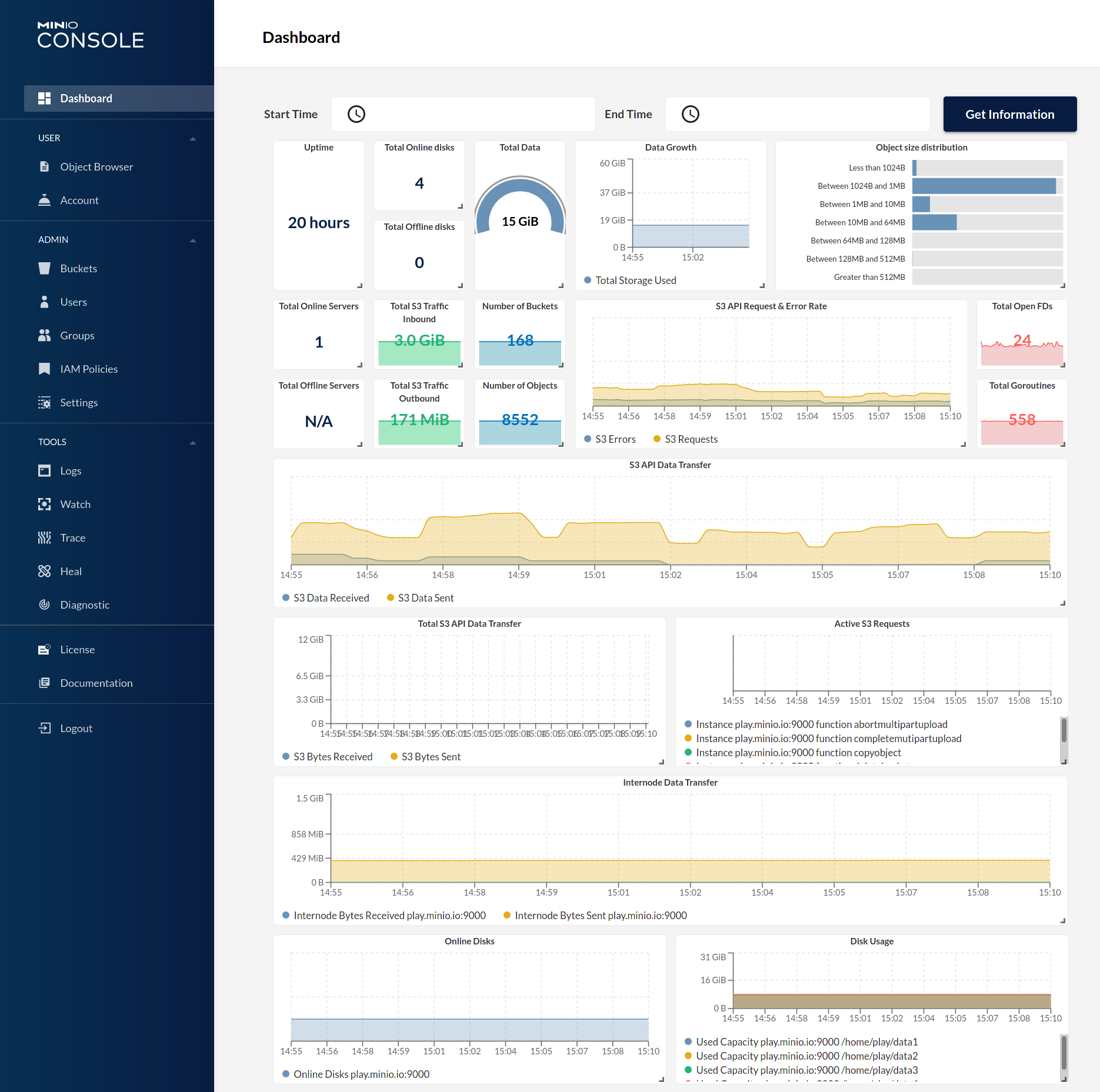 | 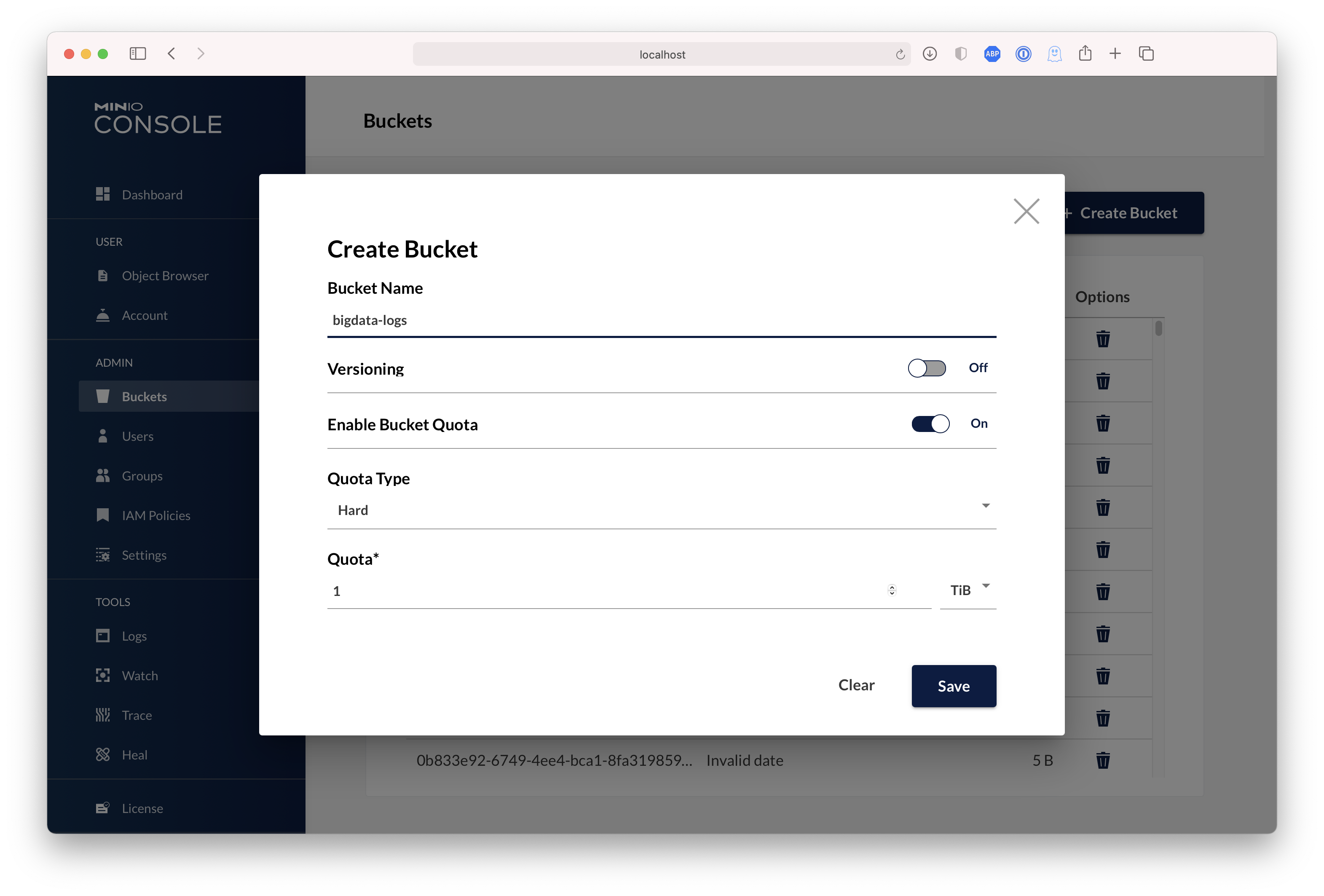 |
|
||||
|
||||
## Test using MinIO Client `mc`
|
||||
|
||||
`mc` provides a modern alternative to UNIX commands like ls, cat, cp, mirror, diff etc. It supports filesystems and Amazon S3 compatible cloud storage services. Follow the MinIO Client [Quickstart Guide](https://docs.min.io/docs/minio-client-quickstart-guide) for further instructions.
|
||||
|
||||
# Upgrading MinIO
|
||||
## Upgrading MinIO
|
||||
|
||||
Upgrades require zero downtime in MinIO, all upgrades are non-disruptive, all transactions on MinIO are atomic. So upgrading all the servers simultaneously is the recommended way to upgrade MinIO.
|
||||
|
||||
> NOTE: requires internet access to update directly from https://dl.min.io, optionally you can host any mirrors at https://my-artifactory.example.com/minio/
|
||||
> NOTE: requires internet access to update directly from <https://dl.min.io>, optionally you can host any mirrors at <https://my-artifactory.example.com/minio/>
|
||||
|
||||
- For deployments that installed the MinIO server binary by hand, use [`mc admin update`](https://docs.min.io/minio/baremetal/reference/minio-mc-admin/mc-admin-update.html)
|
||||
```
|
||||
|
||||
```sh
|
||||
mc admin update <minio alias, e.g., myminio>
|
||||
```
|
||||
|
||||
- For deployments without external internet access (e.g. airgapped environments), download the binary from https://dl.min.io and replace the existing MinIO binary let's say for example `/opt/bin/minio`, apply executable permissions `chmod +x /opt/bin/minio` and do `mc admin service restart alias/`.
|
||||
- For deployments without external internet access (e.g. airgapped environments), download the binary from <https://dl.min.io> and replace the existing MinIO binary let's say for example `/opt/bin/minio`, apply executable permissions `chmod +x /opt/bin/minio` and do `mc admin service restart alias/`.
|
||||
|
||||
- For RPM/DEB installations, upgrade packages **parallelly** on all servers. Once upgraded, perform `systemctl restart minio` across all nodes in **parallel**. RPM/DEB based installations are usually automated using [`ansible`](https://github.com/minio/ansible-minio).
|
||||
|
||||
## Upgrade Checklist
|
||||
### Upgrade Checklist
|
||||
|
||||
- Test all upgrades in a lower environment (DEV, QA, UAT) before applying to production. Performing blind upgrades in production environments carries significant risk.
|
||||
- Read the release notes for the targeted MinIO release *before* performing any installation, there is no forced requirement to upgrade to latest releases every week. If it has a bug fix you are looking for then yes, else avoid actively upgrading a running production system.
|
||||
- Make sure MinIO process has write access to `/opt/bin` if you plan to use `mc admin update`. This is needed for MinIO to download the latest binary from https://dl.min.io and save it locally for upgrades.
|
||||
- Make sure MinIO process has write access to `/opt/bin` if you plan to use `mc admin update`. This is needed for MinIO to download the latest binary from <https://dl.min.io> and save it locally for upgrades.
|
||||
- `mc admin update` is not supported in kubernetes/container environments, container environments provide their own mechanisms for container updates.
|
||||
- **We do not recommend upgrading one MinIO server at a time, the product is designed to support parallel upgrades please follow our recommended guidelines.**
|
||||
|
||||
# Explore Further
|
||||
## Explore Further
|
||||
|
||||
- [MinIO Erasure Code QuickStart Guide](https://docs.min.io/docs/minio-erasure-code-quickstart-guide)
|
||||
- [Use `mc` with MinIO Server](https://docs.min.io/docs/minio-client-quickstart-guide)
|
||||
- [Use `aws-cli` with MinIO Server](https://docs.min.io/docs/aws-cli-with-minio)
|
||||
@@ -255,10 +263,12 @@ mc admin update <minio alias, e.g., myminio>
|
||||
- [Use `minio-go` SDK with MinIO Server](https://docs.min.io/docs/golang-client-quickstart-guide)
|
||||
- [The MinIO documentation website](https://docs.min.io)
|
||||
|
||||
# Contribute to MinIO Project
|
||||
## Contribute to MinIO Project
|
||||
|
||||
Please follow MinIO [Contributor's Guide](https://github.com/minio/minio/blob/master/CONTRIBUTING.md)
|
||||
|
||||
# License
|
||||
## License
|
||||
|
||||
- MinIO source is licensed under the GNU AGPLv3 license that can be found in the [LICENSE](https://github.com/minio/minio/blob/master/LICENSE) file.
|
||||
- MinIO [Documentation](https://github.com/minio/minio/tree/master/docs) © 2021 by MinIO, Inc is licensed under [CC BY 4.0](https://creativecommons.org/licenses/by/4.0/).
|
||||
- [License Compliance](https://github.com/minio/minio/blob/master/COMPLIANCE.md)
|
||||
|
||||
+5
-4
@@ -18,9 +18,10 @@ you need access credentials for a successful exploit).
|
||||
|
||||
If you have not received a reply to your email within 48 hours or you have not heard from the security team
|
||||
for the past five days please contact the security team directly:
|
||||
- Primary security coordinator: aead@min.io
|
||||
- Secondary coordinator: harsha@min.io
|
||||
- If you receive no response: dev@min.io
|
||||
|
||||
- Primary security coordinator: aead@min.io
|
||||
- Secondary coordinator: harsha@min.io
|
||||
- If you receive no response: dev@min.io
|
||||
|
||||
### Disclosure Process
|
||||
|
||||
@@ -32,7 +33,7 @@ MinIO uses the following disclosure process:
|
||||
If the report is rejected the response explains why.
|
||||
3. Code is audited to find any potential similar problems.
|
||||
4. Fixes are prepared for the latest release.
|
||||
5. On the date that the fixes are applied a security advisory will be published on https://blog.min.io.
|
||||
5. On the date that the fixes are applied a security advisory will be published on <https://blog.min.io>.
|
||||
Please inform us in your report email whether MinIO should mention your contribution w.r.t. fixing
|
||||
the security issue. By default MinIO will **not** publish this information to protect your privacy.
|
||||
|
||||
|
||||
@@ -1,11 +1,11 @@
|
||||
## Vulnerability Management Policy
|
||||
# Vulnerability Management Policy
|
||||
|
||||
This document formally describes the process of addressing and managing a
|
||||
reported vulnerability that has been found in the MinIO server code base,
|
||||
any directly connected ecosystem component or a direct / indirect dependency
|
||||
of the code base.
|
||||
|
||||
### Scope
|
||||
## Scope
|
||||
|
||||
The vulnerability management policy described in this document covers the
|
||||
process of investigating, assessing and resolving a vulnerability report
|
||||
@@ -14,13 +14,13 @@ opened by a MinIO employee or an external third party.
|
||||
Therefore, it lists pre-conditions and actions that should be performed to
|
||||
resolve and fix a reported vulnerability.
|
||||
|
||||
### Vulnerability Management Process
|
||||
## Vulnerability Management Process
|
||||
|
||||
The vulnerability management process requires that the vulnerability report
|
||||
contains the following information:
|
||||
|
||||
- The project / component that contains the reported vulnerability.
|
||||
- A description of the vulnerability. In particular, the type of the
|
||||
- The project / component that contains the reported vulnerability.
|
||||
- A description of the vulnerability. In particular, the type of the
|
||||
reported vulnerability and how it might be exploited. Alternatively,
|
||||
a well-established vulnerability identifier, e.g. CVE number, can be
|
||||
used instead.
|
||||
@@ -28,12 +28,11 @@ contains the following information:
|
||||
Based on the description mentioned above, a MinIO engineer or security team
|
||||
member investigates:
|
||||
|
||||
- Whether the reported vulnerability exists.
|
||||
- The conditions that are required such that the vulnerability can be exploited.
|
||||
- The steps required to fix the vulnerability.
|
||||
- Whether the reported vulnerability exists.
|
||||
- The conditions that are required such that the vulnerability can be exploited.
|
||||
- The steps required to fix the vulnerability.
|
||||
|
||||
In general, if the vulnerability exists in one of the MinIO code bases
|
||||
itself - not in a code dependency - then MinIO will, if possible, fix
|
||||
the vulnerability or implement reasonable countermeasures such that the
|
||||
vulnerability cannot be exploited anymore.
|
||||
|
||||
|
||||
@@ -1,18 +0,0 @@
|
||||
**/*.swp
|
||||
cover.out
|
||||
*~
|
||||
minio
|
||||
!*/
|
||||
site/
|
||||
**/*.test
|
||||
**/*.sublime-workspace
|
||||
/.idea/
|
||||
/Minio.iml
|
||||
**/access.log
|
||||
build
|
||||
vendor/**/*.js
|
||||
vendor/**/*.json
|
||||
.DS_Store
|
||||
*.syso
|
||||
coverage.txt
|
||||
node_modules
|
||||
@@ -30,6 +30,7 @@ function start_minio_16drive() {
|
||||
export MC_HOST_minio="http://minio:minio123@127.0.0.1:${start_port}/"
|
||||
unset MINIO_KMS_AUTO_ENCRYPTION # do not auto-encrypt objects
|
||||
export _MINIO_SHARD_DISKTIME_DELTA="5s" # do not change this as its needed for tests
|
||||
export MINIO_CI_CD=1
|
||||
|
||||
MC_BUILD_DIR="mc-$RANDOM"
|
||||
if ! git clone --quiet https://github.com/minio/mc "$MC_BUILD_DIR"; then
|
||||
|
||||
@@ -22,6 +22,8 @@ export GO111MODULE=on
|
||||
export GOGC=25
|
||||
export ENABLE_ADMIN=1
|
||||
|
||||
export MINIO_CI_CD=1
|
||||
|
||||
MINIO_CONFIG_DIR="$WORK_DIR/.minio"
|
||||
MINIO=( "$PWD/minio" --config-dir "$MINIO_CONFIG_DIR" )
|
||||
|
||||
|
||||
@@ -17,6 +17,7 @@ function start_minio_3_node() {
|
||||
export MINIO_ROOT_USER=minio
|
||||
export MINIO_ROOT_PASSWORD=minio123
|
||||
export MINIO_ERASURE_SET_DRIVE_COUNT=6
|
||||
export MINIO_CI_CD=1
|
||||
|
||||
start_port=$2
|
||||
args=""
|
||||
|
||||
@@ -71,6 +71,11 @@ func (a adminAPIHandlers) PutBucketQuotaConfigHandler(w http.ResponseWriter, r *
|
||||
return
|
||||
}
|
||||
|
||||
if quotaConfig.Type == "fifo" {
|
||||
writeErrorResponseJSON(ctx, w, errorCodes.ToAPIErr(ErrInvalidRequest), r.URL)
|
||||
return
|
||||
}
|
||||
|
||||
if err = globalBucketMetadataSys.Update(ctx, bucket, bucketQuotaConfigFile, data); err != nil {
|
||||
writeErrorResponse(ctx, w, toAPIError(ctx, err), r.URL)
|
||||
return
|
||||
|
||||
@@ -182,6 +182,12 @@ func toAdminAPIErr(ctx context.Context, err error) APIError {
|
||||
Description: err.Error(),
|
||||
HTTPStatusCode: http.StatusConflict,
|
||||
}
|
||||
case errors.Is(err, errTierBackendNotEmpty):
|
||||
apiErr = APIError{
|
||||
Code: "XMinioAdminTierBackendNotEmpty",
|
||||
Description: err.Error(),
|
||||
HTTPStatusCode: http.StatusBadRequest,
|
||||
}
|
||||
case errors.Is(err, errTierInsufficientCreds):
|
||||
apiErr = APIError{
|
||||
Code: "XMinioAdminTierInsufficientCreds",
|
||||
|
||||
@@ -64,6 +64,12 @@ func (a adminAPIHandlers) DelConfigKVHandler(w http.ResponseWriter, r *http.Requ
|
||||
return
|
||||
}
|
||||
|
||||
subSys, _, _, err := config.GetSubSys(string(kvBytes))
|
||||
if err != nil {
|
||||
writeErrorResponseJSON(ctx, w, toAdminAPIErr(ctx, err), r.URL)
|
||||
return
|
||||
}
|
||||
|
||||
cfg, err := readServerConfig(ctx, objectAPI)
|
||||
if err != nil {
|
||||
writeErrorResponseJSON(ctx, w, toAdminAPIErr(ctx, err), r.URL)
|
||||
@@ -74,7 +80,7 @@ func (a adminAPIHandlers) DelConfigKVHandler(w http.ResponseWriter, r *http.Requ
|
||||
writeErrorResponseJSON(ctx, w, toAdminAPIErr(ctx, err), r.URL)
|
||||
return
|
||||
}
|
||||
if err = validateConfig(cfg); err != nil {
|
||||
if err = validateConfig(cfg, subSys); err != nil {
|
||||
writeCustomErrorResponseJSON(ctx, w, errorCodes.ToAPIErr(ErrAdminConfigBadJSON), err.Error(), r.URL)
|
||||
return
|
||||
}
|
||||
@@ -84,15 +90,16 @@ func (a adminAPIHandlers) DelConfigKVHandler(w http.ResponseWriter, r *http.Requ
|
||||
return
|
||||
}
|
||||
|
||||
dynamic := config.SubSystemsDynamic.Contains(string(kvBytes))
|
||||
dynamic := config.SubSystemsDynamic.Contains(subSys)
|
||||
if dynamic {
|
||||
applyDynamic(ctx, objectAPI, cfg, r, w)
|
||||
applyDynamic(ctx, objectAPI, cfg, subSys, r, w)
|
||||
}
|
||||
}
|
||||
|
||||
func applyDynamic(ctx context.Context, objectAPI ObjectLayer, cfg config.Config, r *http.Request, w http.ResponseWriter) {
|
||||
func applyDynamic(ctx context.Context, objectAPI ObjectLayer, cfg config.Config, subSys string,
|
||||
r *http.Request, w http.ResponseWriter) {
|
||||
// Apply dynamic values.
|
||||
if err := applyDynamicConfig(GlobalContext, objectAPI, cfg); err != nil {
|
||||
if err := applyDynamicConfigForSubSys(GlobalContext, objectAPI, cfg, subSys); err != nil {
|
||||
writeErrorResponseJSON(ctx, w, toAdminAPIErr(ctx, err), r.URL)
|
||||
return
|
||||
}
|
||||
@@ -138,7 +145,13 @@ func (a adminAPIHandlers) SetConfigKVHandler(w http.ResponseWriter, r *http.Requ
|
||||
return
|
||||
}
|
||||
|
||||
if err = validateConfig(cfg); err != nil {
|
||||
subSys, _, _, err := config.GetSubSys(string(kvBytes))
|
||||
if err != nil {
|
||||
writeErrorResponseJSON(ctx, w, toAdminAPIErr(ctx, err), r.URL)
|
||||
return
|
||||
}
|
||||
|
||||
if err = validateConfig(cfg, subSys); err != nil {
|
||||
writeCustomErrorResponseJSON(ctx, w, errorCodes.ToAPIErr(ErrAdminConfigBadJSON), err.Error(), r.URL)
|
||||
return
|
||||
}
|
||||
@@ -156,7 +169,7 @@ func (a adminAPIHandlers) SetConfigKVHandler(w http.ResponseWriter, r *http.Requ
|
||||
}
|
||||
|
||||
if dynamic {
|
||||
applyDynamic(ctx, objectAPI, cfg, r, w)
|
||||
applyDynamic(ctx, objectAPI, cfg, subSys, r, w)
|
||||
}
|
||||
writeSuccessResponseHeadersOnly(w)
|
||||
}
|
||||
@@ -260,7 +273,7 @@ func (a adminAPIHandlers) RestoreConfigHistoryKVHandler(w http.ResponseWriter, r
|
||||
return
|
||||
}
|
||||
|
||||
if err = validateConfig(cfg); err != nil {
|
||||
if err = validateConfig(cfg, ""); err != nil {
|
||||
writeCustomErrorResponseJSON(ctx, w, errorCodes.ToAPIErr(ErrAdminConfigBadJSON), err.Error(), r.URL)
|
||||
return
|
||||
}
|
||||
@@ -371,7 +384,7 @@ func (a adminAPIHandlers) SetConfigHandler(w http.ResponseWriter, r *http.Reques
|
||||
return
|
||||
}
|
||||
|
||||
if err = validateConfig(cfg); err != nil {
|
||||
if err = validateConfig(cfg, ""); err != nil {
|
||||
writeCustomErrorResponseJSON(ctx, w, errorCodes.ToAPIErr(ErrAdminConfigBadJSON), err.Error(), r.URL)
|
||||
return
|
||||
}
|
||||
|
||||
+27
-1
@@ -284,6 +284,7 @@ type ServerHTTPAPIStats struct {
|
||||
// including their average execution time.
|
||||
type ServerHTTPStats struct {
|
||||
S3RequestsInQueue int32 `json:"s3RequestsInQueue"`
|
||||
S3RequestsIncoming uint64 `json:"s3RequestsIncoming"`
|
||||
CurrentS3Requests ServerHTTPAPIStats `json:"currentS3Requests"`
|
||||
TotalS3Requests ServerHTTPAPIStats `json:"totalS3Requests"`
|
||||
TotalS3Errors ServerHTTPAPIStats `json:"totalS3Errors"`
|
||||
@@ -983,6 +984,31 @@ func (a adminAPIHandlers) ObjectSpeedtestHandler(w http.ResponseWriter, r *http.
|
||||
duration = time.Second * 10
|
||||
}
|
||||
|
||||
// ignores any errors here.
|
||||
storageInfo, _ := objectAPI.StorageInfo(ctx)
|
||||
capacityNeeded := uint64(concurrent * size)
|
||||
capacity := uint64(GetTotalUsableCapacityFree(storageInfo.Disks, storageInfo))
|
||||
|
||||
if capacity < capacityNeeded {
|
||||
writeErrorResponseJSON(ctx, w, toAdminAPIErr(ctx, AdminError{
|
||||
Code: "XMinioSpeedtestInsufficientCapacity",
|
||||
Message: fmt.Sprintf("not enough usable space available to perform speedtest - expected %s, got %s",
|
||||
humanize.IBytes(capacityNeeded), humanize.IBytes(capacity)),
|
||||
StatusCode: http.StatusInsufficientStorage,
|
||||
}), r.URL)
|
||||
return
|
||||
}
|
||||
|
||||
// Verify if we can employ autotune without running out of capacity,
|
||||
// if we do run out of capacity, make sure to turn-off autotuning
|
||||
// in such situations.
|
||||
newConcurrent := concurrent + (concurrent+1)/2
|
||||
autoTunedCapacityNeeded := uint64(newConcurrent * size)
|
||||
if autotune && capacity < autoTunedCapacityNeeded {
|
||||
// Turn-off auto-tuning if next possible concurrency would reach beyond disk capacity.
|
||||
autotune = false
|
||||
}
|
||||
|
||||
deleteBucket := func() {
|
||||
objectAPI.DeleteBucket(context.Background(), pathJoin(minioMetaBucket, "speedtest"), DeleteBucketOptions{
|
||||
Force: true,
|
||||
@@ -2221,7 +2247,7 @@ func fetchKMSStatus() madmin.KMS {
|
||||
func fetchLoggerInfo() ([]madmin.Logger, []madmin.Audit) {
|
||||
var loggerInfo []madmin.Logger
|
||||
var auditloggerInfo []madmin.Audit
|
||||
for _, target := range logger.Targets() {
|
||||
for _, target := range logger.SystemTargets() {
|
||||
if target.Endpoint() != "" {
|
||||
tgt := target.String()
|
||||
err := checkConnection(target.Endpoint(), 15*time.Second)
|
||||
|
||||
@@ -74,11 +74,11 @@ func prepareAdminErasureTestBed(ctx context.Context) (*adminErasureTestBed, erro
|
||||
|
||||
globalEndpoints = mustGetPoolEndpoints(erasureDirs...)
|
||||
|
||||
newAllSubsystems()
|
||||
initAllSubsystems()
|
||||
|
||||
initConfigSubsystem(ctx, objLayer)
|
||||
|
||||
globalIAMSys.Init(ctx, objLayer, globalEtcdClient, globalNotificationSys, 2*time.Second)
|
||||
globalIAMSys.Init(ctx, objLayer, globalEtcdClient, 2*time.Second)
|
||||
|
||||
// Setup admin mgmt REST API handlers.
|
||||
adminRouter := mux.NewRouter()
|
||||
|
||||
+2
-1
@@ -191,7 +191,8 @@ func registerAdminRouter(router *mux.Router, enableConfigOps bool) {
|
||||
adminRouter.Methods(http.MethodPut).Path(adminVersion + "/tier").HandlerFunc(gz(httpTraceHdrs(adminAPI.AddTierHandler)))
|
||||
adminRouter.Methods(http.MethodPost).Path(adminVersion + "/tier/{tier}").HandlerFunc(gz(httpTraceHdrs(adminAPI.EditTierHandler)))
|
||||
adminRouter.Methods(http.MethodGet).Path(adminVersion + "/tier").HandlerFunc(gz(httpTraceHdrs(adminAPI.ListTierHandler)))
|
||||
|
||||
adminRouter.Methods(http.MethodDelete).Path(adminVersion + "/tier/{tier}").HandlerFunc(gz(httpTraceHdrs(adminAPI.RemoveTierHandler)))
|
||||
adminRouter.Methods(http.MethodGet).Path(adminVersion + "/tier/{tier}").HandlerFunc(gz(httpTraceHdrs(adminAPI.VerifyTierHandler)))
|
||||
// Tier stats
|
||||
adminRouter.Methods(http.MethodGet).Path(adminVersion + "/tier-stats").HandlerFunc(gz(httpTraceHdrs(adminAPI.TierStatsHandler)))
|
||||
|
||||
|
||||
@@ -212,6 +212,7 @@ const (
|
||||
ErrInvalidSSECustomerParameters
|
||||
ErrIncompatibleEncryptionMethod
|
||||
ErrKMSNotConfigured
|
||||
ErrKMSKeyNotFoundException
|
||||
|
||||
ErrNoAccessKey
|
||||
ErrInvalidToken
|
||||
@@ -1127,6 +1128,11 @@ var errorCodes = errorCodeMap{
|
||||
Description: "Server side encryption specified but KMS is not configured",
|
||||
HTTPStatusCode: http.StatusNotImplemented,
|
||||
},
|
||||
ErrKMSKeyNotFoundException: {
|
||||
Code: "KMS.NotFoundException",
|
||||
Description: "Invalid keyId",
|
||||
HTTPStatusCode: http.StatusBadRequest,
|
||||
},
|
||||
ErrNoAccessKey: {
|
||||
Code: "AccessDenied",
|
||||
Description: "No AWSAccessKey was presented",
|
||||
@@ -1912,6 +1918,9 @@ func toAPIErrorCode(ctx context.Context, err error) (apiErr APIErrorCode) {
|
||||
apiErr = ErrIncompatibleEncryptionMethod
|
||||
case errKMSNotConfigured:
|
||||
apiErr = ErrKMSNotConfigured
|
||||
case errKMSKeyNotFound:
|
||||
apiErr = ErrKMSKeyNotFoundException
|
||||
|
||||
case context.Canceled, context.DeadlineExceeded:
|
||||
apiErr = ErrOperationTimedOut
|
||||
case errDiskNotFound:
|
||||
|
||||
+7
-3
@@ -287,7 +287,7 @@ func registerAPIRouter(router *mux.Router) {
|
||||
collectAPIStats("getobjectlegalhold", maxClients(gz(httpTraceAll(api.GetObjectLegalHoldHandler))))).Queries("legal-hold", "")
|
||||
// GetObject - note gzip compression is *not* added due to Range requests.
|
||||
router.Methods(http.MethodGet).Path("/{object:.+}").HandlerFunc(
|
||||
collectAPIStats("getobject", maxClients(httpTraceHdrs(api.GetObjectHandler))))
|
||||
collectAPIStats("getobject", maxClients(gz(httpTraceHdrs(api.GetObjectHandler)))))
|
||||
// CopyObject
|
||||
router.Methods(http.MethodPut).Path("/{object:.+}").HeadersRegexp(xhttp.AmzCopySource, ".*?(\\/|%2F).*?").HandlerFunc(
|
||||
collectAPIStats("copyobject", maxClients(gz(httpTraceAll(api.CopyObjectHandler)))))
|
||||
@@ -343,6 +343,9 @@ func registerAPIRouter(router *mux.Router) {
|
||||
// ListenNotification
|
||||
router.Methods(http.MethodGet).HandlerFunc(
|
||||
collectAPIStats("listennotification", maxClients(gz(httpTraceAll(api.ListenNotificationHandler))))).Queries("events", "{events:.*}")
|
||||
// ResetBucketReplicationStatus - MinIO extension API
|
||||
router.Methods(http.MethodGet).HandlerFunc(
|
||||
collectAPIStats("resetbucketreplicationstatus", maxClients(gz(httpTraceAll(api.ResetBucketReplicationStatusHandler))))).Queries("replication-reset-status", "")
|
||||
|
||||
// Dummy Bucket Calls
|
||||
// GetBucketACL -- this is a dummy call.
|
||||
@@ -417,9 +420,10 @@ func registerAPIRouter(router *mux.Router) {
|
||||
// PutBucketNotification
|
||||
router.Methods(http.MethodPut).HandlerFunc(
|
||||
collectAPIStats("putbucketnotification", maxClients(gz(httpTraceAll(api.PutBucketNotificationHandler))))).Queries("notification", "")
|
||||
// ResetBucketReplicationState - MinIO extension API
|
||||
// ResetBucketReplicationStart - MinIO extension API
|
||||
router.Methods(http.MethodPut).HandlerFunc(
|
||||
collectAPIStats("resetbucketreplicationstate", maxClients(gz(httpTraceAll(api.ResetBucketReplicationStateHandler))))).Queries("replication-reset", "")
|
||||
collectAPIStats("resetbucketreplicationstart", maxClients(gz(httpTraceAll(api.ResetBucketReplicationStartHandler))))).Queries("replication-reset", "")
|
||||
|
||||
// PutBucket
|
||||
router.Methods(http.MethodPut).HandlerFunc(
|
||||
collectAPIStats("putbucket", maxClients(gz(httpTraceAll(api.PutBucketHandler)))))
|
||||
|
||||
+155
-154
File diff suppressed because one or more lines are too long
@@ -362,14 +362,14 @@ func TestIsReqAuthenticated(t *testing.T) {
|
||||
t.Fatalf("unable initialize config file, %s", err)
|
||||
}
|
||||
|
||||
newAllSubsystems()
|
||||
initAllSubsystems()
|
||||
|
||||
ctx, cancel := context.WithCancel(context.Background())
|
||||
defer cancel()
|
||||
|
||||
initConfigSubsystem(ctx, objLayer)
|
||||
|
||||
globalIAMSys.Init(ctx, objLayer, globalEtcdClient, globalNotificationSys, 2*time.Second)
|
||||
globalIAMSys.Init(ctx, objLayer, globalEtcdClient, 2*time.Second)
|
||||
|
||||
creds, err := auth.CreateCredentials("myuser", "mypassword")
|
||||
if err != nil {
|
||||
@@ -455,11 +455,11 @@ func TestValidateAdminSignature(t *testing.T) {
|
||||
t.Fatalf("unable initialize config file, %s", err)
|
||||
}
|
||||
|
||||
newAllSubsystems()
|
||||
initAllSubsystems()
|
||||
|
||||
initConfigSubsystem(ctx, objLayer)
|
||||
|
||||
globalIAMSys.Init(ctx, objLayer, globalEtcdClient, globalNotificationSys, 2*time.Second)
|
||||
globalIAMSys.Init(ctx, objLayer, globalEtcdClient, 2*time.Second)
|
||||
|
||||
creds, err := auth.CreateCredentials("admin", "mypassword")
|
||||
if err != nil {
|
||||
|
||||
@@ -205,11 +205,11 @@ func verifyServerSystemConfig(ctx context.Context, endpointServerPools EndpointS
|
||||
for onlineServers < len(clnts)/2 {
|
||||
for _, clnt := range clnts {
|
||||
if err := clnt.Verify(ctx, srcCfg); err != nil {
|
||||
if isNetworkError(err) {
|
||||
offlineEndpoints = append(offlineEndpoints, clnt.String())
|
||||
continue
|
||||
if !isNetworkError(err) {
|
||||
logger.Info(fmt.Errorf("%s has incorrect configuration: %w", clnt.String(), err).Error())
|
||||
}
|
||||
return fmt.Errorf("%s as has incorrect configuration: %w", clnt.String(), err)
|
||||
offlineEndpoints = append(offlineEndpoints, clnt.String())
|
||||
continue
|
||||
}
|
||||
onlineServers++
|
||||
}
|
||||
|
||||
@@ -20,12 +20,15 @@ package cmd
|
||||
import (
|
||||
"encoding/base64"
|
||||
"encoding/xml"
|
||||
"errors"
|
||||
"fmt"
|
||||
"io"
|
||||
"net/http"
|
||||
|
||||
"github.com/gorilla/mux"
|
||||
"github.com/minio/kes"
|
||||
"github.com/minio/madmin-go"
|
||||
"github.com/minio/minio/internal/kms"
|
||||
"github.com/minio/minio/internal/logger"
|
||||
"github.com/minio/pkg/bucket/policy"
|
||||
)
|
||||
@@ -84,6 +87,19 @@ func (api objectAPIHandlers) PutBucketEncryptionHandler(w http.ResponseWriter, r
|
||||
writeErrorResponse(ctx, w, errorCodes.ToAPIErr(ErrKMSNotConfigured), r.URL)
|
||||
return
|
||||
}
|
||||
kmsKey := encConfig.KeyID()
|
||||
if kmsKey != "" {
|
||||
kmsContext := kms.Context{"MinIO admin API": "ServerInfoHandler"} // Context for a test key operation
|
||||
_, err := GlobalKMS.GenerateKey(kmsKey, kmsContext)
|
||||
if err != nil {
|
||||
if errors.Is(err, kes.ErrKeyNotFound) {
|
||||
writeErrorResponse(ctx, w, toAPIError(ctx, errKMSKeyNotFound), r.URL)
|
||||
return
|
||||
}
|
||||
writeErrorResponse(ctx, w, toAPIError(ctx, err), r.URL)
|
||||
return
|
||||
}
|
||||
}
|
||||
|
||||
configData, err := xml.Marshal(encConfig)
|
||||
if err != nil {
|
||||
|
||||
+90
-20
@@ -1301,7 +1301,7 @@ func (api objectAPIHandlers) DeleteBucketHandler(w http.ResponseWriter, r *http.
|
||||
}
|
||||
|
||||
globalNotificationSys.DeleteBucketMetadata(ctx, bucket)
|
||||
|
||||
globalReplicationPool.deleteResyncMetadata(ctx, bucket)
|
||||
// Call site replication hook.
|
||||
if err := globalSiteReplicationSys.DeleteBucketHook(ctx, bucket, forceDelete); err != nil {
|
||||
writeErrorResponse(ctx, w, toAPIError(ctx, err), r.URL)
|
||||
@@ -1760,12 +1760,13 @@ func (api objectAPIHandlers) GetBucketReplicationMetricsHandler(w http.ResponseW
|
||||
}
|
||||
}
|
||||
|
||||
// ResetBucketReplicationStateHandler - starts a replication reset for all objects in a bucket which
|
||||
// ResetBucketReplicationStartHandler - starts a replication reset for all objects in a bucket which
|
||||
// qualify for replication and re-sync the object(s) to target, provided ExistingObjectReplication is
|
||||
// enabled for the qualifying rule. This API is a MinIO only extension provided for situations where
|
||||
// remote target is entirely lost,and previously replicated objects need to be re-synced.
|
||||
func (api objectAPIHandlers) ResetBucketReplicationStateHandler(w http.ResponseWriter, r *http.Request) {
|
||||
ctx := newContext(r, w, "ResetBucketReplicationState")
|
||||
// remote target is entirely lost,and previously replicated objects need to be re-synced. If resync is
|
||||
// already in progress it returns an error
|
||||
func (api objectAPIHandlers) ResetBucketReplicationStartHandler(w http.ResponseWriter, r *http.Request) {
|
||||
ctx := newContext(r, w, "ResetBucketReplicationStart")
|
||||
defer logger.AuditLog(ctx, w, r, mustGetClaimsFromToken(r))
|
||||
|
||||
vars := mux.Vars(r)
|
||||
@@ -1789,6 +1790,7 @@ func (api objectAPIHandlers) ResetBucketReplicationStateHandler(w http.ResponseW
|
||||
}), r.URL)
|
||||
}
|
||||
}
|
||||
resetBeforeDate := UTCNow().AddDate(0, 0, -1*int(days/24))
|
||||
|
||||
objectAPI := api.ObjectAPI()
|
||||
if objectAPI == nil {
|
||||
@@ -1825,7 +1827,7 @@ func (api objectAPIHandlers) ResetBucketReplicationStateHandler(w http.ResponseW
|
||||
if len(tgtArns) == 0 {
|
||||
writeErrorResponseJSON(ctx, w, errorCodes.ToAPIErrWithErr(ErrBadRequest, InvalidArgument{
|
||||
Bucket: bucket,
|
||||
Err: fmt.Errorf("Remote target ARN %s missing/not eligible for replication resync", arn),
|
||||
Err: fmt.Errorf("Remote target ARN %s missing or ineligible for replication resync", arn),
|
||||
}), r.URL)
|
||||
return
|
||||
}
|
||||
@@ -1849,22 +1851,90 @@ func (api objectAPIHandlers) ResetBucketReplicationStateHandler(w http.ResponseW
|
||||
default:
|
||||
writeErrorResponseJSON(ctx, w, toAPIError(ctx, err), r.URL)
|
||||
}
|
||||
}
|
||||
if err := startReplicationResync(ctx, bucket, arn, resetID, resetBeforeDate, objectAPI); err != nil {
|
||||
writeErrorResponseJSON(ctx, w, errorCodes.ToAPIErrWithErr(ErrBadRequest, InvalidArgument{
|
||||
Bucket: bucket,
|
||||
Err: err,
|
||||
}), r.URL)
|
||||
return
|
||||
}
|
||||
targets, err := globalBucketTargetSys.ListBucketTargets(ctx, bucket)
|
||||
if err != nil {
|
||||
writeErrorResponse(ctx, w, toAPIError(ctx, err), r.URL)
|
||||
return
|
||||
}
|
||||
tgtBytes, err := json.Marshal(&targets)
|
||||
if err != nil {
|
||||
writeErrorResponseJSON(ctx, w, errorCodes.ToAPIErrWithErr(ErrAdminConfigBadJSON, err), r.URL)
|
||||
return
|
||||
}
|
||||
if err = globalBucketMetadataSys.Update(ctx, bucket, bucketTargetsFile, tgtBytes); err != nil {
|
||||
writeErrorResponse(ctx, w, toAPIError(ctx, err), r.URL)
|
||||
return
|
||||
}
|
||||
|
||||
data, err := json.Marshal(rinfo)
|
||||
if err != nil {
|
||||
writeErrorResponseJSON(ctx, w, toAdminAPIErr(ctx, err), r.URL)
|
||||
return
|
||||
}
|
||||
// Write success response.
|
||||
writeSuccessResponseJSON(w, data)
|
||||
}
|
||||
|
||||
// ResetBucketReplicationStatusHandler - returns the status of replication reset.
|
||||
// This API is a MinIO only extension
|
||||
func (api objectAPIHandlers) ResetBucketReplicationStatusHandler(w http.ResponseWriter, r *http.Request) {
|
||||
ctx := newContext(r, w, "ResetBucketReplicationStatus")
|
||||
defer logger.AuditLog(ctx, w, r, mustGetClaimsFromToken(r))
|
||||
|
||||
vars := mux.Vars(r)
|
||||
bucket := vars["bucket"]
|
||||
arn := r.URL.Query().Get("arn")
|
||||
var err error
|
||||
|
||||
objectAPI := api.ObjectAPI()
|
||||
if objectAPI == nil {
|
||||
writeErrorResponse(ctx, w, errorCodes.ToAPIErr(ErrServerNotInitialized), r.URL)
|
||||
return
|
||||
}
|
||||
|
||||
if s3Error := checkRequestAuthType(ctx, r, policy.ResetBucketReplicationStateAction, bucket, ""); s3Error != ErrNone {
|
||||
writeErrorResponse(ctx, w, errorCodes.ToAPIErr(s3Error), r.URL)
|
||||
return
|
||||
}
|
||||
|
||||
// Check if bucket exists.
|
||||
if _, err := objectAPI.GetBucketInfo(ctx, bucket); err != nil {
|
||||
writeErrorResponse(ctx, w, toAPIError(ctx, err), r.URL)
|
||||
return
|
||||
}
|
||||
|
||||
if _, err := globalBucketMetadataSys.GetReplicationConfig(ctx, bucket); err != nil {
|
||||
writeErrorResponse(ctx, w, toAPIError(ctx, err), r.URL)
|
||||
return
|
||||
}
|
||||
|
||||
globalReplicationPool.resyncState.RLock()
|
||||
brs, ok := globalReplicationPool.resyncState.statusMap[bucket]
|
||||
if !ok {
|
||||
brs, err = loadBucketResyncMetadata(ctx, bucket, objectAPI)
|
||||
if err != nil {
|
||||
writeErrorResponse(ctx, w, errorCodes.ToAPIErrWithErr(ErrBadRequest, InvalidArgument{
|
||||
Bucket: bucket,
|
||||
Err: fmt.Errorf("No replication resync status available for %s", arn),
|
||||
}), r.URL)
|
||||
}
|
||||
return
|
||||
}
|
||||
|
||||
var rinfo ResyncTargetsInfo
|
||||
for tarn, st := range brs.TargetsMap {
|
||||
if arn != "" && tarn != arn {
|
||||
continue
|
||||
}
|
||||
rinfo.Targets = append(rinfo.Targets, ResyncTarget{
|
||||
Arn: tarn,
|
||||
ResetID: st.ResyncID,
|
||||
StartTime: st.StartTime,
|
||||
EndTime: st.EndTime,
|
||||
ResyncStatus: st.ResyncStatus.String(),
|
||||
ReplicatedSize: st.ReplicatedSize,
|
||||
ReplicatedCount: st.ReplicatedCount,
|
||||
FailedSize: st.FailedSize,
|
||||
FailedCount: st.FailedCount,
|
||||
Bucket: st.Bucket,
|
||||
Object: st.Object,
|
||||
})
|
||||
}
|
||||
globalReplicationPool.resyncState.RUnlock()
|
||||
data, err := json.Marshal(rinfo)
|
||||
if err != nil {
|
||||
writeErrorResponseJSON(ctx, w, toAdminAPIErr(ctx, err), r.URL)
|
||||
|
||||
+14
-15
@@ -221,17 +221,18 @@ func (t *transitionState) worker(ctx context.Context, objectAPI ObjectLayer) {
|
||||
var err error
|
||||
if tier, err = transitionObject(ctx, objectAPI, oi); err != nil {
|
||||
logger.LogIf(ctx, fmt.Errorf("Transition failed for %s/%s version:%s with %w", oi.Bucket, oi.Name, oi.VersionID, err))
|
||||
} else {
|
||||
ts := tierStats{
|
||||
TotalSize: uint64(oi.Size),
|
||||
NumVersions: 1,
|
||||
}
|
||||
if oi.IsLatest {
|
||||
ts.NumObjects = 1
|
||||
}
|
||||
t.addLastDayStats(tier, ts)
|
||||
}
|
||||
atomic.AddInt32(&t.activeTasks, -1)
|
||||
|
||||
ts := tierStats{
|
||||
TotalSize: uint64(oi.Size),
|
||||
NumVersions: 1,
|
||||
}
|
||||
if oi.IsLatest {
|
||||
ts.NumObjects = 1
|
||||
}
|
||||
t.addLastDayStats(tier, ts)
|
||||
}
|
||||
}
|
||||
}
|
||||
@@ -693,9 +694,9 @@ func completedRestoreObj(expiry time.Time) restoreObjStatus {
|
||||
// String returns x-amz-restore compatible representation of r.
|
||||
func (r restoreObjStatus) String() string {
|
||||
if r.Ongoing() {
|
||||
return "ongoing-request=true"
|
||||
return `ongoing-request="true"`
|
||||
}
|
||||
return fmt.Sprintf("ongoing-request=false, expiry-date=%s", r.expiry.Format(http.TimeFormat))
|
||||
return fmt.Sprintf(`ongoing-request="false", expiry-date="%s"`, r.expiry.Format(http.TimeFormat))
|
||||
}
|
||||
|
||||
// Expiry returns expiry of restored object and true if restore-object has completed.
|
||||
@@ -739,12 +740,11 @@ func parseRestoreObjStatus(restoreHdr string) (restoreObjStatus, error) {
|
||||
}
|
||||
|
||||
switch progressTokens[1] {
|
||||
case "true":
|
||||
case "true", `"true"`: // true without double quotes is deprecated in Feb 2022
|
||||
if len(tokens) == 1 {
|
||||
return ongoingRestoreObj(), nil
|
||||
}
|
||||
|
||||
case "false":
|
||||
case "false", `"false"`: // false without double quotes is deprecated in Feb 2022
|
||||
if len(tokens) != 2 {
|
||||
return restoreObjStatus{}, errRestoreHDRMalformed
|
||||
}
|
||||
@@ -755,8 +755,7 @@ func parseRestoreObjStatus(restoreHdr string) (restoreObjStatus, error) {
|
||||
if strings.TrimSpace(expiryTokens[0]) != "expiry-date" {
|
||||
return restoreObjStatus{}, errRestoreHDRMalformed
|
||||
}
|
||||
|
||||
expiry, err := time.Parse(http.TimeFormat, expiryTokens[1])
|
||||
expiry, err := time.Parse(http.TimeFormat, strings.Trim(expiryTokens[1], `"`))
|
||||
if err != nil {
|
||||
return restoreObjStatus{}, errRestoreHDRMalformed
|
||||
}
|
||||
|
||||
@@ -36,7 +36,7 @@ func TestParseRestoreObjStatus(t *testing.T) {
|
||||
}{
|
||||
{
|
||||
// valid: represents a restored object, 'pending' expiry.
|
||||
restoreHdr: "ongoing-request=false, expiry-date=Fri, 21 Dec 2012 00:00:00 GMT",
|
||||
restoreHdr: `ongoing-request="false", expiry-date="Fri, 21 Dec 2012 00:00:00 GMT"`,
|
||||
expectedStatus: restoreObjStatus{
|
||||
ongoing: false,
|
||||
expiry: time.Date(2012, 12, 21, 0, 0, 0, 0, time.UTC),
|
||||
@@ -45,7 +45,7 @@ func TestParseRestoreObjStatus(t *testing.T) {
|
||||
},
|
||||
{
|
||||
// valid: represents an ongoing restore object request.
|
||||
restoreHdr: "ongoing-request=true",
|
||||
restoreHdr: `ongoing-request="true"`,
|
||||
expectedStatus: restoreObjStatus{
|
||||
ongoing: true,
|
||||
},
|
||||
@@ -53,13 +53,13 @@ func TestParseRestoreObjStatus(t *testing.T) {
|
||||
},
|
||||
{
|
||||
// invalid; ongoing restore object request can't have expiry set on it.
|
||||
restoreHdr: "ongoing-request=true, expiry-date=Fri, 21 Dec 2012 00:00:00 GMT",
|
||||
restoreHdr: `ongoing-request="true", expiry-date="Fri, 21 Dec 2012 00:00:00 GMT"`,
|
||||
expectedStatus: restoreObjStatus{},
|
||||
expectedErr: errRestoreHDRMalformed,
|
||||
},
|
||||
{
|
||||
// invalid; completed restore object request must have expiry set on it.
|
||||
restoreHdr: "ongoing-request=false",
|
||||
restoreHdr: `ongoing-request="false"`,
|
||||
expectedStatus: restoreObjStatus{},
|
||||
expectedErr: errRestoreHDRMalformed,
|
||||
},
|
||||
|
||||
@@ -434,6 +434,7 @@ func (sys *BucketMetadataSys) concurrentLoad(ctx context.Context, buckets []Buck
|
||||
_, _ = objAPI.HealBucket(ctx, buckets[index].Name, madmin.HealOpts{
|
||||
// Ensure heal opts for bucket metadata be deep healed all the time.
|
||||
ScanMode: madmin.HealDeepScan,
|
||||
Recreate: true,
|
||||
})
|
||||
meta, err := loadBucketMetadata(ctx, objAPI, buckets[index].Name)
|
||||
if err != nil {
|
||||
|
||||
@@ -375,6 +375,7 @@ func deleteBucketMetadata(ctx context.Context, obj objectDeleter, bucket string)
|
||||
metadataFiles := []string{
|
||||
dataUsageCacheName,
|
||||
bucketMetadataFile,
|
||||
path.Join(replicationDir, resyncFileName),
|
||||
}
|
||||
for _, metaFile := range metadataFiles {
|
||||
configFile := path.Join(bucketMetaPrefix, bucket, metaFile)
|
||||
|
||||
@@ -20,10 +20,12 @@ package cmd
|
||||
import (
|
||||
"context"
|
||||
"encoding/json"
|
||||
"errors"
|
||||
"fmt"
|
||||
"time"
|
||||
|
||||
"github.com/minio/madmin-go"
|
||||
"github.com/minio/minio/internal/logger"
|
||||
)
|
||||
|
||||
// BucketQuotaSys - map of bucket and quota configuration.
|
||||
@@ -85,6 +87,10 @@ func parseBucketQuota(bucket string, data []byte) (quotaCfg *madmin.BucketQuota,
|
||||
return quotaCfg, err
|
||||
}
|
||||
if !quotaCfg.IsValid() {
|
||||
if quotaCfg.Type == "fifo" {
|
||||
logger.LogIf(GlobalContext, errors.New("Detected older 'fifo' quota config, 'fifo' feature is removed and not supported anymore. Please clear your quota configs using 'mc admin bucket quota alias/bucket --clear' and use 'mc ilm add' for expiration of objects"))
|
||||
return quotaCfg, nil
|
||||
}
|
||||
return quotaCfg, fmt.Errorf("Invalid quota config %#v", quotaCfg)
|
||||
}
|
||||
return
|
||||
|
||||
@@ -23,6 +23,7 @@ import (
|
||||
"regexp"
|
||||
"strconv"
|
||||
"strings"
|
||||
"sync"
|
||||
"time"
|
||||
|
||||
"github.com/minio/minio/internal/bucket/replication"
|
||||
@@ -576,8 +577,23 @@ type ResyncTargetsInfo struct {
|
||||
|
||||
// ResyncTarget is a struct representing the Target reset ID where target is identified by its Arn
|
||||
type ResyncTarget struct {
|
||||
Arn string `json:"arn"`
|
||||
ResetID string `json:"resetid"`
|
||||
Arn string `json:"arn"`
|
||||
ResetID string `json:"resetid"`
|
||||
StartTime time.Time `json:"startTime"`
|
||||
EndTime time.Time `json:"endTime"`
|
||||
// Status of resync operation
|
||||
ResyncStatus string `json:"resyncStatus,omitempty"`
|
||||
// Completed size in bytes
|
||||
ReplicatedSize int64 `json:"completedReplicationSize"`
|
||||
// Failed size in bytes
|
||||
FailedSize int64 `json:"failedReplicationSize"`
|
||||
// Total number of failed operations
|
||||
FailedCount int64 `json:"failedReplicationCount"`
|
||||
// Total number of failed operations
|
||||
ReplicatedCount int64 `json:"replicationCount"`
|
||||
// Last bucket/object replicated.
|
||||
Bucket string `json:"bucket,omitempty"`
|
||||
Object string `json:"object,omitempty"`
|
||||
}
|
||||
|
||||
// VersionPurgeStatusType represents status of a versioned delete or permanent delete w.r.t bucket replication
|
||||
@@ -603,3 +619,83 @@ func (v VersionPurgeStatusType) Empty() bool {
|
||||
func (v VersionPurgeStatusType) Pending() bool {
|
||||
return v == Pending || v == Failed
|
||||
}
|
||||
|
||||
type replicationResyncState struct {
|
||||
// map of bucket to their resync status
|
||||
statusMap map[string]BucketReplicationResyncStatus
|
||||
sync.RWMutex
|
||||
}
|
||||
|
||||
const (
|
||||
replicationDir = "replication"
|
||||
resyncFileName = "resync.bin"
|
||||
resyncMetaFormat = 1
|
||||
resyncMetaVersionV1 = 1
|
||||
resyncMetaVersion = resyncMetaVersionV1
|
||||
)
|
||||
|
||||
// ResyncStatusType status of resync operation
|
||||
type ResyncStatusType int
|
||||
|
||||
const (
|
||||
// NoResync - no resync in progress
|
||||
NoResync ResyncStatusType = iota
|
||||
// ResyncStarted - resync in progress
|
||||
ResyncStarted
|
||||
// ResyncCompleted - resync finished
|
||||
ResyncCompleted
|
||||
// ResyncFailed - resync failed
|
||||
ResyncFailed
|
||||
)
|
||||
|
||||
func (rt ResyncStatusType) String() string {
|
||||
switch rt {
|
||||
case ResyncStarted:
|
||||
return "Ongoing"
|
||||
case ResyncCompleted:
|
||||
return "Completed"
|
||||
case ResyncFailed:
|
||||
return "Failed"
|
||||
default:
|
||||
return ""
|
||||
}
|
||||
}
|
||||
|
||||
// TargetReplicationResyncStatus status of resync of bucket for a specific target
|
||||
type TargetReplicationResyncStatus struct {
|
||||
StartTime time.Time `json:"startTime" msg:"st"`
|
||||
EndTime time.Time `json:"endTime" msg:"et"`
|
||||
// Resync ID assigned to this reset
|
||||
ResyncID string `json:"resyncID" msg:"id"`
|
||||
// ResyncBeforeDate - resync all objects created prior to this date
|
||||
ResyncBeforeDate time.Time `json:"resyncBeforeDate" msg:"rdt"`
|
||||
// Status of resync operation
|
||||
ResyncStatus ResyncStatusType `json:"resyncStatus" msg:"rst"`
|
||||
// Failed size in bytes
|
||||
FailedSize int64 `json:"failedReplicationSize" msg:"fs"`
|
||||
// Total number of failed operations
|
||||
FailedCount int64 `json:"failedReplicationCount" msg:"frc"`
|
||||
// Completed size in bytes
|
||||
ReplicatedSize int64 `json:"completedReplicationSize" msg:"rs"`
|
||||
// Total number of failed operations
|
||||
ReplicatedCount int64 `json:"replicationCount" msg:"rrc"`
|
||||
// Last bucket/object replicated.
|
||||
Bucket string `json:"-" msg:"bkt"`
|
||||
Object string `json:"-" msg:"obj"`
|
||||
}
|
||||
|
||||
// BucketReplicationResyncStatus captures current replication resync status
|
||||
type BucketReplicationResyncStatus struct {
|
||||
Version int `json:"version" msg:"v"`
|
||||
// map of remote arn to their resync status for a bucket
|
||||
TargetsMap map[string]TargetReplicationResyncStatus `json:"resyncMap,omitempty" msg:"brs"`
|
||||
ID int `json:"id" msg:"id"`
|
||||
LastUpdate time.Time `json:"lastUpdate" msg:"lu"`
|
||||
}
|
||||
|
||||
func newBucketResyncStatus(bucket string) BucketReplicationResyncStatus {
|
||||
return BucketReplicationResyncStatus{
|
||||
TargetsMap: make(map[string]TargetReplicationResyncStatus),
|
||||
Version: resyncMetaVersion,
|
||||
}
|
||||
}
|
||||
|
||||
File diff suppressed because it is too large
Load Diff
@@ -9,6 +9,119 @@ import (
|
||||
"github.com/tinylib/msgp/msgp"
|
||||
)
|
||||
|
||||
func TestMarshalUnmarshalBucketReplicationResyncStatus(t *testing.T) {
|
||||
v := BucketReplicationResyncStatus{}
|
||||
bts, err := v.MarshalMsg(nil)
|
||||
if err != nil {
|
||||
t.Fatal(err)
|
||||
}
|
||||
left, err := v.UnmarshalMsg(bts)
|
||||
if err != nil {
|
||||
t.Fatal(err)
|
||||
}
|
||||
if len(left) > 0 {
|
||||
t.Errorf("%d bytes left over after UnmarshalMsg(): %q", len(left), left)
|
||||
}
|
||||
|
||||
left, err = msgp.Skip(bts)
|
||||
if err != nil {
|
||||
t.Fatal(err)
|
||||
}
|
||||
if len(left) > 0 {
|
||||
t.Errorf("%d bytes left over after Skip(): %q", len(left), left)
|
||||
}
|
||||
}
|
||||
|
||||
func BenchmarkMarshalMsgBucketReplicationResyncStatus(b *testing.B) {
|
||||
v := BucketReplicationResyncStatus{}
|
||||
b.ReportAllocs()
|
||||
b.ResetTimer()
|
||||
for i := 0; i < b.N; i++ {
|
||||
v.MarshalMsg(nil)
|
||||
}
|
||||
}
|
||||
|
||||
func BenchmarkAppendMsgBucketReplicationResyncStatus(b *testing.B) {
|
||||
v := BucketReplicationResyncStatus{}
|
||||
bts := make([]byte, 0, v.Msgsize())
|
||||
bts, _ = v.MarshalMsg(bts[0:0])
|
||||
b.SetBytes(int64(len(bts)))
|
||||
b.ReportAllocs()
|
||||
b.ResetTimer()
|
||||
for i := 0; i < b.N; i++ {
|
||||
bts, _ = v.MarshalMsg(bts[0:0])
|
||||
}
|
||||
}
|
||||
|
||||
func BenchmarkUnmarshalBucketReplicationResyncStatus(b *testing.B) {
|
||||
v := BucketReplicationResyncStatus{}
|
||||
bts, _ := v.MarshalMsg(nil)
|
||||
b.ReportAllocs()
|
||||
b.SetBytes(int64(len(bts)))
|
||||
b.ResetTimer()
|
||||
for i := 0; i < b.N; i++ {
|
||||
_, err := v.UnmarshalMsg(bts)
|
||||
if err != nil {
|
||||
b.Fatal(err)
|
||||
}
|
||||
}
|
||||
}
|
||||
|
||||
func TestEncodeDecodeBucketReplicationResyncStatus(t *testing.T) {
|
||||
v := BucketReplicationResyncStatus{}
|
||||
var buf bytes.Buffer
|
||||
msgp.Encode(&buf, &v)
|
||||
|
||||
m := v.Msgsize()
|
||||
if buf.Len() > m {
|
||||
t.Log("WARNING: TestEncodeDecodeBucketReplicationResyncStatus Msgsize() is inaccurate")
|
||||
}
|
||||
|
||||
vn := BucketReplicationResyncStatus{}
|
||||
err := msgp.Decode(&buf, &vn)
|
||||
if err != nil {
|
||||
t.Error(err)
|
||||
}
|
||||
|
||||
buf.Reset()
|
||||
msgp.Encode(&buf, &v)
|
||||
err = msgp.NewReader(&buf).Skip()
|
||||
if err != nil {
|
||||
t.Error(err)
|
||||
}
|
||||
}
|
||||
|
||||
func BenchmarkEncodeBucketReplicationResyncStatus(b *testing.B) {
|
||||
v := BucketReplicationResyncStatus{}
|
||||
var buf bytes.Buffer
|
||||
msgp.Encode(&buf, &v)
|
||||
b.SetBytes(int64(buf.Len()))
|
||||
en := msgp.NewWriter(msgp.Nowhere)
|
||||
b.ReportAllocs()
|
||||
b.ResetTimer()
|
||||
for i := 0; i < b.N; i++ {
|
||||
v.EncodeMsg(en)
|
||||
}
|
||||
en.Flush()
|
||||
}
|
||||
|
||||
func BenchmarkDecodeBucketReplicationResyncStatus(b *testing.B) {
|
||||
v := BucketReplicationResyncStatus{}
|
||||
var buf bytes.Buffer
|
||||
msgp.Encode(&buf, &v)
|
||||
b.SetBytes(int64(buf.Len()))
|
||||
rd := msgp.NewEndlessReader(buf.Bytes(), b)
|
||||
dc := msgp.NewReader(rd)
|
||||
b.ReportAllocs()
|
||||
b.ResetTimer()
|
||||
for i := 0; i < b.N; i++ {
|
||||
err := v.DecodeMsg(dc)
|
||||
if err != nil {
|
||||
b.Fatal(err)
|
||||
}
|
||||
}
|
||||
}
|
||||
|
||||
func TestMarshalUnmarshalReplicateDecision(t *testing.T) {
|
||||
v := ReplicateDecision{}
|
||||
bts, err := v.MarshalMsg(nil)
|
||||
@@ -686,3 +799,116 @@ func BenchmarkDecodeResyncTargetsInfo(b *testing.B) {
|
||||
}
|
||||
}
|
||||
}
|
||||
|
||||
func TestMarshalUnmarshalTargetReplicationResyncStatus(t *testing.T) {
|
||||
v := TargetReplicationResyncStatus{}
|
||||
bts, err := v.MarshalMsg(nil)
|
||||
if err != nil {
|
||||
t.Fatal(err)
|
||||
}
|
||||
left, err := v.UnmarshalMsg(bts)
|
||||
if err != nil {
|
||||
t.Fatal(err)
|
||||
}
|
||||
if len(left) > 0 {
|
||||
t.Errorf("%d bytes left over after UnmarshalMsg(): %q", len(left), left)
|
||||
}
|
||||
|
||||
left, err = msgp.Skip(bts)
|
||||
if err != nil {
|
||||
t.Fatal(err)
|
||||
}
|
||||
if len(left) > 0 {
|
||||
t.Errorf("%d bytes left over after Skip(): %q", len(left), left)
|
||||
}
|
||||
}
|
||||
|
||||
func BenchmarkMarshalMsgTargetReplicationResyncStatus(b *testing.B) {
|
||||
v := TargetReplicationResyncStatus{}
|
||||
b.ReportAllocs()
|
||||
b.ResetTimer()
|
||||
for i := 0; i < b.N; i++ {
|
||||
v.MarshalMsg(nil)
|
||||
}
|
||||
}
|
||||
|
||||
func BenchmarkAppendMsgTargetReplicationResyncStatus(b *testing.B) {
|
||||
v := TargetReplicationResyncStatus{}
|
||||
bts := make([]byte, 0, v.Msgsize())
|
||||
bts, _ = v.MarshalMsg(bts[0:0])
|
||||
b.SetBytes(int64(len(bts)))
|
||||
b.ReportAllocs()
|
||||
b.ResetTimer()
|
||||
for i := 0; i < b.N; i++ {
|
||||
bts, _ = v.MarshalMsg(bts[0:0])
|
||||
}
|
||||
}
|
||||
|
||||
func BenchmarkUnmarshalTargetReplicationResyncStatus(b *testing.B) {
|
||||
v := TargetReplicationResyncStatus{}
|
||||
bts, _ := v.MarshalMsg(nil)
|
||||
b.ReportAllocs()
|
||||
b.SetBytes(int64(len(bts)))
|
||||
b.ResetTimer()
|
||||
for i := 0; i < b.N; i++ {
|
||||
_, err := v.UnmarshalMsg(bts)
|
||||
if err != nil {
|
||||
b.Fatal(err)
|
||||
}
|
||||
}
|
||||
}
|
||||
|
||||
func TestEncodeDecodeTargetReplicationResyncStatus(t *testing.T) {
|
||||
v := TargetReplicationResyncStatus{}
|
||||
var buf bytes.Buffer
|
||||
msgp.Encode(&buf, &v)
|
||||
|
||||
m := v.Msgsize()
|
||||
if buf.Len() > m {
|
||||
t.Log("WARNING: TestEncodeDecodeTargetReplicationResyncStatus Msgsize() is inaccurate")
|
||||
}
|
||||
|
||||
vn := TargetReplicationResyncStatus{}
|
||||
err := msgp.Decode(&buf, &vn)
|
||||
if err != nil {
|
||||
t.Error(err)
|
||||
}
|
||||
|
||||
buf.Reset()
|
||||
msgp.Encode(&buf, &v)
|
||||
err = msgp.NewReader(&buf).Skip()
|
||||
if err != nil {
|
||||
t.Error(err)
|
||||
}
|
||||
}
|
||||
|
||||
func BenchmarkEncodeTargetReplicationResyncStatus(b *testing.B) {
|
||||
v := TargetReplicationResyncStatus{}
|
||||
var buf bytes.Buffer
|
||||
msgp.Encode(&buf, &v)
|
||||
b.SetBytes(int64(buf.Len()))
|
||||
en := msgp.NewWriter(msgp.Nowhere)
|
||||
b.ReportAllocs()
|
||||
b.ResetTimer()
|
||||
for i := 0; i < b.N; i++ {
|
||||
v.EncodeMsg(en)
|
||||
}
|
||||
en.Flush()
|
||||
}
|
||||
|
||||
func BenchmarkDecodeTargetReplicationResyncStatus(b *testing.B) {
|
||||
v := TargetReplicationResyncStatus{}
|
||||
var buf bytes.Buffer
|
||||
msgp.Encode(&buf, &v)
|
||||
b.SetBytes(int64(buf.Len()))
|
||||
rd := msgp.NewEndlessReader(buf.Bytes(), b)
|
||||
dc := msgp.NewReader(rd)
|
||||
b.ReportAllocs()
|
||||
b.ResetTimer()
|
||||
for i := 0; i < b.N; i++ {
|
||||
err := v.DecodeMsg(dc)
|
||||
if err != nil {
|
||||
b.Fatal(err)
|
||||
}
|
||||
}
|
||||
}
|
||||
|
||||
+346
-14
@@ -19,10 +19,13 @@ package cmd
|
||||
|
||||
import (
|
||||
"context"
|
||||
"encoding/binary"
|
||||
"errors"
|
||||
"fmt"
|
||||
"io"
|
||||
"math"
|
||||
"net/http"
|
||||
"path"
|
||||
"reflect"
|
||||
"strings"
|
||||
"sync"
|
||||
@@ -998,6 +1001,7 @@ func replicateObjectToTarget(ctx context.Context, ri ReplicateObjectInfo, object
|
||||
OpType: ri.OpType,
|
||||
ReplicationAction: rAction,
|
||||
}
|
||||
|
||||
if ri.ObjectInfo.TargetReplicationStatus(tgt.ARN) == replication.Completed && !ri.ExistingObjResync.Empty() && !ri.ExistingObjResync.mustResyncTarget(tgt.ARN) {
|
||||
rinfo.ReplicationStatus = replication.Completed
|
||||
rinfo.ReplicationResynced = true
|
||||
@@ -1057,6 +1061,13 @@ func replicateObjectToTarget(ctx context.Context, ri ReplicateObjectInfo, object
|
||||
})
|
||||
return rinfo
|
||||
}
|
||||
defer func() {
|
||||
if rinfo.ReplicationStatus == replication.Completed && ri.OpType == replication.ExistingObjectReplicationType && tgt.ResetID != "" {
|
||||
rinfo.ResyncTimestamp = fmt.Sprintf("%s;%s", UTCNow().Format(http.TimeFormat), tgt.ResetID)
|
||||
rinfo.ReplicationResynced = true
|
||||
}
|
||||
rinfo.Duration = time.Since(startTime)
|
||||
}()
|
||||
|
||||
rAction = replicateAll
|
||||
oi, cerr := tgt.StatObject(ctx, tgt.Bucket, object, miniogo.StatObjectOptions{
|
||||
@@ -1089,13 +1100,8 @@ func replicateObjectToTarget(ctx context.Context, ri ReplicateObjectInfo, object
|
||||
// Note: Replication Stats would have been updated despite metadata update failure.
|
||||
gr.Close()
|
||||
closeOnDefer = false
|
||||
return replicatedTargetInfo{
|
||||
ReplicationStatus: replication.Completed,
|
||||
Size: sz,
|
||||
Arn: tgt.ARN,
|
||||
ReplicationAction: rAction,
|
||||
PrevReplicationStatus: objInfo.TargetReplicationStatus(tgt.ARN),
|
||||
}
|
||||
rinfo.ReplicationAction = rAction
|
||||
rinfo.ReplicationStatus = replication.Completed
|
||||
}
|
||||
return
|
||||
}
|
||||
@@ -1103,13 +1109,6 @@ func replicateObjectToTarget(ctx context.Context, ri ReplicateObjectInfo, object
|
||||
rinfo.ReplicationStatus = replication.Completed
|
||||
rinfo.Size = size
|
||||
rinfo.ReplicationAction = rAction
|
||||
defer func() {
|
||||
if rinfo.ReplicationStatus == replication.Completed && ri.OpType == replication.ExistingObjectReplicationType && tgt.ResetID != "" {
|
||||
rinfo.ResyncTimestamp = fmt.Sprintf("%s;%s", UTCNow().Format(http.TimeFormat), tgt.ResetID)
|
||||
rinfo.ReplicationResynced = true
|
||||
}
|
||||
rinfo.Duration = time.Since(startTime)
|
||||
}()
|
||||
// use core client to avoid doing multipart on PUT
|
||||
c := &miniogo.Core{Client: tgt.Client}
|
||||
if rAction != replicateAll {
|
||||
@@ -1308,6 +1307,7 @@ type ReplicationPool struct {
|
||||
existingReplicaDeleteCh chan DeletedObjectReplicationInfo
|
||||
workerSize int
|
||||
mrfWorkerSize int
|
||||
resyncState replicationResyncState
|
||||
workerWg sync.WaitGroup
|
||||
mrfWorkerWg sync.WaitGroup
|
||||
once sync.Once
|
||||
@@ -1324,6 +1324,7 @@ func NewReplicationPool(ctx context.Context, o ObjectLayer, opts replicationPool
|
||||
mrfWorkerKillCh: make(chan struct{}, opts.FailedWorkers),
|
||||
existingReplicaCh: make(chan ReplicateObjectInfo, 100000),
|
||||
existingReplicaDeleteCh: make(chan DeletedObjectReplicationInfo, 100000),
|
||||
resyncState: replicationResyncState{statusMap: make(map[string]BucketReplicationResyncStatus)},
|
||||
ctx: ctx,
|
||||
objLayer: o,
|
||||
}
|
||||
@@ -1331,6 +1332,7 @@ func NewReplicationPool(ctx context.Context, o ObjectLayer, opts replicationPool
|
||||
pool.ResizeWorkers(opts.Workers)
|
||||
pool.ResizeFailedWorkers(opts.FailedWorkers)
|
||||
go pool.AddExistingObjectReplicateWorker()
|
||||
go pool.periodicResyncMetaSave(ctx, o)
|
||||
return pool
|
||||
}
|
||||
|
||||
@@ -1870,3 +1872,333 @@ func getLatestReplicationStats(bucket string, u BucketUsageInfo) (s BucketReplic
|
||||
s.ReplicatedSize = int64(math.Max(float64(s.ReplicatedSize), float64(latestTotReplicatedSize)))
|
||||
return s
|
||||
}
|
||||
|
||||
const resyncTimeInterval = time.Minute * 10
|
||||
|
||||
// periodicResyncMetaSave saves in-memory resync meta stats to disk in periodic intervals
|
||||
func (p *ReplicationPool) periodicResyncMetaSave(ctx context.Context, objectAPI ObjectLayer) {
|
||||
resyncTimer := time.NewTimer(resyncTimeInterval)
|
||||
defer resyncTimer.Stop()
|
||||
|
||||
for {
|
||||
select {
|
||||
case <-resyncTimer.C:
|
||||
resyncTimer.Reset(resyncTimeInterval)
|
||||
now := UTCNow()
|
||||
p.resyncState.RLock()
|
||||
for bucket, brs := range p.resyncState.statusMap {
|
||||
var updt bool
|
||||
for _, st := range brs.TargetsMap {
|
||||
// if resync in progress or just ended, needs to save to disk
|
||||
if st.EndTime.Equal(timeSentinel) || now.Sub(st.EndTime) <= resyncTimeInterval {
|
||||
updt = true
|
||||
break
|
||||
}
|
||||
}
|
||||
if updt {
|
||||
brs.LastUpdate = now
|
||||
if err := saveResyncStatus(ctx, bucket, brs, objectAPI); err != nil {
|
||||
logger.LogIf(ctx, fmt.Errorf("Could not save resync metadata to disk for %s - %w", bucket, err))
|
||||
continue
|
||||
}
|
||||
}
|
||||
}
|
||||
p.resyncState.RUnlock()
|
||||
case <-ctx.Done():
|
||||
// server could be restarting - need
|
||||
// to exit immediately
|
||||
return
|
||||
}
|
||||
}
|
||||
}
|
||||
|
||||
// resyncBucket resyncs all qualifying objects as per replication rules for the target
|
||||
// ARN
|
||||
func resyncBucket(ctx context.Context, bucket, arn string, heal bool, objectAPI ObjectLayer) {
|
||||
resyncStatus := ResyncFailed
|
||||
defer func() {
|
||||
globalReplicationPool.resyncState.Lock()
|
||||
m := globalReplicationPool.resyncState.statusMap[bucket]
|
||||
st := m.TargetsMap[arn]
|
||||
st.EndTime = UTCNow()
|
||||
st.ResyncStatus = resyncStatus
|
||||
m.TargetsMap[arn] = st
|
||||
globalReplicationPool.resyncState.Unlock()
|
||||
}()
|
||||
// Allocate new results channel to receive ObjectInfo.
|
||||
objInfoCh := make(chan ObjectInfo)
|
||||
cfg, err := getReplicationConfig(ctx, bucket)
|
||||
if err != nil {
|
||||
logger.LogIf(ctx, fmt.Errorf("Replication resync of %s for arn %s failed with %w", bucket, arn, err))
|
||||
return
|
||||
}
|
||||
tgts, err := globalBucketTargetSys.ListBucketTargets(ctx, bucket)
|
||||
if err != nil {
|
||||
logger.LogIf(ctx, fmt.Errorf("Replication resync of %s for arn %s failed %w", bucket, arn, err))
|
||||
return
|
||||
}
|
||||
rcfg := replicationConfig{
|
||||
Config: cfg,
|
||||
remotes: tgts,
|
||||
}
|
||||
tgtArns := cfg.FilterTargetArns(
|
||||
replication.ObjectOpts{
|
||||
OpType: replication.ResyncReplicationType,
|
||||
TargetArn: arn,
|
||||
})
|
||||
if len(tgtArns) != 1 {
|
||||
logger.LogIf(ctx, fmt.Errorf("Replication resync failed for %s - arn specified %s is missing in the replication config", bucket, arn))
|
||||
return
|
||||
}
|
||||
tgt := globalBucketTargetSys.GetRemoteTargetClient(ctx, arn)
|
||||
if tgt == nil {
|
||||
logger.LogIf(ctx, fmt.Errorf("Replication resync failed for %s - target could not be created for arn %s", bucket, arn))
|
||||
return
|
||||
}
|
||||
|
||||
// Walk through all object versions - note ascending order of walk needed to ensure delete marker replicated to
|
||||
// target after object version is first created.
|
||||
if err := objectAPI.Walk(ctx, bucket, "", objInfoCh, ObjectOptions{WalkAscending: true}); err != nil {
|
||||
logger.LogIf(ctx, err)
|
||||
return
|
||||
}
|
||||
|
||||
globalReplicationPool.resyncState.RLock()
|
||||
m := globalReplicationPool.resyncState.statusMap[bucket]
|
||||
st := m.TargetsMap[arn]
|
||||
globalReplicationPool.resyncState.RUnlock()
|
||||
var lastCheckpoint string
|
||||
if st.ResyncStatus == ResyncStarted || st.ResyncStatus == ResyncFailed {
|
||||
lastCheckpoint = st.Object
|
||||
}
|
||||
for obj := range objInfoCh {
|
||||
if heal && lastCheckpoint != "" && lastCheckpoint != obj.Name {
|
||||
continue
|
||||
}
|
||||
lastCheckpoint = ""
|
||||
|
||||
roi := getHealReplicateObjectInfo(obj, rcfg)
|
||||
if !roi.ExistingObjResync.mustResync() {
|
||||
continue
|
||||
}
|
||||
|
||||
if roi.DeleteMarker || !roi.VersionPurgeStatus.Empty() {
|
||||
|
||||
versionID := ""
|
||||
dmVersionID := ""
|
||||
if roi.VersionPurgeStatus.Empty() {
|
||||
dmVersionID = roi.VersionID
|
||||
} else {
|
||||
versionID = roi.VersionID
|
||||
}
|
||||
|
||||
doi := DeletedObjectReplicationInfo{
|
||||
DeletedObject: DeletedObject{
|
||||
ObjectName: roi.Name,
|
||||
DeleteMarkerVersionID: dmVersionID,
|
||||
VersionID: versionID,
|
||||
ReplicationState: roi.getReplicationState(roi.Dsc.String(), versionID, true),
|
||||
DeleteMarkerMTime: DeleteMarkerMTime{roi.ModTime},
|
||||
DeleteMarker: roi.DeleteMarker,
|
||||
},
|
||||
Bucket: roi.Bucket,
|
||||
OpType: replication.ExistingObjectReplicationType,
|
||||
}
|
||||
replicateDelete(ctx, doi, objectAPI, ReplicateDelete)
|
||||
} else {
|
||||
roi.OpType = replication.ExistingObjectReplicationType
|
||||
replicateObject(ctx, roi, objectAPI, ReplicateExisting)
|
||||
}
|
||||
_, err = tgt.StatObject(ctx, tgt.Bucket, roi.Name, miniogo.StatObjectOptions{
|
||||
VersionID: roi.VersionID,
|
||||
Internal: miniogo.AdvancedGetOptions{
|
||||
ReplicationProxyRequest: "false",
|
||||
},
|
||||
})
|
||||
globalReplicationPool.resyncState.Lock()
|
||||
m = globalReplicationPool.resyncState.statusMap[bucket]
|
||||
st = m.TargetsMap[arn]
|
||||
st.Object = roi.Name
|
||||
if err != nil {
|
||||
if roi.DeleteMarker && isErrMethodNotAllowed(ErrorRespToObjectError(err, bucket, roi.Name)) {
|
||||
st.ReplicatedCount++
|
||||
} else {
|
||||
st.FailedCount++
|
||||
}
|
||||
} else {
|
||||
st.ReplicatedCount++
|
||||
st.ReplicatedSize += roi.Size
|
||||
}
|
||||
m.TargetsMap[arn] = st
|
||||
globalReplicationPool.resyncState.Unlock()
|
||||
}
|
||||
resyncStatus = ResyncCompleted
|
||||
}
|
||||
|
||||
// start replication resync for the remote target ARN specified
|
||||
func startReplicationResync(ctx context.Context, bucket, arn, resyncID string, resyncBeforeDate time.Time, objAPI ObjectLayer) error {
|
||||
if bucket == "" {
|
||||
return fmt.Errorf("bucket name is empty")
|
||||
}
|
||||
if arn == "" {
|
||||
return fmt.Errorf("target ARN specified for resync is empty")
|
||||
}
|
||||
// Check if the current bucket has quota restrictions, if not skip it
|
||||
cfg, err := getReplicationConfig(ctx, bucket)
|
||||
if err != nil {
|
||||
return err
|
||||
}
|
||||
tgtArns := cfg.FilterTargetArns(
|
||||
replication.ObjectOpts{
|
||||
OpType: replication.ResyncReplicationType,
|
||||
TargetArn: arn,
|
||||
})
|
||||
|
||||
if len(tgtArns) == 0 {
|
||||
return fmt.Errorf("arn %s specified for resync not found in replication config", arn)
|
||||
}
|
||||
|
||||
data, err := loadBucketResyncMetadata(ctx, bucket, objAPI)
|
||||
if err != nil {
|
||||
return err
|
||||
}
|
||||
// validate if resync is in progress for this arn
|
||||
for tArn, st := range data.TargetsMap {
|
||||
if arn == tArn && st.ResyncStatus == ResyncStarted {
|
||||
return fmt.Errorf("Resync of bucket %s is already in progress for remote bucket %s", bucket, arn)
|
||||
}
|
||||
}
|
||||
|
||||
status := TargetReplicationResyncStatus{
|
||||
ResyncID: resyncID,
|
||||
ResyncBeforeDate: resyncBeforeDate,
|
||||
StartTime: UTCNow(),
|
||||
ResyncStatus: ResyncStarted,
|
||||
Bucket: bucket,
|
||||
}
|
||||
data.TargetsMap[arn] = status
|
||||
if err = saveResyncStatus(ctx, bucket, data, objAPI); err != nil {
|
||||
return err
|
||||
}
|
||||
globalReplicationPool.resyncState.Lock()
|
||||
defer globalReplicationPool.resyncState.Unlock()
|
||||
brs, ok := globalReplicationPool.resyncState.statusMap[bucket]
|
||||
if !ok {
|
||||
brs = BucketReplicationResyncStatus{
|
||||
Version: resyncMetaVersion,
|
||||
TargetsMap: make(map[string]TargetReplicationResyncStatus),
|
||||
}
|
||||
}
|
||||
brs.TargetsMap[arn] = status
|
||||
globalReplicationPool.resyncState.statusMap[bucket] = brs
|
||||
go resyncBucket(GlobalContext, bucket, arn, false, objAPI)
|
||||
return nil
|
||||
}
|
||||
|
||||
// delete resync metadata from replication resync state in memory
|
||||
func (p *ReplicationPool) deleteResyncMetadata(ctx context.Context, bucket string) {
|
||||
if p == nil {
|
||||
return
|
||||
}
|
||||
p.resyncState.Lock()
|
||||
delete(p.resyncState.statusMap, bucket)
|
||||
defer p.resyncState.Unlock()
|
||||
}
|
||||
|
||||
// initResync - initializes bucket replication resync for all buckets.
|
||||
func (p *ReplicationPool) initResync(ctx context.Context, buckets []BucketInfo, objAPI ObjectLayer) error {
|
||||
if objAPI == nil {
|
||||
return errServerNotInitialized
|
||||
}
|
||||
// replication applies only to erasure coded setups
|
||||
if !globalIsErasure {
|
||||
return nil
|
||||
}
|
||||
// Load bucket metadata sys in background
|
||||
go p.loadResync(ctx, buckets, objAPI)
|
||||
return nil
|
||||
}
|
||||
|
||||
// Loads bucket replication resync statuses into memory.
|
||||
func (p *ReplicationPool) loadResync(ctx context.Context, buckets []BucketInfo, objAPI ObjectLayer) {
|
||||
for index := range buckets {
|
||||
meta, err := loadBucketResyncMetadata(ctx, buckets[index].Name, objAPI)
|
||||
if err != nil {
|
||||
if errors.Is(err, errVolumeNotFound) {
|
||||
meta = newBucketResyncStatus(buckets[index].Name)
|
||||
} else {
|
||||
logger.LogIf(ctx, err)
|
||||
continue
|
||||
}
|
||||
}
|
||||
p.resyncState.statusMap[buckets[index].Name] = meta
|
||||
}
|
||||
for index := range buckets {
|
||||
bucket := buckets[index].Name
|
||||
m, ok := p.resyncState.statusMap[bucket]
|
||||
if ok {
|
||||
for arn, st := range m.TargetsMap {
|
||||
if st.ResyncStatus == ResyncFailed || st.ResyncStatus == ResyncStarted {
|
||||
go resyncBucket(ctx, bucket, arn, true, objAPI)
|
||||
}
|
||||
}
|
||||
}
|
||||
}
|
||||
}
|
||||
|
||||
// load bucket resync metadata from disk
|
||||
func loadBucketResyncMetadata(ctx context.Context, bucket string, objAPI ObjectLayer) (brs BucketReplicationResyncStatus, e error) {
|
||||
brs = newBucketResyncStatus(bucket)
|
||||
|
||||
resyncDirPath := path.Join(bucketMetaPrefix, bucket, replicationDir)
|
||||
data, err := readConfig(GlobalContext, objAPI, pathJoin(resyncDirPath, resyncFileName))
|
||||
if err != nil && err != errConfigNotFound {
|
||||
return brs, err
|
||||
}
|
||||
if len(data) == 0 {
|
||||
// Seems to be empty.
|
||||
return brs, nil
|
||||
}
|
||||
if len(data) <= 4 {
|
||||
return brs, fmt.Errorf("replication resync: no data")
|
||||
}
|
||||
// Read resync meta header
|
||||
switch binary.LittleEndian.Uint16(data[0:2]) {
|
||||
case resyncMetaFormat:
|
||||
default:
|
||||
return brs, fmt.Errorf("resyncMeta: unknown format: %d", binary.LittleEndian.Uint16(data[0:2]))
|
||||
}
|
||||
switch binary.LittleEndian.Uint16(data[2:4]) {
|
||||
case resyncMetaVersion:
|
||||
default:
|
||||
return brs, fmt.Errorf("resyncMeta: unknown version: %d", binary.LittleEndian.Uint16(data[2:4]))
|
||||
}
|
||||
// OK, parse data.
|
||||
if _, err = brs.UnmarshalMsg(data[4:]); err != nil {
|
||||
return brs, err
|
||||
}
|
||||
|
||||
switch brs.Version {
|
||||
case resyncMetaVersionV1:
|
||||
default:
|
||||
return brs, fmt.Errorf("unexpected resync meta version: %d", brs.Version)
|
||||
}
|
||||
return brs, nil
|
||||
}
|
||||
|
||||
// save resync status to resync.bin
|
||||
func saveResyncStatus(ctx context.Context, bucket string, brs BucketReplicationResyncStatus, objectAPI ObjectLayer) error {
|
||||
data := make([]byte, 4, brs.Msgsize()+4)
|
||||
|
||||
// Initialize the resync meta header.
|
||||
binary.LittleEndian.PutUint16(data[0:2], resyncMetaFormat)
|
||||
binary.LittleEndian.PutUint16(data[2:4], resyncMetaVersion)
|
||||
|
||||
buf, err := brs.MarshalMsg(data)
|
||||
if err != nil {
|
||||
return err
|
||||
}
|
||||
|
||||
configFile := path.Join(bucketMetaPrefix, bucket, replicationDir, resyncFileName)
|
||||
return saveConfig(ctx, objectAPI, configFile, buf)
|
||||
}
|
||||
|
||||
+1
-1
@@ -664,7 +664,7 @@ func handleCommonEnvVars() {
|
||||
globalRootDiskThreshold = size
|
||||
}
|
||||
|
||||
globalIsCICD = env.Get("MINIO_CI_CD", "") != ""
|
||||
globalIsCICD = env.Get("MINIO_CI_CD", "") != "" || env.Get("CI", "") != ""
|
||||
|
||||
domains := env.Get(config.EnvDomain, "")
|
||||
if len(domains) != 0 {
|
||||
|
||||
+200
-177
@@ -44,8 +44,6 @@ import (
|
||||
xhttp "github.com/minio/minio/internal/http"
|
||||
"github.com/minio/minio/internal/kms"
|
||||
"github.com/minio/minio/internal/logger"
|
||||
"github.com/minio/minio/internal/logger/target/http"
|
||||
"github.com/minio/minio/internal/logger/target/kafka"
|
||||
"github.com/minio/pkg/env"
|
||||
)
|
||||
|
||||
@@ -255,65 +253,55 @@ var (
|
||||
globalServerConfigMu sync.RWMutex
|
||||
)
|
||||
|
||||
func validateConfig(s config.Config) error {
|
||||
objAPI := newObjectLayerFn()
|
||||
|
||||
// We must have a global lock for this so nobody else modifies env while we do.
|
||||
defer env.LockSetEnv()()
|
||||
|
||||
// Disable merging env values with config for validation.
|
||||
env.SetEnvOff()
|
||||
|
||||
// Enable env values to validate KMS.
|
||||
defer env.SetEnvOn()
|
||||
|
||||
if _, err := config.LookupCreds(s[config.CredentialsSubSys][config.Default]); err != nil {
|
||||
return err
|
||||
}
|
||||
|
||||
if _, err := config.LookupSite(s[config.SiteSubSys][config.Default], s[config.RegionSubSys][config.Default]); err != nil {
|
||||
return err
|
||||
}
|
||||
|
||||
if _, err := api.LookupConfig(s[config.APISubSys][config.Default]); err != nil {
|
||||
return err
|
||||
}
|
||||
|
||||
if globalIsErasure {
|
||||
if objAPI == nil {
|
||||
return errServerNotInitialized
|
||||
func validateSubSysConfig(s config.Config, subSys string, objAPI ObjectLayer) error {
|
||||
switch subSys {
|
||||
case config.CredentialsSubSys:
|
||||
if _, err := config.LookupCreds(s[config.CredentialsSubSys][config.Default]); err != nil {
|
||||
return err
|
||||
}
|
||||
for _, setDriveCount := range objAPI.SetDriveCounts() {
|
||||
if _, err := storageclass.LookupConfig(s[config.StorageClassSubSys][config.Default], setDriveCount); err != nil {
|
||||
return err
|
||||
case config.SiteSubSys:
|
||||
if _, err := config.LookupSite(s[config.SiteSubSys][config.Default], s[config.RegionSubSys][config.Default]); err != nil {
|
||||
return err
|
||||
}
|
||||
case config.APISubSys:
|
||||
if _, err := api.LookupConfig(s[config.APISubSys][config.Default]); err != nil {
|
||||
return err
|
||||
}
|
||||
case config.StorageClassSubSys:
|
||||
if globalIsErasure {
|
||||
if objAPI == nil {
|
||||
return errServerNotInitialized
|
||||
}
|
||||
for _, setDriveCount := range objAPI.SetDriveCounts() {
|
||||
if _, err := storageclass.LookupConfig(s[config.StorageClassSubSys][config.Default], setDriveCount); err != nil {
|
||||
return err
|
||||
}
|
||||
}
|
||||
}
|
||||
}
|
||||
|
||||
if _, err := cache.LookupConfig(s[config.CacheSubSys][config.Default]); err != nil {
|
||||
return err
|
||||
}
|
||||
|
||||
compCfg, err := compress.LookupConfig(s[config.CompressionSubSys][config.Default])
|
||||
if err != nil {
|
||||
return err
|
||||
}
|
||||
|
||||
if objAPI != nil {
|
||||
if compCfg.Enabled && !objAPI.IsCompressionSupported() {
|
||||
return fmt.Errorf("Backend does not support compression")
|
||||
case config.CacheSubSys:
|
||||
if _, err := cache.LookupConfig(s[config.CacheSubSys][config.Default]); err != nil {
|
||||
return err
|
||||
}
|
||||
case config.CompressionSubSys:
|
||||
compCfg, err := compress.LookupConfig(s[config.CompressionSubSys][config.Default])
|
||||
if err != nil {
|
||||
return err
|
||||
}
|
||||
}
|
||||
|
||||
if _, err = heal.LookupConfig(s[config.HealSubSys][config.Default]); err != nil {
|
||||
return err
|
||||
}
|
||||
|
||||
if _, err = scanner.LookupConfig(s[config.ScannerSubSys][config.Default]); err != nil {
|
||||
return err
|
||||
}
|
||||
|
||||
{
|
||||
if objAPI != nil {
|
||||
if compCfg.Enabled && !objAPI.IsCompressionSupported() {
|
||||
return fmt.Errorf("Backend does not support compression")
|
||||
}
|
||||
}
|
||||
case config.HealSubSys:
|
||||
if _, err := heal.LookupConfig(s[config.HealSubSys][config.Default]); err != nil {
|
||||
return err
|
||||
}
|
||||
case config.ScannerSubSys:
|
||||
if _, err := scanner.LookupConfig(s[config.ScannerSubSys][config.Default]); err != nil {
|
||||
return err
|
||||
}
|
||||
case config.EtcdSubSys:
|
||||
etcdCfg, err := etcd.LookupConfig(s[config.EtcdSubSys][config.Default], globalRootCAs)
|
||||
if err != nil {
|
||||
return err
|
||||
@@ -325,15 +313,13 @@ func validateConfig(s config.Config) error {
|
||||
}
|
||||
etcdClnt.Close()
|
||||
}
|
||||
}
|
||||
if _, err := openid.LookupConfig(s[config.IdentityOpenIDSubSys][config.Default],
|
||||
NewGatewayHTTPTransport(), xhttp.DrainBody, globalSite.Region); err != nil {
|
||||
return err
|
||||
}
|
||||
|
||||
{
|
||||
cfg, err := xldap.Lookup(s[config.IdentityLDAPSubSys][config.Default],
|
||||
globalRootCAs)
|
||||
case config.IdentityOpenIDSubSys:
|
||||
if _, err := openid.LookupConfig(s[config.IdentityOpenIDSubSys][config.Default],
|
||||
NewGatewayHTTPTransport(), xhttp.DrainBody, globalSite.Region); err != nil {
|
||||
return err
|
||||
}
|
||||
case config.IdentityLDAPSubSys:
|
||||
cfg, err := xldap.Lookup(s[config.IdentityLDAPSubSys][config.Default], globalRootCAs)
|
||||
if err != nil {
|
||||
return err
|
||||
}
|
||||
@@ -344,28 +330,58 @@ func validateConfig(s config.Config) error {
|
||||
}
|
||||
conn.Close()
|
||||
}
|
||||
case config.IdentityTLSSubSys:
|
||||
if _, err := xtls.Lookup(s[config.IdentityTLSSubSys][config.Default]); err != nil {
|
||||
return err
|
||||
}
|
||||
case config.SubnetSubSys:
|
||||
if _, err := subnet.LookupConfig(s[config.SubnetSubSys][config.Default]); err != nil {
|
||||
return err
|
||||
}
|
||||
case config.PolicyOPASubSys:
|
||||
if _, err := opa.LookupConfig(s[config.PolicyOPASubSys][config.Default],
|
||||
NewGatewayHTTPTransport(), xhttp.DrainBody); err != nil {
|
||||
return err
|
||||
}
|
||||
default:
|
||||
if config.LoggerSubSystems.Contains(subSys) {
|
||||
if err := logger.ValidateSubSysConfig(s, subSys); err != nil {
|
||||
return err
|
||||
}
|
||||
}
|
||||
}
|
||||
{
|
||||
_, err := xtls.Lookup(s[config.IdentityTLSSubSys][config.Default])
|
||||
if err != nil {
|
||||
|
||||
if config.NotifySubSystems.Contains(subSys) {
|
||||
if err := notify.TestSubSysNotificationTargets(GlobalContext, s, NewGatewayHTTPTransport(), globalNotificationSys.ConfiguredTargetIDs(), subSys); err != nil {
|
||||
return err
|
||||
}
|
||||
}
|
||||
return nil
|
||||
}
|
||||
|
||||
func validateConfig(s config.Config, subSys string) error {
|
||||
objAPI := newObjectLayerFn()
|
||||
|
||||
// We must have a global lock for this so nobody else modifies env while we do.
|
||||
defer env.LockSetEnv()()
|
||||
|
||||
// Disable merging env values with config for validation.
|
||||
env.SetEnvOff()
|
||||
|
||||
// Enable env values to validate KMS.
|
||||
defer env.SetEnvOn()
|
||||
if subSys != "" {
|
||||
return validateSubSysConfig(s, subSys, objAPI)
|
||||
}
|
||||
|
||||
// No sub-system passed. Validate all of them.
|
||||
for _, ss := range config.SubSystems.ToSlice() {
|
||||
if err := validateSubSysConfig(s, ss, objAPI); err != nil {
|
||||
return err
|
||||
}
|
||||
}
|
||||
|
||||
if _, err := opa.LookupConfig(s[config.PolicyOPASubSys][config.Default],
|
||||
NewGatewayHTTPTransport(), xhttp.DrainBody); err != nil {
|
||||
return err
|
||||
}
|
||||
|
||||
if _, err := logger.LookupConfig(s); err != nil {
|
||||
return err
|
||||
}
|
||||
|
||||
if _, err = subnet.LookupConfig(s[config.SubnetSubSys][config.Default]); err != nil {
|
||||
return err
|
||||
}
|
||||
|
||||
return notify.TestNotificationTargets(GlobalContext, s, NewGatewayHTTPTransport(), globalNotificationSys.ConfiguredTargetIDs())
|
||||
return nil
|
||||
}
|
||||
|
||||
func lookupConfigs(s config.Config, objAPI ObjectLayer) {
|
||||
@@ -542,48 +558,6 @@ func lookupConfigs(s config.Config, objAPI ObjectLayer) {
|
||||
logger.LogIf(ctx, fmt.Errorf("Unable to parse subnet configuration: %w", err))
|
||||
}
|
||||
|
||||
// Load logger targets based on user's configuration
|
||||
loggerUserAgent := getUserAgent(getMinioMode())
|
||||
|
||||
loggerCfg, err := logger.LookupConfig(s)
|
||||
if err != nil {
|
||||
logger.LogIf(ctx, fmt.Errorf("Unable to initialize logger/audit targets: %w", err))
|
||||
}
|
||||
|
||||
for _, l := range loggerCfg.HTTP {
|
||||
if l.Enabled {
|
||||
l.LogOnce = logger.LogOnceIf
|
||||
l.UserAgent = loggerUserAgent
|
||||
l.Transport = NewGatewayHTTPTransportWithClientCerts(l.ClientCert, l.ClientKey)
|
||||
// Enable http logging
|
||||
if err = logger.AddTarget(http.New(l)); err != nil {
|
||||
logger.LogIf(ctx, fmt.Errorf("Unable to initialize server logger HTTP target: %w", err))
|
||||
}
|
||||
}
|
||||
}
|
||||
|
||||
for _, l := range loggerCfg.AuditWebhook {
|
||||
if l.Enabled {
|
||||
l.LogOnce = logger.LogOnceIf
|
||||
l.UserAgent = loggerUserAgent
|
||||
l.Transport = NewGatewayHTTPTransportWithClientCerts(l.ClientCert, l.ClientKey)
|
||||
// Enable http audit logging
|
||||
if err = logger.AddAuditTarget(http.New(l)); err != nil {
|
||||
logger.LogIf(ctx, fmt.Errorf("Unable to initialize server audit HTTP target: %w", err))
|
||||
}
|
||||
}
|
||||
}
|
||||
|
||||
for _, l := range loggerCfg.AuditKafka {
|
||||
if l.Enabled {
|
||||
l.LogOnce = logger.LogOnceIf
|
||||
// Enable Kafka audit logging
|
||||
if err = logger.AddAuditTarget(kafka.New(l)); err != nil {
|
||||
logger.LogIf(ctx, fmt.Errorf("Unable to initialize server audit Kafka target: %w", err))
|
||||
}
|
||||
}
|
||||
}
|
||||
|
||||
globalConfigTargetList, err = notify.GetNotificationTargets(GlobalContext, s, NewGatewayHTTPTransport(), false)
|
||||
if err != nil {
|
||||
logger.LogIf(ctx, fmt.Errorf("Unable to initialize notification target(s): %w", err))
|
||||
@@ -604,65 +578,114 @@ func lookupConfigs(s config.Config, objAPI ObjectLayer) {
|
||||
}
|
||||
}
|
||||
|
||||
// applyDynamicConfig will apply dynamic config values.
|
||||
// Dynamic systems should be in config.SubSystemsDynamic as well.
|
||||
func applyDynamicConfig(ctx context.Context, objAPI ObjectLayer, s config.Config) error {
|
||||
// Read all dynamic configs.
|
||||
// API
|
||||
apiConfig, err := api.LookupConfig(s[config.APISubSys][config.Default])
|
||||
if err != nil {
|
||||
logger.LogIf(ctx, fmt.Errorf("Invalid api configuration: %w", err))
|
||||
}
|
||||
func applyDynamicConfigForSubSys(ctx context.Context, objAPI ObjectLayer, s config.Config, subSys string) error {
|
||||
switch subSys {
|
||||
case config.APISubSys:
|
||||
apiConfig, err := api.LookupConfig(s[config.APISubSys][config.Default])
|
||||
if err != nil {
|
||||
logger.LogIf(ctx, fmt.Errorf("Invalid api configuration: %w", err))
|
||||
}
|
||||
var setDriveCounts []int
|
||||
if objAPI != nil {
|
||||
setDriveCounts = objAPI.SetDriveCounts()
|
||||
}
|
||||
globalAPIConfig.init(apiConfig, setDriveCounts)
|
||||
case config.CompressionSubSys:
|
||||
cmpCfg, err := compress.LookupConfig(s[config.CompressionSubSys][config.Default])
|
||||
if err != nil {
|
||||
return fmt.Errorf("Unable to setup Compression: %w", err)
|
||||
}
|
||||
// Validate if the object layer supports compression.
|
||||
if objAPI != nil {
|
||||
if cmpCfg.Enabled && !objAPI.IsCompressionSupported() {
|
||||
return fmt.Errorf("Backend does not support compression")
|
||||
}
|
||||
}
|
||||
globalCompressConfigMu.Lock()
|
||||
globalCompressConfig = cmpCfg
|
||||
globalCompressConfigMu.Unlock()
|
||||
case config.HealSubSys:
|
||||
healCfg, err := heal.LookupConfig(s[config.HealSubSys][config.Default])
|
||||
if err != nil {
|
||||
return fmt.Errorf("Unable to apply heal config: %w", err)
|
||||
}
|
||||
globalHealConfig.Update(healCfg)
|
||||
case config.ScannerSubSys:
|
||||
scannerCfg, err := scanner.LookupConfig(s[config.ScannerSubSys][config.Default])
|
||||
if err != nil {
|
||||
return fmt.Errorf("Unable to apply scanner config: %w", err)
|
||||
}
|
||||
// update dynamic scanner values.
|
||||
scannerCycle.Update(scannerCfg.Cycle)
|
||||
logger.LogIf(ctx, scannerSleeper.Update(scannerCfg.Delay, scannerCfg.MaxWait))
|
||||
case config.LoggerWebhookSubSys:
|
||||
loggerCfg, err := logger.LookupConfigForSubSys(s, config.LoggerWebhookSubSys)
|
||||
if err != nil {
|
||||
logger.LogIf(ctx, fmt.Errorf("Unable to load logger webhook config: %w", err))
|
||||
}
|
||||
userAgent := getUserAgent(getMinioMode())
|
||||
for n, l := range loggerCfg.HTTP {
|
||||
if l.Enabled {
|
||||
l.LogOnce = logger.LogOnceIf
|
||||
l.UserAgent = userAgent
|
||||
l.Transport = NewGatewayHTTPTransportWithClientCerts(l.ClientCert, l.ClientKey)
|
||||
loggerCfg.HTTP[n] = l
|
||||
}
|
||||
}
|
||||
err = logger.UpdateSystemTargets(loggerCfg)
|
||||
if err != nil {
|
||||
logger.LogIf(ctx, fmt.Errorf("Unable to update logger webhook config: %w", err))
|
||||
}
|
||||
case config.AuditWebhookSubSys:
|
||||
loggerCfg, err := logger.LookupConfigForSubSys(s, config.AuditWebhookSubSys)
|
||||
if err != nil {
|
||||
logger.LogIf(ctx, fmt.Errorf("Unable to load audit webhook config: %w", err))
|
||||
}
|
||||
userAgent := getUserAgent(getMinioMode())
|
||||
for n, l := range loggerCfg.AuditWebhook {
|
||||
if l.Enabled {
|
||||
l.LogOnce = logger.LogOnceIf
|
||||
l.UserAgent = userAgent
|
||||
l.Transport = NewGatewayHTTPTransportWithClientCerts(l.ClientCert, l.ClientKey)
|
||||
loggerCfg.AuditWebhook[n] = l
|
||||
}
|
||||
}
|
||||
|
||||
// Compression
|
||||
cmpCfg, err := compress.LookupConfig(s[config.CompressionSubSys][config.Default])
|
||||
if err != nil {
|
||||
return fmt.Errorf("Unable to setup Compression: %w", err)
|
||||
}
|
||||
|
||||
// Validate if the object layer supports compression.
|
||||
if objAPI != nil {
|
||||
if cmpCfg.Enabled && !objAPI.IsCompressionSupported() {
|
||||
return fmt.Errorf("Backend does not support compression")
|
||||
err = logger.UpdateAuditWebhookTargets(loggerCfg)
|
||||
if err != nil {
|
||||
logger.LogIf(ctx, fmt.Errorf("Unable to update audit webhook targets: %w", err))
|
||||
}
|
||||
case config.AuditKafkaSubSys:
|
||||
loggerCfg, err := logger.LookupConfigForSubSys(s, config.AuditKafkaSubSys)
|
||||
if err != nil {
|
||||
logger.LogIf(ctx, fmt.Errorf("Unable to load audit kafka config: %w", err))
|
||||
}
|
||||
for n, l := range loggerCfg.AuditKafka {
|
||||
if l.Enabled {
|
||||
l.LogOnce = logger.LogOnceIf
|
||||
loggerCfg.AuditKafka[n] = l
|
||||
}
|
||||
}
|
||||
err = logger.UpdateAuditKafkaTargets(loggerCfg)
|
||||
if err != nil {
|
||||
logger.LogIf(ctx, fmt.Errorf("Unable to update audit kafka targets: %w", err))
|
||||
}
|
||||
}
|
||||
|
||||
// Heal
|
||||
healCfg, err := heal.LookupConfig(s[config.HealSubSys][config.Default])
|
||||
if err != nil {
|
||||
return fmt.Errorf("Unable to apply heal config: %w", err)
|
||||
}
|
||||
|
||||
// Scanner
|
||||
scannerCfg, err := scanner.LookupConfig(s[config.ScannerSubSys][config.Default])
|
||||
if err != nil {
|
||||
return fmt.Errorf("Unable to apply scanner config: %w", err)
|
||||
}
|
||||
|
||||
// Apply configurations.
|
||||
// We should not fail after this.
|
||||
var setDriveCounts []int
|
||||
if objAPI != nil {
|
||||
setDriveCounts = objAPI.SetDriveCounts()
|
||||
}
|
||||
globalAPIConfig.init(apiConfig, setDriveCounts)
|
||||
|
||||
globalCompressConfigMu.Lock()
|
||||
globalCompressConfig = cmpCfg
|
||||
globalCompressConfigMu.Unlock()
|
||||
|
||||
globalHealConfig.Update(healCfg)
|
||||
|
||||
// update dynamic scanner values.
|
||||
scannerCycle.Update(scannerCfg.Cycle)
|
||||
logger.LogIf(ctx, scannerSleeper.Update(scannerCfg.Delay, scannerCfg.MaxWait))
|
||||
|
||||
// Update all dynamic config values in memory.
|
||||
globalServerConfigMu.Lock()
|
||||
defer globalServerConfigMu.Unlock()
|
||||
if globalServerConfig != nil {
|
||||
for k := range config.SubSystemsDynamic {
|
||||
globalServerConfig[k] = s[k]
|
||||
globalServerConfig[subSys] = s[subSys]
|
||||
}
|
||||
return nil
|
||||
}
|
||||
|
||||
// applyDynamicConfig will apply dynamic config values.
|
||||
// Dynamic systems should be in config.SubSystemsDynamic as well.
|
||||
func applyDynamicConfig(ctx context.Context, objAPI ObjectLayer, s config.Config) error {
|
||||
for subSys := range config.SubSystemsDynamic {
|
||||
err := applyDynamicConfigForSubSys(ctx, objAPI, s, subSys)
|
||||
if err != nil {
|
||||
return err
|
||||
}
|
||||
}
|
||||
return nil
|
||||
|
||||
+12
-2
@@ -25,6 +25,7 @@ import (
|
||||
"github.com/minio/minio/internal/logger"
|
||||
"github.com/minio/minio/internal/logger/message/log"
|
||||
"github.com/minio/minio/internal/logger/target/console"
|
||||
"github.com/minio/minio/internal/logger/target/types"
|
||||
"github.com/minio/minio/internal/pubsub"
|
||||
xnet "github.com/minio/pkg/net"
|
||||
)
|
||||
@@ -77,7 +78,7 @@ func (sys *HTTPConsoleLoggerSys) HasLogListeners() bool {
|
||||
func (sys *HTTPConsoleLoggerSys) Subscribe(subCh chan interface{}, doneCh <-chan struct{}, node string, last int, logKind string, filter func(entry interface{}) bool) {
|
||||
// Enable console logging for remote client.
|
||||
if !sys.HasLogListeners() {
|
||||
logger.AddTarget(sys)
|
||||
logger.AddSystemTarget(sys)
|
||||
}
|
||||
|
||||
cnt := 0
|
||||
@@ -129,7 +130,7 @@ func (sys *HTTPConsoleLoggerSys) Endpoint() string {
|
||||
|
||||
// String - stringer function for interface compatibility
|
||||
func (sys *HTTPConsoleLoggerSys) String() string {
|
||||
return "console+http"
|
||||
return logger.ConsoleLoggerTgt
|
||||
}
|
||||
|
||||
// Content returns the console stdout log
|
||||
@@ -150,6 +151,15 @@ func (sys *HTTPConsoleLoggerSys) Content() (logs []log.Entry) {
|
||||
return
|
||||
}
|
||||
|
||||
// Cancel - cancels the target
|
||||
func (sys *HTTPConsoleLoggerSys) Cancel() {
|
||||
}
|
||||
|
||||
// Type - returns type of the target
|
||||
func (sys *HTTPConsoleLoggerSys) Type() types.TargetType {
|
||||
return types.TargetConsole
|
||||
}
|
||||
|
||||
// Send log message 'e' to console and publish to console
|
||||
// log pubsub system
|
||||
func (sys *HTTPConsoleLoggerSys) Send(e interface{}, logKind string) error {
|
||||
|
||||
@@ -31,6 +31,7 @@ import (
|
||||
|
||||
"github.com/minio/minio/internal/logger"
|
||||
"github.com/minio/minio/internal/logger/message/log"
|
||||
"github.com/minio/minio/internal/logger/target/types"
|
||||
)
|
||||
|
||||
type testLoggerI interface {
|
||||
@@ -55,6 +56,13 @@ func (t *testingLogger) Init() error {
|
||||
return nil
|
||||
}
|
||||
|
||||
func (t *testingLogger) Cancel() {
|
||||
}
|
||||
|
||||
func (t *testingLogger) Type() types.TargetType {
|
||||
return types.TargetHTTP
|
||||
}
|
||||
|
||||
func (t *testingLogger) Send(entry interface{}, errKind string) error {
|
||||
t.mu.Lock()
|
||||
defer t.mu.Unlock()
|
||||
@@ -73,7 +81,7 @@ func (t *testingLogger) Send(entry interface{}, errKind string) error {
|
||||
|
||||
func addTestingLogging(t testLoggerI) func() {
|
||||
tl := &testingLogger{t: t}
|
||||
logger.AddTarget(tl)
|
||||
logger.AddSystemTarget(tl)
|
||||
return func() {
|
||||
tl.mu.Lock()
|
||||
defer tl.mu.Unlock()
|
||||
|
||||
+1
-2
@@ -19,7 +19,6 @@ package cmd
|
||||
|
||||
import (
|
||||
"context"
|
||||
"errors"
|
||||
"fmt"
|
||||
"io"
|
||||
"net/http"
|
||||
@@ -602,7 +601,7 @@ func newCache(config cache.Config) ([]*diskCache, bool, error) {
|
||||
continue
|
||||
}
|
||||
if err := checkAtimeSupport(dir); err != nil {
|
||||
return nil, false, errors.New("Atime support required for disk caching")
|
||||
return nil, false, fmt.Errorf("Atime support required for disk caching, atime check failed with %w", err)
|
||||
}
|
||||
|
||||
cache, err := newDiskCache(ctx, dir, config)
|
||||
|
||||
@@ -33,6 +33,7 @@ import (
|
||||
"strconv"
|
||||
"strings"
|
||||
|
||||
"github.com/minio/kes"
|
||||
"github.com/minio/minio/internal/crypto"
|
||||
"github.com/minio/minio/internal/fips"
|
||||
xhttp "github.com/minio/minio/internal/http"
|
||||
@@ -46,6 +47,7 @@ var (
|
||||
errEncryptedObject = errors.New("The object was stored using a form of SSE")
|
||||
errInvalidSSEParameters = errors.New("The SSE-C key for key-rotation is not correct") // special access denied
|
||||
errKMSNotConfigured = errors.New("KMS not configured for a server side encrypted object")
|
||||
errKMSKeyNotFound = errors.New("Invalid KMS keyId")
|
||||
// Additional MinIO errors for SSE-C requests.
|
||||
errObjectTampered = errors.New("The requested object was modified and may be compromised")
|
||||
// error returned when invalid encryption parameters are specified
|
||||
@@ -262,6 +264,9 @@ func newEncryptMetadata(kind crypto.Type, keyID string, key []byte, bucket, obje
|
||||
}
|
||||
key, err := GlobalKMS.GenerateKey(keyID, kmsCtx)
|
||||
if err != nil {
|
||||
if errors.Is(err, kes.ErrKeyNotFound) {
|
||||
return crypto.ObjectKey{}, errKMSKeyNotFound
|
||||
}
|
||||
return crypto.ObjectKey{}, err
|
||||
}
|
||||
|
||||
|
||||
@@ -59,9 +59,7 @@ func (er erasureObjects) getLoadBalancedLocalDisks() (newDisks []StorageAPI) {
|
||||
// Based on the random shuffling return back randomized disks.
|
||||
for _, i := range hashOrder(UTCNow().String(), len(disks)) {
|
||||
if disks[i-1] != nil && disks[i-1].IsLocal() {
|
||||
if disks[i-1].Healing() == nil && disks[i-1].IsOnline() {
|
||||
newDisks = append(newDisks, disks[i-1])
|
||||
}
|
||||
newDisks = append(newDisks, disks[i-1])
|
||||
}
|
||||
}
|
||||
return newDisks
|
||||
|
||||
+12
-44
@@ -808,52 +808,20 @@ func (er erasureObjects) purgeObjectDangling(ctx context.Context, bucket, object
|
||||
) {
|
||||
storageDisks := er.getDisks()
|
||||
storageEndpoints := er.getEndpoints()
|
||||
// Check if the object is dangling, if yes and user requested
|
||||
// remove we simply delete it from namespace.
|
||||
m, ok := isObjectDangling(metaArr, errs, dataErrs)
|
||||
if ok {
|
||||
parityBlocks := er.defaultParityCount
|
||||
dataBlocks := len(storageDisks) - parityBlocks
|
||||
if m.IsValid() {
|
||||
parityBlocks = m.Erasure.ParityBlocks
|
||||
dataBlocks = m.Erasure.DataBlocks
|
||||
}
|
||||
|
||||
writeQuorum := dataBlocks
|
||||
if dataBlocks == parityBlocks {
|
||||
writeQuorum++
|
||||
}
|
||||
|
||||
var err error
|
||||
if opts.Remove {
|
||||
err = er.deleteObjectVersion(ctx, bucket, object, writeQuorum, FileInfo{
|
||||
VersionID: versionID,
|
||||
}, false)
|
||||
|
||||
// If Delete was successful, make sure to return the appropriate error
|
||||
// and heal result appropriate with delete's error messages
|
||||
errs = make([]error, len(errs))
|
||||
for i := range errs {
|
||||
errs[i] = err
|
||||
}
|
||||
if err == nil {
|
||||
// Dangling object successfully purged, size is '0'
|
||||
m.Size = 0
|
||||
}
|
||||
|
||||
return er.defaultHealResult(FileInfo{}, storageDisks, storageEndpoints,
|
||||
errs, bucket, object, versionID), nil
|
||||
}
|
||||
|
||||
return er.defaultHealResult(m, storageDisks, storageEndpoints,
|
||||
errs, bucket, object, versionID), toObjectErr(err, bucket, object, versionID)
|
||||
m, err := er.deleteIfDangling(ctx, bucket, object, metaArr, errs, dataErrs, ObjectOptions{
|
||||
VersionID: versionID,
|
||||
})
|
||||
errs = make([]error, len(errs))
|
||||
for i := range errs {
|
||||
errs[i] = err
|
||||
}
|
||||
|
||||
readQuorum := len(storageDisks) - er.defaultParityCount
|
||||
|
||||
err := toObjectErr(reduceReadQuorumErrs(ctx, errs, objectOpIgnoredErrs, readQuorum),
|
||||
bucket, object, versionID)
|
||||
return er.defaultHealResult(m, storageDisks, storageEndpoints, errs, bucket, object, versionID), err
|
||||
if err == nil {
|
||||
// Dangling object successfully purged, size is '0'
|
||||
m.Size = 0
|
||||
}
|
||||
return er.defaultHealResult(m, storageDisks, storageEndpoints,
|
||||
errs, bucket, object, versionID), nil
|
||||
}
|
||||
|
||||
// Object is considered dangling/corrupted if any only
|
||||
|
||||
@@ -1043,10 +1043,14 @@ func TestHealObjectErasure(t *testing.T) {
|
||||
z.serverPools[0].erasureDisksMu.Unlock()
|
||||
|
||||
// Try healing now, expect to receive errDiskNotFound.
|
||||
_, err = obj.HealObject(ctx, bucket, object, "", madmin.HealOpts{ScanMode: madmin.HealDeepScan})
|
||||
// since majority of xl.meta's are not available, object quorum can't be read properly and error will be errErasureReadQuorum
|
||||
if _, ok := err.(InsufficientReadQuorum); !ok {
|
||||
t.Errorf("Expected %v but received %v", InsufficientReadQuorum{}, err)
|
||||
_, err = obj.HealObject(ctx, bucket, object, "", madmin.HealOpts{
|
||||
ScanMode: madmin.HealDeepScan,
|
||||
})
|
||||
// since majority of xl.meta's are not available, object quorum
|
||||
// can't be read properly will be deleted automatically and
|
||||
// err is nil
|
||||
if err != nil {
|
||||
t.Fatal(err)
|
||||
}
|
||||
}
|
||||
|
||||
|
||||
@@ -67,6 +67,9 @@ func reduceErrs(errs []error, ignoredErrs []error) (maxCount int, maxErr error)
|
||||
// values of maximally occurring errors validated against a generic
|
||||
// quorum number that can be read or write quorum depending on usage.
|
||||
func reduceQuorumErrs(ctx context.Context, errs []error, ignoredErrs []error, quorum int, quorumErr error) error {
|
||||
if contextCanceled(ctx) {
|
||||
return context.Canceled
|
||||
}
|
||||
maxCount, maxErr := reduceErrs(errs, ignoredErrs)
|
||||
if maxCount >= quorum {
|
||||
return maxErr
|
||||
|
||||
@@ -477,6 +477,18 @@ func (fi *FileInfo) TierFreeVersion() bool {
|
||||
return ok
|
||||
}
|
||||
|
||||
// IsRestoreObjReq returns true if fi corresponds to a RestoreObject request.
|
||||
func (fi *FileInfo) IsRestoreObjReq() bool {
|
||||
if restoreHdr, ok := fi.Metadata[xhttp.AmzRestore]; ok {
|
||||
if restoreStatus, err := parseRestoreObjStatus(restoreHdr); err == nil {
|
||||
if !restoreStatus.Ongoing() {
|
||||
return true
|
||||
}
|
||||
}
|
||||
}
|
||||
return false
|
||||
}
|
||||
|
||||
// VersionPurgeStatus returns overall version purge status for this object version across targets
|
||||
func (fi *FileInfo) VersionPurgeStatus() VersionPurgeStatusType {
|
||||
return fi.ReplicationState.CompositeVersionPurgeStatus()
|
||||
|
||||
+45
-25
@@ -397,6 +397,29 @@ func (er erasureObjects) GetObjectInfo(ctx context.Context, bucket, object strin
|
||||
return er.getObjectInfo(ctx, bucket, object, opts)
|
||||
}
|
||||
|
||||
func (er erasureObjects) deleteIfDangling(ctx context.Context, bucket, object string, metaArr []FileInfo, errs []error, dataErrs []error, opts ObjectOptions) (FileInfo, error) {
|
||||
var err error
|
||||
m, ok := isObjectDangling(metaArr, errs, dataErrs)
|
||||
if ok {
|
||||
err = errFileNotFound
|
||||
if opts.VersionID != "" {
|
||||
err = errFileVersionNotFound
|
||||
}
|
||||
defer NSUpdated(bucket, object)
|
||||
|
||||
if opts.VersionID != "" {
|
||||
er.deleteObjectVersion(ctx, bucket, object, 1, FileInfo{
|
||||
VersionID: opts.VersionID,
|
||||
}, false)
|
||||
} else {
|
||||
er.deleteObjectVersion(ctx, bucket, object, 1, FileInfo{
|
||||
VersionID: m.VersionID,
|
||||
}, false)
|
||||
}
|
||||
}
|
||||
return m, err
|
||||
}
|
||||
|
||||
func (er erasureObjects) getObjectFileInfo(ctx context.Context, bucket, object string, opts ObjectOptions, readData bool) (fi FileInfo, metaArr []FileInfo, onlineDisks []StorageAPI, err error) {
|
||||
disks := er.getDisks()
|
||||
|
||||
@@ -405,27 +428,20 @@ func (er erasureObjects) getObjectFileInfo(ctx context.Context, bucket, object s
|
||||
|
||||
readQuorum, _, err := objectQuorumFromMeta(ctx, metaArr, errs, er.defaultParityCount)
|
||||
if err != nil {
|
||||
return fi, nil, nil, err
|
||||
if errors.Is(err, errErasureReadQuorum) && !strings.HasPrefix(bucket, minioMetaBucket) {
|
||||
_, derr := er.deleteIfDangling(ctx, bucket, object, metaArr, errs, nil, opts)
|
||||
if derr != nil {
|
||||
err = derr
|
||||
}
|
||||
}
|
||||
return fi, nil, nil, toObjectErr(err, bucket, object)
|
||||
}
|
||||
|
||||
if reducedErr := reduceReadQuorumErrs(ctx, errs, objectOpIgnoredErrs, readQuorum); reducedErr != nil {
|
||||
if errors.Is(reducedErr, errErasureReadQuorum) && !strings.HasPrefix(bucket, minioMetaBucket) {
|
||||
// Skip buckets that live at `.minio.sys` bucket.
|
||||
if _, ok := isObjectDangling(metaArr, errs, nil); ok {
|
||||
reducedErr = errFileNotFound
|
||||
if opts.VersionID != "" {
|
||||
reducedErr = errFileVersionNotFound
|
||||
}
|
||||
// Remove the dangling object only when:
|
||||
// - This is a non versioned bucket
|
||||
// - This is a versioned bucket and the version ID is passed, the reason
|
||||
// is that we cannot fetch the ID of the latest version when we don't trust xl.meta
|
||||
if !opts.Versioned || opts.VersionID != "" {
|
||||
er.deleteObjectVersion(ctx, bucket, object, 1, FileInfo{
|
||||
Name: object,
|
||||
VersionID: opts.VersionID,
|
||||
}, false)
|
||||
}
|
||||
_, derr := er.deleteIfDangling(ctx, bucket, object, metaArr, errs, nil, opts)
|
||||
if derr != nil {
|
||||
err = derr
|
||||
}
|
||||
}
|
||||
return fi, nil, nil, toObjectErr(reducedErr, bucket, object)
|
||||
@@ -558,7 +574,7 @@ func renameData(ctx context.Context, disks []StorageAPI, srcBucket, srcEntry str
|
||||
// Wait for all renames to finish.
|
||||
errs := g.Wait()
|
||||
|
||||
// We can safely allow RenameFile errors up to len(er.getDisks()) - writeQuorum
|
||||
// We can safely allow RenameData errors up to len(er.getDisks()) - writeQuorum
|
||||
// otherwise return failure. Cleanup successful renames.
|
||||
err := reduceWriteQuorumErrs(ctx, errs, objectOpIgnoredErrs, writeQuorum)
|
||||
return evalDisks(disks, errs), err
|
||||
@@ -985,14 +1001,18 @@ func (er erasureObjects) putObject(ctx context.Context, bucket string, object st
|
||||
}
|
||||
}
|
||||
|
||||
// Whether a disk was initially or becomes offline
|
||||
// during this upload, send it to the MRF list.
|
||||
for i := 0; i < len(onlineDisks); i++ {
|
||||
if onlineDisks[i] != nil && onlineDisks[i].IsOnline() {
|
||||
continue
|
||||
// For speedtest objects do not attempt to heal them.
|
||||
if !opts.Speedtest {
|
||||
// Whether a disk was initially or becomes offline
|
||||
// during this upload, send it to the MRF list.
|
||||
for i := 0; i < len(onlineDisks); i++ {
|
||||
if onlineDisks[i] != nil && onlineDisks[i].IsOnline() {
|
||||
continue
|
||||
}
|
||||
|
||||
er.addPartial(bucket, object, fi.VersionID, fi.Size)
|
||||
break
|
||||
}
|
||||
er.addPartial(bucket, object, fi.VersionID, fi.Size)
|
||||
break
|
||||
}
|
||||
|
||||
fi.ReplicationState = opts.PutReplicationState()
|
||||
|
||||
+46
-31
@@ -335,7 +335,9 @@ func (z *erasureServerPools) getPoolIdxExistingWithOpts(ctx context.Context, buc
|
||||
pinfo := poolObjInfo{
|
||||
PoolIndex: i,
|
||||
}
|
||||
opts.VersionID = "" // no need to check for specific versionId
|
||||
// do not remove this check as it can lead to inconsistencies
|
||||
// for all callers of bucket replication.
|
||||
opts.VersionID = ""
|
||||
pinfo.ObjInfo, pinfo.Err = pool.GetObjectInfo(ctx, bucket, object, opts)
|
||||
poolObjInfos[i] = pinfo
|
||||
}(i, pool, poolOpts[i])
|
||||
@@ -353,15 +355,15 @@ func (z *erasureServerPools) getPoolIdxExistingWithOpts(ctx context.Context, buc
|
||||
})
|
||||
|
||||
for _, pinfo := range poolObjInfos {
|
||||
if pinfo.Err != nil && !isErrObjectNotFound(pinfo.Err) {
|
||||
return -1, pinfo.Err
|
||||
}
|
||||
|
||||
// skip all objects from suspended pools for mutating calls.
|
||||
if z.IsSuspended(pinfo.PoolIndex) && opts.Mutate {
|
||||
continue
|
||||
}
|
||||
|
||||
if pinfo.Err != nil && !isErrObjectNotFound(pinfo.Err) {
|
||||
return -1, pinfo.Err
|
||||
}
|
||||
|
||||
if isErrObjectNotFound(pinfo.Err) {
|
||||
// No object exists or its a delete marker,
|
||||
// check objInfo to confirm.
|
||||
@@ -1666,7 +1668,13 @@ func (z *erasureServerPools) Walk(ctx context.Context, bucket, prefix string, re
|
||||
cancel()
|
||||
return
|
||||
}
|
||||
|
||||
if opts.WalkAscending {
|
||||
for i := len(fivs.Versions) - 1; i >= 0; i-- {
|
||||
version := fivs.Versions[i]
|
||||
results <- version.ToObjectInfo(bucket, version.Name)
|
||||
}
|
||||
return
|
||||
}
|
||||
for _, version := range fivs.Versions {
|
||||
results <- version.ToObjectInfo(bucket, version.Name)
|
||||
}
|
||||
@@ -1722,14 +1730,13 @@ func (z *erasureServerPools) Walk(ctx context.Context, bucket, prefix string, re
|
||||
// HealObjectFn closure function heals the object.
|
||||
type HealObjectFn func(bucket, object, versionID string) error
|
||||
|
||||
func listAndHeal(ctx context.Context, bucket, prefix string, set *erasureObjects, healEntry func(metaCacheEntry) error, errCh chan<- error) {
|
||||
func listAndHeal(ctx context.Context, bucket, prefix string, set *erasureObjects, healEntry func(metaCacheEntry) error) error {
|
||||
ctx, cancel := context.WithCancel(ctx)
|
||||
defer cancel()
|
||||
|
||||
disks, _ := set.getOnlineDisksWithHealing()
|
||||
if len(disks) == 0 {
|
||||
errCh <- errors.New("listAndHeal: No non-healing disks found")
|
||||
return
|
||||
return errors.New("listAndHeal: No non-healing disks found")
|
||||
}
|
||||
|
||||
// How to resolve partial results.
|
||||
@@ -1755,8 +1762,8 @@ func listAndHeal(ctx context.Context, bucket, prefix string, set *erasureObjects
|
||||
reportNotFound: false,
|
||||
agreed: func(entry metaCacheEntry) {
|
||||
if err := healEntry(entry); err != nil {
|
||||
errCh <- err
|
||||
return
|
||||
logger.LogIf(ctx, err)
|
||||
cancel()
|
||||
}
|
||||
},
|
||||
partial: func(entries metaCacheEntries, nAgreed int, errs []error) {
|
||||
@@ -1768,7 +1775,8 @@ func listAndHeal(ctx context.Context, bucket, prefix string, set *erasureObjects
|
||||
}
|
||||
|
||||
if err := healEntry(*entry); err != nil {
|
||||
errCh <- err
|
||||
logger.LogIf(ctx, err)
|
||||
cancel()
|
||||
return
|
||||
}
|
||||
},
|
||||
@@ -1776,13 +1784,13 @@ func listAndHeal(ctx context.Context, bucket, prefix string, set *erasureObjects
|
||||
}
|
||||
|
||||
if err := listPathRaw(ctx, lopts); err != nil {
|
||||
errCh <- fmt.Errorf("listPathRaw returned %w: opts(%#v)", err, lopts)
|
||||
return
|
||||
return fmt.Errorf("listPathRaw returned %w: opts(%#v)", err, lopts)
|
||||
}
|
||||
|
||||
return nil
|
||||
}
|
||||
|
||||
func (z *erasureServerPools) HealObjects(ctx context.Context, bucket, prefix string, opts madmin.HealOpts, healObjectFn HealObjectFn) error {
|
||||
errCh := make(chan error)
|
||||
healEntry := func(entry metaCacheEntry) error {
|
||||
if entry.isDir() {
|
||||
return nil
|
||||
@@ -1821,26 +1829,33 @@ func (z *erasureServerPools) HealObjects(ctx context.Context, bucket, prefix str
|
||||
ctx, cancel := context.WithCancel(ctx)
|
||||
defer cancel()
|
||||
|
||||
go func() {
|
||||
defer close(errCh)
|
||||
|
||||
var poolErrs [][]error
|
||||
for idx, erasureSet := range z.serverPools {
|
||||
if z.IsSuspended(idx) {
|
||||
continue
|
||||
}
|
||||
errs := make([]error, len(erasureSet.sets))
|
||||
var wg sync.WaitGroup
|
||||
for idx, erasureSet := range z.serverPools {
|
||||
if z.IsSuspended(idx) {
|
||||
continue
|
||||
}
|
||||
for _, set := range erasureSet.sets {
|
||||
wg.Add(1)
|
||||
go func(set *erasureObjects) {
|
||||
defer wg.Done()
|
||||
for idx, set := range erasureSet.sets {
|
||||
wg.Add(1)
|
||||
go func(idx int, set *erasureObjects) {
|
||||
defer wg.Done()
|
||||
|
||||
listAndHeal(ctx, bucket, prefix, set, healEntry, errCh)
|
||||
}(set)
|
||||
}
|
||||
errs[idx] = listAndHeal(ctx, bucket, prefix, set, healEntry)
|
||||
}(idx, set)
|
||||
}
|
||||
wg.Wait()
|
||||
}()
|
||||
return <-errCh
|
||||
poolErrs = append(poolErrs, errs)
|
||||
}
|
||||
for _, errs := range poolErrs {
|
||||
for _, err := range errs {
|
||||
if err == nil {
|
||||
continue
|
||||
}
|
||||
return err
|
||||
}
|
||||
}
|
||||
return nil
|
||||
}
|
||||
|
||||
func (z *erasureServerPools) HealObject(ctx context.Context, bucket, object, versionID string, opts madmin.HealOpts) (madmin.HealResultItem, error) {
|
||||
|
||||
+48
-51
@@ -97,21 +97,6 @@ type erasureSets struct {
|
||||
lastConnectDisksOpTime time.Time
|
||||
}
|
||||
|
||||
// Return false if endpoint is not connected or has been reconnected after last check
|
||||
func isEndpointConnectionStable(diskMap map[Endpoint]StorageAPI, endpoint Endpoint, lastCheck time.Time) bool {
|
||||
disk := diskMap[endpoint]
|
||||
if disk == nil {
|
||||
return false
|
||||
}
|
||||
if !disk.IsOnline() {
|
||||
return false
|
||||
}
|
||||
if !lastCheck.IsZero() && disk.LastConn().After(lastCheck) {
|
||||
return false
|
||||
}
|
||||
return true
|
||||
}
|
||||
|
||||
func (s *erasureSets) getDiskMap() map[Endpoint]StorageAPI {
|
||||
diskMap := make(map[Endpoint]StorageAPI)
|
||||
|
||||
@@ -209,12 +194,26 @@ func (s *erasureSets) connectDisks() {
|
||||
}()
|
||||
|
||||
var wg sync.WaitGroup
|
||||
setsJustConnected := make([]bool, s.setCount)
|
||||
diskMap := s.getDiskMap()
|
||||
setsJustConnected := make([]bool, s.setCount)
|
||||
for _, endpoint := range s.endpoints.Endpoints {
|
||||
if isEndpointConnectionStable(diskMap, endpoint, s.lastConnectDisksOpTime) {
|
||||
continue
|
||||
cdisk := diskMap[endpoint]
|
||||
if cdisk != nil && cdisk.IsOnline() {
|
||||
if s.lastConnectDisksOpTime.IsZero() {
|
||||
continue
|
||||
}
|
||||
|
||||
// An online-disk means its a valid disk but it may be a re-connected disk
|
||||
// we verify that here based on LastConn(), however we make sure to avoid
|
||||
// putting it back into the s.erasureDisks by re-placing the disk again.
|
||||
_, setIndex, _ := cdisk.GetDiskLoc()
|
||||
if setIndex != -1 {
|
||||
// Recently disconnected disks must go to MRF
|
||||
setsJustConnected[setIndex] = cdisk.LastConn().After(s.lastConnectDisksOpTime)
|
||||
continue
|
||||
}
|
||||
}
|
||||
|
||||
wg.Add(1)
|
||||
go func(endpoint Endpoint) {
|
||||
defer wg.Done()
|
||||
@@ -268,7 +267,7 @@ func (s *erasureSets) connectDisks() {
|
||||
s.erasureDisks[setIndex][diskIndex] = disk
|
||||
}
|
||||
disk.SetDiskLoc(s.poolIndex, setIndex, diskIndex)
|
||||
setsJustConnected[setIndex] = true
|
||||
setsJustConnected[setIndex] = true // disk just went online we treat it is as MRF event
|
||||
s.erasureDisksMu.Unlock()
|
||||
}(endpoint)
|
||||
}
|
||||
@@ -508,9 +507,18 @@ func (s *erasureSets) cleanupDeletedObjects(ctx context.Context) {
|
||||
// Reset for the next interval
|
||||
timer.Reset(globalAPIConfig.getDeleteCleanupInterval())
|
||||
|
||||
var wg sync.WaitGroup
|
||||
for _, set := range s.sets {
|
||||
set.cleanupDeletedObjects(ctx)
|
||||
wg.Add(1)
|
||||
go func(set *erasureObjects) {
|
||||
defer wg.Done()
|
||||
if set == nil {
|
||||
return
|
||||
}
|
||||
set.cleanupDeletedObjects(ctx)
|
||||
}(set)
|
||||
}
|
||||
wg.Wait()
|
||||
}
|
||||
}
|
||||
}
|
||||
@@ -527,9 +535,18 @@ func (s *erasureSets) cleanupStaleUploads(ctx context.Context) {
|
||||
// Reset for the next interval
|
||||
timer.Reset(globalAPIConfig.getStaleUploadsCleanupInterval())
|
||||
|
||||
var wg sync.WaitGroup
|
||||
for _, set := range s.sets {
|
||||
set.cleanupStaleUploads(ctx, globalAPIConfig.getStaleUploadsExpiry())
|
||||
wg.Add(1)
|
||||
go func(set *erasureObjects) {
|
||||
defer wg.Done()
|
||||
if set == nil {
|
||||
return
|
||||
}
|
||||
set.cleanupStaleUploads(ctx, globalAPIConfig.getStaleUploadsExpiry())
|
||||
}(set)
|
||||
}
|
||||
wg.Wait()
|
||||
}
|
||||
}
|
||||
}
|
||||
@@ -1208,24 +1225,6 @@ func formatsToDrivesInfo(endpoints Endpoints, formats []*formatErasureV3, sErrs
|
||||
return beforeDrives
|
||||
}
|
||||
|
||||
// If it is a single node Erasure and all disks are root disks, it is most likely a test setup, else it is a production setup.
|
||||
// On a test setup we allow creation of format.json on root disks to help with dev/testing.
|
||||
func isTestSetup(infos []DiskInfo, errs []error) bool {
|
||||
if globalIsCICD {
|
||||
return true
|
||||
}
|
||||
rootDiskCount := 0
|
||||
for i := range errs {
|
||||
if errs[i] == nil || errs[i] == errUnformattedDisk {
|
||||
if infos[i].RootDisk {
|
||||
rootDiskCount++
|
||||
}
|
||||
}
|
||||
}
|
||||
// It is a test setup if all disks are root disks in quorum.
|
||||
return rootDiskCount >= len(infos)/2+1
|
||||
}
|
||||
|
||||
func getHealDiskInfos(storageDisks []StorageAPI, errs []error) ([]DiskInfo, []error) {
|
||||
infos := make([]DiskInfo, len(storageDisks))
|
||||
g := errgroup.WithNErrs(len(storageDisks))
|
||||
@@ -1249,20 +1248,18 @@ func getHealDiskInfos(storageDisks []StorageAPI, errs []error) ([]DiskInfo, []er
|
||||
// Mark root disks as down so as not to heal them.
|
||||
func markRootDisksAsDown(storageDisks []StorageAPI, errs []error) {
|
||||
if globalIsCICD {
|
||||
// Do nothing
|
||||
return
|
||||
}
|
||||
var infos []DiskInfo
|
||||
infos, errs = getHealDiskInfos(storageDisks, errs)
|
||||
if !isTestSetup(infos, errs) {
|
||||
for i := range storageDisks {
|
||||
if storageDisks[i] != nil && infos[i].RootDisk {
|
||||
// We should not heal on root disk. i.e in a situation where the minio-administrator has unmounted a
|
||||
// defective drive we should not heal a path on the root disk.
|
||||
logger.Info("Disk `%s` the same as the system root disk.\n"+
|
||||
"Disk will not be used. Please supply a separate disk and restart the server.",
|
||||
storageDisks[i].String())
|
||||
storageDisks[i] = nil
|
||||
}
|
||||
infos, _ := getHealDiskInfos(storageDisks, errs)
|
||||
for i := range storageDisks {
|
||||
if storageDisks[i] != nil && infos[i].RootDisk {
|
||||
// We should not heal on root disk. i.e in a situation where the minio-administrator has unmounted a
|
||||
// defective drive we should not heal a path on the root disk.
|
||||
logger.Info("Disk `%s` the same as the system root disk.\n"+
|
||||
"Disk will not be used. Please supply a separate disk and restart the server.",
|
||||
storageDisks[i].String())
|
||||
storageDisks[i] = nil
|
||||
}
|
||||
}
|
||||
}
|
||||
|
||||
+82
-35
@@ -24,6 +24,7 @@ import (
|
||||
"fmt"
|
||||
"io/ioutil"
|
||||
"os"
|
||||
"path/filepath"
|
||||
"sort"
|
||||
"strconv"
|
||||
"strings"
|
||||
@@ -35,6 +36,11 @@ import (
|
||||
"github.com/minio/pkg/trie"
|
||||
)
|
||||
|
||||
const (
|
||||
bgAppendsDirName = "bg-appends"
|
||||
bgAppendsCleanupInterval = 10 * time.Minute
|
||||
)
|
||||
|
||||
// Returns EXPORT/.minio.sys/multipart/SHA256/UPLOADID
|
||||
func (fs *FSObjects) getUploadIDDir(bucket, object, uploadID string) string {
|
||||
return pathJoin(fs.fsPath, minioMetaMultipartBucket, getSHA256Hash([]byte(pathJoin(bucket, object))), uploadID)
|
||||
@@ -74,7 +80,7 @@ func (fs *FSObjects) backgroundAppend(ctx context.Context, bucket, object, uploa
|
||||
file := fs.appendFileMap[uploadID]
|
||||
if file == nil {
|
||||
file = &fsAppendFile{
|
||||
filePath: pathJoin(fs.fsPath, minioMetaTmpBucket, fs.fsUUID, fmt.Sprintf("%s.%s", uploadID, mustGetUUID())),
|
||||
filePath: pathJoin(fs.fsPath, minioMetaTmpBucket, fs.fsUUID, bgAppendsDirName, fmt.Sprintf("%s.%s", uploadID, mustGetUUID())),
|
||||
}
|
||||
fs.appendFileMap[uploadID] = file
|
||||
}
|
||||
@@ -643,7 +649,7 @@ func (fs *FSObjects) CompleteMultipartUpload(ctx context.Context, bucket string,
|
||||
}
|
||||
|
||||
appendFallback := true // In case background-append did not append the required parts.
|
||||
appendFilePath := pathJoin(fs.fsPath, minioMetaTmpBucket, fs.fsUUID, fmt.Sprintf("%s.%s", uploadID, mustGetUUID()))
|
||||
appendFilePath := pathJoin(fs.fsPath, minioMetaTmpBucket, fs.fsUUID, "bg-appends", fmt.Sprintf("%s.%s", uploadID, mustGetUUID()))
|
||||
|
||||
// Most of the times appendFile would already be fully appended by now. We call fs.backgroundAppend()
|
||||
// to take care of the following corner case:
|
||||
@@ -843,58 +849,99 @@ func (fs *FSObjects) AbortMultipartUpload(ctx context.Context, bucket, object, u
|
||||
return nil
|
||||
}
|
||||
|
||||
// Return all uploads IDs with full path of each upload-id directory.
|
||||
// Do not return an error as this is a lazy operation
|
||||
func (fs *FSObjects) getAllUploadIDs(ctx context.Context) (result map[string]string) {
|
||||
result = make(map[string]string)
|
||||
|
||||
entries, err := readDir(pathJoin(fs.fsPath, minioMetaMultipartBucket))
|
||||
if err != nil {
|
||||
return
|
||||
}
|
||||
for _, entry := range entries {
|
||||
uploadIDs, err := readDir(pathJoin(fs.fsPath, minioMetaMultipartBucket, entry))
|
||||
if err != nil {
|
||||
continue
|
||||
}
|
||||
// Remove the trailing slash separator
|
||||
for i := range uploadIDs {
|
||||
uploadID := strings.TrimSuffix(uploadIDs[i], SlashSeparator)
|
||||
result[uploadID] = pathJoin(fs.fsPath, minioMetaMultipartBucket, entry, uploadID)
|
||||
}
|
||||
}
|
||||
return
|
||||
}
|
||||
|
||||
// Removes multipart uploads if any older than `expiry` duration
|
||||
// on all buckets for every `cleanupInterval`, this function is
|
||||
// blocking and should be run in a go-routine.
|
||||
func (fs *FSObjects) cleanupStaleUploads(ctx context.Context) {
|
||||
timer := time.NewTimer(globalAPIConfig.getStaleUploadsCleanupInterval())
|
||||
defer timer.Stop()
|
||||
expiryUploadsTimer := time.NewTimer(globalAPIConfig.getStaleUploadsCleanupInterval())
|
||||
defer expiryUploadsTimer.Stop()
|
||||
|
||||
bgAppendTmpCleaner := time.NewTimer(bgAppendsCleanupInterval)
|
||||
defer bgAppendTmpCleaner.Stop()
|
||||
|
||||
for {
|
||||
select {
|
||||
case <-ctx.Done():
|
||||
return
|
||||
case <-timer.C:
|
||||
// Reset for the next interval
|
||||
timer.Reset(globalAPIConfig.getStaleUploadsCleanupInterval())
|
||||
case <-bgAppendTmpCleaner.C:
|
||||
bgAppendTmpCleaner.Reset(bgAppendsCleanupInterval)
|
||||
|
||||
expiry := globalAPIConfig.getStaleUploadsExpiry()
|
||||
foundUploadIDs := fs.getAllUploadIDs(ctx)
|
||||
|
||||
now := time.Now()
|
||||
entries, err := readDir(pathJoin(fs.fsPath, minioMetaMultipartBucket))
|
||||
// Remove background append map from the memory
|
||||
fs.appendFileMapMu.Lock()
|
||||
for uploadID := range fs.appendFileMap {
|
||||
_, ok := foundUploadIDs[uploadID]
|
||||
if !ok {
|
||||
delete(fs.appendFileMap, uploadID)
|
||||
}
|
||||
}
|
||||
fs.appendFileMapMu.Unlock()
|
||||
|
||||
// Remove background appends file from the disk
|
||||
bgAppendsDir := pathJoin(fs.fsPath, minioMetaTmpBucket, fs.fsUUID, bgAppendsDirName)
|
||||
entries, err := readDir(bgAppendsDir)
|
||||
if err != nil {
|
||||
continue
|
||||
break
|
||||
}
|
||||
for _, entry := range entries {
|
||||
uploadIDs, err := readDir(pathJoin(fs.fsPath, minioMetaMultipartBucket, entry))
|
||||
uploadID := strings.Split(entry, ".")[0]
|
||||
_, ok := foundUploadIDs[uploadID]
|
||||
if !ok {
|
||||
fsRemoveFile(ctx, pathJoin(bgAppendsDir, entry))
|
||||
}
|
||||
}
|
||||
|
||||
case <-expiryUploadsTimer.C:
|
||||
// Reset for the next interval
|
||||
expiryUploadsTimer.Reset(globalAPIConfig.getStaleUploadsCleanupInterval())
|
||||
|
||||
expiry := globalAPIConfig.getStaleUploadsExpiry()
|
||||
now := time.Now()
|
||||
|
||||
uploadIDs := fs.getAllUploadIDs(ctx)
|
||||
|
||||
for uploadID, path := range uploadIDs {
|
||||
fi, err := fsStatDir(ctx, path)
|
||||
if err != nil {
|
||||
continue
|
||||
}
|
||||
if now.Sub(fi.ModTime()) > expiry {
|
||||
fsRemoveAll(ctx, path)
|
||||
// Remove upload ID parent directory if empty
|
||||
fsRemoveDir(ctx, filepath.Base(path))
|
||||
|
||||
// Remove the trailing slash separator
|
||||
for i := range uploadIDs {
|
||||
uploadIDs[i] = strings.TrimSuffix(uploadIDs[i], SlashSeparator)
|
||||
}
|
||||
|
||||
for _, uploadID := range uploadIDs {
|
||||
fi, err := fsStatDir(ctx, pathJoin(fs.fsPath, minioMetaMultipartBucket, entry, uploadID))
|
||||
if err != nil {
|
||||
continue
|
||||
}
|
||||
if now.Sub(fi.ModTime()) > expiry {
|
||||
fsRemoveAll(ctx, pathJoin(fs.fsPath, minioMetaMultipartBucket, entry, uploadID))
|
||||
// It is safe to ignore any directory not empty error (in case there were multiple uploadIDs on the same object)
|
||||
fsRemoveDir(ctx, pathJoin(fs.fsPath, minioMetaMultipartBucket, entry))
|
||||
|
||||
// Remove uploadID from the append file map and its corresponding temporary file
|
||||
fs.appendFileMapMu.Lock()
|
||||
bgAppend, ok := fs.appendFileMap[uploadID]
|
||||
if ok {
|
||||
_ = fsRemoveFile(ctx, bgAppend.filePath)
|
||||
delete(fs.appendFileMap, uploadID)
|
||||
}
|
||||
fs.appendFileMapMu.Unlock()
|
||||
// Remove uploadID from the append file map and its corresponding temporary file
|
||||
fs.appendFileMapMu.Lock()
|
||||
bgAppend, ok := fs.appendFileMap[uploadID]
|
||||
if ok {
|
||||
_ = fsRemoveFile(ctx, bgAppend.filePath)
|
||||
delete(fs.appendFileMap, uploadID)
|
||||
}
|
||||
fs.appendFileMapMu.Unlock()
|
||||
}
|
||||
}
|
||||
}
|
||||
|
||||
@@ -106,6 +106,10 @@ func initMetaVolumeFS(fsPath, fsUUID string) error {
|
||||
return err
|
||||
}
|
||||
|
||||
if err := os.MkdirAll(pathJoin(metaTmpPath, bgAppendsDirName), 0o777); err != nil {
|
||||
return err
|
||||
}
|
||||
|
||||
if err := os.MkdirAll(pathJoin(fsPath, dataUsageBucket), 0o777); err != nil {
|
||||
return err
|
||||
}
|
||||
|
||||
@@ -335,6 +335,8 @@ func ErrorRespToObjectError(err error, params ...string) error {
|
||||
switch minioErr.StatusCode {
|
||||
case http.StatusMethodNotAllowed:
|
||||
err = toObjectErr(errMethodNotAllowed, bucket, object)
|
||||
case http.StatusBadGateway:
|
||||
return BackendDown{Err: err.Error()}
|
||||
}
|
||||
return err
|
||||
}
|
||||
|
||||
+24
-6
@@ -31,6 +31,7 @@ import (
|
||||
"github.com/gorilla/mux"
|
||||
"github.com/minio/cli"
|
||||
"github.com/minio/madmin-go"
|
||||
"github.com/minio/minio/internal/color"
|
||||
xhttp "github.com/minio/minio/internal/http"
|
||||
"github.com/minio/minio/internal/logger"
|
||||
"github.com/minio/pkg/certs"
|
||||
@@ -160,7 +161,7 @@ func StartGateway(ctx *cli.Context, gw Gateway) {
|
||||
signal.Notify(globalOSSignalCh, os.Interrupt, syscall.SIGTERM, syscall.SIGQUIT)
|
||||
// This is only to uniquely identify each gateway deployments.
|
||||
globalDeploymentID = env.Get("MINIO_GATEWAY_DEPLOYMENT_ID", mustGetUUID())
|
||||
logger.SetDeploymentID(globalDeploymentID)
|
||||
xhttp.SetDeploymentID(globalDeploymentID)
|
||||
|
||||
if gw == nil {
|
||||
logger.FatalIf(errUnexpected, "Gateway implementation not initialized")
|
||||
@@ -175,7 +176,7 @@ func StartGateway(ctx *cli.Context, gw Gateway) {
|
||||
|
||||
// Initialize globalConsoleSys system
|
||||
globalConsoleSys = NewConsoleLogger(GlobalContext)
|
||||
logger.AddTarget(globalConsoleSys)
|
||||
logger.AddSystemTarget(globalConsoleSys)
|
||||
|
||||
// Handle common command args.
|
||||
handleCommonCmdArgs(ctx)
|
||||
@@ -251,6 +252,11 @@ func StartGateway(ctx *cli.Context, gw Gateway) {
|
||||
// Add API router.
|
||||
registerAPIRouter(router)
|
||||
|
||||
// Enable bucket forwarding handler only if bucket federation is enabled.
|
||||
if globalDNSConfig != nil && globalBucketFederation {
|
||||
globalHandlers = append(globalHandlers, setBucketForwardingHandler)
|
||||
}
|
||||
|
||||
// Use all the middlewares
|
||||
router.Use(globalHandlers...)
|
||||
|
||||
@@ -291,22 +297,24 @@ func StartGateway(ctx *cli.Context, gw Gateway) {
|
||||
newObject = NewGatewayLayerWithLocker(newObject)
|
||||
|
||||
// Calls all New() for all sub-systems.
|
||||
newAllSubsystems()
|
||||
initAllSubsystems()
|
||||
|
||||
// Once endpoints are finalized, initialize the new object api in safe mode.
|
||||
globalObjLayerMutex.Lock()
|
||||
globalObjectAPI = newObject
|
||||
globalObjLayerMutex.Unlock()
|
||||
|
||||
go globalIAMSys.Init(GlobalContext, newObject, globalEtcdClient, globalRefreshIAMInterval)
|
||||
|
||||
if gatewayName == NASBackendGateway {
|
||||
buckets, err := newObject.ListBuckets(GlobalContext)
|
||||
if err != nil {
|
||||
logger.Fatal(err, "Unable to list buckets")
|
||||
}
|
||||
logger.FatalIf(globalNotificationSys.Init(GlobalContext, buckets, newObject), "Unable to initialize notification system")
|
||||
}
|
||||
logger.FatalIf(globalBucketMetadataSys.Init(GlobalContext, buckets, newObject), "Unable to initialize bucket metadata")
|
||||
|
||||
go globalIAMSys.Init(GlobalContext, newObject, globalEtcdClient, globalNotificationSys, globalRefreshIAMInterval)
|
||||
logger.FatalIf(globalNotificationSys.InitBucketTargets(GlobalContext, newObject), "Unable to initialize bucket targets for notification system")
|
||||
}
|
||||
|
||||
if globalCacheConfig.Enabled {
|
||||
// initialize the new disk cache objects.
|
||||
@@ -368,5 +376,15 @@ func StartGateway(ctx *cli.Context, gw Gateway) {
|
||||
logger.Info("======")
|
||||
}
|
||||
|
||||
// TODO: remove the following line by June 1st.
|
||||
logStartupMessage(
|
||||
color.RedBold(`
|
||||
===================================================================================
|
||||
**** WARNING: MinIO Gateway will be removed by June 1st from MinIO repository *****
|
||||
|
||||
Please read https://github.com/minio/minio/issues/14331
|
||||
===================================================================================
|
||||
`))
|
||||
|
||||
<-globalOSSignalCh
|
||||
}
|
||||
|
||||
@@ -371,7 +371,8 @@ func setRequestValidityHandler(h http.Handler) http.Handler {
|
||||
// is obtained from centralized etcd configuration service.
|
||||
func setBucketForwardingHandler(h http.Handler) http.Handler {
|
||||
return http.HandlerFunc(func(w http.ResponseWriter, r *http.Request) {
|
||||
if guessIsHealthCheckReq(r) || guessIsMetricsReq(r) ||
|
||||
if globalDNSConfig == nil || !globalBucketFederation ||
|
||||
guessIsHealthCheckReq(r) || guessIsMetricsReq(r) ||
|
||||
guessIsRPCReq(r) || guessIsLoginSTSReq(r) || isAdminReq(r) {
|
||||
h.ServeHTTP(w, r)
|
||||
return
|
||||
|
||||
@@ -50,6 +50,7 @@ type apiConfig struct {
|
||||
staleUploadsCleanupInterval time.Duration
|
||||
deleteCleanupInterval time.Duration
|
||||
disableODirect bool
|
||||
gzipObjects bool
|
||||
}
|
||||
|
||||
const cgroupLimitFile = "/sys/fs/cgroup/memory/memory.limit_in_bytes"
|
||||
@@ -152,6 +153,7 @@ func (t *apiConfig) init(cfg api.Config, setDriveCounts []int) {
|
||||
t.staleUploadsCleanupInterval = cfg.StaleUploadsCleanupInterval
|
||||
t.deleteCleanupInterval = cfg.DeleteCleanupInterval
|
||||
t.disableODirect = cfg.DisableODirect
|
||||
t.gzipObjects = cfg.GzipObjects
|
||||
}
|
||||
|
||||
func (t *apiConfig) isDisableODirect() bool {
|
||||
@@ -161,6 +163,13 @@ func (t *apiConfig) isDisableODirect() bool {
|
||||
return t.disableODirect
|
||||
}
|
||||
|
||||
func (t *apiConfig) shouldGzipObjects() bool {
|
||||
t.mu.RLock()
|
||||
defer t.mu.RUnlock()
|
||||
|
||||
return t.gzipObjects
|
||||
}
|
||||
|
||||
func (t *apiConfig) getListQuorum() int {
|
||||
t.mu.RLock()
|
||||
defer t.mu.RUnlock()
|
||||
@@ -235,6 +244,8 @@ func (t *apiConfig) getRequestsPool() (chan struct{}, time.Duration) {
|
||||
// maxClients throttles the S3 API calls
|
||||
func maxClients(f http.HandlerFunc) http.HandlerFunc {
|
||||
return func(w http.ResponseWriter, r *http.Request) {
|
||||
globalHTTPStats.incS3RequestsIncoming()
|
||||
|
||||
if val := globalServiceFreeze.Load(); val != nil {
|
||||
if unlock, ok := val.(chan struct{}); ok && unlock != nil {
|
||||
// Wait until unfrozen.
|
||||
|
||||
+9
-1
@@ -138,11 +138,13 @@ func (stats *HTTPAPIStats) Load() map[string]int {
|
||||
// HTTPStats holds statistics information about
|
||||
// HTTP requests made by all clients
|
||||
type HTTPStats struct {
|
||||
s3RequestsInQueue int32 // ref: https://golang.org/pkg/sync/atomic/#pkg-note-BUG
|
||||
_ int32 // For 64 bits alignment
|
||||
s3RequestsIncoming uint64
|
||||
rejectedRequestsAuth uint64
|
||||
rejectedRequestsTime uint64
|
||||
rejectedRequestsHeader uint64
|
||||
rejectedRequestsInvalid uint64
|
||||
s3RequestsInQueue int32
|
||||
currentS3Requests HTTPAPIStats
|
||||
totalS3Requests HTTPAPIStats
|
||||
totalS3Errors HTTPAPIStats
|
||||
@@ -153,9 +155,15 @@ func (st *HTTPStats) addRequestsInQueue(i int32) {
|
||||
atomic.AddInt32(&st.s3RequestsInQueue, i)
|
||||
}
|
||||
|
||||
func (st *HTTPStats) incS3RequestsIncoming() {
|
||||
// Golang automatically resets to zero if this overflows
|
||||
atomic.AddUint64(&st.s3RequestsIncoming, 1)
|
||||
}
|
||||
|
||||
// Converts http stats into struct to be sent back to the client.
|
||||
func (st *HTTPStats) toServerHTTPStats() ServerHTTPStats {
|
||||
serverStats := ServerHTTPStats{}
|
||||
serverStats.S3RequestsIncoming = atomic.SwapUint64(&st.s3RequestsIncoming, 0)
|
||||
serverStats.S3RequestsInQueue = atomic.LoadInt32(&st.s3RequestsInQueue)
|
||||
serverStats.TotalS3RejectedAuth = atomic.LoadUint64(&st.rejectedRequestsAuth)
|
||||
serverStats.TotalS3RejectedTime = atomic.LoadUint64(&st.rejectedRequestsTime)
|
||||
|
||||
+6
-4
@@ -1450,11 +1450,11 @@ func (store *IAMStoreSys) DeleteUsers(ctx context.Context, users []string) error
|
||||
|
||||
// GetAllParentUsers - returns all distinct "parent-users" associated with STS or service
|
||||
// credentials.
|
||||
func (store *IAMStoreSys) GetAllParentUsers() []string {
|
||||
func (store *IAMStoreSys) GetAllParentUsers() map[string]string {
|
||||
cache := store.rlock()
|
||||
defer store.runlock()
|
||||
|
||||
res := set.NewStringSet()
|
||||
res := map[string]string{}
|
||||
for _, cred := range cache.iamUsersMap {
|
||||
if cred.IsServiceAccount() || cred.IsTemp() {
|
||||
parentUser := cred.ParentUser
|
||||
@@ -1470,11 +1470,13 @@ func (store *IAMStoreSys) GetAllParentUsers() []string {
|
||||
}
|
||||
}
|
||||
}
|
||||
res.Add(parentUser)
|
||||
if _, ok := res[parentUser]; !ok {
|
||||
res[parentUser] = cred.ParentUser
|
||||
}
|
||||
}
|
||||
}
|
||||
|
||||
return res.ToSlice()
|
||||
return res
|
||||
}
|
||||
|
||||
// SetUserStatus - sets current user status.
|
||||
|
||||
+13
-15
@@ -66,7 +66,6 @@ type IAMSys struct {
|
||||
sync.Mutex
|
||||
|
||||
iamRefreshInterval time.Duration
|
||||
notificationSys *NotificationSys
|
||||
|
||||
usersSysType UsersSysType
|
||||
|
||||
@@ -198,12 +197,11 @@ func (sys *IAMSys) Load(ctx context.Context) error {
|
||||
}
|
||||
|
||||
// Init - initializes config system by reading entries from config/iam
|
||||
func (sys *IAMSys) Init(ctx context.Context, objAPI ObjectLayer, etcdClient *etcd.Client, nSys *NotificationSys, iamRefreshInterval time.Duration) {
|
||||
func (sys *IAMSys) Init(ctx context.Context, objAPI ObjectLayer, etcdClient *etcd.Client, iamRefreshInterval time.Duration) {
|
||||
sys.Lock()
|
||||
defer sys.Unlock()
|
||||
|
||||
sys.iamRefreshInterval = iamRefreshInterval
|
||||
sys.notificationSys = nSys
|
||||
|
||||
// Initialize IAM store
|
||||
sys.initStore(objAPI, etcdClient)
|
||||
@@ -466,7 +464,7 @@ func (sys *IAMSys) DeletePolicy(ctx context.Context, policyName string, notifyPe
|
||||
}
|
||||
|
||||
// Notify all other MinIO peers to delete policy
|
||||
for _, nerr := range sys.notificationSys.DeletePolicy(policyName) {
|
||||
for _, nerr := range globalNotificationSys.DeletePolicy(policyName) {
|
||||
if nerr.Err != nil {
|
||||
logger.GetReqInfo(ctx).SetTags("peerAddress", nerr.Host.String())
|
||||
logger.LogIf(ctx, nerr.Err)
|
||||
@@ -524,7 +522,7 @@ func (sys *IAMSys) SetPolicy(ctx context.Context, policyName string, p iampolicy
|
||||
|
||||
if !sys.HasWatcher() {
|
||||
// Notify all other MinIO peers to reload policy
|
||||
for _, nerr := range sys.notificationSys.LoadPolicy(policyName) {
|
||||
for _, nerr := range globalNotificationSys.LoadPolicy(policyName) {
|
||||
if nerr.Err != nil {
|
||||
logger.GetReqInfo(ctx).SetTags("peerAddress", nerr.Host.String())
|
||||
logger.LogIf(ctx, nerr.Err)
|
||||
@@ -546,7 +544,7 @@ func (sys *IAMSys) DeleteUser(ctx context.Context, accessKey string, notifyPeers
|
||||
|
||||
// Notify all other MinIO peers to delete user.
|
||||
if notifyPeers && !sys.HasWatcher() {
|
||||
for _, nerr := range sys.notificationSys.DeleteUser(accessKey) {
|
||||
for _, nerr := range globalNotificationSys.DeleteUser(accessKey) {
|
||||
if nerr.Err != nil {
|
||||
logger.GetReqInfo(ctx).SetTags("peerAddress", nerr.Host.String())
|
||||
logger.LogIf(ctx, nerr.Err)
|
||||
@@ -572,7 +570,7 @@ func (sys *IAMSys) CurrentPolicies(policyName string) string {
|
||||
func (sys *IAMSys) notifyForUser(ctx context.Context, accessKey string, isTemp bool) {
|
||||
// Notify all other MinIO peers to reload user.
|
||||
if !sys.HasWatcher() {
|
||||
for _, nerr := range sys.notificationSys.LoadUser(accessKey, isTemp) {
|
||||
for _, nerr := range globalNotificationSys.LoadUser(accessKey, isTemp) {
|
||||
if nerr.Err != nil {
|
||||
logger.GetReqInfo(ctx).SetTags("peerAddress", nerr.Host.String())
|
||||
logger.LogIf(ctx, nerr.Err)
|
||||
@@ -735,7 +733,7 @@ func (sys *IAMSys) SetUserStatus(ctx context.Context, accessKey string, status m
|
||||
func (sys *IAMSys) notifyForServiceAccount(ctx context.Context, accessKey string) {
|
||||
// Notify all other Minio peers to reload the service account
|
||||
if !sys.HasWatcher() {
|
||||
for _, nerr := range sys.notificationSys.LoadServiceAccount(accessKey) {
|
||||
for _, nerr := range globalNotificationSys.LoadServiceAccount(accessKey) {
|
||||
if nerr.Err != nil {
|
||||
logger.GetReqInfo(ctx).SetTags("peerAddress", nerr.Host.String())
|
||||
logger.LogIf(ctx, nerr.Err)
|
||||
@@ -940,7 +938,7 @@ func (sys *IAMSys) DeleteServiceAccount(ctx context.Context, accessKey string, n
|
||||
}
|
||||
|
||||
if notifyPeers && !sys.HasWatcher() {
|
||||
for _, nerr := range sys.notificationSys.DeleteServiceAccount(accessKey) {
|
||||
for _, nerr := range globalNotificationSys.DeleteServiceAccount(accessKey) {
|
||||
if nerr.Err != nil {
|
||||
logger.GetReqInfo(ctx).SetTags("peerAddress", nerr.Host.String())
|
||||
logger.LogIf(ctx, nerr.Err)
|
||||
@@ -1005,7 +1003,7 @@ func (sys *IAMSys) SetUserSecretKey(ctx context.Context, accessKey string, secre
|
||||
func (sys *IAMSys) purgeExpiredCredentialsForExternalSSO(ctx context.Context) {
|
||||
parentUsers := sys.store.GetAllParentUsers()
|
||||
var expiredUsers []string
|
||||
for _, parentUser := range parentUsers {
|
||||
for parentUser, expiredUser := range parentUsers {
|
||||
u, err := globalOpenIDConfig.LookupUser(parentUser)
|
||||
if err != nil {
|
||||
logger.LogIf(GlobalContext, err)
|
||||
@@ -1014,7 +1012,7 @@ func (sys *IAMSys) purgeExpiredCredentialsForExternalSSO(ctx context.Context) {
|
||||
// If user is set to "disabled", we will remove them
|
||||
// subsequently.
|
||||
if !u.Enabled {
|
||||
expiredUsers = append(expiredUsers, parentUser)
|
||||
expiredUsers = append(expiredUsers, expiredUser)
|
||||
}
|
||||
}
|
||||
|
||||
@@ -1027,12 +1025,12 @@ func (sys *IAMSys) purgeExpiredCredentialsForExternalSSO(ctx context.Context) {
|
||||
func (sys *IAMSys) purgeExpiredCredentialsForLDAP(ctx context.Context) {
|
||||
parentUsers := sys.store.GetAllParentUsers()
|
||||
var allDistNames []string
|
||||
for _, parentUser := range parentUsers {
|
||||
for parentUser, expiredUser := range parentUsers {
|
||||
if !globalLDAPConfig.IsLDAPUserDN(parentUser) {
|
||||
continue
|
||||
}
|
||||
|
||||
allDistNames = append(allDistNames, parentUser)
|
||||
allDistNames = append(allDistNames, expiredUser)
|
||||
}
|
||||
|
||||
expiredUsers, err := globalLDAPConfig.GetNonEligibleUserDistNames(allDistNames)
|
||||
@@ -1149,7 +1147,7 @@ func (sys *IAMSys) GetUser(ctx context.Context, accessKey string) (cred auth.Cre
|
||||
// Notify all other MinIO peers to load group.
|
||||
func (sys *IAMSys) notifyForGroup(ctx context.Context, group string) {
|
||||
if !sys.HasWatcher() {
|
||||
for _, nerr := range sys.notificationSys.LoadGroup(group) {
|
||||
for _, nerr := range globalNotificationSys.LoadGroup(group) {
|
||||
if nerr.Err != nil {
|
||||
logger.GetReqInfo(ctx).SetTags("peerAddress", nerr.Host.String())
|
||||
logger.LogIf(ctx, nerr.Err)
|
||||
@@ -1256,7 +1254,7 @@ func (sys *IAMSys) PolicyDBSet(ctx context.Context, name, policy string, isGroup
|
||||
|
||||
// Notify all other MinIO peers to reload policy
|
||||
if !sys.HasWatcher() {
|
||||
for _, nerr := range sys.notificationSys.LoadPolicyMapping(name, isGroup) {
|
||||
for _, nerr := range globalNotificationSys.LoadPolicyMapping(name, isGroup) {
|
||||
if nerr.Err != nil {
|
||||
logger.GetReqInfo(ctx).SetTags("peerAddress", nerr.Host.String())
|
||||
logger.LogIf(ctx, nerr.Err)
|
||||
|
||||
+99
-1
@@ -48,6 +48,7 @@ func init() {
|
||||
getMinioHealingMetrics(),
|
||||
getNodeHealthMetrics(),
|
||||
getClusterStorageMetrics(),
|
||||
getClusterTierMetrics(),
|
||||
}
|
||||
|
||||
peerMetricsGroups = []*MetricsGroup{
|
||||
@@ -137,6 +138,7 @@ const (
|
||||
limitTotal MetricName = "limit_total"
|
||||
missedTotal MetricName = "missed_total"
|
||||
waitingTotal MetricName = "waiting_total"
|
||||
incomingTotal MetricName = "incoming_total"
|
||||
objectTotal MetricName = "object_total"
|
||||
offlineTotal MetricName = "offline_total"
|
||||
onlineTotal MetricName = "online_total"
|
||||
@@ -180,6 +182,10 @@ const (
|
||||
expiryPendingTasks MetricName = "expiry_pending_tasks"
|
||||
transitionPendingTasks MetricName = "transition_pending_tasks"
|
||||
transitionActiveTasks MetricName = "transition_active_tasks"
|
||||
|
||||
transitionedBytes MetricName = "transitioned_bytes"
|
||||
transitionedObjects MetricName = "transitioned_objects"
|
||||
transitionedVersions MetricName = "transitioned_versions"
|
||||
)
|
||||
|
||||
const (
|
||||
@@ -570,6 +576,16 @@ func getS3RequestsInQueueMD() MetricDescription {
|
||||
}
|
||||
}
|
||||
|
||||
func getIncomingS3RequestsMD() MetricDescription {
|
||||
return MetricDescription{
|
||||
Namespace: s3MetricNamespace,
|
||||
Subsystem: requestsSubsystem,
|
||||
Name: incomingTotal,
|
||||
Help: "Volatile number of total incoming S3 requests",
|
||||
Type: gaugeMetric,
|
||||
}
|
||||
}
|
||||
|
||||
func getS3RequestsTotalMD() MetricDescription {
|
||||
return MetricDescription{
|
||||
Namespace: s3MetricNamespace,
|
||||
@@ -1435,6 +1451,11 @@ func getHTTPMetrics() *MetricsGroup {
|
||||
Description: getS3RequestsInQueueMD(),
|
||||
Value: float64(httpStats.S3RequestsInQueue),
|
||||
})
|
||||
metrics = append(metrics, Metric{
|
||||
Description: getIncomingS3RequestsMD(),
|
||||
Value: float64(httpStats.S3RequestsIncoming),
|
||||
})
|
||||
|
||||
for api, value := range httpStats.CurrentS3Requests.APIStats {
|
||||
metrics = append(metrics, Metric{
|
||||
Description: getS3RequestsInFlightMD(),
|
||||
@@ -1589,13 +1610,90 @@ func getBucketUsageMetrics() *MetricsGroup {
|
||||
HistogramBucketLabel: "range",
|
||||
VariableLabels: map[string]string{"bucket": bucket},
|
||||
})
|
||||
|
||||
}
|
||||
return
|
||||
})
|
||||
return mg
|
||||
}
|
||||
|
||||
func getClusterTransitionedBytesMD() MetricDescription {
|
||||
return MetricDescription{
|
||||
Namespace: clusterMetricNamespace,
|
||||
Subsystem: ilmSubsystem,
|
||||
Name: transitionedBytes,
|
||||
Help: "Total bytes transitioned to a tier",
|
||||
Type: gaugeMetric,
|
||||
}
|
||||
}
|
||||
|
||||
func getClusterTransitionedObjectsMD() MetricDescription {
|
||||
return MetricDescription{
|
||||
Namespace: clusterMetricNamespace,
|
||||
Subsystem: ilmSubsystem,
|
||||
Name: transitionedObjects,
|
||||
Help: "Total number of objects transitioned to a tier",
|
||||
Type: gaugeMetric,
|
||||
}
|
||||
}
|
||||
|
||||
func getClusterTransitionedVersionsMD() MetricDescription {
|
||||
return MetricDescription{
|
||||
Namespace: clusterMetricNamespace,
|
||||
Subsystem: ilmSubsystem,
|
||||
Name: transitionedVersions,
|
||||
Help: "Total number of versions transitioned to a tier",
|
||||
Type: gaugeMetric,
|
||||
}
|
||||
}
|
||||
|
||||
func getClusterTierMetrics() *MetricsGroup {
|
||||
mg := &MetricsGroup{
|
||||
cacheInterval: 10 * time.Second,
|
||||
}
|
||||
mg.RegisterRead(func(ctx context.Context) (metrics []Metric) {
|
||||
if globalTierConfigMgr.Empty() {
|
||||
return
|
||||
}
|
||||
objLayer := newObjectLayerFn()
|
||||
if objLayer == nil || globalIsGateway {
|
||||
return
|
||||
}
|
||||
|
||||
dui, err := loadDataUsageFromBackend(GlobalContext, objLayer)
|
||||
if err != nil {
|
||||
return
|
||||
}
|
||||
// data usage has not captured any data yet.
|
||||
if dui.LastUpdate.IsZero() {
|
||||
return
|
||||
}
|
||||
|
||||
// e.g minio_cluster_ilm_transitioned_bytes{tier="S3TIER-1"}=136314880
|
||||
// minio_cluster_ilm_transitioned_objects{tier="S3TIER-1"}=1
|
||||
// minio_cluster_ilm_transitioned_versions{tier="S3TIER-1"}=3
|
||||
for tier, st := range dui.TierStats.Tiers {
|
||||
metrics = append(metrics, Metric{
|
||||
Description: getClusterTransitionedBytesMD(),
|
||||
Value: float64(st.TotalSize),
|
||||
VariableLabels: map[string]string{"tier": tier},
|
||||
})
|
||||
metrics = append(metrics, Metric{
|
||||
Description: getClusterTransitionedObjectsMD(),
|
||||
Value: float64(st.NumObjects),
|
||||
VariableLabels: map[string]string{"tier": tier},
|
||||
})
|
||||
metrics = append(metrics, Metric{
|
||||
Description: getClusterTransitionedVersionsMD(),
|
||||
Value: float64(st.NumVersions),
|
||||
VariableLabels: map[string]string{"tier": tier},
|
||||
})
|
||||
}
|
||||
|
||||
return metrics
|
||||
})
|
||||
return mg
|
||||
}
|
||||
|
||||
func getLocalStorageMetrics() *MetricsGroup {
|
||||
mg := &MetricsGroup{
|
||||
cacheInterval: 10 * time.Second,
|
||||
|
||||
+2
-1
@@ -50,7 +50,8 @@ type setInfo struct {
|
||||
// mrfState sncapsulates all the information
|
||||
// related to the global background MRF.
|
||||
type mrfState struct {
|
||||
ready int32
|
||||
ready int32 // ref: https://golang.org/pkg/sync/atomic/#pkg-note-BUG
|
||||
_ int32 // For 64 bits alignment
|
||||
|
||||
ctx context.Context
|
||||
objectAPI ObjectLayer
|
||||
|
||||
+2
-2
@@ -673,8 +673,8 @@ func (sys *NotificationSys) set(bucket BucketInfo, meta BucketMetadata) {
|
||||
sys.AddRulesMap(bucket.Name, config.ToRulesMap())
|
||||
}
|
||||
|
||||
// Init - initializes notification system from notification.xml and listenxl.meta of all buckets.
|
||||
func (sys *NotificationSys) Init(ctx context.Context, buckets []BucketInfo, objAPI ObjectLayer) error {
|
||||
// InitBucketTargets - initializes notification system from notification.xml of all buckets.
|
||||
func (sys *NotificationSys) InitBucketTargets(ctx context.Context, objAPI ObjectLayer) error {
|
||||
if objAPI == nil {
|
||||
return errServerNotInitialized
|
||||
}
|
||||
|
||||
@@ -31,6 +31,9 @@ func toObjectErr(err error, params ...string) error {
|
||||
if err == nil {
|
||||
return nil
|
||||
}
|
||||
if errors.Is(err, context.Canceled) {
|
||||
return context.Canceled
|
||||
}
|
||||
switch err.Error() {
|
||||
case errVolumeNotFound.Error():
|
||||
apiErr := BucketNotFound{}
|
||||
|
||||
@@ -66,13 +66,16 @@ type ObjectOptions struct {
|
||||
ReplicationSourceTaggingTimestamp time.Time // set if MinIOSourceTaggingTimestamp received
|
||||
ReplicationSourceLegalholdTimestamp time.Time // set if MinIOSourceObjectLegalholdTimestamp received
|
||||
ReplicationSourceRetentionTimestamp time.Time // set if MinIOSourceObjectRetentionTimestamp received
|
||||
DeletePrefix bool // set true to enforce a prefix deletion, only application for DeleteObject API,
|
||||
DeletePrefix bool // set true to enforce a prefix deletion, only application for DeleteObject API,
|
||||
|
||||
Speedtest bool // object call specifically meant for SpeedTest code, set to 'true' when invoked by SpeedtestHandler.
|
||||
|
||||
// Use the maximum parity (N/2), used when saving server configuration files
|
||||
MaxParity bool
|
||||
|
||||
// Mutate set to 'true' if the call is namespace mutation call
|
||||
Mutate bool
|
||||
Mutate bool
|
||||
WalkAscending bool // return Walk results in ascending order of versions
|
||||
}
|
||||
|
||||
// ExpirationOptions represents object options for object expiration at objectLayer.
|
||||
|
||||
@@ -1894,7 +1894,7 @@ func initFSObjectsB(disk string, t *testing.B) (obj ObjectLayer) {
|
||||
|
||||
newTestConfig(globalMinioDefaultRegion, obj)
|
||||
|
||||
newAllSubsystems()
|
||||
initAllSubsystems()
|
||||
|
||||
return obj
|
||||
}
|
||||
|
||||
@@ -37,6 +37,7 @@ import (
|
||||
|
||||
"github.com/google/uuid"
|
||||
"github.com/gorilla/mux"
|
||||
"github.com/klauspost/compress/gzhttp"
|
||||
miniogo "github.com/minio/minio-go/v7"
|
||||
"github.com/minio/minio-go/v7/pkg/credentials"
|
||||
"github.com/minio/minio-go/v7/pkg/encrypt"
|
||||
@@ -568,6 +569,9 @@ func (api objectAPIHandlers) GetObjectHandler(w http.ResponseWriter, r *http.Req
|
||||
writeErrorResponse(ctx, w, toAPIError(ctx, err), r.URL)
|
||||
return
|
||||
}
|
||||
if !globalAPIConfig.shouldGzipObjects() {
|
||||
w.Header().Set(gzhttp.HeaderNoCompression, "true")
|
||||
}
|
||||
|
||||
if r.Header.Get(xMinIOExtract) == "true" && strings.Contains(object, archivePattern) {
|
||||
api.getObjectInArchiveFileHandler(ctx, objectAPI, bucket, object, w, r)
|
||||
|
||||
+10
-8
@@ -1169,6 +1169,7 @@ func selfSpeedtest(ctx context.Context, size, concurrent int, duration time.Dura
|
||||
var totalBytesRead uint64
|
||||
|
||||
objCountPerThread := make([]uint64, concurrent)
|
||||
|
||||
uploadsCtx, uploadsCancel := context.WithCancel(context.Background())
|
||||
defer uploadsCancel()
|
||||
|
||||
@@ -1187,10 +1188,9 @@ func selfSpeedtest(ctx context.Context, size, concurrent int, duration time.Dura
|
||||
hashReader, err := hash.NewReader(newRandomReader(size),
|
||||
int64(size), "", "", int64(size))
|
||||
if err != nil {
|
||||
if !contextCanceled(uploadsCtx) {
|
||||
if !contextCanceled(uploadsCtx) && !errors.Is(err, context.Canceled) {
|
||||
errOnce.Do(func() {
|
||||
retError = err.Error()
|
||||
logger.LogIf(ctx, err)
|
||||
})
|
||||
}
|
||||
uploadsCancel()
|
||||
@@ -1202,12 +1202,13 @@ func selfSpeedtest(ctx context.Context, size, concurrent int, duration time.Dura
|
||||
UserDefined: map[string]string{
|
||||
xhttp.AmzStorageClass: storageClass,
|
||||
},
|
||||
Speedtest: true,
|
||||
})
|
||||
if err != nil {
|
||||
if !contextCanceled(uploadsCtx) {
|
||||
objCountPerThread[i]--
|
||||
if !contextCanceled(uploadsCtx) && !errors.Is(err, context.Canceled) {
|
||||
errOnce.Do(func() {
|
||||
retError = err.Error()
|
||||
logger.LogIf(ctx, err)
|
||||
})
|
||||
}
|
||||
uploadsCancel()
|
||||
@@ -1247,10 +1248,12 @@ func selfSpeedtest(ctx context.Context, size, concurrent int, duration time.Dura
|
||||
r, err := objAPI.GetObjectNInfo(downloadsCtx, minioMetaBucket, fmt.Sprintf("%s.%d.%d",
|
||||
objNamePrefix, i, j), nil, nil, noLock, ObjectOptions{})
|
||||
if err != nil {
|
||||
if !contextCanceled(downloadsCtx) {
|
||||
if isErrObjectNotFound(err) {
|
||||
continue
|
||||
}
|
||||
if !contextCanceled(downloadsCtx) && !errors.Is(err, context.Canceled) {
|
||||
errOnce.Do(func() {
|
||||
retError = err.Error()
|
||||
logger.LogIf(ctx, err)
|
||||
})
|
||||
}
|
||||
downloadsCancel()
|
||||
@@ -1265,10 +1268,9 @@ func selfSpeedtest(ctx context.Context, size, concurrent int, duration time.Dura
|
||||
atomic.AddUint64(&totalBytesRead, uint64(n))
|
||||
}
|
||||
if err != nil {
|
||||
if !contextCanceled(downloadsCtx) {
|
||||
if !contextCanceled(downloadsCtx) && !errors.Is(err, context.Canceled) {
|
||||
errOnce.Do(func() {
|
||||
retError = err.Error()
|
||||
logger.LogIf(ctx, err)
|
||||
})
|
||||
}
|
||||
downloadsCancel()
|
||||
|
||||
+10
-13
@@ -98,12 +98,7 @@ func formatErasureCleanupTmp(diskPath string) {
|
||||
err))
|
||||
}
|
||||
|
||||
if err := renameAll(tmpOld, pathJoin(diskPath, minioMetaTmpDeletedBucket, tmpID)); err != nil && !errors.Is(err, errFileNotFound) {
|
||||
logger.LogIf(GlobalContext, fmt.Errorf("unable to rename (%s -> %s) %w, drive may be faulty please investigate",
|
||||
pathJoin(diskPath, minioMetaTmpBucket),
|
||||
tmpOld,
|
||||
osErrToFileErr(err)))
|
||||
}
|
||||
go removeAll(tmpOld)
|
||||
|
||||
// Renames and schedules for purging all bucket metacache.
|
||||
renameAllBucketMetacache(diskPath)
|
||||
@@ -173,7 +168,7 @@ func isServerResolvable(endpoint Endpoint, timeout time.Duration) error {
|
||||
// connect to list of endpoints and load all Erasure disk formats, validate the formats are correct
|
||||
// and are in quorum, if no formats are found attempt to initialize all of them for the first
|
||||
// time. additionally make sure to close all the disks used in this attempt.
|
||||
func connectLoadInitFormats(retryCount int, firstDisk bool, endpoints Endpoints, poolCount, setCount, setDriveCount int, deploymentID, distributionAlgo string) (storageDisks []StorageAPI, format *formatErasureV3, err error) {
|
||||
func connectLoadInitFormats(verboseLogging bool, firstDisk bool, endpoints Endpoints, poolCount, setCount, setDriveCount int, deploymentID, distributionAlgo string) (storageDisks []StorageAPI, format *formatErasureV3, err error) {
|
||||
// Initialize all storage disks
|
||||
storageDisks, errs := initStorageDisksWithErrors(endpoints)
|
||||
|
||||
@@ -185,7 +180,7 @@ func connectLoadInitFormats(retryCount int, firstDisk bool, endpoints Endpoints,
|
||||
|
||||
for i, err := range errs {
|
||||
if err != nil {
|
||||
if err == errDiskNotFound && retryCount >= 10 {
|
||||
if err == errDiskNotFound && verboseLogging {
|
||||
logger.Error("Unable to connect to %s: %v", endpoints[i], isServerResolvable(endpoints[i], time.Second))
|
||||
} else {
|
||||
logger.Error("Unable to use the drive %s: %v", endpoints[i], err)
|
||||
@@ -202,7 +197,7 @@ func connectLoadInitFormats(retryCount int, firstDisk bool, endpoints Endpoints,
|
||||
// Check if we have
|
||||
for i, sErr := range sErrs {
|
||||
// print the error, nonetheless, which is perhaps unhandled
|
||||
if sErr != errUnformattedDisk && sErr != errDiskNotFound && retryCount >= 10 {
|
||||
if sErr != errUnformattedDisk && sErr != errDiskNotFound && verboseLogging {
|
||||
if sErr != nil {
|
||||
logger.Error("Unable to read 'format.json' from %s: %v\n", endpoints[i], sErr)
|
||||
}
|
||||
@@ -307,7 +302,8 @@ func waitForFormatErasure(firstDisk bool, endpoints Endpoints, poolCount, setCou
|
||||
}
|
||||
|
||||
var tries int
|
||||
storageDisks, format, err := connectLoadInitFormats(tries, firstDisk, endpoints, poolCount, setCount, setDriveCount, deploymentID, distributionAlgo)
|
||||
var verboseLogging bool
|
||||
storageDisks, format, err := connectLoadInitFormats(verboseLogging, firstDisk, endpoints, poolCount, setCount, setDriveCount, deploymentID, distributionAlgo)
|
||||
if err == nil {
|
||||
return storageDisks, format, nil
|
||||
}
|
||||
@@ -321,12 +317,13 @@ func waitForFormatErasure(firstDisk bool, endpoints Endpoints, poolCount, setCou
|
||||
for {
|
||||
select {
|
||||
case <-ticker.C:
|
||||
if tries == 10 {
|
||||
// Reset the tries count such that we log only for every 10 retries.
|
||||
// Only log once every 10 iterations, then reset the tries count.
|
||||
verboseLogging = tries >= 10
|
||||
if verboseLogging {
|
||||
tries = 1
|
||||
}
|
||||
|
||||
storageDisks, format, err := connectLoadInitFormats(tries, firstDisk, endpoints, poolCount, setCount, setDriveCount, deploymentID, distributionAlgo)
|
||||
storageDisks, format, err := connectLoadInitFormats(verboseLogging, firstDisk, endpoints, poolCount, setCount, setDriveCount, deploymentID, distributionAlgo)
|
||||
if err != nil {
|
||||
tries++
|
||||
switch err {
|
||||
|
||||
+2
-4
@@ -58,6 +58,8 @@ var globalHandlers = []mux.MiddlewareFunc{
|
||||
setRequestValidityHandler,
|
||||
// set x-amz-request-id header.
|
||||
addCustomHeaders,
|
||||
// Add bucket forwarding handler
|
||||
setBucketForwardingHandler,
|
||||
// Add new handlers here.
|
||||
}
|
||||
|
||||
@@ -87,10 +89,6 @@ func configureServerHandler(endpointServerPools EndpointServerPools) (http.Handl
|
||||
// Add API router
|
||||
registerAPIRouter(router)
|
||||
|
||||
// Enable bucket forwarding handler only if bucket federation is enabled.
|
||||
if globalDNSConfig != nil && globalBucketFederation {
|
||||
globalHandlers = append(globalHandlers, setBucketForwardingHandler)
|
||||
}
|
||||
router.Use(globalHandlers...)
|
||||
|
||||
return router, nil
|
||||
|
||||
+84
-114
@@ -34,7 +34,6 @@ import (
|
||||
"time"
|
||||
|
||||
"github.com/minio/cli"
|
||||
"github.com/minio/madmin-go"
|
||||
"github.com/minio/minio/internal/auth"
|
||||
"github.com/minio/minio/internal/bucket/bandwidth"
|
||||
"github.com/minio/minio/internal/color"
|
||||
@@ -43,7 +42,6 @@ import (
|
||||
xhttp "github.com/minio/minio/internal/http"
|
||||
"github.com/minio/minio/internal/logger"
|
||||
"github.com/minio/minio/internal/rest"
|
||||
"github.com/minio/minio/internal/sync/errgroup"
|
||||
"github.com/minio/pkg/certs"
|
||||
"github.com/minio/pkg/env"
|
||||
)
|
||||
@@ -218,7 +216,7 @@ func serverHandleEnvVars() {
|
||||
|
||||
var globalHealStateLK sync.RWMutex
|
||||
|
||||
func newAllSubsystems() {
|
||||
func initAllSubsystems() {
|
||||
if globalIsErasure {
|
||||
globalHealStateLK.Lock()
|
||||
// New global heal state
|
||||
@@ -227,7 +225,7 @@ func newAllSubsystems() {
|
||||
globalHealStateLK.Unlock()
|
||||
}
|
||||
|
||||
// Create new notification system and initialize notification targets
|
||||
// Create new notification system and initialize notification peer targets
|
||||
globalNotificationSys = NewNotificationSys(globalEndpoints)
|
||||
|
||||
// Create new bucket metadata system.
|
||||
@@ -300,7 +298,7 @@ func configRetriableErrors(err error) bool {
|
||||
errors.Is(err, os.ErrDeadlineExceeded)
|
||||
}
|
||||
|
||||
func initServer(ctx context.Context, newObject ObjectLayer) ([]BucketInfo, error) {
|
||||
func initServer(ctx context.Context, newObject ObjectLayer) error {
|
||||
// Once the config is fully loaded, initialize the new object layer.
|
||||
setObjectLayer(newObject)
|
||||
|
||||
@@ -316,7 +314,7 @@ func initServer(ctx context.Context, newObject ObjectLayer) ([]BucketInfo, error
|
||||
select {
|
||||
case <-ctx.Done():
|
||||
// Retry was canceled successfully.
|
||||
return nil, fmt.Errorf("Initializing sub-systems stopped gracefully %w", ctx.Err())
|
||||
return fmt.Errorf("Initializing sub-systems stopped gracefully %w", ctx.Err())
|
||||
default:
|
||||
}
|
||||
|
||||
@@ -348,16 +346,14 @@ func initServer(ctx context.Context, newObject ObjectLayer) ([]BucketInfo, error
|
||||
if err = handleEncryptedConfigBackend(newObject); err == nil {
|
||||
// Upon success migrating the config, initialize all sub-systems
|
||||
// if all sub-systems initialized successfully return right away
|
||||
var buckets []BucketInfo
|
||||
buckets, err = initConfigSubsystem(lkctx.Context(), newObject)
|
||||
if err == nil {
|
||||
if err = initConfigSubsystem(lkctx.Context(), newObject); err == nil {
|
||||
txnLk.Unlock(lkctx.Cancel)
|
||||
// All successful return.
|
||||
if globalIsDistErasure {
|
||||
// These messages only meant primarily for distributed setup, so only log during distributed setup.
|
||||
logger.Info("All MinIO sub-systems initialized successfully")
|
||||
}
|
||||
return buckets, nil
|
||||
return nil
|
||||
}
|
||||
}
|
||||
|
||||
@@ -371,58 +367,28 @@ func initServer(ctx context.Context, newObject ObjectLayer) ([]BucketInfo, error
|
||||
}
|
||||
|
||||
// Any other unhandled return right here.
|
||||
return nil, fmt.Errorf("Unable to initialize sub-systems: %w", err)
|
||||
return fmt.Errorf("Unable to initialize sub-systems: %w", err)
|
||||
}
|
||||
}
|
||||
|
||||
func initConfigSubsystem(ctx context.Context, newObject ObjectLayer) ([]BucketInfo, error) {
|
||||
func initConfigSubsystem(ctx context.Context, newObject ObjectLayer) error {
|
||||
// %w is used by all error returns here to make sure
|
||||
// we wrap the underlying error, make sure when you
|
||||
// are modifying this code that you do so, if and when
|
||||
// you want to add extra context to your error. This
|
||||
// ensures top level retry works accordingly.
|
||||
// List buckets to heal, and be re-used for loading configs.
|
||||
|
||||
buckets, err := newObject.ListBuckets(ctx)
|
||||
if err != nil {
|
||||
return nil, fmt.Errorf("Unable to list buckets to heal: %w", err)
|
||||
}
|
||||
|
||||
if globalIsErasure {
|
||||
if len(buckets) > 0 {
|
||||
if len(buckets) == 1 {
|
||||
logger.Info(fmt.Sprintf("Verifying if %d bucket is consistent across drives...", len(buckets)))
|
||||
} else {
|
||||
logger.Info(fmt.Sprintf("Verifying if %d buckets are consistent across drives...", len(buckets)))
|
||||
}
|
||||
}
|
||||
|
||||
// Limit to no more than 50 concurrent buckets.
|
||||
g := errgroup.WithNErrs(len(buckets)).WithConcurrency(50)
|
||||
for index := range buckets {
|
||||
index := index
|
||||
g.Go(func() error {
|
||||
_, herr := newObject.HealBucket(ctx, buckets[index].Name, madmin.HealOpts{Recreate: true})
|
||||
return herr
|
||||
}, index)
|
||||
}
|
||||
for _, err := range g.Wait() {
|
||||
if err != nil {
|
||||
return nil, fmt.Errorf("Unable to list buckets to heal: %w", err)
|
||||
}
|
||||
}
|
||||
}
|
||||
|
||||
// Initialize config system.
|
||||
if err = globalConfigSys.Init(newObject); err != nil {
|
||||
if err := globalConfigSys.Init(newObject); err != nil {
|
||||
if configRetriableErrors(err) {
|
||||
return nil, fmt.Errorf("Unable to initialize config system: %w", err)
|
||||
return fmt.Errorf("Unable to initialize config system: %w", err)
|
||||
}
|
||||
|
||||
// Any other config errors we simply print a message and proceed forward.
|
||||
logger.LogIf(ctx, fmt.Errorf("Unable to initialize config, some features may be missing %w", err))
|
||||
}
|
||||
|
||||
return buckets, nil
|
||||
return nil
|
||||
}
|
||||
|
||||
// serverMain handler called for 'minio server' command.
|
||||
@@ -435,7 +401,7 @@ func serverMain(ctx *cli.Context) {
|
||||
|
||||
// Initialize globalConsoleSys system
|
||||
globalConsoleSys = NewConsoleLogger(GlobalContext)
|
||||
logger.AddTarget(globalConsoleSys)
|
||||
logger.AddSystemTarget(globalConsoleSys)
|
||||
|
||||
// Perform any self-tests
|
||||
bitrotSelfTest()
|
||||
@@ -455,7 +421,7 @@ func serverMain(ctx *cli.Context) {
|
||||
initHelp()
|
||||
|
||||
// Initialize all sub-systems
|
||||
newAllSubsystems()
|
||||
initAllSubsystems()
|
||||
|
||||
// Is distributed setup, error out if no certificates are found for HTTPS endpoints.
|
||||
if globalIsDistErasure {
|
||||
@@ -516,18 +482,9 @@ func serverMain(ctx *cli.Context) {
|
||||
setHTTPServer(httpServer)
|
||||
|
||||
if globalIsDistErasure && globalEndpoints.FirstLocal() {
|
||||
for {
|
||||
// Additionally in distributed setup, validate the setup and configuration.
|
||||
err := verifyServerSystemConfig(GlobalContext, globalEndpoints)
|
||||
if err == nil || errors.Is(err, context.Canceled) {
|
||||
break
|
||||
}
|
||||
logger.LogIf(GlobalContext, err, "Unable to initialize distributed setup, retrying.. after 5 seconds")
|
||||
select {
|
||||
case <-GlobalContext.Done():
|
||||
return
|
||||
case <-time.After(500 * time.Millisecond):
|
||||
}
|
||||
// Additionally in distributed setup, validate the setup and configuration.
|
||||
if err := verifyServerSystemConfig(GlobalContext, globalEndpoints); err != nil {
|
||||
logger.Fatal(err, "Unable to start the server")
|
||||
}
|
||||
}
|
||||
|
||||
@@ -536,7 +493,8 @@ func serverMain(ctx *cli.Context) {
|
||||
logFatalErrs(err, Endpoint{}, true)
|
||||
}
|
||||
|
||||
logger.SetDeploymentID(globalDeploymentID)
|
||||
xhttp.SetDeploymentID(globalDeploymentID)
|
||||
xhttp.SetMinIOVersion(Version)
|
||||
|
||||
// Enable background operations for erasure coding
|
||||
if globalIsErasure {
|
||||
@@ -546,8 +504,17 @@ func serverMain(ctx *cli.Context) {
|
||||
|
||||
initBackgroundExpiry(GlobalContext, newObject)
|
||||
|
||||
buckets, err := initServer(GlobalContext, newObject)
|
||||
if err != nil {
|
||||
if globalActiveCred.Equal(auth.DefaultCredentials) {
|
||||
msg := fmt.Sprintf("WARNING: Detected default credentials '%s', we recommend that you change these values with 'MINIO_ROOT_USER' and 'MINIO_ROOT_PASSWORD' environment variables",
|
||||
globalActiveCred)
|
||||
logStartupMessage(color.RedBold(msg))
|
||||
}
|
||||
|
||||
if !globalCLIContext.StrictS3Compat {
|
||||
logStartupMessage(color.RedBold("WARNING: Strict AWS S3 compatible incoming PUT, POST content payload validation is turned off, caution is advised do not use in production"))
|
||||
}
|
||||
|
||||
if err = initServer(GlobalContext, newObject); err != nil {
|
||||
var cerr config.Err
|
||||
// For any config error, we don't need to drop into safe-mode
|
||||
// instead its a user error and should be fixed by user.
|
||||
@@ -576,67 +543,69 @@ func serverMain(ctx *cli.Context) {
|
||||
}()
|
||||
}
|
||||
|
||||
// Populate existing buckets to the etcd backend
|
||||
if globalDNSConfig != nil {
|
||||
// Background this operation.
|
||||
go initFederatorBackend(buckets, newObject)
|
||||
}
|
||||
|
||||
// Initialize bucket metadata sub-system.
|
||||
globalBucketMetadataSys.Init(GlobalContext, buckets, newObject)
|
||||
|
||||
// Initialize bucket notification sub-system.
|
||||
globalNotificationSys.Init(GlobalContext, buckets, newObject)
|
||||
|
||||
// Initialize site replication manager.
|
||||
globalSiteReplicationSys.Init(GlobalContext, newObject)
|
||||
|
||||
// Initialize quota manager.
|
||||
globalBucketQuotaSys.Init(newObject)
|
||||
|
||||
// Initialize users credentials and policies in background right after config has initialized.
|
||||
go globalIAMSys.Init(GlobalContext, newObject, globalEtcdClient, globalNotificationSys, globalRefreshIAMInterval)
|
||||
go globalIAMSys.Init(GlobalContext, newObject, globalEtcdClient, globalRefreshIAMInterval)
|
||||
|
||||
initDataScanner(GlobalContext, newObject)
|
||||
// Background all other operations such as initializing bucket metadata etc.
|
||||
go func() {
|
||||
// Initialize transition tier configuration manager
|
||||
if globalIsErasure {
|
||||
initBackgroundReplication(GlobalContext, newObject)
|
||||
initBackgroundTransition(GlobalContext, newObject)
|
||||
|
||||
// Initialize transition tier configuration manager
|
||||
if globalIsErasure {
|
||||
initBackgroundReplication(GlobalContext, newObject)
|
||||
initBackgroundTransition(GlobalContext, newObject)
|
||||
go func() {
|
||||
if err := globalTierConfigMgr.Init(GlobalContext, newObject); err != nil {
|
||||
logger.LogIf(GlobalContext, err)
|
||||
}
|
||||
|
||||
go func() {
|
||||
if err := globalTierConfigMgr.Init(GlobalContext, newObject); err != nil {
|
||||
logger.LogIf(GlobalContext, err)
|
||||
}
|
||||
globalTierJournal, err = initTierDeletionJournal(GlobalContext)
|
||||
if err != nil {
|
||||
logger.FatalIf(err, "Unable to initialize remote tier pending deletes journal")
|
||||
}
|
||||
}()
|
||||
}
|
||||
|
||||
globalTierJournal, err = initTierDeletionJournal(GlobalContext)
|
||||
if err != nil {
|
||||
logger.FatalIf(err, "Unable to initialize remote tier pending deletes journal")
|
||||
}
|
||||
}()
|
||||
}
|
||||
// Initialize site replication manager.
|
||||
globalSiteReplicationSys.Init(GlobalContext, newObject)
|
||||
|
||||
// initialize the new disk cache objects.
|
||||
if globalCacheConfig.Enabled {
|
||||
logStartupMessage(color.Yellow("WARNING: Disk caching is deprecated for single/multi drive MinIO setups. Please migrate to using MinIO S3 gateway instead of disk caching"))
|
||||
var cacheAPI CacheObjectLayer
|
||||
cacheAPI, err = newServerCacheObjects(GlobalContext, globalCacheConfig)
|
||||
logger.FatalIf(err, "Unable to initialize disk caching")
|
||||
// Initialize quota manager.
|
||||
globalBucketQuotaSys.Init(newObject)
|
||||
|
||||
setCacheObjectLayer(cacheAPI)
|
||||
}
|
||||
initDataScanner(GlobalContext, newObject)
|
||||
|
||||
// Prints the formatted startup message, if err is not nil then it prints additional information as well.
|
||||
go printStartupMessage(getAPIEndpoints(), err)
|
||||
// List buckets to heal, and be re-used for loading configs.
|
||||
buckets, err := newObject.ListBuckets(GlobalContext)
|
||||
if err != nil {
|
||||
logger.LogIf(GlobalContext, fmt.Errorf("Unable to list buckets to heal: %w", err))
|
||||
}
|
||||
// initialize replication resync state.
|
||||
go globalReplicationPool.initResync(GlobalContext, buckets, newObject)
|
||||
|
||||
if globalActiveCred.Equal(auth.DefaultCredentials) {
|
||||
msg := fmt.Sprintf("WARNING: Detected default credentials '%s', we recommend that you change these values with 'MINIO_ROOT_USER' and 'MINIO_ROOT_PASSWORD' environment variables", globalActiveCred)
|
||||
logStartupMessage(color.RedBold(msg))
|
||||
}
|
||||
// Populate existing buckets to the etcd backend
|
||||
if globalDNSConfig != nil {
|
||||
// Background this operation.
|
||||
go initFederatorBackend(buckets, newObject)
|
||||
}
|
||||
|
||||
if !globalCLIContext.StrictS3Compat {
|
||||
logStartupMessage(color.RedBold("WARNING: Strict AWS S3 compatible incoming PUT, POST content payload validation is turned off, caution is advised do not use in production"))
|
||||
}
|
||||
// Initialize bucket metadata sub-system.
|
||||
globalBucketMetadataSys.Init(GlobalContext, buckets, newObject)
|
||||
|
||||
// Initialize bucket notification targets.
|
||||
globalNotificationSys.InitBucketTargets(GlobalContext, newObject)
|
||||
|
||||
// initialize the new disk cache objects.
|
||||
if globalCacheConfig.Enabled {
|
||||
logStartupMessage(color.Yellow("WARNING: Disk caching is deprecated for single/multi drive MinIO setups. Please migrate to using MinIO S3 gateway instead of disk caching"))
|
||||
var cacheAPI CacheObjectLayer
|
||||
cacheAPI, err = newServerCacheObjects(GlobalContext, globalCacheConfig)
|
||||
logger.FatalIf(err, "Unable to initialize disk caching")
|
||||
|
||||
setCacheObjectLayer(cacheAPI)
|
||||
}
|
||||
|
||||
// Prints the formatted startup message, if err is not nil then it prints additional information as well.
|
||||
printStartupMessage(getAPIEndpoints(), err)
|
||||
}()
|
||||
|
||||
if serverDebugLog {
|
||||
logger.Info("== DEBUG Mode enabled ==")
|
||||
@@ -656,6 +625,7 @@ func serverMain(ctx *cli.Context) {
|
||||
}
|
||||
logger.Info("======")
|
||||
}
|
||||
|
||||
<-globalOSSignalCh
|
||||
}
|
||||
|
||||
|
||||
@@ -42,11 +42,11 @@ func TestCheckValid(t *testing.T) {
|
||||
t.Fatalf("unable initialize config file, %s", err)
|
||||
}
|
||||
|
||||
newAllSubsystems()
|
||||
initAllSubsystems()
|
||||
|
||||
initConfigSubsystem(ctx, objLayer)
|
||||
|
||||
globalIAMSys.Init(ctx, objLayer, globalEtcdClient, globalNotificationSys, 2*time.Second)
|
||||
globalIAMSys.Init(ctx, objLayer, globalEtcdClient, 2*time.Second)
|
||||
|
||||
req, err := newTestRequest(http.MethodGet, "http://example.com:9000/bucket/object", 0, nil)
|
||||
if err != nil {
|
||||
|
||||
+2
-17
@@ -20,13 +20,11 @@ package cmd
|
||||
import (
|
||||
"bytes"
|
||||
"context"
|
||||
"crypto/tls"
|
||||
"encoding/base64"
|
||||
"encoding/json"
|
||||
"encoding/xml"
|
||||
"errors"
|
||||
"fmt"
|
||||
"net/http"
|
||||
"net/url"
|
||||
"reflect"
|
||||
"sort"
|
||||
@@ -2040,26 +2038,13 @@ func (c *SiteReplicationSys) RemoveRemoteTargetsForEndpoint(ctx context.Context,
|
||||
|
||||
// Other helpers
|
||||
|
||||
// newRemoteClusterHTTPTransport returns a new http configuration
|
||||
// used while communicating with the remote cluster.
|
||||
func newRemoteClusterHTTPTransport() *http.Transport {
|
||||
tr := &http.Transport{
|
||||
Proxy: http.ProxyFromEnvironment,
|
||||
TLSClientConfig: &tls.Config{
|
||||
RootCAs: globalRootCAs,
|
||||
ClientSessionCache: tls.NewLRUClientSessionCache(tlsClientSessionCacheSize),
|
||||
},
|
||||
}
|
||||
return tr
|
||||
}
|
||||
|
||||
func getAdminClient(endpoint, accessKey, secretKey string) (*madmin.AdminClient, error) {
|
||||
epURL, _ := url.Parse(endpoint)
|
||||
client, err := madmin.New(epURL.Host, accessKey, secretKey, epURL.Scheme == "https")
|
||||
if err != nil {
|
||||
return nil, err
|
||||
}
|
||||
client.SetCustomTransport(newRemoteClusterHTTPTransport())
|
||||
client.SetCustomTransport(NewRemoteTargetHTTPTransport())
|
||||
return client, nil
|
||||
}
|
||||
|
||||
@@ -2071,7 +2056,7 @@ func getS3Client(pc madmin.PeerSite) (*minioClient.Client, error) {
|
||||
return minioClient.New(ep.Host, &minioClient.Options{
|
||||
Creds: credentials.NewStaticV4(pc.AccessKey, pc.SecretKey, ""),
|
||||
Secure: ep.Scheme == "https",
|
||||
Transport: newRemoteClusterHTTPTransport(),
|
||||
Transport: NewRemoteTargetHTTPTransport(),
|
||||
})
|
||||
}
|
||||
|
||||
|
||||
+9
-19
@@ -19,8 +19,6 @@ package cmd
|
||||
|
||||
import (
|
||||
"context"
|
||||
"os"
|
||||
"path/filepath"
|
||||
"sort"
|
||||
"time"
|
||||
|
||||
@@ -28,8 +26,6 @@ import (
|
||||
"github.com/minio/madmin-go"
|
||||
)
|
||||
|
||||
var dperfUUID = mustGetUUID()
|
||||
|
||||
type speedTestOpts struct {
|
||||
throughputSize int
|
||||
concurrencyStart int
|
||||
@@ -171,29 +167,23 @@ func driveSpeedTest(ctx context.Context, opts madmin.DriveSpeedTestOpts) madmin.
|
||||
BlockSize: opts.BlockSize,
|
||||
FileSize: opts.FileSize,
|
||||
}
|
||||
paths := func() []string {
|
||||
toRet := []string{}
|
||||
paths := globalEndpoints.LocalDisksPaths()
|
||||
for _, p := range paths {
|
||||
dperfFilename := filepath.Join(p, ".minio.sys", "tmp", dperfUUID)
|
||||
if _, err := os.Stat(dperfFilename); err == nil {
|
||||
// file exists, so remove it
|
||||
os.Remove(dperfFilename)
|
||||
}
|
||||
toRet = append(toRet, dperfFilename)
|
||||
|
||||
localPaths := globalEndpoints.LocalDisksPaths()
|
||||
paths := func() (tmpPaths []string) {
|
||||
for _, lp := range localPaths {
|
||||
tmpPaths = append(tmpPaths, pathJoin(lp, minioMetaTmpBucket))
|
||||
}
|
||||
return toRet
|
||||
return tmpPaths
|
||||
}()
|
||||
|
||||
perfs, err := perf.Run(ctx, paths...)
|
||||
return madmin.DriveSpeedTestResult{
|
||||
Endpoint: globalLocalNodeName,
|
||||
Version: Version,
|
||||
DrivePerf: func() []madmin.DrivePerf {
|
||||
results := []madmin.DrivePerf{}
|
||||
for _, r := range perfs {
|
||||
DrivePerf: func() (results []madmin.DrivePerf) {
|
||||
for idx, r := range perfs {
|
||||
result := madmin.DrivePerf{
|
||||
Path: r.Path,
|
||||
Path: localPaths[idx],
|
||||
ReadThroughput: r.ReadThroughput,
|
||||
WriteThroughput: r.WriteThroughput,
|
||||
Error: func() string {
|
||||
|
||||
+11
-11
@@ -111,7 +111,7 @@ func TestMain(m *testing.M) {
|
||||
|
||||
resetTestGlobals()
|
||||
|
||||
os.Setenv("MINIO_CI_CD", "ci")
|
||||
globalIsCICD = true
|
||||
|
||||
os.Exit(m.Run())
|
||||
}
|
||||
@@ -223,7 +223,7 @@ func initFSObjects(disk string, t *testing.T) (obj ObjectLayer) {
|
||||
|
||||
newTestConfig(globalMinioDefaultRegion, obj)
|
||||
|
||||
newAllSubsystems()
|
||||
initAllSubsystems()
|
||||
return obj
|
||||
}
|
||||
|
||||
@@ -355,13 +355,13 @@ func initTestServerWithBackend(ctx context.Context, t TestErrHandler, testServer
|
||||
globalMinioPort = port
|
||||
globalMinioAddr = getEndpointsLocalAddr(testServer.Disks)
|
||||
|
||||
newAllSubsystems()
|
||||
initAllSubsystems()
|
||||
|
||||
globalEtcdClient = nil
|
||||
|
||||
initConfigSubsystem(ctx, objLayer)
|
||||
|
||||
globalIAMSys.Init(ctx, objLayer, globalEtcdClient, globalNotificationSys, 2*time.Second)
|
||||
globalIAMSys.Init(ctx, objLayer, globalEtcdClient, 2*time.Second)
|
||||
|
||||
return testServer
|
||||
}
|
||||
@@ -1474,7 +1474,7 @@ func newTestObjectLayer(ctx context.Context, endpointServerPools EndpointServerP
|
||||
return nil, err
|
||||
}
|
||||
|
||||
newAllSubsystems()
|
||||
initAllSubsystems()
|
||||
|
||||
return z, nil
|
||||
}
|
||||
@@ -1518,11 +1518,11 @@ func removeDiskN(disks []string, n int) {
|
||||
// initialies the root and returns its path.
|
||||
// return credentials.
|
||||
func initAPIHandlerTest(ctx context.Context, obj ObjectLayer, endpoints []string) (string, http.Handler, error) {
|
||||
newAllSubsystems()
|
||||
initAllSubsystems()
|
||||
|
||||
initConfigSubsystem(ctx, obj)
|
||||
|
||||
globalIAMSys.Init(ctx, obj, globalEtcdClient, globalNotificationSys, 2*time.Second)
|
||||
globalIAMSys.Init(ctx, obj, globalEtcdClient, 2*time.Second)
|
||||
|
||||
// get random bucket name.
|
||||
bucketName := getRandomBucketName()
|
||||
@@ -1799,7 +1799,7 @@ func ExecObjectLayerTest(t TestErrHandler, objTest objTestType) {
|
||||
}
|
||||
setObjectLayer(objLayer)
|
||||
|
||||
newAllSubsystems()
|
||||
initAllSubsystems()
|
||||
|
||||
// initialize the server and obtain the credentials and root.
|
||||
// credentials are necessary to sign the HTTP request.
|
||||
@@ -1807,7 +1807,7 @@ func ExecObjectLayerTest(t TestErrHandler, objTest objTestType) {
|
||||
t.Fatal("Unexpected error", err)
|
||||
}
|
||||
initConfigSubsystem(ctx, objLayer)
|
||||
globalIAMSys.Init(ctx, objLayer, globalEtcdClient, globalNotificationSys, 2*time.Second)
|
||||
globalIAMSys.Init(ctx, objLayer, globalEtcdClient, 2*time.Second)
|
||||
|
||||
// Executing the object layer tests for single node setup.
|
||||
objTest(objLayer, FSTestStr, t)
|
||||
@@ -1825,14 +1825,14 @@ func ExecObjectLayerTest(t TestErrHandler, objTest objTestType) {
|
||||
localMetacacheMgr.deleteAll()
|
||||
}
|
||||
|
||||
newAllSubsystems()
|
||||
initAllSubsystems()
|
||||
objLayer, fsDirs, err := prepareErasureSets32(ctx)
|
||||
if err != nil {
|
||||
t.Fatalf("Initialization of object layer failed for Erasure setup: %s", err)
|
||||
}
|
||||
setObjectLayer(objLayer)
|
||||
initConfigSubsystem(ctx, objLayer)
|
||||
globalIAMSys.Init(ctx, objLayer, globalEtcdClient, globalNotificationSys, 2*time.Second)
|
||||
globalIAMSys.Init(ctx, objLayer, globalEtcdClient, 2*time.Second)
|
||||
|
||||
// Executing the object layer tests for Erasure.
|
||||
objTest(objLayer, ErasureTestStr, t)
|
||||
|
||||
@@ -205,6 +205,69 @@ func (api adminAPIHandlers) EditTierHandler(w http.ResponseWriter, r *http.Reque
|
||||
writeSuccessNoContent(w)
|
||||
}
|
||||
|
||||
func (api adminAPIHandlers) RemoveTierHandler(w http.ResponseWriter, r *http.Request) {
|
||||
ctx := newContext(r, w, "RemoveTier")
|
||||
|
||||
defer logger.AuditLog(ctx, w, r, mustGetClaimsFromToken(r))
|
||||
|
||||
if !globalIsErasure {
|
||||
writeErrorResponseJSON(ctx, w, errorCodes.ToAPIErr(ErrNotImplemented), r.URL)
|
||||
return
|
||||
}
|
||||
|
||||
objAPI, _ := validateAdminReq(ctx, w, r, iampolicy.SetTierAction)
|
||||
if objAPI == nil || globalNotificationSys == nil || globalTierConfigMgr == nil {
|
||||
writeErrorResponseJSON(ctx, w, errorCodes.ToAPIErr(ErrServerNotInitialized), r.URL)
|
||||
return
|
||||
}
|
||||
|
||||
vars := mux.Vars(r)
|
||||
tier := vars["tier"]
|
||||
if err := globalTierConfigMgr.Reload(ctx, objAPI); err != nil {
|
||||
writeErrorResponseJSON(ctx, w, toAdminAPIErr(ctx, err), r.URL)
|
||||
return
|
||||
}
|
||||
|
||||
if err := globalTierConfigMgr.Remove(ctx, tier); err != nil {
|
||||
writeErrorResponseJSON(ctx, w, toAdminAPIErr(ctx, err), r.URL)
|
||||
return
|
||||
}
|
||||
|
||||
if err := globalTierConfigMgr.Save(ctx, objAPI); err != nil {
|
||||
writeErrorResponseJSON(ctx, w, toAdminAPIErr(ctx, err), r.URL)
|
||||
return
|
||||
}
|
||||
globalNotificationSys.LoadTransitionTierConfig(ctx)
|
||||
|
||||
writeSuccessNoContent(w)
|
||||
}
|
||||
|
||||
func (api adminAPIHandlers) VerifyTierHandler(w http.ResponseWriter, r *http.Request) {
|
||||
ctx := newContext(r, w, "VerifyTier")
|
||||
|
||||
defer logger.AuditLog(ctx, w, r, mustGetClaimsFromToken(r))
|
||||
|
||||
if !globalIsErasure {
|
||||
writeErrorResponseJSON(ctx, w, errorCodes.ToAPIErr(ErrNotImplemented), r.URL)
|
||||
return
|
||||
}
|
||||
|
||||
objAPI, _ := validateAdminReq(ctx, w, r, iampolicy.ListTierAction)
|
||||
if objAPI == nil || globalNotificationSys == nil || globalTierConfigMgr == nil {
|
||||
writeErrorResponseJSON(ctx, w, errorCodes.ToAPIErr(ErrServerNotInitialized), r.URL)
|
||||
return
|
||||
}
|
||||
|
||||
vars := mux.Vars(r)
|
||||
tier := vars["tier"]
|
||||
if err := globalTierConfigMgr.Verify(ctx, tier); err != nil {
|
||||
writeErrorResponseJSON(ctx, w, toAdminAPIErr(ctx, err), r.URL)
|
||||
return
|
||||
}
|
||||
|
||||
writeSuccessNoContent(w)
|
||||
}
|
||||
|
||||
func (api adminAPIHandlers) TierStatsHandler(w http.ResponseWriter, r *http.Request) {
|
||||
ctx := newContext(r, w, "TierStats")
|
||||
|
||||
|
||||
+30
@@ -40,6 +40,7 @@ var (
|
||||
errTierInsufficientCreds = errors.New("insufficient tier credentials supplied")
|
||||
errTierBackendInUse = errors.New("remote tier backend already in use")
|
||||
errTierTypeUnsupported = errors.New("unsupported tier type")
|
||||
errTierBackendNotEmpty = errors.New("remote tier not empty")
|
||||
)
|
||||
|
||||
const (
|
||||
@@ -116,6 +117,35 @@ func (config *TierConfigMgr) Add(ctx context.Context, tier madmin.TierConfig) er
|
||||
return nil
|
||||
}
|
||||
|
||||
// Remove removes tier if it is empty.
|
||||
func (config *TierConfigMgr) Remove(ctx context.Context, tier string) error {
|
||||
d, err := config.getDriver(tier)
|
||||
if err != nil {
|
||||
return err
|
||||
}
|
||||
if inuse, err := d.InUse(ctx); err != nil {
|
||||
return err
|
||||
} else if inuse {
|
||||
return errTierBackendNotEmpty
|
||||
} else {
|
||||
config.Lock()
|
||||
delete(config.Tiers, tier)
|
||||
delete(config.drivercache, tier)
|
||||
config.Unlock()
|
||||
}
|
||||
return nil
|
||||
}
|
||||
|
||||
// Verify verifies if tier's config is valid by performing all supported
|
||||
// operations on the corresponding warmbackend.
|
||||
func (config *TierConfigMgr) Verify(ctx context.Context, tier string) error {
|
||||
d, err := config.getDriver(tier)
|
||||
if err != nil {
|
||||
return err
|
||||
}
|
||||
return checkWarmBackend(ctx, d)
|
||||
}
|
||||
|
||||
// Empty returns if tier targets are empty
|
||||
func (config *TierConfigMgr) Empty() bool {
|
||||
return len(config.ListTiers()) == 0
|
||||
|
||||
+18
-13
@@ -91,10 +91,11 @@ func TestReleaseTagToNFromTimeConversion(t *testing.T) {
|
||||
}
|
||||
|
||||
func TestDownloadURL(t *testing.T) {
|
||||
sci := os.Getenv("MINIO_CI_CD")
|
||||
|
||||
os.Setenv("MINIO_CI_CD", "")
|
||||
defer os.Setenv("MINIO_CI_CD", sci)
|
||||
sci := globalIsCICD
|
||||
globalIsCICD = false
|
||||
defer func() {
|
||||
globalIsCICD = sci
|
||||
}()
|
||||
|
||||
minioVersion1 := releaseTimeToReleaseTag(UTCNow())
|
||||
durl := getDownloadURL(minioVersion1)
|
||||
@@ -158,8 +159,8 @@ func TestUserAgent(t *testing.T) {
|
||||
}
|
||||
|
||||
for i, testCase := range testCases {
|
||||
sci := os.Getenv("MINIO_CI_CD")
|
||||
os.Setenv("MINIO_CI_CD", "")
|
||||
sci := globalIsCICD
|
||||
globalIsCICD = false
|
||||
|
||||
os.Setenv(testCase.envName, testCase.envValue)
|
||||
if testCase.envName == "MESOS_CONTAINER_NAME" {
|
||||
@@ -173,7 +174,7 @@ func TestUserAgent(t *testing.T) {
|
||||
if str != expectedStr {
|
||||
t.Errorf("Test %d: expected: %s, got: %s", i+1, expectedStr, str)
|
||||
}
|
||||
os.Setenv("MINIO_CI_CD", sci)
|
||||
globalIsCICD = sci
|
||||
os.Unsetenv("MARATHON_APP_LABEL_DCOS_PACKAGE_VERSION")
|
||||
os.Unsetenv(testCase.envName)
|
||||
}
|
||||
@@ -181,9 +182,11 @@ func TestUserAgent(t *testing.T) {
|
||||
|
||||
// Tests if the environment we are running is in DCOS.
|
||||
func TestIsDCOS(t *testing.T) {
|
||||
sci := os.Getenv("MINIO_CI_CD")
|
||||
os.Setenv("MINIO_CI_CD", "")
|
||||
defer os.Setenv("MINIO_CI_CD", sci)
|
||||
sci := globalIsCICD
|
||||
globalIsCICD = false
|
||||
defer func() {
|
||||
globalIsCICD = sci
|
||||
}()
|
||||
|
||||
os.Setenv("MESOS_CONTAINER_NAME", "mesos-1111")
|
||||
dcos := IsDCOS()
|
||||
@@ -200,9 +203,11 @@ func TestIsDCOS(t *testing.T) {
|
||||
|
||||
// Tests if the environment we are running is in kubernetes.
|
||||
func TestIsKubernetes(t *testing.T) {
|
||||
sci := os.Getenv("MINIO_CI_CD")
|
||||
os.Setenv("MINIO_CI_CD", "")
|
||||
defer os.Setenv("MINIO_CI_CD", sci)
|
||||
sci := globalIsCICD
|
||||
globalIsCICD = false
|
||||
defer func() {
|
||||
globalIsCICD = sci
|
||||
}()
|
||||
|
||||
os.Setenv("KUBERNETES_SERVICE_HOST", "10.11.148.5")
|
||||
kubernetes := IsKubernetes()
|
||||
|
||||
@@ -44,6 +44,7 @@ import (
|
||||
|
||||
"github.com/coreos/go-oidc"
|
||||
"github.com/dustin/go-humanize"
|
||||
"github.com/felixge/fgprof"
|
||||
"github.com/gorilla/mux"
|
||||
"github.com/minio/madmin-go"
|
||||
miniogopolicy "github.com/minio/minio-go/v7/pkg/policy"
|
||||
@@ -319,6 +320,41 @@ func startProfiler(profilerType string) (minioProfiler, error) {
|
||||
defer os.RemoveAll(dirPath)
|
||||
return ioutil.ReadFile(fn)
|
||||
}
|
||||
// TODO(klauspost): Replace with madmin.ProfilerCPUIO on next update.
|
||||
case "cpuio":
|
||||
// at 10k or more goroutines fgprof is likely to become
|
||||
// unable to maintain its sampling rate and to significantly
|
||||
// degrade the performance of your application
|
||||
// https://github.com/felixge/fgprof#fgprof
|
||||
if n := runtime.NumGoroutine(); n > 10000 && !globalIsCICD {
|
||||
return nil, fmt.Errorf("unable to perform CPU IO profile with %d goroutines", n)
|
||||
}
|
||||
dirPath, err := ioutil.TempDir("", "profile")
|
||||
if err != nil {
|
||||
return nil, err
|
||||
}
|
||||
fn := filepath.Join(dirPath, "cpuio.out")
|
||||
f, err := os.Create(fn)
|
||||
if err != nil {
|
||||
return nil, err
|
||||
}
|
||||
stop := fgprof.Start(f, fgprof.FormatPprof)
|
||||
err = pprof.StartCPUProfile(f)
|
||||
if err != nil {
|
||||
return nil, err
|
||||
}
|
||||
prof.stopFn = func() ([]byte, error) {
|
||||
err := stop()
|
||||
if err != nil {
|
||||
return nil, err
|
||||
}
|
||||
err = f.Close()
|
||||
if err != nil {
|
||||
return nil, err
|
||||
}
|
||||
defer os.RemoveAll(dirPath)
|
||||
return ioutil.ReadFile(fn)
|
||||
}
|
||||
case madmin.ProfilerMEM:
|
||||
runtime.GC()
|
||||
prof.record("heap", 0, "before")
|
||||
|
||||
+11
-3
@@ -21,8 +21,10 @@ import (
|
||||
"context"
|
||||
"fmt"
|
||||
"io"
|
||||
"net/http"
|
||||
"net/url"
|
||||
"strings"
|
||||
"sync"
|
||||
"time"
|
||||
|
||||
"github.com/minio/madmin-go"
|
||||
@@ -31,6 +33,12 @@ import (
|
||||
"github.com/minio/minio-go/v7/pkg/credentials"
|
||||
)
|
||||
|
||||
// getRemoteTierTargetInstanceTransport contains a singleton roundtripper.
|
||||
var (
|
||||
getRemoteTierTargetInstanceTransport http.RoundTripper
|
||||
getRemoteTierTargetInstanceTransportOnce sync.Once
|
||||
)
|
||||
|
||||
type warmBackendS3 struct {
|
||||
client *minio.Client
|
||||
core *minio.Core
|
||||
@@ -109,13 +117,13 @@ func newWarmBackendS3(conf madmin.TierS3) (*warmBackendS3, error) {
|
||||
} else {
|
||||
creds = credentials.NewStaticV4(conf.AccessKey, conf.SecretKey, "")
|
||||
}
|
||||
getRemoteTargetInstanceTransportOnce.Do(func() {
|
||||
getRemoteTargetInstanceTransport = newGatewayHTTPTransport(10 * time.Minute)
|
||||
getRemoteTierTargetInstanceTransportOnce.Do(func() {
|
||||
getRemoteTierTargetInstanceTransport = newGatewayHTTPTransport(10 * time.Minute)
|
||||
})
|
||||
opts := &minio.Options{
|
||||
Creds: creds,
|
||||
Secure: u.Scheme == "https",
|
||||
Transport: getRemoteTargetInstanceTransport,
|
||||
Transport: getRemoteTierTargetInstanceTransport,
|
||||
}
|
||||
client, err := minio.New(u.Host, opts)
|
||||
if err != nil {
|
||||
|
||||
+14
-16
@@ -21,7 +21,6 @@ import (
|
||||
"bytes"
|
||||
"context"
|
||||
"crypto/rand"
|
||||
"encoding/hex"
|
||||
"errors"
|
||||
"fmt"
|
||||
"io"
|
||||
@@ -213,13 +212,10 @@ func newXLStorage(ep Endpoint) (s *xlStorage, err error) {
|
||||
}
|
||||
|
||||
var rootDisk bool
|
||||
if globalIsCICD {
|
||||
rootDisk = true
|
||||
} else {
|
||||
if !globalIsCICD {
|
||||
if globalRootDiskThreshold > 0 {
|
||||
// When you do not want rely on automatic verification
|
||||
// of rejecting root disks, we need to add this threshold
|
||||
// to ensure that root disks are ignored properly.
|
||||
// Use MINIO_ROOTDISK_THRESHOLD_SIZE to figure out if
|
||||
// this disk is a root disk.
|
||||
info, err := disk.GetInfo(path)
|
||||
if err != nil {
|
||||
return nil, err
|
||||
@@ -229,9 +225,6 @@ func newXLStorage(ep Endpoint) (s *xlStorage, err error) {
|
||||
// threshold as rootDisks.
|
||||
rootDisk = info.Total <= globalRootDiskThreshold
|
||||
} else {
|
||||
// When root disk threshold is not set, we rely
|
||||
// on automatic detection - does not work in
|
||||
// container environments.
|
||||
rootDisk, err = disk.IsRootDisk(path, SlashSeparator)
|
||||
if err != nil {
|
||||
return nil, err
|
||||
@@ -265,9 +258,8 @@ func newXLStorage(ep Endpoint) (s *xlStorage, err error) {
|
||||
|
||||
if len(s.formatData) == 0 { // Unformatted disk check if O_DIRECT is supported.
|
||||
// Check if backend is writable and supports O_DIRECT
|
||||
var rnd [32]byte
|
||||
_, _ = rand.Read(rnd[:])
|
||||
filePath := pathJoin(s.diskPath, ".writable-check-"+hex.EncodeToString(rnd[:])+".tmp")
|
||||
uuid := mustGetUUID()
|
||||
filePath := pathJoin(s.diskPath, ".writable-check-"+uuid+".tmp")
|
||||
w, err := s.openFileDirect(filePath, os.O_CREATE|os.O_WRONLY|os.O_EXCL)
|
||||
if err != nil {
|
||||
return s, err
|
||||
@@ -280,7 +272,7 @@ func newXLStorage(ep Endpoint) (s *xlStorage, err error) {
|
||||
}
|
||||
return s, err
|
||||
}
|
||||
Remove(filePath)
|
||||
renameAll(filePath, pathJoin(s.diskPath, minioMetaTmpDeletedBucket, uuid))
|
||||
|
||||
// Create all necessary bucket folders if possible.
|
||||
if err = makeFormatErasureMetaVolumes(s); err != nil {
|
||||
@@ -2251,7 +2243,13 @@ func (s *xlStorage) RenameData(ctx context.Context, srcVolume, srcPath string, f
|
||||
// suspended or disabled on this bucket. RenameData will replace
|
||||
// the 'null' version. We add a free-version to track its tiered
|
||||
// content for asynchronous deletion.
|
||||
xlMeta.AddFreeVersion(fi)
|
||||
if !fi.IsRestoreObjReq() {
|
||||
// Note: Restore object request reuses PutObject/Multipart
|
||||
// upload to copy back its data from the remote tier. This
|
||||
// doesn't replace the existing version, so we don't need to add
|
||||
// a free-version.
|
||||
xlMeta.AddFreeVersion(fi)
|
||||
}
|
||||
}
|
||||
|
||||
// indicates if RenameData() is called by healing.
|
||||
@@ -2283,7 +2281,7 @@ func (s *xlStorage) RenameData(ctx context.Context, srcVolume, srcPath string, f
|
||||
// Any failed rename calls un-roll previous transaction.
|
||||
s.deleteFile(dstVolumeDir, legacyDataPath, true)
|
||||
}
|
||||
return err
|
||||
return osErrToFileErr(err)
|
||||
}
|
||||
|
||||
// renameAll only for objects that have xl.meta not saved inline.
|
||||
|
||||
+19
-19
@@ -12,12 +12,12 @@ MinIO also supports multi-cluster, multi-site federation similar to AWS regions
|
||||
|
||||
## **2. Prerequisites**
|
||||
|
||||
* Install Hortonworks Distribution using this [guide.](https://docs.hortonworks.com/HDPDocuments/Ambari-2.7.1.0/bk_ambari-installation/content/ch_Installing_Ambari.html)
|
||||
* [Setup Ambari](https://docs.hortonworks.com/HDPDocuments/Ambari-2.7.1.0/bk_ambari-installation/content/set_up_the_ambari_server.html) which automatically sets up YARN
|
||||
* [Installing Spark](https://docs.hortonworks.com/HDPDocuments/HDP3/HDP-3.0.1/installing-spark/content/installing_spark.html)
|
||||
* Install MinIO Distributed Server using one of the guides below.
|
||||
* [Deployment based on Kubernetes](https://docs.min.io/docs/deploy-minio-on-kubernetes.html#minio-distributed-server-deployment)
|
||||
* [Deployment based on MinIO Helm Chart](https://github.com/helm/charts/tree/master/stable/minio)
|
||||
- Install Hortonworks Distribution using this [guide.](https://docs.hortonworks.com/HDPDocuments/Ambari-2.7.1.0/bk_ambari-installation/content/ch_Installing_Ambari.html)
|
||||
- [Setup Ambari](https://docs.hortonworks.com/HDPDocuments/Ambari-2.7.1.0/bk_ambari-installation/content/set_up_the_ambari_server.html) which automatically sets up YARN
|
||||
- [Installing Spark](https://docs.hortonworks.com/HDPDocuments/HDP3/HDP-3.0.1/installing-spark/content/installing_spark.html)
|
||||
- Install MinIO Distributed Server using one of the guides below.
|
||||
- [Deployment based on Kubernetes](https://docs.min.io/docs/deploy-minio-on-kubernetes.html#minio-distributed-server-deployment)
|
||||
- [Deployment based on MinIO Helm Chart](https://github.com/helm/charts/tree/master/stable/minio)
|
||||
|
||||
## **3. Configure Hadoop, Spark, Hive to use MinIO**
|
||||
|
||||
@@ -37,10 +37,10 @@ Navigate to **Custom core-site** to configure MinIO parameters for `_s3a_` conne
|
||||
|
||||
```
|
||||
sudo pip install yq
|
||||
alias kv-pairify='xq ".configuration[]" | jq ".[]" | jq -r ".name + \"=\" + .value"'
|
||||
alias kv-pairify='yq ".configuration[]" | jq ".[]" | jq -r ".name + \"=\" + .value"'
|
||||
```
|
||||
|
||||
Let's take for example a set of 12 compute nodes with an aggregate memory of *1.2TiB*, we need to do following settings for optimal results. Add the following optimal entries for _core-site.xml_ to configure _s3a_ with **MinIO**. Most important options here are
|
||||
Let's take for example a set of 12 compute nodes with an aggregate memory of _1.2TiB_, we need to do following settings for optimal results. Add the following optimal entries for _core-site.xml_ to configure _s3a_ with **MinIO**. Most important options here are
|
||||
|
||||
```
|
||||
cat ${HADOOP_CONF_DIR}/core-site.xml | kv-pairify | grep "mapred"
|
||||
@@ -56,7 +56,7 @@ mapreduce.task.io.sort.factor=999 # Threshold before writing to disk
|
||||
mapreduce.task.sort.spill.percent=0.9 # Minimum % before spilling to disk
|
||||
```
|
||||
|
||||
S3A is the connector to use S3 and other S3-compatible object stores such as MinIO. MapReduce workloads typically interact with object stores in the same way they do with HDFS. These workloads rely on HDFS atomic rename functionality to complete writing data to the datastore. Object storage operations are atomic by nature and they do not require/implement rename API. The default S3A committer emulates renames through copy and delete APIs. This interaction pattern causes significant loss of performance because of the write amplification. *Netflix*, for example, developed two new staging committers - the Directory staging committer and the Partitioned staging committer - to take full advantage of native object storage operations. These committers do not require rename operation. The two staging committers were evaluated, along with another new addition called the Magic committer for benchmarking.
|
||||
S3A is the connector to use S3 and other S3-compatible object stores such as MinIO. MapReduce workloads typically interact with object stores in the same way they do with HDFS. These workloads rely on HDFS atomic rename functionality to complete writing data to the datastore. Object storage operations are atomic by nature and they do not require/implement rename API. The default S3A committer emulates renames through copy and delete APIs. This interaction pattern causes significant loss of performance because of the write amplification. _Netflix_, for example, developed two new staging committers - the Directory staging committer and the Partitioned staging committer - to take full advantage of native object storage operations. These committers do not require rename operation. The two staging committers were evaluated, along with another new addition called the Magic committer for benchmarking.
|
||||
|
||||
It was found that the directory staging committer was the fastest among the three, S3A connector should be configured with the following parameters for optimal results:
|
||||
|
||||
@@ -95,8 +95,8 @@ fs.s3a.threads.max=2048 # Maximum number of threads for S3A
|
||||
|
||||
The rest of the other optimization options are discussed in the links below
|
||||
|
||||
* [https://hadoop.apache.org/docs/current/hadoop-aws/tools/hadoop-aws/index.html](https://hadoop.apache.org/docs/current/hadoop-aws/tools/hadoop-aws/index.html)
|
||||
* [https://hadoop.apache.org/docs/r3.1.1/hadoop-aws/tools/hadoop-aws/committers.html](https://hadoop.apache.org/docs/r3.1.1/hadoop-aws/tools/hadoop-aws/committers.html)
|
||||
- [https://hadoop.apache.org/docs/current/hadoop-aws/tools/hadoop-aws/index.html](https://hadoop.apache.org/docs/current/hadoop-aws/tools/hadoop-aws/index.html)
|
||||
- [https://hadoop.apache.org/docs/r3.1.1/hadoop-aws/tools/hadoop-aws/committers.html](https://hadoop.apache.org/docs/r3.1.1/hadoop-aws/tools/hadoop-aws/committers.html)
|
||||
|
||||
Once the config changes are applied, proceed to restart **Hadoop** services.
|
||||
|
||||
@@ -187,16 +187,16 @@ Test the Spark installation by running the following compute intensive example,
|
||||
|
||||
Follow these steps to run the Spark Pi example:
|
||||
|
||||
* Login as user **‘spark’**.
|
||||
* When the job runs, the library can now use **MinIO** during intermediate processing.
|
||||
* Navigate to a node with the Spark client and access the spark2-client directory:
|
||||
- Login as user **‘spark’**.
|
||||
- When the job runs, the library can now use **MinIO** during intermediate processing.
|
||||
- Navigate to a node with the Spark client and access the spark2-client directory:
|
||||
|
||||
```
|
||||
cd /usr/hdp/current/spark2-client
|
||||
su spark
|
||||
```
|
||||
|
||||
* Run the Apache Spark Pi job in yarn-client mode, using code from **org.apache.spark**:
|
||||
- Run the Apache Spark Pi job in yarn-client mode, using code from **org.apache.spark**:
|
||||
|
||||
```
|
||||
./bin/spark-submit --class org.apache.spark.examples.SparkPi \
|
||||
@@ -223,9 +223,9 @@ WordCount is a simple program that counts how often a word occurs in a text file
|
||||
|
||||
The following example submits WordCount code to the Scala shell. Select an input file for the Spark WordCount example. We can use any text file as input.
|
||||
|
||||
* Login as user **‘spark’**.
|
||||
* When the job runs, the library can now use **MinIO** during intermediate processing.
|
||||
* Navigate to a node with Spark client and access the spark2-client directory:
|
||||
- Login as user **‘spark’**.
|
||||
- When the job runs, the library can now use **MinIO** during intermediate processing.
|
||||
- Navigate to a node with Spark client and access the spark2-client directory:
|
||||
|
||||
```
|
||||
cd /usr/hdp/current/spark2-client
|
||||
@@ -269,7 +269,7 @@ Type :help for more information.
|
||||
scala>
|
||||
```
|
||||
|
||||
* At the _scala>_ prompt, submit the job by typing the following commands, Replace node names, file name, and file location with your values:
|
||||
- At the _scala>_ prompt, submit the job by typing the following commands, Replace node names, file name, and file location with your values:
|
||||
|
||||
```
|
||||
scala> val file = sc.textFile("s3a://testbucket/testdata")
|
||||
|
||||
@@ -6,11 +6,13 @@ Transition tiers can be added to MinIO using `mc admin tier add` command to asso
|
||||
Lifecycle transition rules can be applied to buckets (both versioned and un-versioned) by specifying the tier name defined above as the transition storage class for the lifecycle rule.
|
||||
|
||||
## Implementation
|
||||
|
||||
ILM tiering takes place when a object placed in the bucket meets lifecycle transition rules and becomes eligible for tiering. MinIO scanner (which runs at one minute intervals, each time scanning one sixteenth of the namespace), picks up the object for tiering. The data is moved to the remote tier in entirety, leaving only the object metadata on MinIO.
|
||||
|
||||
The data on the backend is stored under the `bucket/prefix` specified in the tier configuration with a custom name derived from a randomly generated uuid - e.g. `0b/c4/0bc4fab7-2daf-4d2f-8e39-5c6c6fb7e2d3`. The first two prefixes are characters 1-2,3-4 from the uuid. This format allows tiering to any cloud irrespective of whether the cloud in question supports versioning. The reference to the transitioned object name and transitioned tier is stored as part of the internal metadata for the object (or its version) on MinIO.
|
||||
|
||||
Extra metadata maintained internally in `xl.meta` for a transitioned object
|
||||
|
||||
```
|
||||
...
|
||||
"MetaSys": {
|
||||
@@ -21,6 +23,7 @@ Extra metadata maintained internally in `xl.meta` for a transitioned object
|
||||
```
|
||||
|
||||
When a transitioned object is restored temporarily to local MinIO instance via PostRestoreObject API, the object data is copied back from the remote tier, and additional metadata for the restored object is maintained as referenced below. Once the restore period expires, the local copy of the object is removed by the scanner during its periodic runs.
|
||||
|
||||
```
|
||||
...
|
||||
"MetaUsr": {
|
||||
@@ -29,16 +32,24 @@ When a transitioned object is restored temporarily to local MinIO instance via P
|
||||
"x-amz-restore": "ongoing-request=false, expiry-date=Sat, 27 Feb 2021 00:00:00 GMT",
|
||||
...
|
||||
```
|
||||
|
||||
### Encrypted/Object locked objects
|
||||
|
||||
For objects under SSE-S3 or SSE-C encryption, the encrypted content from MinIO cluster is copied as is to the remote tier without any decryption. The content is decrypted as it is streamed from remote tier on `GET/HEAD`. Objects under retention are protected because the metadata present on MinIO server ensures that the object (version) is not deleted until retention period is over. Administrators need to ensure that the remote tier bucket is under proper access control.
|
||||
|
||||
### Transition Status
|
||||
|
||||
MinIO specific extension header `X-Minio-Transition` is displayed on `HEAD/GET` to predict expected transition date on the object. Once object is transitioned to the remote tier,`x-amz-storage-class` shows the tier name to which object transitioned. Additional headers such as "X-Amz-Restore-Expiry-Days", "x-amz-restore", and "X-Amz-Restore-Request-Date" are displayed when a object is under restore/has been restored to local MinIO cluster.
|
||||
|
||||
### Expiry or removal events
|
||||
|
||||
An object that is in transition tier will be deleted once the object hits expiry date or if removed via `mc rm` (`mc rm --vid` in the case of delete of a specific object version). Other rules specific to legal hold and object locking precede any lifecycle rules.
|
||||
|
||||
### Additional notes
|
||||
|
||||
Tiering and lifecycle transition are applicable only to erasure/distributed MinIO.
|
||||
|
||||
## Explore Further
|
||||
|
||||
- [MinIO | Golang Client API Reference](https://docs.min.io/docs/golang-client-api-reference.html#SetBucketLifecycle)
|
||||
- [Object Lifecycle Management](https://docs.aws.amazon.com/AmazonS3/latest/dev/object-lifecycle-mgmt.html)
|
||||
|
||||
@@ -3,6 +3,7 @@
|
||||
Enable object lifecycle configuration on buckets to setup automatic deletion of objects after a specified number of days or a specified date.
|
||||
|
||||
## 1. Prerequisites
|
||||
|
||||
- Install MinIO - [MinIO Quickstart Guide](https://docs.min.io/docs/minio-quickstart-guide).
|
||||
- Install `mc` - [mc Quickstart Guide](https://docs.minio.io/docs/minio-client-quickstart-guide.html)
|
||||
|
||||
@@ -45,6 +46,7 @@ Lifecycle configuration imported successfully to `play/testbucket`.
|
||||
```
|
||||
|
||||
- List the current settings
|
||||
|
||||
```
|
||||
$ mc ilm ls play/testbucket
|
||||
ID | Prefix | Enabled | Expiry | Date/Days | Transition | Date/Days | Storage-Class | Tags
|
||||
@@ -64,6 +66,7 @@ This will only work with a versioned bucket, take a look at [Bucket Versioning G
|
||||
A non-current object version is a version which is not the latest for a given object. It is possible to set up an automatic removal of non-current versions when a version becomes older than a given number of days.
|
||||
|
||||
e.g., To scan objects stored under `user-uploads/` prefix and remove versions older than one year.
|
||||
|
||||
```
|
||||
{
|
||||
"Rules": [
|
||||
@@ -81,12 +84,12 @@ e.g., To scan objects stored under `user-uploads/` prefix and remove versions ol
|
||||
}
|
||||
```
|
||||
|
||||
|
||||
### 3.2 Automatic removal of noncurrent versions keeping only most recent ones after noncurrent days
|
||||
|
||||
It is possible to configure automatic removal of older noncurrent versions keeping only the most recent `N` using `NewerNoncurrentVersions`.
|
||||
|
||||
e.g, To remove noncurrent versions of all objects keeping the most recent 5 noncurrent versions under the prefix `user-uploads/` 30 days after they become noncurrent ,
|
||||
|
||||
```
|
||||
{
|
||||
"Rules": [
|
||||
@@ -126,6 +129,7 @@ of objects under the prefix `user-uploads/` as soon as there are more than `N` n
|
||||
]
|
||||
}
|
||||
```
|
||||
|
||||
Note: This rule has an implicit zero NoncurrentDays, which makes the expiry of those 'extra' noncurrent versions immediate.
|
||||
|
||||
### 3.3 Automatic removal of delete markers with no other versions
|
||||
@@ -145,6 +149,7 @@ When an object has only one version as a delete marker, the latter can be automa
|
||||
]
|
||||
}
|
||||
```
|
||||
|
||||
## 4. Enable ILM transition feature
|
||||
|
||||
In Erasure mode, MinIO supports tiering to public cloud providers such as GCS, AWS and Azure as well as to other MinIO clusters via the ILM transition feature. This will allow transitioning of older objects to a different cluster or the public cloud by setting up transition rules in the bucket lifecycle configuration. This feature enables applications to optimize storage costs by moving less frequently accessed data to a cheaper storage without compromising accessibility of data.
|
||||
@@ -156,14 +161,17 @@ To transition objects in a bucket to a destination bucket on a different cluster
|
||||
```
|
||||
mc admin tier add azure source AZURETIER --endpoint https://blob.core.windows.net --access-key AZURE_ACCOUNT_NAME --secret-key AZURE_ACCOUNT_KEY --bucket azurebucket --prefix testprefix1/
|
||||
```
|
||||
|
||||
> The admin user running this command needs the "admin:SetTier" and "admin:ListTier" permissions if not running as root.
|
||||
|
||||
Using above tier, set up a lifecycle rule with transition:
|
||||
|
||||
```
|
||||
mc ilm add --expiry-days 365 --transition-days 45 --storage-class "AZURETIER" myminio/srcbucket
|
||||
```
|
||||
|
||||
Note: In the case of S3, it is possible to create a tier from MinIO running in EC2 to S3 using AWS role attached to EC2 as credentials instead of accesskey/secretkey:
|
||||
|
||||
```
|
||||
mc admin tier add s3 source S3TIER --bucket s3bucket --prefix testprefix/ --use-aws-role
|
||||
```
|
||||
@@ -177,10 +185,12 @@ aws s3api restore-object --bucket srcbucket \
|
||||
```
|
||||
|
||||
### 4.1 Monitoring transition events
|
||||
|
||||
`s3:ObjectTransition:Complete` and `s3:ObjectTransition:Failed` events can be used to monitor transition events between the source cluster and transition tier. To watch lifecycle events, you can enable bucket notification on the source bucket with `mc event add` and specify `--event ilm` flag.
|
||||
|
||||
Note that transition event notification is a MinIO extension.
|
||||
|
||||
## Explore Further
|
||||
|
||||
- [MinIO | Golang Client API Reference](https://docs.min.io/docs/golang-client-api-reference.html#SetBucketLifecycle)
|
||||
- [Object Lifecycle Management](https://docs.aws.amazon.com/AmazonS3/latest/dev/object-lifecycle-mgmt.html)
|
||||
|
||||
@@ -32,7 +32,6 @@ Various event types supported by MinIO server are
|
||||
| `s3:BucketCreated` |
|
||||
| `s3:BucketRemoved` |
|
||||
|
||||
|
||||
Use client tools like `mc` to set and listen for event notifications using the [`event` sub-command](https://docs.min.io/docs/minio-client-complete-guide#events). MinIO SDK's [`BucketNotification` APIs](https://docs.min.io/docs/golang-client-api-reference#SetBucketNotification) can also be used. The notification message MinIO sends to publish an event is a JSON message with the following [structure](https://docs.aws.amazon.com/AmazonS3/latest/dev/notification-content-structure.html).
|
||||
|
||||
Bucket events can be published to the following targets:
|
||||
@@ -64,12 +63,11 @@ notify_redis publish bucket notifications to Redis datastores
|
||||
```
|
||||
|
||||
> NOTE:
|
||||
>
|
||||
> - '\*' at the end of arg means its mandatory.
|
||||
> - '\*' at the end of the values, means its the default value for the arg.
|
||||
> - When configured using environment variables, the `:name` can be specified using this format `MINIO_NOTIFY_WEBHOOK_ENABLE_<name>`.
|
||||
|
||||
<a name="AMQP"></a>
|
||||
|
||||
## Publish MinIO events via AMQP
|
||||
|
||||
Install RabbitMQ from [here](https://www.rabbitmq.com/).
|
||||
@@ -135,7 +133,7 @@ Use `mc admin config set` command to update the configuration for the deployment
|
||||
An example configuration for RabbitMQ is shown below:
|
||||
|
||||
```sh
|
||||
$ mc admin config set myminio/ notify_amqp:1 exchange="bucketevents" exchange_type="fanout" mandatory="false" no_wait="false" url="amqp://myuser:mypassword@localhost:5672" auto_deleted="false" delivery_mode="0" durable="false" internal="false" routing_key="bucketlogs"
|
||||
mc admin config set myminio/ notify_amqp:1 exchange="bucketevents" exchange_type="fanout" mandatory="false" no_wait="false" url="amqp://myuser:mypassword@localhost:5672" auto_deleted="false" delivery_mode="0" durable="false" internal="false" routing_key="bucketlogs"
|
||||
```
|
||||
|
||||
MinIO supports all the exchanges available in [RabbitMQ](https://www.rabbitmq.com/). For this setup, we are using `fanout` exchange.
|
||||
@@ -144,7 +142,7 @@ MinIO also sends with the notifications two headers: `minio-bucket` and `minio-e
|
||||
|
||||
Note that, you can add as many AMQP server endpoint configurations as needed by providing an identifier (like "1" in the example above) for the AMQP instance and an object of per-server configuration parameters.
|
||||
|
||||
### Step 2: Enable bucket notification using MinIO client
|
||||
### Step 2: Enable RabbitMQ bucket notification using MinIO client
|
||||
|
||||
We will enable bucket event notification to trigger whenever a JPEG image is uploaded or deleted `images` bucket on `myminio` server. Here ARN value is `arn:minio:sqs::1:amqp`. To understand more about ARN please follow [AWS ARN](http://docs.aws.amazon.com/general/latest/gr/aws-arns-and-namespaces.html) documentation.
|
||||
|
||||
@@ -207,8 +205,6 @@ python rabbit.py
|
||||
'{"Records":[{"eventVersion":"2.0","eventSource":"aws:s3","awsRegion":"","eventTime":"2016–09–08T22:34:38.226Z","eventName":"s3:ObjectCreated:Put","userIdentity":{"principalId":"minio"},"requestParameters":{"sourceIPAddress":"10.1.10.150:44576"},"responseElements":{},"s3":{"s3SchemaVersion":"1.0","configurationId":"Config","bucket":{"name":"images","ownerIdentity":{"principalId":"minio"},"arn":"arn:aws:s3:::images"},"object":{"key":"myphoto.jpg","size":200436,"sequencer":"147279EAF9F40933"}}}],"level":"info","msg":"","time":"2016–09–08T15:34:38–07:00"}'
|
||||
```
|
||||
|
||||
<a name="MQTT"></a>
|
||||
|
||||
## Publish MinIO events MQTT
|
||||
|
||||
Install an MQTT Broker from [here](https://mosquitto.org/).
|
||||
@@ -266,14 +262,14 @@ notify_mqtt:1 broker="" password="" queue_dir="" queue_limit="0" reconnect_inter
|
||||
Use `mc admin config set` command to update the configuration for the deployment. Restart the MinIO server to put the changes into effect. The server will print a line like `SQS ARNs: arn:minio:sqs::1:mqtt` at start-up if there were no errors.
|
||||
|
||||
```sh
|
||||
$ mc admin config set myminio notify_mqtt:1 broker="tcp://localhost:1883" password="" queue_dir="" queue_limit="0" reconnect_interval="0s" keep_alive_interval="0s" qos="1" topic="minio" username=""
|
||||
mc admin config set myminio notify_mqtt:1 broker="tcp://localhost:1883" password="" queue_dir="" queue_limit="0" reconnect_interval="0s" keep_alive_interval="0s" qos="1" topic="minio" username=""
|
||||
```
|
||||
|
||||
MinIO supports any MQTT server that supports MQTT 3.1 or 3.1.1 and can connect to them over TCP, TLS, or a Websocket connection using `tcp://`, `tls://`, or `ws://` respectively as the scheme for the broker url. See the [Go Client](http://www.eclipse.org/paho/clients/golang/) documentation for more information.
|
||||
|
||||
Note that, you can add as many MQTT server endpoint configurations as needed by providing an identifier (like "1" in the example above) for the MQTT instance and an object of per-server configuration parameters.
|
||||
|
||||
### Step 2: Enable bucket notification using MinIO client
|
||||
### Step 2: Enable MQTT bucket notification using MinIO client
|
||||
|
||||
We will enable bucket event notification to trigger whenever a JPEG image is uploaded or deleted `images` bucket on `myminio` server. Here ARN value is `arn:minio:sqs::1:mqtt`.
|
||||
|
||||
@@ -332,8 +328,6 @@ python mqtt.py
|
||||
{“Records”:[{“eventVersion”:”2.0",”eventSource”:”aws:s3",”awsRegion”:”",”eventTime”:”2016–09–08T22:34:38.226Z”,”eventName”:”s3:ObjectCreated:Put”,”userIdentity”:{“principalId”:”minio”},”requestParameters”:{“sourceIPAddress”:”10.1.10.150:44576"},”responseElements”:{},”s3":{“s3SchemaVersion”:”1.0",”configurationId”:”Config”,”bucket”:{“name”:”images”,”ownerIdentity”:{“principalId”:”minio”},”arn”:”arn:aws:s3:::images”},”object”:{“key”:”myphoto.jpg”,”size”:200436,”sequencer”:”147279EAF9F40933"}}}],”level”:”info”,”msg”:””,”time”:”2016–09–08T15:34:38–07:00"}
|
||||
```
|
||||
|
||||
<a name="Elasticsearch"></a>
|
||||
|
||||
## Publish MinIO events via Elasticsearch
|
||||
|
||||
Install [Elasticsearch](https://www.elastic.co/downloads/elasticsearch) server.
|
||||
@@ -346,7 +340,7 @@ When the _access_ format is used, MinIO appends events as documents in an Elasti
|
||||
|
||||
The steps below show how to use this notification target in `namespace` format. The other format is very similar and is omitted for brevity.
|
||||
|
||||
### Step 1: Ensure minimum requirements are met
|
||||
### Step 1: Ensure Elasticsearch minimum requirements are met
|
||||
|
||||
MinIO requires a 5.x series version of Elasticsearch. This is the latest major release series. Elasticsearch provides version upgrade migration guidelines [here](https://www.elastic.co/guide/en/elasticsearch/reference/current/setup-upgrade.html).
|
||||
|
||||
@@ -403,12 +397,12 @@ notify_elasticsearch:1 queue_limit="0" url="" format="namespace" index="" queue
|
||||
Use `mc admin config set` command to update the configuration for the deployment. Restart the MinIO server to put the changes into effect. The server will print a line like `SQS ARNs: arn:minio:sqs::1:elasticsearch` at start-up if there were no errors.
|
||||
|
||||
```sh
|
||||
$ mc admin config set myminio notify_elasticsearch:1 queue_limit="0" url="http://127.0.0.1:9200" format="namespace" index="minio_events" queue_dir="" username="" password=""
|
||||
mc admin config set myminio notify_elasticsearch:1 queue_limit="0" url="http://127.0.0.1:9200" format="namespace" index="minio_events" queue_dir="" username="" password=""
|
||||
```
|
||||
|
||||
Note that, you can add as many Elasticsearch server endpoint configurations as needed by providing an identifier (like "1" in the example above) for the Elasticsearch instance and an object of per-server configuration parameters.
|
||||
|
||||
### Step 3: Enable bucket notification using MinIO client
|
||||
### Step 3: Enable Elastichsearch bucket notification using MinIO client
|
||||
|
||||
We will now enable bucket event notifications on a bucket named `images`. Whenever a JPEG image is created/overwritten, a new document is added or an existing document is updated in the Elasticsearch index configured above. When an existing object is deleted, the corresponding document is deleted from the index. Thus, the rows in the Elasticsearch index, reflect the `.jpg` objects in the `images` bucket.
|
||||
|
||||
@@ -505,8 +499,6 @@ This output shows that a document has been created for the event in Elasticsearc
|
||||
|
||||
Here we see that the document ID is the bucket and object name. In case `access` format was used, the document ID would be automatically generated by Elasticsearch.
|
||||
|
||||
<a name="Redis"></a>
|
||||
|
||||
## Publish MinIO events via Redis
|
||||
|
||||
Install [Redis](http://redis.io/download) server. For illustrative purposes, we have set the database password as "yoursecret".
|
||||
@@ -565,12 +557,12 @@ notify_redis:1 address="" format="namespace" key="" password="" queue_dir="" que
|
||||
Use `mc admin config set` command to update the configuration for the deployment.Restart the MinIO server to put the changes into effect. The server will print a line like `SQS ARNs: arn:minio:sqs::1:redis` at start-up if there were no errors.
|
||||
|
||||
```sh
|
||||
$ mc admin config set myminio/ notify_redis:1 address="127.0.0.1:6379" format="namespace" key="bucketevents" password="yoursecret" queue_dir="" queue_limit="0"
|
||||
mc admin config set myminio/ notify_redis:1 address="127.0.0.1:6379" format="namespace" key="bucketevents" password="yoursecret" queue_dir="" queue_limit="0"
|
||||
```
|
||||
|
||||
Note that, you can add as many Redis server endpoint configurations as needed by providing an identifier (like "1" in the example above) for the Redis instance and an object of per-server configuration parameters.
|
||||
|
||||
### Step 2: Enable bucket notification using MinIO client
|
||||
### Step 2: Enable Redis bucket notification using MinIO client
|
||||
|
||||
We will now enable bucket event notifications on a bucket named `images`. Whenever a JPEG image is created/overwritten, a new key is added or an existing key is updated in the Redis hash configured above. When an existing object is deleted, the corresponding key is deleted from the Redis hash. Thus, the rows in the Redis hash, reflect the `.jpg` objects in the `images` bucket.
|
||||
|
||||
@@ -614,8 +606,6 @@ Here we see that MinIO performed `HSET` on `minio_events` key.
|
||||
|
||||
In case, `access` format was used, then `minio_events` would be a list, and the MinIO server would have performed an `RPUSH` to append to the list. A consumer of this list would ideally use `BLPOP` to remove list items from the left-end of the list.
|
||||
|
||||
<a name="NATS"></a>
|
||||
|
||||
## Publish MinIO events via NATS
|
||||
|
||||
Install NATS from [here](http://nats.io/).
|
||||
@@ -650,6 +640,7 @@ comment (sentence) optionally add a comment to this s
|
||||
```
|
||||
|
||||
or environment variables
|
||||
|
||||
```
|
||||
KEY:
|
||||
notify_nats[:name] publish bucket notifications to NATS endpoints
|
||||
@@ -686,14 +677,14 @@ notify_nats:1 password="yoursecret" streaming_max_pub_acks_in_flight="10" subjec
|
||||
Use `mc admin config set` command to update the configuration for the deployment.Restart MinIO server to reflect config changes. `bucketevents` is the subject used by NATS in this example.
|
||||
|
||||
```sh
|
||||
$ mc admin config set myminio notify_nats:1 password="yoursecret" streaming_max_pub_acks_in_flight="10" subject="" address="0.0.0.0:4222" token="" username="yourusername" ping_interval="0" queue_limit="0" tls="off" streaming_async="on" queue_dir="" streaming_cluster_id="test-cluster" streaming_enable="on"
|
||||
mc admin config set myminio notify_nats:1 password="yoursecret" streaming_max_pub_acks_in_flight="10" subject="" address="0.0.0.0:4222" token="" username="yourusername" ping_interval="0" queue_limit="0" tls="off" streaming_async="on" queue_dir="" streaming_cluster_id="test-cluster" streaming_enable="on"
|
||||
```
|
||||
|
||||
MinIO server also supports [NATS Streaming mode](http://nats.io/documentation/streaming/nats-streaming-intro/) that offers additional functionality like `At-least-once-delivery`, and `Publisher rate limiting`. To configure MinIO server to send notifications to NATS Streaming server, update the MinIO server configuration file as follows:
|
||||
|
||||
Read more about sections `cluster_id`, `client_id` on [NATS documentation](https://github.com/nats-io/nats-streaming-server/blob/master/README.md). Section `maxPubAcksInflight` is explained [here](https://github.com/nats-io/stan.go#publisher-rate-limiting).
|
||||
|
||||
### Step 2: Enable bucket notification using MinIO client
|
||||
### Step 2: Enable NATS bucket notification using MinIO client
|
||||
|
||||
We will enable bucket event notification to trigger whenever a JPEG image is uploaded or deleted from `images` bucket on `myminio` server. Here ARN value is `arn:minio:sqs::1:nats`. To understand more about ARN please follow [AWS ARN](http://docs.aws.amazon.com/general/latest/gr/aws-arns-and-namespaces.html) documentation.
|
||||
|
||||
@@ -713,28 +704,28 @@ package main
|
||||
|
||||
// Import Go and NATS packages
|
||||
import (
|
||||
"log"
|
||||
"runtime"
|
||||
"log"
|
||||
"runtime"
|
||||
|
||||
"github.com/nats-io/nats.go"
|
||||
"github.com/nats-io/nats.go"
|
||||
)
|
||||
|
||||
func main() {
|
||||
|
||||
// Create server connection
|
||||
natsConnection, _ := nats.Connect("nats://yourusername:yoursecret@localhost:4222")
|
||||
log.Println("Connected")
|
||||
// Create server connection
|
||||
natsConnection, _ := nats.Connect("nats://yourusername:yoursecret@localhost:4222")
|
||||
log.Println("Connected")
|
||||
|
||||
// Subscribe to subject
|
||||
log.Printf("Subscribing to subject 'bucketevents'\n")
|
||||
natsConnection.Subscribe("bucketevents", func(msg *nats.Msg) {
|
||||
// Subscribe to subject
|
||||
log.Printf("Subscribing to subject 'bucketevents'\n")
|
||||
natsConnection.Subscribe("bucketevents", func(msg *nats.Msg) {
|
||||
|
||||
// Handle the message
|
||||
log.Printf("Received message '%s\n", string(msg.Data)+"'")
|
||||
})
|
||||
// Handle the message
|
||||
log.Printf("Received message '%s\n", string(msg.Data)+"'")
|
||||
})
|
||||
|
||||
// Keep the connection alive
|
||||
runtime.Goexit()
|
||||
// Keep the connection alive
|
||||
runtime.Goexit()
|
||||
}
|
||||
```
|
||||
|
||||
@@ -766,52 +757,52 @@ package main
|
||||
|
||||
// Import Go and NATS packages
|
||||
import (
|
||||
"fmt"
|
||||
"runtime"
|
||||
"fmt"
|
||||
"runtime"
|
||||
|
||||
"github.com/nats-io/stan.go"
|
||||
"github.com/nats-io/stan.go"
|
||||
)
|
||||
|
||||
func main() {
|
||||
|
||||
var stanConnection stan.Conn
|
||||
var stanConnection stan.Conn
|
||||
|
||||
subscribe := func() {
|
||||
fmt.Printf("Subscribing to subject 'bucketevents'\n")
|
||||
stanConnection.Subscribe("bucketevents", func(m *stan.Msg) {
|
||||
subscribe := func() {
|
||||
fmt.Printf("Subscribing to subject 'bucketevents'\n")
|
||||
stanConnection.Subscribe("bucketevents", func(m *stan.Msg) {
|
||||
|
||||
// Handle the message
|
||||
fmt.Printf("Received a message: %s\n", string(m.Data))
|
||||
})
|
||||
}
|
||||
// Handle the message
|
||||
fmt.Printf("Received a message: %s\n", string(m.Data))
|
||||
})
|
||||
}
|
||||
|
||||
|
||||
stanConnection, _ = stan.Connect("test-cluster", "test-client", stan.NatsURL("nats://yourusername:yoursecret@0.0.0.0:4222"), stan.SetConnectionLostHandler(func(c stan.Conn, _ error) {
|
||||
go func() {
|
||||
for {
|
||||
// Reconnect if the connection is lost.
|
||||
if stanConnection == nil || stanConnection.NatsConn() == nil || !stanConnection.NatsConn().IsConnected() {
|
||||
stanConnection, _ = stan.Connect("test-cluster", "test-client", stan.NatsURL("nats://yourusername:yoursecret@0.0.0.0:4222"), stan.SetConnectionLostHandler(func(c stan.Conn, _ error) {
|
||||
if c.NatsConn() != nil {
|
||||
c.NatsConn().Close()
|
||||
}
|
||||
_ = c.Close()
|
||||
}))
|
||||
if stanConnection != nil {
|
||||
subscribe()
|
||||
}
|
||||
stanConnection, _ = stan.Connect("test-cluster", "test-client", stan.NatsURL("nats://yourusername:yoursecret@0.0.0.0:4222"), stan.SetConnectionLostHandler(func(c stan.Conn, _ error) {
|
||||
go func() {
|
||||
for {
|
||||
// Reconnect if the connection is lost.
|
||||
if stanConnection == nil || stanConnection.NatsConn() == nil || !stanConnection.NatsConn().IsConnected() {
|
||||
stanConnection, _ = stan.Connect("test-cluster", "test-client", stan.NatsURL("nats://yourusername:yoursecret@0.0.0.0:4222"), stan.SetConnectionLostHandler(func(c stan.Conn, _ error) {
|
||||
if c.NatsConn() != nil {
|
||||
c.NatsConn().Close()
|
||||
}
|
||||
_ = c.Close()
|
||||
}))
|
||||
if stanConnection != nil {
|
||||
subscribe()
|
||||
}
|
||||
|
||||
}
|
||||
}
|
||||
}
|
||||
}
|
||||
|
||||
}()
|
||||
}))
|
||||
}()
|
||||
}))
|
||||
|
||||
// Subscribe to subject
|
||||
subscribe()
|
||||
// Subscribe to subject
|
||||
subscribe()
|
||||
|
||||
// Keep the connection alive
|
||||
runtime.Goexit()
|
||||
// Keep the connection alive
|
||||
runtime.Goexit()
|
||||
}
|
||||
|
||||
```
|
||||
@@ -834,8 +825,6 @@ The example `nats.go` program prints event notification to console.
|
||||
Received a message: {"EventType":"s3:ObjectCreated:Put","Key":"images/myphoto.jpg","Records":[{"eventVersion":"2.0","eventSource":"minio:s3","awsRegion":"","eventTime":"2017-07-07T18:46:37Z","eventName":"s3:ObjectCreated:Put","userIdentity":{"principalId":"minio"},"requestParameters":{"sourceIPAddress":"192.168.1.80:55328"},"responseElements":{"x-amz-request-id":"14CF20BD1EFD5B93","x-minio-origin-endpoint":"http://127.0.0.1:9000"},"s3":{"s3SchemaVersion":"1.0","configurationId":"Config","bucket":{"name":"images","ownerIdentity":{"principalId":"minio"},"arn":"arn:aws:s3:::images"},"object":{"key":"myphoto.jpg","size":248682,"eTag":"f1671feacb8bbf7b0397c6e9364e8c92","contentType":"image/jpeg","userDefined":{"content-type":"image/jpeg"},"versionId":"1","sequencer":"14CF20BD1EFD5B93"}},"source":{"host":"192.168.1.80","port":"55328","userAgent":"MinIO (linux; amd64) minio-go/2.0.4 mc/DEVELOPMENT.GOGET"}}],"level":"info","msg":"","time":"2017-07-07T11:46:37-07:00"}
|
||||
```
|
||||
|
||||
<a name="PostgreSQL"></a>
|
||||
|
||||
## Publish MinIO events via PostgreSQL
|
||||
|
||||
> NOTE: Until release RELEASE.2020-04-10T03-34-42Z PostgreSQL notification used to support following options:
|
||||
@@ -848,8 +837,8 @@ Received a message: {"EventType":"s3:ObjectCreated:Put","Key":"images/myphoto.jp
|
||||
> database (string) database name (used only if `connection_string` is empty)
|
||||
> ```
|
||||
>
|
||||
> These are now deprecated, if you plan to upgrade to any releases after *RELEASE.2020-04-10T03-34-42Z* make sure
|
||||
> to migrate to only using *connection_string* option. To migrate, once you have upgraded all the servers use the
|
||||
> These are now deprecated, if you plan to upgrade to any releases after _RELEASE.2020-04-10T03-34-42Z_ make sure
|
||||
> to migrate to only using _connection_string_ option. To migrate, once you have upgraded all the servers use the
|
||||
> following command to update the existing notification targets.
|
||||
>
|
||||
> ```
|
||||
@@ -858,7 +847,7 @@ Received a message: {"EventType":"s3:ObjectCreated:Put","Key":"images/myphoto.jp
|
||||
>
|
||||
> Please make sure this step is carried out, without this step PostgreSQL notification targets will not work,
|
||||
> an error message will be shown on the console upon server upgrade/restart, make sure to follow the above
|
||||
> instructions appropriately. For further questions please join our https://slack.min.io
|
||||
> instructions appropriately. For further questions please join our <https://slack.min.io>
|
||||
|
||||
Install [PostgreSQL](https://www.postgresql.org/) database server. For illustrative purposes, we have set the "postgres" user password as `password` and created a database called `minio_events` to store the events.
|
||||
|
||||
@@ -870,7 +859,7 @@ When the _access_ format is used, MinIO appends events to a table. It creates ro
|
||||
|
||||
The steps below show how to use this notification target in `namespace` format. The other format is very similar and is omitted for brevity.
|
||||
|
||||
### Step 1: Ensure minimum requirements are met
|
||||
### Step 1: Ensure PostgresSQL minimum requirements are met
|
||||
|
||||
MinIO requires PostgreSQL version 9.5 or above. MinIO uses the [`INSERT ON CONFLICT`](https://www.postgresql.org/docs/9.5/static/sql-insert.html#SQL-ON-CONFLICT) (aka UPSERT) feature, introduced in version 9.5 and the [JSONB](https://www.postgresql.org/docs/9.4/static/datatype-json.html) data-type introduced in version 9.4.
|
||||
|
||||
@@ -893,6 +882,7 @@ comment (sentence) optionally add a comment to this setti
|
||||
```
|
||||
|
||||
or environment variables
|
||||
|
||||
```
|
||||
KEY:
|
||||
notify_postgres[:name] publish bucket notifications to Postgres databases
|
||||
@@ -924,12 +914,12 @@ notify_postgres:1 queue_dir="" connection_string="" queue_limit="0" table="" fo
|
||||
Use `mc admin config set` command to update the configuration for the deployment. Restart the MinIO server to put the changes into effect. The server will print a line like `SQS ARNs: arn:minio:sqs::1:postgresql` at start-up if there were no errors.
|
||||
|
||||
```sh
|
||||
$ mc admin config set myminio notify_postgres:1 connection_string="host=localhost port=5432 dbname=minio_events user=postgres password=password sslmode=disable" table="bucketevents" format="namespace"
|
||||
mc admin config set myminio notify_postgres:1 connection_string="host=localhost port=5432 dbname=minio_events user=postgres password=password sslmode=disable" table="bucketevents" format="namespace"
|
||||
```
|
||||
|
||||
Note that, you can add as many PostgreSQL server endpoint configurations as needed by providing an identifier (like "1" in the example above) for the PostgreSQL instance and an object of per-server configuration parameters.
|
||||
|
||||
### Step 3: Enable bucket notification using MinIO client
|
||||
### Step 3: Enable PostgreSQL bucket notification using MinIO client
|
||||
|
||||
We will now enable bucket event notifications on a bucket named `images`. Whenever a JPEG image is created/overwritten, a new row is added or an existing row is updated in the PostgreSQL configured above. When an existing object is deleted, the corresponding row is deleted from the PostgreSQL table. Thus, the rows in the PostgreSQL table, reflect the `.jpg` objects in the `images` bucket.
|
||||
|
||||
@@ -968,8 +958,6 @@ key | value
|
||||
(1 row)
|
||||
```
|
||||
|
||||
<a name="MySQL"></a>
|
||||
|
||||
## Publish MinIO events via MySQL
|
||||
|
||||
> NOTE: Until release RELEASE.2020-04-10T03-34-42Z MySQL notification used to support following options:
|
||||
@@ -982,8 +970,8 @@ key | value
|
||||
> database (string) database name (used only if `dsn_string` is empty)
|
||||
> ```
|
||||
>
|
||||
> These are now deprecated, if you plan to upgrade to any releases after *RELEASE.2020-04-10T03-34-42Z* make sure
|
||||
> to migrate to only using *dsn_string* option. To migrate, once you have upgraded all the servers use the
|
||||
> These are now deprecated, if you plan to upgrade to any releases after _RELEASE.2020-04-10T03-34-42Z_ make sure
|
||||
> to migrate to only using _dsn_string_ option. To migrate, once you have upgraded all the servers use the
|
||||
> following command to update the existing notification targets.
|
||||
>
|
||||
> ```
|
||||
@@ -992,7 +980,7 @@ key | value
|
||||
>
|
||||
> Please make sure this step is carried out, without this step MySQL notification targets will not work,
|
||||
> an error message will be shown on the console upon server upgrade/restart, make sure to follow the above
|
||||
> instructions appropriately. For further questions please join our https://slack.min.io
|
||||
> instructions appropriately. For further questions please join our <https://slack.min.io>
|
||||
|
||||
Install MySQL from [here](https://dev.mysql.com/downloads/mysql/). For illustrative purposes, we have set the root password as `password` and created a database called `miniodb` to store the events.
|
||||
|
||||
@@ -1004,7 +992,7 @@ When the _access_ format is used, MinIO appends events to a table. It creates ro
|
||||
|
||||
The steps below show how to use this notification target in `namespace` format. The other format is very similar and is omitted for brevity.
|
||||
|
||||
### Step 1: Ensure minimum requirements are met
|
||||
### Step 1: Ensure MySQL minimum requirements are met
|
||||
|
||||
MinIO requires MySQL version 5.7.8 or above. MinIO uses the [JSON](https://dev.mysql.com/doc/refman/5.7/en/json.html) data-type introduced in version 5.7.8. We tested this setup on MySQL 5.7.17.
|
||||
|
||||
@@ -1027,6 +1015,7 @@ comment (sentence) optionally add a comment to this setti
|
||||
```
|
||||
|
||||
or environment variables
|
||||
|
||||
```
|
||||
KEY:
|
||||
notify_mysql[:name] publish bucket notifications to MySQL databases
|
||||
@@ -1059,14 +1048,14 @@ notify_mysql:myinstance enable=off format=namespace host= port= username= passwo
|
||||
Use `mc admin config set` command to update MySQL notification configuration for the deployment with `dsn_string` parameter:
|
||||
|
||||
```sh
|
||||
$ mc admin config set myminio notify_mysql:myinstance table="minio_images" dsn_string="root:xxxx@tcp(172.17.0.1:3306)/miniodb"
|
||||
mc admin config set myminio notify_mysql:myinstance table="minio_images" dsn_string="root:xxxx@tcp(172.17.0.1:3306)/miniodb"
|
||||
```
|
||||
|
||||
Note that, you can add as many MySQL server endpoint configurations as needed by providing an identifier (like "myinstance" in the example above) for each MySQL instance desired.
|
||||
|
||||
Restart the MinIO server to put the changes into effect. The server will print a line like `SQS ARNs: arn:minio:sqs::myinstance:mysql` at start-up, if there are no errors.
|
||||
|
||||
### Step 3: Enable bucket notification using MinIO client
|
||||
### Step 3: Enable MySQL bucket notification using MinIO client
|
||||
|
||||
We will now setup bucket notifications on a bucket named `images`. Whenever a JPEG image object is created/overwritten, a new row is added or an existing row is updated in the MySQL table configured above. When an existing object is deleted, the corresponding row is deleted from the MySQL table. Thus, the rows in the MySQL table, reflect the `.jpg` objects in the `images` bucket.
|
||||
|
||||
@@ -1106,8 +1095,6 @@ mysql> select * from minio_images;
|
||||
|
||||
```
|
||||
|
||||
<a name="apache-kafka"></a>
|
||||
|
||||
## Publish MinIO events via Kafka
|
||||
|
||||
Install Apache Kafka from [here](http://kafka.apache.org/).
|
||||
@@ -1143,6 +1130,7 @@ comment (sentence) optionally add a comment to this setting
|
||||
```
|
||||
|
||||
or environment variables
|
||||
|
||||
```
|
||||
KEY:
|
||||
notify_kafka[:name] publish bucket notifications to Kafka endpoints
|
||||
@@ -1176,10 +1164,10 @@ notify_kafka:1 tls_skip_verify="off" queue_dir="" queue_limit="0" sasl="off" sa
|
||||
Use `mc admin config set` command to update the configuration for the deployment. Restart the MinIO server to put the changes into effect. The server will print a line like `SQS ARNs: arn:minio:sqs::1:kafka` at start-up if there were no errors.`bucketevents` is the topic used by kafka in this example.
|
||||
|
||||
```sh
|
||||
$ mc admin config set myminio notify_kafka:1 tls_skip_verify="off" queue_dir="" queue_limit="0" sasl="off" sasl_password="" sasl_username="" tls_client_auth="0" tls="off" client_tls_cert="" client_tls_key="" brokers="localhost:9092,localhost:9093" topic="bucketevents" version=""
|
||||
mc admin config set myminio notify_kafka:1 tls_skip_verify="off" queue_dir="" queue_limit="0" sasl="off" sasl_password="" sasl_username="" tls_client_auth="0" tls="off" client_tls_cert="" client_tls_key="" brokers="localhost:9092,localhost:9093" topic="bucketevents" version=""
|
||||
```
|
||||
|
||||
### Step 3: Enable bucket notification using MinIO client
|
||||
### Step 3: Enable Kafka bucket notification using MinIO client
|
||||
|
||||
We will enable bucket event notification to trigger whenever a JPEG image is uploaded or deleted from `images` bucket on `myminio` server. Here ARN value is `arn:minio:sqs::1:kafka`. To understand more about ARN please follow [AWS ARN](http://docs.aws.amazon.com/general/latest/gr/aws-arns-and-namespaces.html) documentation.
|
||||
|
||||
@@ -1263,8 +1251,6 @@ kafkacat -b localhost:9092 -t bucketevents
|
||||
}
|
||||
```
|
||||
|
||||
<a name="webhooks"></a>
|
||||
|
||||
## Publish MinIO events via Webhooks
|
||||
|
||||
[Webhooks](https://en.wikipedia.org/wiki/Webhook) are a way to receive information when it happens, rather than continually polling for that data.
|
||||
@@ -1288,6 +1274,7 @@ comment (sentence) optionally add a comment to this setting
|
||||
```
|
||||
|
||||
or environment variables
|
||||
|
||||
```
|
||||
KEY:
|
||||
notify_webhook[:name] publish bucket notifications to webhook endpoints
|
||||
@@ -1311,10 +1298,10 @@ notify_webhook:1 endpoint="" auth_token="" queue_limit="0" queue_dir="" client_c
|
||||
Use `mc admin config set` command to update the configuration for the deployment. Here the endpoint is the server listening for webhook notifications. Save the settings and restart the MinIO server for changes to take effect. Note that the endpoint needs to be live and reachable when you restart your MinIO server.
|
||||
|
||||
```sh
|
||||
$ mc admin config set myminio notify_webhook:1 queue_limit="0" endpoint="http://localhost:3000" queue_dir=""
|
||||
mc admin config set myminio notify_webhook:1 queue_limit="0" endpoint="http://localhost:3000" queue_dir=""
|
||||
```
|
||||
|
||||
### Step 2: Enable bucket notification using MinIO client
|
||||
### Step 2: Enable Webhook bucket notification using MinIO client
|
||||
|
||||
We will enable bucket event notification to trigger whenever a JPEG image is uploaded to `images` bucket on `myminio` server. Here ARN value is `arn:minio:sqs::1:webhook`. To learn more about ARN please follow [AWS ARN](http://docs.aws.amazon.com/general/latest/gr/aws-arns-and-namespaces.html) documentation.
|
||||
|
||||
@@ -1365,8 +1352,6 @@ mc ls myminio/images-thumbnail
|
||||
[2017-02-08 11:39:40 IST] 992B images-thumbnail.jpg
|
||||
```
|
||||
|
||||
<a name="NSQ"></a>
|
||||
|
||||
## Publish MinIO events to NSQ
|
||||
|
||||
Install an NSQ Daemon from [here](https://nsq.io/). Or use the following Docker
|
||||
@@ -1397,6 +1382,7 @@ comment (sentence) optionally add a comment to this setting
|
||||
```
|
||||
|
||||
or environment variables
|
||||
|
||||
```
|
||||
KEY:
|
||||
notify_nsq[:name] publish bucket notifications to NSQ endpoints
|
||||
@@ -1420,12 +1406,12 @@ notify_nsq:1 nsqd_address="" queue_dir="" queue_limit="0" tls="off" tls_skip_ve
|
||||
Use `mc admin config set` command to update the configuration for the deployment. Restart the MinIO server to put the changes into effect. The server will print a line like `SQS ARNs: arn:minio:sqs::1:nsq` at start-up if there were no errors.
|
||||
|
||||
```sh
|
||||
$ mc admin config set myminio notify_nsq:1 nsqd_address="127.0.0.1:4150" queue_dir="" queue_limit="0" tls="off" tls_skip_verify="on" topic="minio"
|
||||
mc admin config set myminio notify_nsq:1 nsqd_address="127.0.0.1:4150" queue_dir="" queue_limit="0" tls="off" tls_skip_verify="on" topic="minio"
|
||||
```
|
||||
|
||||
Note that, you can add as many NSQ daemon endpoint configurations as needed by providing an identifier (like "1" in the example above) for the NSQ instance and an object of per-server configuration parameters.
|
||||
|
||||
### Step 2: Enable bucket notification using MinIO client
|
||||
### Step 2: Enable NSQ bucket notification using MinIO client
|
||||
|
||||
We will enable bucket event notification to trigger whenever a JPEG image is uploaded or deleted `images` bucket on `myminio` server. Here ARN value is `arn:minio:sqs::1:nsq`.
|
||||
|
||||
|
||||
@@ -7,25 +7,26 @@ Buckets can be configured to have `Hard` quota - it disallows writes to the buck
|
||||
> NOTE: Bucket quotas are not supported under gateway or standalone single disk deployments.
|
||||
|
||||
## Prerequisites
|
||||
|
||||
- Install MinIO - [MinIO Quickstart Guide](https://docs.min.io/docs/minio-quickstart-guide).
|
||||
- [Use `mc` with MinIO Server](https://docs.min.io/docs/minio-client-quickstart-guide)
|
||||
|
||||
## Set bucket quota configuration
|
||||
|
||||
### Set a hard quota of 1GB for a bucket `mybucket` on MinIO object storage:
|
||||
### Set a hard quota of 1GB for a bucket `mybucket` on MinIO object storage
|
||||
|
||||
```sh
|
||||
$ mc admin bucket quota myminio/mybucket --hard 1gb
|
||||
mc admin bucket quota myminio/mybucket --hard 1gb
|
||||
```
|
||||
|
||||
### Verify the quota configured on `mybucket` on MinIO
|
||||
|
||||
```sh
|
||||
$ mc admin bucket quota myminio/mybucket
|
||||
mc admin bucket quota myminio/mybucket
|
||||
```
|
||||
|
||||
### Clear bucket quota configuration for `mybucket` on MinIO
|
||||
|
||||
```sh
|
||||
$ mc admin bucket quota myminio/mybucket --clear
|
||||
mc admin bucket quota myminio/mybucket --clear
|
||||
```
|
||||
|
||||
@@ -3,9 +3,11 @@
|
||||
This document explains the design approach of server side bucket replication. If you're looking to get started with replication, we suggest you go through the [Bucket replication guide](https://github.com/minio/minio/blob/master/docs/bucket/replication/README.md) first.
|
||||
|
||||
## Overview
|
||||
|
||||
Replication relies on immutability provided by versioning to sync objects between the configured source and replication target. Replication results in the object data, metadata, last modification time and version ID all being identical between the source and target. Thus version ordering is automatically guaranteed on the source and target clusters.
|
||||
|
||||
### Replication of object version and metadata
|
||||
|
||||
If an object meets replication rules as set in the replication configuration, `X-Amz-Replication-Status` is first set to `PENDING` as the PUT operation completes and replication is queued (unless synchronous replication is in place). After replication is performed, the metadata on the source object version changes to `COMPLETED` or `FAILED` depending on whether replication succeeded. The object version on the target shows `X-Amz-Replication-Status` of `REPLICA`
|
||||
|
||||
All replication failures are picked up by the scanner which runs at a one minute frequency, each time scanning upto a sixteenth of the namespace. Object versions marked `PENDING` or `FAILED` are re-queued for replication.
|
||||
@@ -36,14 +38,18 @@ An additional header `X-Minio-Replication-Delete-Status` is returned which would
|
||||
Note that synchronous replication, i.e. when remote target is configured with --sync mode in `mc admin bucket remote add` does not apply to `DELETE` operations. The version being deleted on the source cluster needs to maintain state and ensure that the operation is mirrored to the target cluster prior to completing on the source object version. Since this needs to account for the target cluster availability and the need to serialize concurrent DELETE operations on different versions of the same object during multi DELETE operations, the current implementation queues the `DELETE` operations in both sync and async modes.
|
||||
|
||||
### Existing object replication
|
||||
|
||||
Existing object replication works similar to regular replication. Objects qualifying for existing object replication are detected when scanner runs, and will be replicated if existing object replication is enabled and applicable replication rules are satisfied. Because replication depends on the immutability of versions, only pre-existing objects created while versioning was enabled can be replicated. Even if replication rules are disabled and re-enabled later, the objects created during the interim will be synced as the scanner queues them. For saving iops, objects qualifying for
|
||||
existing object replication are not marked as `PENDING` prior to replication.
|
||||
|
||||
Note that objects with `null` versions, i.e. objects created prior to enabling versioning break the immutability guarantees provided by versioning. When existing object replication is enabled, these objects will be replicated as `null` versions to the remote targets provided they are not present on the target or if `null` version of object on source is newer than the `null` version of object on target.
|
||||
|
||||
If the remote site is fully lost and objects previously replicated need to be re-synced, the `mc replicate resync` command with optional flag of `--older-than` needs to be used to trigger re-syncing of previously replicated objects. This command generates a ResetID which is a unique UUID saved to the remote target config along with the applicable date(defaults to time of initiating the reset). All objects created prior to this date are eligible for re-replication if existing object replication is enabled for the replication rule the object satisfies. At the time of completion of replication, `X-Minio-Replication-Reset-Status` is set in the metadata with the timestamp of replication and ResetID. For saving iops, the objects which are re-replicated are not first set to `PENDING` state.
|
||||
If the remote site is fully lost and objects previously replicated need to be re-synced, the `mc replicate resync start` command with optional flag of `--older-than` needs to be used to trigger re-syncing of previously replicated objects. This command generates a ResetID which is a unique UUID saved to the remote target config along with the applicable date(defaults to time of initiating the reset). All objects created prior to this date are eligible for re-replication if existing object replication is enabled for the replication rule the object satisfies. At the time of completion of replication, `x-minio-internal-replication-reset-arn:<arn>` is set in the metadata with the timestamp of replication and ResetID. For saving iops, the objects which are re-replicated are not first set to `PENDING` state.
|
||||
|
||||
This is a slower operation that does not use replication queues and is designed to walk the namespace and replicate objects one at a time so as not to impede server load. Ideally, resync should not be initiated for multiple buckets simultaneously - progress of the syncing can be monitored by looking at `mc replicate resync status alias/bucket --remote-bucket <arn>`. In the event that resync operation failed to replicate some versions, they would be picked up by the healing mechanism in-built as part of the scanner. If the resync operation reports a failed status or in the event of a cluster restart while resync is in progress, a fresh `resync start` can be issued - this will replicate previously unsynced content at the cost of additional overhead in additional metadata updates.
|
||||
|
||||
### Multi destination replication
|
||||
|
||||
The replication design for multiple sites works in a similar manner as described above for two site scenario. However there are some
|
||||
important exceptions.
|
||||
|
||||
@@ -90,8 +96,11 @@ If 3 or more targets are participating in active-active replication, the replica
|
||||
},
|
||||
...
|
||||
```
|
||||
|
||||
### Additional replication metadata for DeleteMarker
|
||||
|
||||
```
|
||||
...
|
||||
{
|
||||
"DelObj": {
|
||||
"ID": "u8H5pYQFRMKgkIgkpSKIkQ==",
|
||||
@@ -122,6 +131,30 @@ If 3 or more targets are participating in active-active replication, the replica
|
||||
}
|
||||
```
|
||||
|
||||
### Additional Metadata for object replication resync - on source
|
||||
|
||||
```
|
||||
...
|
||||
"MetaSys": {
|
||||
...
|
||||
"x-minio-internal-replication-reset-arn:minio:replication::af470089-d354-4473-934c-9e1f52f6da89:bucket": "TW9uLCAwNyBGZWIgMjAyMiAyMDowMzo0MCBHTVQ7ZGMxMWQzNDgtMTAwMS00ODA3LWFhNjEtOGY2MmFiNWQ5ZjU2",
|
||||
...
|
||||
},
|
||||
...
|
||||
```
|
||||
|
||||
### Additional Metadata for resync replication of delete-markers - on source
|
||||
|
||||
```
|
||||
...
|
||||
"MetaSys": {
|
||||
"x-minio-internal-replication-reset-arn:minio:replication::af470089-d354-4473-934c-9e1f52f6da89:bucket": "TW9uLCAwNyBGZWIgMjAyMiAyMDowMzo0MCBHTVQ7ZGMxMWQzNDgtMTAwMS00ODA3LWFhNjEtOGY2MmFiNWQ5ZjU2",
|
||||
...
|
||||
}
|
||||
...
|
||||
```
|
||||
|
||||
## Explore Further
|
||||
|
||||
- [MinIO Bucket Versioning Implementation](https://docs.minio.io/docs/minio-bucket-versioning-guide.html)
|
||||
- [MinIO Client Quickstart Guide](https://docs.minio.io/docs/minio-client-quickstart-guide.html)
|
||||
|
||||
@@ -7,6 +7,7 @@ The contents of this page have been migrated to the new [MinIO Baremetal Documen
|
||||
To replicate objects in a bucket to a destination bucket on a target site either in the same cluster or a different cluster, start by enabling [versioning](https://docs.minio.io/docs/minio-bucket-versioning-guide.html) for both source and destination buckets. Finally, the target site and the destination bucket need to be configured on the source MinIO server.
|
||||
|
||||
## Highlights
|
||||
|
||||
- Supports source and destination buckets to have the same name unlike AWS S3, addresses variety of usecases such as *Splunk*, *Veeam* site to site DR.
|
||||
- Supports object locking/retention across source and destination buckets natively out of the box, unlike AWS S3.
|
||||
- Simpler implementation than [AWS S3 Bucket Replication Config](https://docs.aws.amazon.com/AmazonS3/latest/dev/replication-add-config.html) with requirements such as IAM Role, AccessControlTranslation, Metrics and SourceSelectionCriteria are not needed with MinIO.
|
||||
@@ -14,6 +15,7 @@ To replicate objects in a bucket to a destination bucket on a target site either
|
||||
- Multi destination replication
|
||||
|
||||
## How to use?
|
||||
|
||||
Ensure that versioning is enabled on the source and target buckets with `mc version` command. If object locking is required, the buckets should have been created with `mc mb --with-lock`
|
||||
|
||||
Create a replication target on the source cluster as shown below:
|
||||
@@ -23,9 +25,10 @@ mc admin bucket remote add myminio/srcbucket https://accessKey:secretKey@replica
|
||||
Remote ARN = 'arn:minio:replication:us-east-1:c5be6b16-769d-432a-9ef1-4567081f3566:destbucket'
|
||||
```
|
||||
|
||||
> The user running the above command needs *s3:GetReplicationConfiguration* and *s3:GetBucketVersioning* permission on the source cluster. We do not recommend running root credentials/super admin with replication, instead create a dedicated user. The access credentials used at the destination requires *s3:ReplicateObject* permission.
|
||||
> The user running the above command needs *s3:GetReplicationConfiguration* and *s3:GetBucketVersioning* permission on the source cluster. We do not recommend running root credentials/super admin with replication, instead create a dedicated user. The access credentials used at the destination requires *s3:ReplicateObject* permission.
|
||||
|
||||
The following minimal permission policy is needed by admin user setting up replication on the `source`:
|
||||
|
||||
```
|
||||
{
|
||||
"Version": "2012-10-17",
|
||||
@@ -57,6 +60,7 @@ The following minimal permission policy is needed by admin user setting up repli
|
||||
```
|
||||
|
||||
The access key provided for the replication *target* cluster should have these minimal permissions:
|
||||
|
||||
```
|
||||
{
|
||||
"Version": "2012-10-17",
|
||||
@@ -96,9 +100,11 @@ The access key provided for the replication *target* cluster should have these m
|
||||
]
|
||||
}
|
||||
```
|
||||
|
||||
Please note that the permissions required by the admin user on the target cluster can be more fine grained to exclude permissions like "s3:ReplicateDelete", "s3:GetBucketObjectLockConfiguration" etc depending on whether delete replication rules are set up or if object locking is disabled on `destbucket`. The above policies assume that replication of objects, tags and delete marker replication are all enabled on object lock enabled buckets. A sample script to setup replication is provided [here](https://github.com/minio/minio/blob/master/docs/bucket/replication/setup_replication.sh)
|
||||
|
||||
Once successfully created and authorized, the `mc admin bucket remote add` command generates a replication target ARN. This command lists all the currently authorized replication targets:
|
||||
|
||||
```
|
||||
mc admin bucket remote ls myminio/srcbucket --service "replication"
|
||||
Remote ARN = 'arn:minio:replication:us-east-1:c5be6b16-769d-432a-9ef1-4567081f3566:destbucket'
|
||||
@@ -157,19 +163,25 @@ To perform bi-directional replication, repeat the above process on the target si
|
||||
|
||||
|
||||
## Replica Modification sync
|
||||
|
||||
If bi-directional replication is set up between two clusters, any metadata update on the REPLICA object is by default reflected back in the source object when `ReplicaModifications` status in the `SourceSelectionCriteria` is `Enabled`. In MinIO, this is enabled by default. If a metadata update is performed on the "REPLICA" object, its `X-Amz-Replication-Status` will change from `PENDING` to `COMPLETE` or `FAILED`, and the source object version will show `X-Amz-Replication-Status` of `REPLICA` once the replication operation is complete.
|
||||
|
||||
The replication configuration in use on a bucket can be viewed using the `mc replicate export alias/bucket` command.
|
||||
|
||||
To disable replica metadata modification syncing, use `mc replicate edit` with the --replicate flag.
|
||||
|
||||
```
|
||||
$ mc replicate edit alias/bucket --id xyz.id --replicate "delete,delete-marker"
|
||||
mc replicate edit alias/bucket --id xyz.id --replicate "delete,delete-marker"
|
||||
```
|
||||
|
||||
To re-enable replica metadata modification syncing,
|
||||
|
||||
```
|
||||
$ mc replicate edit alias/bucket --id xyz.id --replicate "delete,delete-marker,replica-metadata-sync"
|
||||
mc replicate edit alias/bucket --id xyz.id --replicate "delete,delete-marker,replica-metadata-sync"
|
||||
```
|
||||
|
||||
## MinIO Extension
|
||||
|
||||
### Replicating Deletes
|
||||
|
||||
Delete marker replication is allowed in [AWS V1 Configuration](https://aws.amazon.com/blogs/storage/managing-delete-marker-replication-in-amazon-s3/) but not in V2 configuration. The MinIO implementation above is based on V2 configuration, however it has been extended to allow both DeleteMarker replication and replication of versioned deletes with the `DeleteMarkerReplication` and `DeleteReplication` fields in the replication configuration above. By default, this is set to `Disabled` unless the user specifies it while adding a replication rule.
|
||||
@@ -183,16 +195,19 @@ Note that just like with [AWS](https://docs.aws.amazon.com/AmazonS3/latest/userg
|
||||
To add a replication rule allowing both delete marker replication, versioned delete replication or both specify the --replicate flag with comma separated values as in the example below.
|
||||
|
||||
Additional permission of "s3:ReplicateDelete" action would need to be specified on the access key configured for the target cluster if Delete Marker replication or versioned delete replication is enabled.
|
||||
|
||||
```
|
||||
mc replicate add myminio/srcbucket/Tax --priority 1 --remote-bucket "arn:minio:replication:us-east-1:c5be6b16-769d-432a-9ef1-4567081f3566:destbucket" --tags "Year=2019&Company=AcmeCorp" --storage-class "STANDARD" --replicate "delete,delete-marker"
|
||||
Replication configuration applied successfully to myminio/srcbucket.
|
||||
```
|
||||
|
||||
> NOTE: In mc versions RELEASE.2021-09-02T09-21-27Z and older, the remote target ARN needs to be passed in the --arn flag and actual remote bucket name in --remote-bucket flag of `mc replicate add`. For example, with the ARN above the replication configuration used to be added with
|
||||
|
||||
```
|
||||
mc replicate add myminio/srcbucket/Tax --priority 1 --remote-bucket destbucket --arn "arn:minio:replication:us-east-1:c5be6b16-769d-432a-9ef1-4567081f3566:destbucket" --tags "Year=2019&Company=AcmeCorp" --storage-class "STANDARD" --replicate "delete,delete-marker"
|
||||
Replication configuration applied successfully to myminio/srcbucket.
|
||||
```
|
||||
```
|
||||
|
||||
Also note that for `mc` version `RELEASE.2021-09-02T09-21-27Z` or older supports only a single remote target per bucket. To take advantage of multiple destination replication, use the latest version of `mc`
|
||||
|
||||
Status of delete marker replication can be viewed by doing a GET/HEAD on the object version - it will return a `X-Minio-Replication-DeleteMarker-Status` header and http response code of `405`. In the case of permanent deletes, if the delete replication is pending or failed to propagate to the target cluster, GET/HEAD will return additional `X-Minio-Replication-Delete-Status` header and a http response code of `405`.
|
||||
@@ -201,23 +216,24 @@ Status of delete marker replication can be viewed by doing a GET/HEAD on the obj
|
||||
|
||||
The status of replication can be monitored by configuring event notifications on the source and target buckets using `mc event add`.On the source side, the `s3:PutObject`, `s3:Replication:OperationCompletedReplication` and `s3:Replication:OperationFailedReplication` events show the status of replication in the `X-Amz-Replication-Status` metadata.
|
||||
|
||||
On the target bucket, `s3:PutObject` event shows `X-Amz-Replication-Status` status of `REPLICA` in the metadata. Additional metrics to monitor backlog state for the purpose of bandwidth management and resource allocation are exposed via Prometheus - see https://github.com/minio/minio/blob/master/docs/metrics/prometheus/list.md for more details.
|
||||
On the target bucket, `s3:PutObject` event shows `X-Amz-Replication-Status` status of `REPLICA` in the metadata. Additional metrics to monitor backlog state for the purpose of bandwidth management and resource allocation are exposed via Prometheus - see <https://github.com/minio/minio/blob/master/docs/metrics/prometheus/list.md> for more details.
|
||||
|
||||
### Sync/Async Replication
|
||||
|
||||
By default, replication is completed asynchronously. If synchronous replication is desired, set the --sync flag while adding a
|
||||
remote replication target using the `mc admin bucket remote add` command
|
||||
|
||||
```
|
||||
mc admin bucket remote add myminio/srcbucket https://accessKey:secretKey@replica-endpoint:9000/destbucket --service replication --region us-east-1 --sync --healthcheck-seconds 100
|
||||
```
|
||||
|
||||
### Existing object replication
|
||||
|
||||
Existing object replication as detailed [here](https://aws.amazon.com/blogs/storage/replicating-existing-objects-between-s3-buckets/) can be enabled by passing `existing-objects` as a value to `--replicate` flag while adding or editing a replication rule.
|
||||
|
||||
Once existing object replication is enabled, all objects or object prefixes that satisfy the replication rules and were created prior to adding replication configuration OR while replication rules were disabled will be synced to the target cluster. Depending on the number of previously existing objects, the existing objects that are now eligible to be replicated will eventually be synced to the target cluster as the scanner schedules them. This may be slower depending on the load on the cluster, latency and size of the namespace.
|
||||
|
||||
In the rare event that target DR site is entirely lost and previously replicated objects to the DR cluster need to be re-replicated, `mc replicate resync alias/bucket` can be used to initiate a reset. This would initiate a re-sync between the two clusters on a lower priority as the scanner picks up these objects to re-sync.
|
||||
|
||||
This is an expensive operation and should be initiated only once - progress of the syncing can be monitored by looking at Prometheus metrics. If object version has been re-replicated, `mc stat --vid --debug` on this version shows an additional header `X-Minio-Replication-Reset-Status` with the replication timestamp and ResetID generated at the time of issuing the `mc replicate resync` command.
|
||||
In the rare event that target DR site is entirely lost and previously replicated objects to the DR cluster need to be re-replicated, `mc replicate resync start alias/bucket --remote-bucket <arn>` can be used to initiate a reset. This would initiate a re-sync between the two clusters by walking the bucket namespace and replicating eligible objects that satisfy the existing objects replication rule specified in the replication config. The status of the resync operation can be viewed with `mc replicate resync status alias/bucket --remote-bucket <arn>`.
|
||||
|
||||
Note that ExistingObjectReplication needs to be enabled in the config via `mc replicate [add|edit]` by passing `existing-objects` as one of the values to `--replicate` flag. Only those objects meeting replication rules and having existing object replication enabled will be re-synced.
|
||||
|
||||
@@ -228,6 +244,7 @@ Replication from a source bucket to multiple destination buckets is supported. F
|
||||
Note that on the source side, the `X-Amz-Replication-Status` changes from `PENDING` to `COMPLETED` after replication succeeds to each of the targets. On the destination side, a `X-Amz-Replication-Status` status of `REPLICA` indicates that the object was replicated successfully. Any replication failures are automatically re-attempted during a periodic disk scanner cycle.
|
||||
|
||||
## Explore Further
|
||||
|
||||
- [MinIO Bucket Replication Design](https://github.com/minio/minio/blob/master/docs/bucket/replication/DESIGN.md)
|
||||
- [MinIO Bucket Versioning Implementation](https://docs.minio.io/docs/minio-bucket-versioning-guide.html)
|
||||
- [MinIO Client Quickstart Guide](https://docs.minio.io/docs/minio-client-quickstart-guide.html)
|
||||
|
||||
@@ -25,6 +25,7 @@ catch() {
|
||||
catch
|
||||
|
||||
set -e
|
||||
export MINIO_CI_CD=1
|
||||
export MINIO_BROWSER=off
|
||||
export MINIO_ROOT_USER="minio"
|
||||
export MINIO_ROOT_PASSWORD="minio123"
|
||||
|
||||
@@ -18,7 +18,7 @@ Independent of retention, an object can also be under legal hold. This effective
|
||||
WORM on a bucket is enabled by setting object lock configuration. This configuration is applied to existing and new objects in the bucket. Below is an example sets `Governance` mode and one day retention time from object creation time of all objects in `mybucket`.
|
||||
|
||||
```sh
|
||||
$ awscli s3api put-object-lock-configuration --bucket mybucket --object-lock-configuration 'ObjectLockEnabled=\"Enabled\",Rule={DefaultRetention={Mode=\"GOVERNANCE\",Days=1}}'
|
||||
awscli s3api put-object-lock-configuration --bucket mybucket --object-lock-configuration 'ObjectLockEnabled=\"Enabled\",Rule={DefaultRetention={Mode=\"GOVERNANCE\",Days=1}}'
|
||||
```
|
||||
|
||||
### Set object lock
|
||||
@@ -29,7 +29,7 @@ PutObject API allows setting per object retention mode and retention duration us
|
||||
aws s3api put-object --bucket testbucket --key lockme --object-lock-mode GOVERNANCE --object-lock-retain-until-date "2019-11-20" --body /etc/issue
|
||||
```
|
||||
|
||||
See https://docs.aws.amazon.com/AmazonS3/latest/dev/object-lock-overview.html for AWS S3 spec on object locking and permissions required for object retention and governance bypass overrides.
|
||||
See <https://docs.aws.amazon.com/AmazonS3/latest/dev/object-lock-overview.html> for AWS S3 spec on object locking and permissions required for object retention and governance bypass overrides.
|
||||
|
||||
### Set legal hold on an object
|
||||
|
||||
@@ -39,9 +39,10 @@ PutObject API allows setting legal hold using `x-amz-object-lock-legal-hold` hea
|
||||
aws s3api put-object --bucket testbucket --key legalhold --object-lock-legal-hold-status ON --body /etc/issue
|
||||
```
|
||||
|
||||
See https://docs.aws.amazon.com/AmazonS3/latest/dev/object-lock-overview.html for AWS S3 spec on object locking and permissions required for specifying legal hold.
|
||||
See <https://docs.aws.amazon.com/AmazonS3/latest/dev/object-lock-overview.html> for AWS S3 spec on object locking and permissions required for specifying legal hold.
|
||||
|
||||
## Concepts
|
||||
|
||||
- If an object is under legal hold, it cannot be deleted unless the legal hold is explicitly removed for the respective version id. DeleteObjectVersion() would fail otherwise.
|
||||
- In `Compliance` mode, objects cannot be deleted by anyone until retention period is expired for the respective version id. If user has requisite governance bypass permissions, an object's retention date can be extended in `Compliance` mode.
|
||||
- Once object lock configuration is set to a bucket
|
||||
|
||||
@@ -3,10 +3,10 @@
|
||||
## Description of `xl.meta`
|
||||
|
||||
`xl.meta` is a new self describing backend format used by MinIO to support AWS S3 compatible versioning.
|
||||
This file is the source of truth for each `version` at rest. `xl.meta` is a msgpack file serialized from a
|
||||
This file is the source of truth for each `version` at rest. `xl.meta` is a msgpack file serialized from a
|
||||
well defined data structure. To understand `xl.meta` here are the few things to start with
|
||||
|
||||
`xl.meta` carries first 8 bytes an XL header which describes the current format and the format version,
|
||||
`xl.meta` carries first 8 bytes an XL header which describes the current format and the format version,
|
||||
allowing the unmarshaller's to automatically use the right data structures to parse the subsequent content in the stream.
|
||||
|
||||
### v1.0
|
||||
@@ -43,6 +43,7 @@ Therefore, the metadata is wrapped as a binary array for easy skipping.
|
||||
- DeleteMarker (a versionId to capture the DELETE sequences implemented primarily for AWS spec compatibility)
|
||||
|
||||
A sample msgpack-JSON `xl.meta`, you can debug the content inside `xl.meta` using [xl-meta.go](https://github.com/minio/minio/tree/master/docs/debugging#decoding-metadata) program.
|
||||
|
||||
```json
|
||||
{
|
||||
"Versions": [
|
||||
@@ -92,7 +93,7 @@ Version 1.3 introduces changes to help with [faster metadata reads and updates](
|
||||
| versions | msgp int | Number of versions following
|
||||
| header_1 | msgp bin array | Header of version 1
|
||||
| metadata_1 | msgp bin array | Metadata of version 1
|
||||
| ...header_n | msgp bin array | Header of last version
|
||||
| ...header_n | msgp bin array | Header of last version
|
||||
| ...metadata_n | msgp bin array | Metadata of last version
|
||||
|
||||
Each header contains a mspg array (tuple) encoded object:
|
||||
@@ -102,11 +103,11 @@ xlHeaderVersion version == 1:
|
||||
```
|
||||
//msgp:tuple xlMetaV2VersionHeader
|
||||
type xlMetaV2VersionHeader struct {
|
||||
VersionID [16]byte // Version UUID, raw.
|
||||
ModTime int64 // Unix nanoseconds.
|
||||
Signature [4]byte // Signature of metadata.
|
||||
Type uint8 // Type if the version
|
||||
Flags uint8
|
||||
VersionID [16]byte // Version UUID, raw.
|
||||
ModTime int64 // Unix nanoseconds.
|
||||
Signature [4]byte // Signature of metadata.
|
||||
Type uint8 // Type if the version
|
||||
Flags uint8
|
||||
}
|
||||
```
|
||||
|
||||
@@ -114,16 +115,16 @@ The following flags are defined:
|
||||
|
||||
```
|
||||
const (
|
||||
FreeVersion = 1 << 0
|
||||
UsesDataDir = 1 << 1
|
||||
InlineData = 1 << 2
|
||||
FreeVersion = 1 << 0
|
||||
UsesDataDir = 1 << 1
|
||||
InlineData = 1 << 2
|
||||
)
|
||||
```
|
||||
|
||||
The "Metadata" section contains a single version, encoded in similar fashion as each version in the `Versions` array
|
||||
of the previous version.
|
||||
|
||||
# Inline Data
|
||||
## Inline Data
|
||||
|
||||
Inline data is optional. If no inline data is present, it is encoded as 0 bytes.
|
||||
|
||||
|
||||
@@ -31,6 +31,7 @@ To permanently delete an object you need to specify the version you want to dele
|
||||
|
||||
|
||||
## Concepts
|
||||
|
||||
- All Buckets on MinIO are always in one of the following states: unversioned (the default) and all other existing deployments, versioning-enabled, or versioning-suspended.
|
||||
- Versioning state applies to all of the objects in the versioning enabled bucket. The first time you enable a bucket for versioning, objects in the bucket are thereafter always versioned and given a unique version ID.
|
||||
- Existing or newer buckets can be created with versioning enabled and eventually can be suspended as well. Existing versions of objects stay as is and can still be accessed using the version ID.
|
||||
@@ -38,13 +39,16 @@ To permanently delete an object you need to specify the version you want to dele
|
||||
- **Versioning feature is only available in erasure coded and distributed erasure coded setups**.
|
||||
|
||||
## How to configure versioning on a bucket
|
||||
|
||||
Each bucket created has a versioning configuration associated with it. By default bucket is unversioned as shown below
|
||||
|
||||
```
|
||||
<VersioningConfiguration xmlns="http://s3.amazonaws.com/doc/2006-03-01/">
|
||||
</VersioningConfiguration>
|
||||
```
|
||||
|
||||
To enable versioning, you send a request to MinIO with a versioning configuration with Status set to `Enabled`.
|
||||
|
||||
```
|
||||
<VersioningConfiguration xmlns="http://s3.amazonaws.com/doc/2006-03-01/">
|
||||
<Status>Enabled</Status>
|
||||
@@ -52,6 +56,7 @@ To enable versioning, you send a request to MinIO with a versioning configuratio
|
||||
```
|
||||
|
||||
Similarly to suspend versioning set the configuration with Status set to `Suspended`.
|
||||
|
||||
```
|
||||
<VersioningConfiguration xmlns="http://s3.amazonaws.com/doc/2006-03-01/">
|
||||
<Status>Suspended</Status>
|
||||
@@ -160,6 +165,7 @@ public class IsVersioningEnabled {
|
||||
```
|
||||
|
||||
## Explore Further
|
||||
|
||||
- [Use `minio-java` SDK with MinIO Server](https://docs.minio.io/docs/java-client-quickstart-guide.html)
|
||||
- [Object Lock and Immutablity Guide](https://docs.minio.io/docs/minio-bucket-object-lock-guide.html)
|
||||
- [MinIO Admin Complete Guide](https://docs.min.io/docs/minio-admin-complete-guide.html)
|
||||
|
||||
@@ -3,10 +3,12 @@
|
||||
Chroot allows user based namespace isolation on many standard Linux deployments.
|
||||
|
||||
## 1. Prerequisites
|
||||
* Familiarity with [chroot](http://man7.org/linux/man-pages/man2/chroot.2.html)
|
||||
* Chroot installed on your machine.
|
||||
|
||||
- Familiarity with [chroot](http://man7.org/linux/man-pages/man2/chroot.2.html)
|
||||
- Chroot installed on your machine.
|
||||
|
||||
## 2. Install MinIO in Chroot
|
||||
|
||||
```sh
|
||||
mkdir -p /mnt/export/${USER}/bin
|
||||
wget https://dl.min.io/server/minio/release/linux-amd64/minio -O /mnt/export/${USER}/bin/minio
|
||||
@@ -14,12 +16,15 @@ chmod +x /mnt/export/${USER}/bin/minio
|
||||
```
|
||||
|
||||
Bind your `proc` mount to the target chroot directory
|
||||
|
||||
```
|
||||
sudo mount --bind /proc /mnt/export/${USER}/proc
|
||||
```
|
||||
|
||||
## 3. Run Standalone MinIO in Chroot
|
||||
|
||||
### GNU/Linux
|
||||
|
||||
```sh
|
||||
sudo chroot --userspec username:group /mnt/export/${USER} /bin/minio --config-dir=/.minio server /data
|
||||
|
||||
@@ -30,9 +35,10 @@ SecretKey: X3RKxEeFOI8InuNWoPsbG+XEVoaJVCqbvxe+PTOa
|
||||
...
|
||||
```
|
||||
|
||||
Instance is now accessible on the host at port 9000, proceed to access the Web browser at http://127.0.0.1:9000/
|
||||
Instance is now accessible on the host at port 9000, proceed to access the Web browser at <http://127.0.0.1:9000/>
|
||||
|
||||
## Explore Further
|
||||
|
||||
- [MinIO Erasure Code QuickStart Guide](https://docs.min.io/docs/minio-erasure-code-quickstart-guide)
|
||||
- [Use `mc` with MinIO Server](https://docs.min.io/docs/minio-client-quickstart-guide)
|
||||
- [Use `aws-cli` with MinIO Server](https://docs.min.io/docs/aws-cli-with-minio)
|
||||
|
||||
+35
-34
@@ -1,18 +1,18 @@
|
||||
# Compression Guide [](https://slack.min.io)
|
||||
|
||||
MinIO server allows streaming compression to ensure efficient disk space usage.
|
||||
Compression happens inflight, i.e objects are compressed before being written to disk(s).
|
||||
MinIO uses [`klauspost/compress/s2`](https://github.com/klauspost/compress/tree/master/s2)
|
||||
MinIO server allows streaming compression to ensure efficient disk space usage.
|
||||
Compression happens inflight, i.e objects are compressed before being written to disk(s).
|
||||
MinIO uses [`klauspost/compress/s2`](https://github.com/klauspost/compress/tree/master/s2)
|
||||
streaming compression due to its stability and performance.
|
||||
|
||||
This algorithm is specifically optimized for machine generated content.
|
||||
This algorithm is specifically optimized for machine generated content.
|
||||
Write throughput is typically at least 500MB/s per CPU core,
|
||||
and scales with the number of available CPU cores.
|
||||
and scales with the number of available CPU cores.
|
||||
Decompression speed is typically at least 1GB/s.
|
||||
|
||||
This means that in cases where raw IO is below these numbers
|
||||
This means that in cases where raw IO is below these numbers
|
||||
compression will not only reduce disk usage but also help increase system throughput.
|
||||
Typically, enabling compression on spinning disk systems
|
||||
Typically, enabling compression on spinning disk systems
|
||||
will increase speed when the content can be compressed.
|
||||
|
||||
## Get Started
|
||||
@@ -23,7 +23,7 @@ Install MinIO - [MinIO Quickstart Guide](https://docs.min.io/docs/minio-quicksta
|
||||
|
||||
### 2. Run MinIO with compression
|
||||
|
||||
Compression can be enabled by updating the `compress` config settings for MinIO server config.
|
||||
Compression can be enabled by updating the `compress` config settings for MinIO server config.
|
||||
Config `compress` settings take extensions and mime-types to be compressed.
|
||||
|
||||
```bash
|
||||
@@ -38,18 +38,19 @@ Default config includes most common highly compressible content extensions and m
|
||||
```
|
||||
|
||||
To show help on setting compression config values.
|
||||
|
||||
```bash
|
||||
~ mc admin config set myminio compression
|
||||
```
|
||||
|
||||
To enable compression for all content, no matter the extension and content type
|
||||
To enable compression for all content, no matter the extension and content type
|
||||
(except for the default excluded types) set BOTH extensions and mime types to empty.
|
||||
|
||||
```bash
|
||||
~ mc admin config set myminio compression enable="on" extensions="" mime_types=""
|
||||
```
|
||||
|
||||
The compression settings may also be set through environment variables.
|
||||
The compression settings may also be set through environment variables.
|
||||
When set, environment variables override the defined `compress` config settings in the server config.
|
||||
|
||||
```bash
|
||||
@@ -66,7 +67,7 @@ See [CRIME TLS](https://en.wikipedia.org/wiki/CRIME) as an example of this.
|
||||
|
||||
Therefore, compression is disabled when encrypting by default, and must be enabled separately.
|
||||
|
||||
Consult our security experts on [SUBNET](https://min.io/pricing) to help you evaluate if
|
||||
Consult our security experts on [SUBNET](https://min.io/pricing) to help you evaluate if
|
||||
your setup can use this feature combination safely.
|
||||
|
||||
To enable compression+encryption use:
|
||||
@@ -79,40 +80,40 @@ Or alternatively through the environment variable `MINIO_COMPRESS_ALLOW_ENCRYPTI
|
||||
|
||||
### 4. Excluded Types
|
||||
|
||||
- Already compressed objects are not fit for compression since they do not have compressible patterns.
|
||||
- Already compressed objects are not fit for compression since they do not have compressible patterns.
|
||||
Such objects do not produce efficient [`LZ compression`](https://en.wikipedia.org/wiki/LZ77_and_LZ78)
|
||||
which is a fitness factor for a lossless data compression.
|
||||
|
||||
Pre-compressed input typically compresses in excess of 2GiB/s per core,
|
||||
Pre-compressed input typically compresses in excess of 2GiB/s per core,
|
||||
so performance impact should be minimal even if precompressed data is re-compressed.
|
||||
Decompressing incompressible data has no significant performance impact.
|
||||
|
||||
Below is a list of common files and content-types which are typically not suitable for compression.
|
||||
|
||||
- Extensions
|
||||
- Extensions
|
||||
|
||||
| `gz` | (GZIP)
|
||||
| `bz2` | (BZIP2)
|
||||
| `rar` | (WinRAR)
|
||||
| `zip` | (ZIP)
|
||||
| `7z` | (7-Zip)
|
||||
| `xz` | (LZMA)
|
||||
| `mp4` | (MP4)
|
||||
| `mkv` | (MKV media)
|
||||
| `mov` | (MOV)
|
||||
| `gz` | (GZIP) |
|
||||
| `bz2` | (BZIP2) |
|
||||
| `rar` | (WinRAR) |
|
||||
| `zip` | (ZIP) |
|
||||
| `7z` | (7-Zip) |
|
||||
| `xz` | (LZMA) |
|
||||
| `mp4` | (MP4) |
|
||||
| `mkv` | (MKV media) |
|
||||
| `mov` | (MOV) |
|
||||
|
||||
- Content-Types
|
||||
- Content-Types
|
||||
|
||||
| `video/*` |
|
||||
| `audio/*` |
|
||||
| `application/zip` |
|
||||
| `application/x-gzip` |
|
||||
| `application/zip` |
|
||||
| `application/x-bz2` |
|
||||
| `application/x-compress` |
|
||||
| `application/x-xz` |
|
||||
| `video/*` |
|
||||
| `audio/*` |
|
||||
| `application/zip` |
|
||||
| `application/x-gzip` |
|
||||
| `application/zip` |
|
||||
| `application/x-bz2` |
|
||||
| `application/x-compress` |
|
||||
| `application/x-xz` |
|
||||
|
||||
All files with these extensions and mime types are excluded from compression,
|
||||
All files with these extensions and mime types are excluded from compression,
|
||||
even if compression is enabled for all types.
|
||||
|
||||
### 5. Notes
|
||||
@@ -121,7 +122,7 @@ even if compression is enabled for all types.
|
||||
|
||||
## To test the setup
|
||||
|
||||
To test this setup, practice put calls to the server using `mc` and use `mc ls` on
|
||||
To test this setup, practice put calls to the server using `mc` and use `mc ls` on
|
||||
the data directory to view the size of the object.
|
||||
|
||||
## Explore Further
|
||||
|
||||
+23
-16
@@ -2,23 +2,13 @@
|
||||
|
||||
## Configuration Directory
|
||||
|
||||
Till MinIO release `RELEASE.2018-08-02T23-11-36Z`, MinIO server configuration file (`config.json`) was stored in the configuration directory specified by `--config-dir` or defaulted to `${HOME}/.minio`. However from releases after `RELEASE.2018-08-18T03-49-57Z`, the configuration file (only), has been migrated to the storage backend (storage backend is the directory passed to MinIO server while starting the server).
|
||||
|
||||
You can specify the location of your existing config using `--config-dir`, MinIO will migrate the `config.json` to your backend storage. Your current `config.json` will be renamed upon successful migration as `config.json.deprecated` in your current `--config-dir`. All your existing configurations are honored after this migration.
|
||||
|
||||
Additionally `--config-dir` is now a legacy option which will is scheduled for removal in future, so please update your local startup, ansible scripts accordingly.
|
||||
|
||||
```sh
|
||||
minio server /data
|
||||
```
|
||||
|
||||
MinIO also encrypts all the config, IAM and policies content if KMS is configured. Please refer to how to encrypt your config and IAM credentials [here](https://github.com/minio/minio/blob/master/docs/kms/IAM.md)
|
||||
MinIO stores all its config as part of the server deployment, config is erasure coded on MinIO. On a fresh deployment MinIO automatically generates a new `config` and this config is available to be configured via `mc admin config` command. MinIO also encrypts all the config, IAM and policies content if KMS is configured. Please refer to how to encrypt your config and IAM credentials [here](https://github.com/minio/minio/blob/master/docs/kms/IAM.md)
|
||||
|
||||
### Certificate Directory
|
||||
|
||||
TLS certificates by default are stored under ``${HOME}/.minio/certs`` directory. You need to place certificates here to enable `HTTPS` based access. Read more about [How to secure access to MinIO server with TLS](https://docs.min.io/docs/how-to-secure-access-to-minio-server-with-tls).
|
||||
TLS certificates by default are expected to be stored under ``${HOME}/.minio/certs`` directory. You need to place certificates here to enable `HTTPS` based access. Read more about [How to secure access to MinIO server with TLS](https://docs.min.io/docs/how-to-secure-access-to-minio-server-with-tls).
|
||||
|
||||
Following is the directory structure for MinIO server with TLS certificates.
|
||||
Following is a sample directory structure for MinIO server with TLS certificates.
|
||||
|
||||
```sh
|
||||
$ mc tree --files ~/.minio
|
||||
@@ -32,7 +22,8 @@ $ mc tree --files ~/.minio
|
||||
You can provide a custom certs directory using `--certs-dir` command line option.
|
||||
|
||||
#### Credentials
|
||||
On MinIO admin credentials or root credentials are only allowed to be changed using ENVs namely `MINIO_ROOT_USER` and `MINIO_ROOT_PASSWORD`. Using the combination of these two values MinIO encrypts the config stored at the backend.
|
||||
|
||||
On MinIO admin credentials or root credentials are only allowed to be changed using ENVs namely `MINIO_ROOT_USER` and `MINIO_ROOT_PASSWORD`.
|
||||
|
||||
```sh
|
||||
export MINIO_ROOT_USER=minio
|
||||
@@ -41,6 +32,7 @@ minio server /data
|
||||
```
|
||||
|
||||
#### Site
|
||||
|
||||
```
|
||||
KEY:
|
||||
site label the server and its location
|
||||
@@ -52,6 +44,7 @@ comment (sentence) optionally add a comment to this setting
|
||||
```
|
||||
|
||||
or environment variables
|
||||
|
||||
```
|
||||
KEY:
|
||||
site label the server and its location
|
||||
@@ -71,6 +64,7 @@ minio server /data
|
||||
```
|
||||
|
||||
### Storage Class
|
||||
|
||||
By default, parity for objects with standard storage class is set to `N/2`, and parity for objects with reduced redundancy storage class objects is set to `2`. Read more about storage class support in MinIO server [here](https://github.com/minio/minio/blob/master/docs/erasure/storage-class/README.md).
|
||||
|
||||
```
|
||||
@@ -84,6 +78,7 @@ comment (sentence) optionally add a comment to this setting
|
||||
```
|
||||
|
||||
or environment variables
|
||||
|
||||
```
|
||||
KEY:
|
||||
storage_class define object level redundancy
|
||||
@@ -95,6 +90,7 @@ MINIO_STORAGE_CLASS_COMMENT (sentence) optionally add a comment to this setti
|
||||
```
|
||||
|
||||
### Cache
|
||||
|
||||
MinIO provides caching storage tier for primarily gateway deployments, allowing you to cache content for faster reads, cost savings on repeated downloads from the cloud.
|
||||
|
||||
```
|
||||
@@ -111,6 +107,7 @@ comment (sentence) optionally add a comment to this setting
|
||||
```
|
||||
|
||||
or environment variables
|
||||
|
||||
```
|
||||
KEY:
|
||||
cache add caching storage tier
|
||||
@@ -125,7 +122,8 @@ MINIO_CACHE_COMMENT (sentence) optionally add a comment to this setting
|
||||
```
|
||||
|
||||
#### Etcd
|
||||
MinIO supports storing encrypted IAM assets and bucket DNS records on etcd.
|
||||
|
||||
MinIO supports storing encrypted IAM assets in etcd, if KMS is configured. Please refer to how to encrypt your config and IAM credentials [here](https://github.com/minio/minio/blob/master/docs/kms/IAM.md)
|
||||
|
||||
> NOTE: if *path_prefix* is set then MinIO will not federate your buckets, namespaced IAM assets are assumed as isolated tenants, only buckets are considered globally unique but performing a lookup with a *bucket* which belongs to a different tenant will fail unlike federated setups where MinIO would port-forward and route the request to relevant cluster accordingly. This is a special feature, federated deployments should not need to set *path_prefix*.
|
||||
|
||||
@@ -143,6 +141,7 @@ comment (sentence) optionally add a comment to this setting
|
||||
```
|
||||
|
||||
or environment variables
|
||||
|
||||
```
|
||||
KEY:
|
||||
etcd federate multiple clusters for IAM and Bucket DNS
|
||||
@@ -157,6 +156,7 @@ MINIO_ETCD_COMMENT (sentence) optionally add a comment to this setting
|
||||
```
|
||||
|
||||
### API
|
||||
|
||||
By default, there is no limitation on the number of concurrent requests that a server/cluster processes at the same time. However, it is possible to impose such limitation using the API subsystem. Read more about throttling limitation in MinIO server [here](https://github.com/minio/minio/blob/master/docs/throttle/README.md).
|
||||
|
||||
```
|
||||
@@ -180,6 +180,7 @@ MINIO_API_REMOTE_TRANSPORT_DEADLINE (duration) set the deadline for API reques
|
||||
```
|
||||
|
||||
#### Notifications
|
||||
|
||||
Notification targets supported by MinIO are in the following list. To configure individual targets please refer to more detailed documentation [here](https://docs.min.io/docs/minio-bucket-notification-guide.html)
|
||||
|
||||
```
|
||||
@@ -196,14 +197,17 @@ notify_redis publish bucket notifications to Redis datastores
|
||||
```
|
||||
|
||||
### Accessing configuration
|
||||
|
||||
All configuration changes can be made using [`mc admin config` get/set/reset/export/import commands](https://github.com/minio/mc/blob/master/docs/minio-admin-complete-guide.md).
|
||||
|
||||
#### List all config keys available
|
||||
|
||||
```
|
||||
~ mc admin config set myminio/
|
||||
```
|
||||
|
||||
#### Obtain help for each key
|
||||
|
||||
```
|
||||
~ mc admin config set myminio/ <key>
|
||||
```
|
||||
@@ -225,6 +229,7 @@ comment (sentence) optionally add a comment to this setting
|
||||
```
|
||||
|
||||
To get ENV equivalent for each config args use `--env` flag
|
||||
|
||||
```
|
||||
~ mc admin config set play/ etcd --env
|
||||
KEY:
|
||||
@@ -321,7 +326,7 @@ minio server /data
|
||||
|
||||
### Domain
|
||||
|
||||
By default, MinIO supports path-style requests that are of the format http://mydomain.com/bucket/object. `MINIO_DOMAIN` environment variable is used to enable virtual-host-style requests. If the request `Host` header matches with `(.+).mydomain.com` then the matched pattern `$1` is used as bucket and the path is used as object. More information on path-style and virtual-host-style [here](http://docs.aws.amazon.com/AmazonS3/latest/dev/RESTAPI.html)
|
||||
By default, MinIO supports path-style requests that are of the format <http://mydomain.com/bucket/object>. `MINIO_DOMAIN` environment variable is used to enable virtual-host-style requests. If the request `Host` header matches with `(.+).mydomain.com` then the matched pattern `$1` is used as bucket and the path is used as object. More information on path-style and virtual-host-style [here](http://docs.aws.amazon.com/AmazonS3/latest/dev/RESTAPI.html)
|
||||
Example:
|
||||
|
||||
```sh
|
||||
@@ -330,11 +335,13 @@ minio server /data
|
||||
```
|
||||
|
||||
For advanced use cases `MINIO_DOMAIN` environment variable supports multiple-domains with comma separated values.
|
||||
|
||||
```sh
|
||||
export MINIO_DOMAIN=sub1.mydomain.com,sub2.mydomain.com
|
||||
minio server /data
|
||||
```
|
||||
|
||||
## Explore Further
|
||||
|
||||
* [MinIO Quickstart Guide](https://docs.min.io/docs/minio-quickstart-guide)
|
||||
* [Configure MinIO Server with TLS](https://docs.min.io/docs/how-to-secure-access-to-minio-server-with-tls)
|
||||
|
||||
+29
-41
@@ -1,42 +1,51 @@
|
||||
# MinIO Server Debugging Guide [](https://slack.min.io) [](https://hub.docker.com/r/minio/minio/)
|
||||
|
||||
### HTTP Trace
|
||||
## HTTP Trace
|
||||
|
||||
HTTP tracing can be enabled by using [`mc admin trace`](https://github.com/minio/mc/blob/master/docs/minio-admin-complete-guide.md#command-trace---display-minio-server-http-trace) command.
|
||||
|
||||
Example:
|
||||
|
||||
```sh
|
||||
minio server /data
|
||||
```
|
||||
|
||||
Default trace is succinct only to indicate the API operations being called and the HTTP response status.
|
||||
|
||||
```sh
|
||||
mc admin trace myminio
|
||||
```
|
||||
|
||||
To trace entire HTTP request
|
||||
|
||||
```sh
|
||||
mc admin trace --verbose myminio
|
||||
```
|
||||
|
||||
To trace entire HTTP request and also internode communication
|
||||
|
||||
```sh
|
||||
mc admin trace --all --verbose myminio
|
||||
```
|
||||
|
||||
### Subnet Health
|
||||
Subnet Health diagnostics help ensure that the underlying infrastructure that runs MinIO is configured correctly, and is functioning properly. This test is one-shot long running one, that is recommended to be run as soon as the cluster is first provisioned, and each time a failure scenario is encountered. Note that the test incurs majority of the available resources on the system. Care must be taken when using this to debug failure scenario, so as to prevent larger outages. Health tests can be triggered using `mc admin subnet health` command.
|
||||
## Subnet Health
|
||||
|
||||
Subnet Health diagnostics help ensure that the underlying infrastructure that runs MinIO is configured correctly, and is functioning properly. This test is one-shot long running one, that is recommended to be run as soon as the cluster is first provisioned, and each time a failure scenario is encountered. Note that the test incurs majority of the available resources on the system. Care must be taken when using this to debug failure scenario, so as to prevent larger outages. Health tests can be triggered using `mc support diagnostics` command.
|
||||
|
||||
Example:
|
||||
|
||||
```sh
|
||||
minio server /data
|
||||
minio server /data{1...4}
|
||||
```
|
||||
|
||||
The command takes no flags
|
||||
|
||||
```sh
|
||||
mc admin subnet health myminio
|
||||
mc support diagnostics myminio/
|
||||
```
|
||||
|
||||
The output printed will be of the form
|
||||
|
||||
```sh
|
||||
● Admin Info ... ✔
|
||||
● CPU ... ✔
|
||||
@@ -57,52 +66,32 @@ mc: Health data saved to dc-11-health_20200321053323.json.gz
|
||||
|
||||
The gzipped output contains debugging information for your system
|
||||
|
||||
### Decoding Metadata
|
||||
## Decoding Metadata
|
||||
|
||||
Metadata is stored in `xl.meta` files for erasure coded objects.
|
||||
Each disk in the set containing the object has this file.
|
||||
The file format is a binary format and therefore requires tools to view values.
|
||||
Metadata is stored in `xl.meta` files for erasure coded objects. Each disk in the set containing the object has this file. The file format is a binary format and therefore requires tools to view values.
|
||||
|
||||
#### Installing xl-meta
|
||||
### Installing xl-meta
|
||||
|
||||
To install, [Go](https://golang.org/dl/) must be installed.
|
||||
|
||||
Once installed, execute this to install the binary:
|
||||
To install, [Go](https://golang.org/dl/) must be installed. Once installed, execute this to install the binary:
|
||||
|
||||
```bash
|
||||
go install github.com/minio/minio/docs/debugging/xl-meta@latest
|
||||
```
|
||||
|
||||
#### Using xl-meta
|
||||
### Using xl-meta
|
||||
|
||||
Executing `xl-meta` will look for an `xl.meta` in the current folder and decode it to JSON.
|
||||
|
||||
It is also possible to specify multiple files or wildcards, for example `xl-meta ./**/xl.meta` will output decoded metadata recursively.
|
||||
|
||||
It is possible to view what inline data is stored inline in the metadata using `--data` parameter `xl-meta -data xl.json` will display an id -> data size.
|
||||
To export inline data to a file use the `--export` option.
|
||||
Executing `xl-meta` will look for an `xl.meta` in the current folder and decode it to JSON. It is also possible to specify multiple files or wildcards, for example `xl-meta ./**/xl.meta` will output decoded metadata recursively. It is possible to view what inline data is stored inline in the metadata using `--data` parameter `xl-meta -data xl.json` will display an id -> data size. To export inline data to a file use the `--export` option.
|
||||
|
||||
### Remotely Inspecting backend data
|
||||
|
||||
`mc admin inspect` allows collecting files based on *path* from all backend drives.
|
||||
`mc support inspect` allows collecting files based on *path* from all backend drives. Matching files will be collected in a zip file with their respective host+drive+path. A MinIO host from October 2021 or later is required for full functionality. Syntax is `mc support inspect ALIAS/path/to/files`. This can for example be used to collect `xl.meta` from objects that are misbehaving. To collect `xl.meta` from a specific object, for example placed at `ALIAS/bucket/path/to/file.txt` append `/xl.meta`, for instance `mc support inspect ALIAS/bucket/path/to/file.txt/xl.meta`. All files can be collected, so this can also be used to retrieve `part.*` files, etc.
|
||||
|
||||
Matching files will be collected in a zip file with their respective host+drive+path.
|
||||
Wildcards can be used, for example `mc support inspect ALIAS/bucket/path/**/xl.meta` will collect all `xl.meta` recursively. `mc support inspect ALIAS/bucket/path/to/file.txt/*/part.*` will collect parts for all versions for the object located at `bucket/path/to/file.txt`.
|
||||
|
||||
A MinIO host from October 2021 or later is required for full functionality.
|
||||
|
||||
Syntax is `mc admin inspect ALIAS/path/to/files`. This can for example be used to collect `xl.meta` from objects that are misbehaving.
|
||||
|
||||
To collect `xl.meta` from a specific object, for example placed at `ALIAS/bucket/path/to/file.txt` append `/xl.meta`, for instance `mc admin inspect ALIAS/bucket/path/to/file.txt/xl.meta`.
|
||||
All files can be collected, so this can also be used to retrieve `part.*` files, etc.
|
||||
|
||||
Wildcards can be used, for example `mc admin inspect ALIAS/bucket/path/**/xl.meta` will collect all `xl.meta` recursively.
|
||||
`mc admin inspect ALIAS/bucket/path/to/file.txt/*/part.*` will collect parts for all versions for the object located at `bucket/path/to/file.txt`.
|
||||
|
||||
`xl-meta` accepts zip files as input and will output all `xl.meta` files found within the archive.
|
||||
For example:
|
||||
`xl-meta` accepts zip files as input and will output all `xl.meta` files found within the archive. For example:
|
||||
|
||||
```
|
||||
$ mc admin inspect play/test123/test*/xl.meta
|
||||
$ mc support inspect play/test123/test*/xl.meta
|
||||
mc: File data successfully downloaded as inspect.6f96b336.zip
|
||||
$ xl-meta inspect.6f96b336.zip
|
||||
{
|
||||
@@ -116,7 +105,7 @@ $ xl-meta inspect.6f96b336.zip
|
||||
Optionally `--encrypt` can be specified. This will output an encrypted file and a decryption key:
|
||||
|
||||
```
|
||||
$ mc admin inspect --encrypt play/test123/test*/*/part.*
|
||||
$ mc support inspect --encrypt play/test123/test*/*/part.*
|
||||
mc: Encrypted file data successfully downloaded as inspect.ad2b43d8.enc
|
||||
mc: Decryption key: ad2b43d847fdb14e54c5836200177f7158b3f745433525f5d23c0e0208e50c9948540b54
|
||||
|
||||
@@ -127,7 +116,7 @@ mc: Even with the decryption key, data stored with encryption cannot be accessed
|
||||
|
||||
This file can be decrypted using the decryption tool below:
|
||||
|
||||
#### Installing decryption tool
|
||||
### Installing decryption tool
|
||||
|
||||
To install, [Go](https://golang.org/dl/) must be installed.
|
||||
|
||||
@@ -136,7 +125,8 @@ Once installed, execute this to install the binary:
|
||||
```bash
|
||||
go install github.com/minio/minio/docs/debugging/inspect@latest
|
||||
```
|
||||
#### Usage
|
||||
|
||||
### Usage
|
||||
|
||||
To decrypt the file above:
|
||||
|
||||
@@ -145,6 +135,4 @@ $ inspect -key=ad2b43d847fdb14e54c5836200177f7158b3f745433525f5d23c0e0208e50c994
|
||||
Output decrypted to inspect.ad2b43d8.zip
|
||||
```
|
||||
|
||||
If `--key` is not specified an interactive prompt will ask for it.
|
||||
|
||||
The file name will contain the beginning of the key. This can be used to verify that the key is for the encrypted file.
|
||||
If `--key` is not specified an interactive prompt will ask for it. The file name will contain the beginning of the key. This can be used to verify that the key is for the encrypted file.
|
||||
|
||||
@@ -40,7 +40,9 @@ minio gateway s3 https://s3.amazonaws.com
|
||||
```
|
||||
|
||||
### Run MinIO gateway with cache on Docker Container
|
||||
|
||||
### Stable
|
||||
|
||||
Cache drives need to have `strictatime` or `relatime` enabled for disk caching feature. In this example, mount the xfs file system on /mnt/cache with `strictatime` or `relatime` enabled.
|
||||
|
||||
```sh
|
||||
@@ -48,21 +50,25 @@ truncate -s 4G /tmp/data
|
||||
```
|
||||
|
||||
### Build xfs filesystem on /tmp/data
|
||||
|
||||
```
|
||||
mkfs.xfs /tmp/data
|
||||
```
|
||||
|
||||
### Create mount dir
|
||||
|
||||
```
|
||||
sudo mkdir /mnt/cache #
|
||||
```
|
||||
|
||||
### Mount xfs on /mnt/cache with atime.
|
||||
### Mount xfs on /mnt/cache with atime
|
||||
|
||||
```
|
||||
sudo mount -o relatime /tmp/data /mnt/cache
|
||||
```
|
||||
|
||||
### Start using the cached drive with S3 gateway
|
||||
|
||||
```
|
||||
podman run --net=host -e MINIO_ROOT_USER={s3-access-key} -e MINIO_ROOT_PASSWORD={s3-secret-key} \
|
||||
-e MINIO_CACHE_DRIVES=/cache -e MINIO_CACHE_QUOTA=99 -e MINIO_CACHE_AFTER=0 \
|
||||
|
||||
@@ -29,15 +29,14 @@ export MINIO_CACHE_WATERMARK_HIGH=90
|
||||
minio gateway s3
|
||||
```
|
||||
|
||||
The `CACHE_WATERMARK` numbers are percentages of `CACHE_QUOTA`.
|
||||
In the example above this means that `MINIO_CACHE_WATERMARK_LOW` is effectively `0.8 * 0.7 * 100 = 56%` and the `MINIO_CACHE_WATERMARK_HIGH` is effectively `0.8 * 0.9 * 100 = 72%` of total disk space.
|
||||
|
||||
The `CACHE_WATERMARK` numbers are percentages of `CACHE_QUOTA`.
|
||||
In the example above this means that `MINIO_CACHE_WATERMARK_LOW` is effectively `0.8 * 0.7 * 100 = 56%` and the `MINIO_CACHE_WATERMARK_HIGH` is effectively `0.8 * 0.9 * 100 = 72%` of total disk space.
|
||||
|
||||
### 3. Test your setup
|
||||
|
||||
To test this setup, access the MinIO gateway via browser or [`mc`](https://docs.min.io/docs/minio-client-quickstart-guide). You’ll see the uploaded files are accessible from all the MinIO endpoints.
|
||||
|
||||
# Explore Further
|
||||
## Explore Further
|
||||
|
||||
- [Disk cache design](https://github.com/minio/minio/blob/master/docs/disk-caching/DESIGN.md)
|
||||
- [Use `mc` with MinIO Server](https://docs.min.io/docs/minio-client-quickstart-guide)
|
||||
|
||||
@@ -1,21 +1,23 @@
|
||||
## Decommissioning
|
||||
# Decommissioning
|
||||
|
||||
Decommissiong is a mechanism in MinIO to drain older pools (usually with old hardware) and migrate the content from such pools to a newer pools (usually better hardware). Decommissioning spreads the data across all pools - for example if you decommission `pool1`, all the data from `pool1` shall be spread across `pool2` and `pool3` respectively.
|
||||
|
||||
### Features
|
||||
## Features
|
||||
|
||||
- A pool in decommission still allows READ access to all its contents, newer WRITEs will be automatically scheduled to only new pools.
|
||||
- All versioned buckets maintain the same order for "versions" for each objects after being decommissioned to the newer pools.
|
||||
- A pool in decommission resumes from where it was left off (for example - in-case of cluster restarts or restarts attempted after a failed decommission attempt).
|
||||
|
||||
### How to decommission a pool?
|
||||
## How to decommission a pool?
|
||||
|
||||
```
|
||||
λ mc admin decommission start alias/ http://minio{1...2}/data{1...4}
|
||||
```
|
||||
|
||||
### Status decommissioning a pool
|
||||
## Status decommissioning a pool
|
||||
|
||||
### Decommissioning without args lists all pools
|
||||
|
||||
#### Decommissioning without args lists all pools
|
||||
```
|
||||
λ mc admin decommission status alias/
|
||||
┌─────┬─────────────────────────────────┬──────────────────────────────────┬────────┐
|
||||
@@ -25,7 +27,8 @@ Decommissiong is a mechanism in MinIO to drain older pools (usually with old har
|
||||
└─────┴─────────────────────────────────┴──────────────────────────────────┴────────┘
|
||||
```
|
||||
|
||||
#### Decommissioning status
|
||||
### Decommissioning status
|
||||
|
||||
```
|
||||
λ mc admin decommission status alias/ http://minio{1...2}/data{1...4}
|
||||
Decommissioning rate at 36 MiB/sec [4 TiB/50 TiB]
|
||||
@@ -39,13 +42,15 @@ Once it is **Complete**
|
||||
Decommission of pool http://minio{1...2}/data{1...4} is complete, you may now remove it from server command line
|
||||
```
|
||||
|
||||
#### A pool not under decommissioning will throw an error
|
||||
### A pool not under decommissioning will throw an error
|
||||
|
||||
```
|
||||
λ mc admin decommission status alias/ http://minio{1...2}/data{1...4}
|
||||
ERROR: This pool is not scheduled for decommissioning currently.
|
||||
```
|
||||
|
||||
### Canceling a decommission?
|
||||
## Canceling a decommission?
|
||||
|
||||
Stop an on-going decommission in progress, mainly used in situations when the load may be too high and you may want to schedule the decommission at a later point in time.
|
||||
|
||||
`mc admin decommission cancel` without an argument, lists out any on-going decommission in progress.
|
||||
@@ -69,6 +74,7 @@ Stop an on-going decommission in progress, mainly used in situations when the lo
|
||||
```
|
||||
|
||||
If for some reason decommission fails in between, the `status` will indicate decommission as failed instead.
|
||||
|
||||
```
|
||||
λ mc admin decommission status alias/
|
||||
┌─────┬─────────────────────────────────┬──────────────────────────────────┬──────────────────┐
|
||||
@@ -78,14 +84,16 @@ If for some reason decommission fails in between, the `status` will indicate dec
|
||||
└─────┴─────────────────────────────────┴──────────────────────────────────┴──────────────────┘
|
||||
```
|
||||
|
||||
### Restart a canceled or failed decommission?
|
||||
## Restart a canceled or failed decommission?
|
||||
|
||||
```
|
||||
λ mc admin decommission start alias/ http://minio{1...2}/data{1...4}
|
||||
```
|
||||
|
||||
### When decommission is 'Complete'?
|
||||
## When decommission is 'Complete'?
|
||||
|
||||
Once decommission is complete, it will be indicated with *Complete* status. *Complete* means that now you can now safely remove the first pool argument from the MinIO command line.
|
||||
|
||||
```
|
||||
λ mc admin decommission status alias/
|
||||
┌─────┬─────────────────────────────────┬──────────────────────────────────┬──────────┐
|
||||
@@ -103,10 +111,12 @@ Once decommission is complete, it will be indicated with *Complete* status. *Co
|
||||
|
||||
> Without a 'Complete' status any 'Active' or 'Draining' pool(s) are not allowed to be removed once configured.
|
||||
|
||||
### NOTE
|
||||
## NOTE
|
||||
|
||||
- Empty delete marker's i.e objects with no other successor versions are not transitioned to the new pool, to avoid any empty metadata being recreated on the newer pool. We do not think this is needed, please open a GitHub issue if you think otherwise.
|
||||
|
||||
### TODO
|
||||
## TODO
|
||||
|
||||
- Richer progress UI is not present at the moment, this will be addressed in subsequent releases. Currently however a RATE of data transfer and usage increase is displayed via `mc`.
|
||||
- Transitioned Hot Tier's as pooled setups are not currently supported, attempting to decommission buckets with ILM Transition will be rejected by the server. This will be supported in future releases.
|
||||
- Embedded Console UI does not support Decommissioning through the UI yet. This will be supported in future releases.
|
||||
|
||||
@@ -1,7 +1,9 @@
|
||||
# Distributed Server Design Guide [](https://slack.min.io)
|
||||
|
||||
This document explains the design, architecture and advanced use cases of the MinIO distributed server.
|
||||
|
||||
## Command-line
|
||||
|
||||
```
|
||||
NAME:
|
||||
minio server - start object storage server
|
||||
@@ -22,6 +24,7 @@ DIR:
|
||||
## Common usage
|
||||
|
||||
Standalone erasure coded configuration with 4 sets with 16 disks each.
|
||||
|
||||
```
|
||||
minio server dir{1...64}
|
||||
```
|
||||
@@ -44,7 +47,7 @@ Expansion of ellipses and choice of erasure sets based on this expansion is an a
|
||||
|
||||
- Choice of erasure set size is automatic based on the number of disks available, let's say for example if there are 32 servers and 32 disks which is a total of 1024 disks. In this scenario 16 becomes the erasure set size. This is decided based on the greatest common divisor (GCD) of acceptable erasure set sizes ranging from *4 to 16*.
|
||||
|
||||
- *If total disks has many common divisors the algorithm chooses the minimum amounts of erasure sets possible for a erasure set size of any N*. In the example with 1024 disks - 4, 8, 16 are GCD factors. With 16 disks we get a total of 64 possible sets, with 8 disks we get a total of 128 possible sets, with 4 disks we get a total of 256 possible sets. So algorithm automatically chooses 64 sets, which is *16 * 64 = 1024* disks in total.
|
||||
- *If total disks has many common divisors the algorithm chooses the minimum amounts of erasure sets possible for a erasure set size of any N*. In the example with 1024 disks - 4, 8, 16 are GCD factors. With 16 disks we get a total of 64 possible sets, with 8 disks we get a total of 128 possible sets, with 4 disks we get a total of 256 possible sets. So algorithm automatically chooses 64 sets, which is *16* 64 = 1024* disks in total.
|
||||
|
||||
- *If total number of nodes are of odd number then GCD algorithm provides affinity towards odd number erasure sets to provide for uniform distribution across nodes*. This is to ensure that same number of disks are pariticipating in any erasure set. For example if you have 2 nodes with 180 drives then GCD is 15 but this would lead to uneven distribution, one of the nodes would participate more drives. To avoid this the affinity is given towards nodes which leads to next best GCD factor of 12 which provides uniform distribution.
|
||||
|
||||
@@ -55,6 +58,7 @@ minio server http://host{1...2}/export{1...8}
|
||||
```
|
||||
|
||||
Expected expansion
|
||||
|
||||
```
|
||||
> http://host1/export1
|
||||
> http://host2/export1
|
||||
@@ -77,6 +81,7 @@ Expected expansion
|
||||
*A noticeable trait of this expansion is that it chooses unique hosts such the setup provides maximum protection and availability.*
|
||||
|
||||
- Choosing an erasure set for the object is decided during `PutObject()`, object names are used to find the right erasure set using the following pseudo code.
|
||||
|
||||
```go
|
||||
// hashes the key returning an integer.
|
||||
func sipHashMod(key string, cardinality int, id [16]byte) int {
|
||||
@@ -88,6 +93,7 @@ func sipHashMod(key string, cardinality int, id [16]byte) int {
|
||||
return int(sip.Sum64() % uint64(cardinality))
|
||||
}
|
||||
```
|
||||
|
||||
Input for the key is the object name specified in `PutObject()`, returns a unique index. This index is one of the erasure sets where the object will reside. This function is a consistent hash for a given object name i.e for a given object name the index returned is always the same.
|
||||
|
||||
- Write and Read quorum are required to be satisfied only across the erasure set for an object. Healing is also done per object within the erasure set which contains the object.
|
||||
@@ -96,7 +102,7 @@ Input for the key is the object name specified in `PutObject()`, returns a uniqu
|
||||
|
||||
- MinIO also supports expansion of existing clusters in server pools. Each pool is a self contained entity with same SLA's (read/write quorum) for each object as original cluster. By using the existing namespace for lookup validation MinIO ensures conflicting objects are not created. When no such object exists then MinIO simply uses the least used pool to place new objects.
|
||||
|
||||
__There are no limits on how many server pools can be combined__
|
||||
### There are no limits on how many server pools can be combined
|
||||
|
||||
```
|
||||
minio server http://host{1...32}/export{1...32} http://host{1...12}/export{1...12}
|
||||
@@ -112,6 +118,7 @@ In above example there are two server pools
|
||||
Refer to the sizing guide with details on the default parity count chosen for different erasure stripe sizes [here](https://github.com/minio/minio/blob/master/docs/distributed/SIZING.md)
|
||||
|
||||
MinIO places new objects in server pools based on proportionate free space, per pool. Following pseudo code demonstrates this behavior.
|
||||
|
||||
```go
|
||||
func getAvailablePoolIdx(ctx context.Context) int {
|
||||
serverPools := z.getServerPoolsAvailableSpace(ctx)
|
||||
@@ -135,21 +142,25 @@ func getAvailablePoolIdx(ctx context.Context) int {
|
||||
### Advanced use cases with multiple ellipses
|
||||
|
||||
Standalone erasure coded configuration with 4 sets with 16 disks each, which spawns disks across controllers.
|
||||
|
||||
```
|
||||
minio server /mnt/controller{1...4}/data{1...16}
|
||||
```
|
||||
|
||||
Standalone erasure coded configuration with 16 sets, 16 disks per set, across mounts and controllers.
|
||||
|
||||
```
|
||||
minio server /mnt{1...4}/controller{1...4}/data{1...16}
|
||||
```
|
||||
|
||||
Distributed erasure coded configuration with 2 sets, 16 disks per set across hosts.
|
||||
|
||||
```
|
||||
minio server http://host{1...32}/disk1
|
||||
```
|
||||
|
||||
Distributed erasure coded configuration with rack level redundancy 32 sets in total, 16 disks per set.
|
||||
|
||||
```
|
||||
minio server http://rack{1...4}-host{1...8}.example.net/export{1...16}
|
||||
```
|
||||
|
||||
+19
-16
@@ -26,36 +26,36 @@ MinIO follows strict **read-after-write** and **list-after-write** consistency m
|
||||
|
||||
**If MinIO distributed setup is using NFS volumes underneath it is not guaranteed MinIO will provide these consistency guarantees since NFS is not consistent filesystem by design (If you must use NFS we recommend that you atleast use NFSv4 instead of NFSv3).**
|
||||
|
||||
# Get started
|
||||
## Get started
|
||||
|
||||
If you're aware of stand-alone MinIO set up, the process remains largely the same. MinIO server automatically switches to stand-alone or distributed mode, depending on the command line parameters.
|
||||
|
||||
## 1. Prerequisites
|
||||
### 1. Prerequisites
|
||||
|
||||
Install MinIO - [MinIO Quickstart Guide](https://docs.min.io/docs/minio-quickstart-guide).
|
||||
|
||||
## 2. Run distributed MinIO
|
||||
### 2. Run distributed MinIO
|
||||
|
||||
To start a distributed MinIO instance, you just need to pass drive locations as parameters to the minio server command. Then, you’ll need to run the same command on all the participating nodes.
|
||||
|
||||
__NOTE:__
|
||||
**NOTE:**
|
||||
|
||||
- All the nodes running distributed MinIO should share a common root credentials, for the nodes to connect and trust each other. To achieve this, it is __recommended__ to export root user and root password as environment variables, `MINIO_ROOT_USER` and `MINIO_ROOT_PASSWORD`, on all the nodes before executing MinIO server command. If not exported, default `minioadmin/minioadmin` credentials shall be used.
|
||||
- __MinIO creates erasure-coding sets of *4* to *16* drives per set. The number of drives you provide in total must be a multiple of one of those numbers.__
|
||||
- __MinIO chooses the largest EC set size which divides into the total number of drives or total number of nodes given - making sure to keep the uniform distribution i.e each node participates equal number of drives per set__.
|
||||
- __Each object is written to a single EC set, and therefore is spread over no more than 16 drives.__
|
||||
- __All the nodes running distributed MinIO setup are recommended to be homogeneous, i.e. same operating system, same number of disks and same network interconnects.__
|
||||
- MinIO distributed mode requires __fresh directories__. If required, the drives can be shared with other applications. You can do this by using a sub-directory exclusive to MinIO. For example, if you have mounted your volume under `/export`, pass `/export/data` as arguments to MinIO server.
|
||||
- All the nodes running distributed MinIO should share a common root credentials, for the nodes to connect and trust each other. To achieve this, it is **recommended** to export root user and root password as environment variables, `MINIO_ROOT_USER` and `MINIO_ROOT_PASSWORD`, on all the nodes before executing MinIO server command. If not exported, default `minioadmin/minioadmin` credentials shall be used.
|
||||
- **MinIO creates erasure-coding sets of _4_ to _16_ drives per set. The number of drives you provide in total must be a multiple of one of those numbers.**
|
||||
- **MinIO chooses the largest EC set size which divides into the total number of drives or total number of nodes given - making sure to keep the uniform distribution i.e each node participates equal number of drives per set**.
|
||||
- **Each object is written to a single EC set, and therefore is spread over no more than 16 drives.**
|
||||
- **All the nodes running distributed MinIO setup are recommended to be homogeneous, i.e. same operating system, same number of disks and same network interconnects.**
|
||||
- MinIO distributed mode requires **fresh directories**. If required, the drives can be shared with other applications. You can do this by using a sub-directory exclusive to MinIO. For example, if you have mounted your volume under `/export`, pass `/export/data` as arguments to MinIO server.
|
||||
- The IP addresses and drive paths below are for demonstration purposes only, you need to replace these with the actual IP addresses and drive paths/folders.
|
||||
- Servers running distributed MinIO instances should be less than 15 minutes apart. You can enable [NTP](http://www.ntp.org/) service as a best practice to ensure same times across servers.
|
||||
- `MINIO_DOMAIN` environment variable should be defined and exported for bucket DNS style support.
|
||||
- Running Distributed MinIO on __Windows__ operating system is considered **experimental**. Please proceed with caution.
|
||||
- Running Distributed MinIO on **Windows** operating system is considered **experimental**. Please proceed with caution.
|
||||
|
||||
Example 1: Start distributed MinIO instance on n nodes with m drives each mounted at `/export1` to `/exportm` (pictured below), by running this command on all the n nodes:
|
||||
|
||||
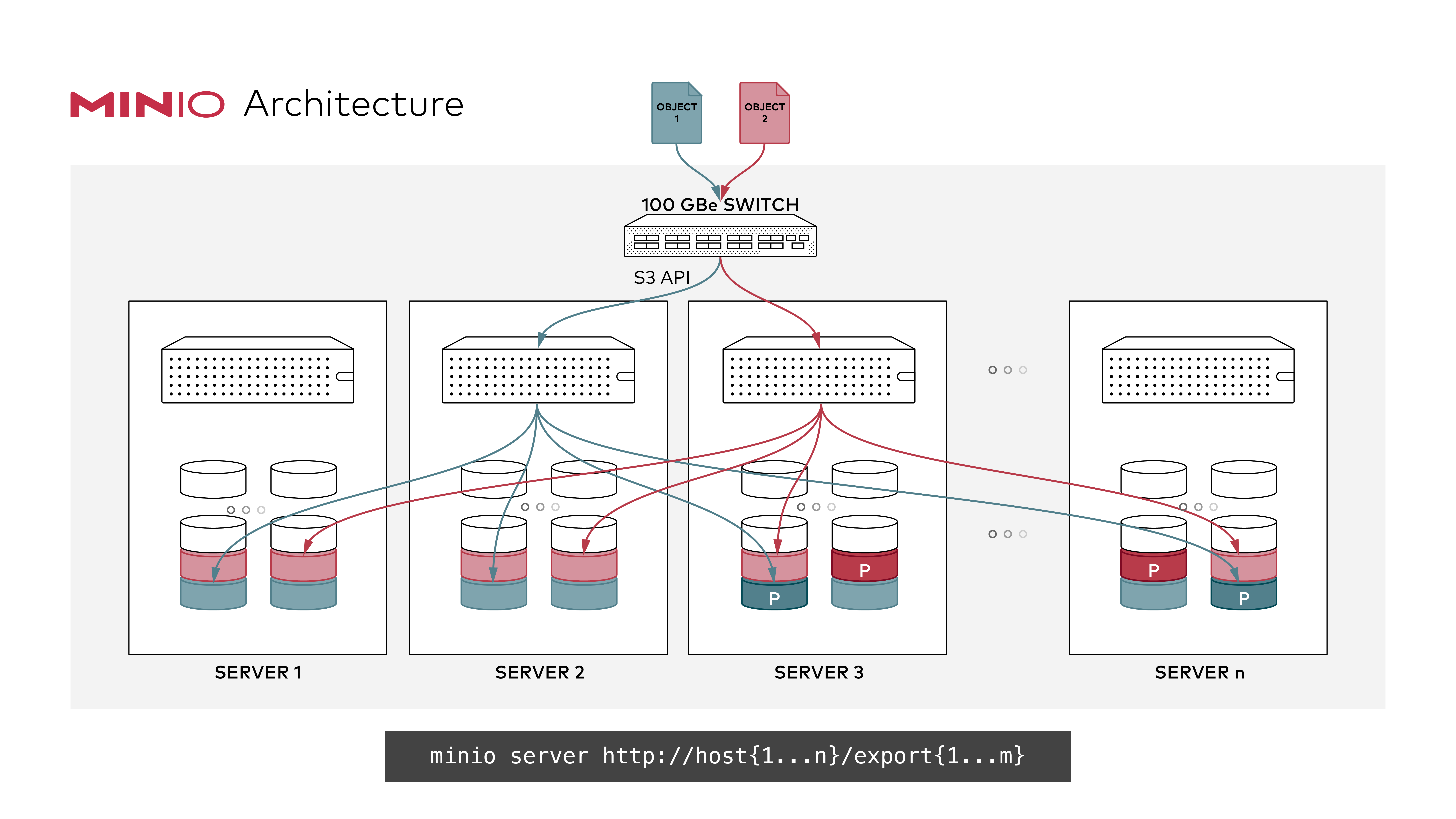
|
||||
|
||||
#### GNU/Linux and macOS
|
||||
### GNU/Linux and macOS
|
||||
|
||||
```sh
|
||||
export MINIO_ROOT_USER=<ACCESS_KEY>
|
||||
@@ -63,11 +63,11 @@ export MINIO_ROOT_PASSWORD=<SECRET_KEY>
|
||||
minio server http://host{1...n}/export{1...m}
|
||||
```
|
||||
|
||||
> __NOTE:__ In above example `n` and `m` represent positive integers, *do not copy paste and expect it work make the changes according to local deployment and setup*.
|
||||
> **NOTE:** In above example `n` and `m` represent positive integers, _do not copy paste and expect it work make the changes according to local deployment and setup_.
|
||||
> **NOTE:** `{1...n}` shown have 3 dots! Using only 2 dots `{1..n}` will be interpreted by your shell and won't be passed to MinIO server, affecting the erasure coding order, which would impact performance and high availability. **Always use ellipses syntax `{1...n}` (3 dots!) for optimal erasure-code distribution**
|
||||
|
||||
> __NOTE:__ `{1...n}` shown have 3 dots! Using only 2 dots `{1..n}` will be interpreted by your shell and won't be passed to MinIO server, affecting the erasure coding order, which would impact performance and high availability. __Always use ellipses syntax `{1...n}` (3 dots!) for optimal erasure-code distribution__
|
||||
### Expanding existing distributed setup
|
||||
|
||||
#### Expanding existing distributed setup
|
||||
MinIO supports expanding distributed erasure coded clusters by specifying new set of clusters on the command-line as shown below:
|
||||
|
||||
```sh
|
||||
@@ -77,18 +77,21 @@ minio server http://host{1...n}/export{1...m} http://host{o...z}/export{1...m}
|
||||
```
|
||||
|
||||
For example:
|
||||
|
||||
```
|
||||
minio server http://host{1...4}/export{1...16} http://host{5...12}/export{1...16}
|
||||
```
|
||||
|
||||
Now the server has expanded total storage by _(newly_added_servers\*m)_ more disks, taking the total count to _(existing_servers\*m)+(newly_added_servers\*m)_ disks. New object upload requests automatically start using the least used cluster. This expansion strategy works endlessly, so you can perpetually expand your clusters as needed. When you restart, it is immediate and non-disruptive to the applications. Each group of servers in the command-line is called a pool. There are 2 server pools in this example. New objects are placed in server pools in proportion to the amount of free space in each pool. Within each pool, the location of the erasure-set of drives is determined based on a deterministic hashing algorithm.
|
||||
|
||||
> __NOTE:__ __Each pool you add must have the same erasure coding parity configuration as the original pool, so the same data redundancy SLA is maintained.__
|
||||
> **NOTE:** **Each pool you add must have the same erasure coding parity configuration as the original pool, so the same data redundancy SLA is maintained.**
|
||||
|
||||
## 3. Test your setup
|
||||
|
||||
To test this setup, access the MinIO server via browser or [`mc`](https://docs.min.io/docs/minio-client-quickstart-guide).
|
||||
|
||||
## Explore Further
|
||||
|
||||
- [MinIO Erasure Code QuickStart Guide](https://docs.min.io/docs/minio-erasure-code-quickstart-guide)
|
||||
- [Use `mc` with MinIO Server](https://docs.min.io/docs/minio-client-quickstart-guide)
|
||||
- [Use `aws-cli` with MinIO Server](https://docs.min.io/docs/aws-cli-with-minio)
|
||||
|
||||
@@ -1,6 +1,6 @@
|
||||
## Erasure code sizing guide
|
||||
# Erasure code sizing guide
|
||||
|
||||
### Toy Setups
|
||||
## Toy Setups
|
||||
|
||||
Capacity constrained environments, MinIO will work but not recommended for production.
|
||||
|
||||
@@ -13,7 +13,7 @@ Capacity constrained environments, MinIO will work but not recommended for produ
|
||||
| 6 | 1 | 6 | 3 | 3 | 2 |
|
||||
| 7 | 1 | 7 | 3 | 3 | 3 |
|
||||
|
||||
### Minimum System Configuration for Production
|
||||
## Minimum System Configuration for Production
|
||||
|
||||
| servers | drives (per node) | stripe_size | parity chosen (default) | tolerance for reads (servers) | tolerance for writes (servers) |
|
||||
|--------:|------------------:|------------:|------------------------:|------------------------------:|-------------------------------:|
|
||||
@@ -32,7 +32,7 @@ Capacity constrained environments, MinIO will work but not recommended for produ
|
||||
| 15 | 2 | 15 | 4 | 4 | 4 |
|
||||
| 16 | 2 | 16 | 4 | 4 | 4 |
|
||||
|
||||
If one or more disks are offline at the start of a PutObject or NewMultipartUpload operation the object will have additional data
|
||||
If one or more disks are offline at the start of a PutObject or NewMultipartUpload operation the object will have additional data
|
||||
protection bits added automatically to provide the regular safety for these objects up to 50% of the number of disks.
|
||||
This will allow normal write operations to take place on systems that exceed the write tolerance.
|
||||
|
||||
|
||||
+32
-10
@@ -3,9 +3,10 @@
|
||||
See our web documentation on [Deploying MinIO in Standalone Mode](Deploy Standalone MinIO in a Container) for a more structured tutorial on deploying MinIO in a container.
|
||||
|
||||
## Prerequisites
|
||||
|
||||
Docker installed on your machine. Download the relevant installer from [here](https://www.docker.com/community-edition#/download).
|
||||
|
||||
## Run Standalone MinIO on Docker.
|
||||
## Run Standalone MinIO on Docker
|
||||
|
||||
*Note*: Standalone MinIO is intended for early development and evaluation. For production clusters, deploy a [Distributed](https://docs.min.io/minio/baremetal/installation/deployment-and-management.html) MinIO deployment.
|
||||
|
||||
@@ -22,7 +23,8 @@ docker run \
|
||||
|
||||
To create a MinIO container with persistent storage, you need to map local persistent directories from the host OS to virtual config. To do this, run the below commands
|
||||
|
||||
#### GNU/Linux and macOS
|
||||
### GNU/Linux and macOS
|
||||
|
||||
```sh
|
||||
mkdir -p ~/minio/data
|
||||
|
||||
@@ -38,7 +40,8 @@ docker run \
|
||||
|
||||
The command creates a new local directory `~/minio/data` in your user home directory. It then starts the MinIO container with the `-v` argument to map the local path (`~/minio/data`) to the specified virtual container directory (`/data`). When MinIO writes data to `/data`, that data is actually written to the local path `~/minio/data` where it can persist between container restarts.
|
||||
|
||||
#### Windows
|
||||
### Windows
|
||||
|
||||
```sh
|
||||
docker run \
|
||||
-p 9000:9000 \
|
||||
@@ -51,14 +54,17 @@ docker run \
|
||||
```
|
||||
|
||||
## Run Distributed MinIO on Docker
|
||||
Distributed MinIO can be deployed via [Docker Compose](https://docs.min.io/docs/deploy-minio-on-docker-compose). This means Docker Compose lets you quickly get started with Distributed MinIO on your computer - ideal for development, testing, staging environments. We recommend kubernetes based deployment for production level deployment https://github.com/minio/operator.
|
||||
|
||||
Distributed MinIO can be deployed via [Docker Compose](https://docs.min.io/docs/deploy-minio-on-docker-compose). This means Docker Compose lets you quickly get started with Distributed MinIO on your computer - ideal for development, testing, staging environments. We recommend kubernetes based deployment for production level deployment <https://github.com/minio/operator>.
|
||||
|
||||
## MinIO Docker Tips
|
||||
|
||||
### MinIO Custom Access and Secret Keys
|
||||
|
||||
To override MinIO's auto-generated keys, you may pass secret and access keys explicitly as environment variables. MinIO server also allows regular strings as access and secret keys.
|
||||
|
||||
#### GNU/Linux and macOS
|
||||
#### GNU/Linux and macOS (custom access and secret keys)
|
||||
|
||||
```sh
|
||||
docker run \
|
||||
-p 9000:9000 \
|
||||
@@ -70,7 +76,8 @@ docker run \
|
||||
quay.io/minio/minio server /data --console-address ":9001"
|
||||
```
|
||||
|
||||
#### Windows
|
||||
#### Windows (custom access and secret keys)
|
||||
|
||||
```powershell
|
||||
docker run \
|
||||
-p 9000:9000 \
|
||||
@@ -83,12 +90,15 @@ docker run \
|
||||
```
|
||||
|
||||
### Run MinIO Docker as a regular user
|
||||
|
||||
Docker provides standardized mechanisms to run docker containers as non-root users.
|
||||
|
||||
#### GNU/Linux and macOS
|
||||
#### GNU/Linux and macOS (regular user)
|
||||
|
||||
On Linux and macOS you can use `--user` to run the container as regular user.
|
||||
|
||||
> NOTE: make sure --user has write permission to *${HOME}/data* prior to using `--user`.
|
||||
|
||||
```sh
|
||||
mkdir -p ${HOME}/data
|
||||
docker run \
|
||||
@@ -99,10 +109,11 @@ docker run \
|
||||
-e "MINIO_ROOT_USER=AKIAIOSFODNN7EXAMPLE" \
|
||||
-e "MINIO_ROOT_PASSWORD=wJalrXUtnFEMIK7MDENGbPxRfiCYEXAMPLEKEY" \
|
||||
-v ${HOME}/data:/data \
|
||||
quay.io/minio/minio server /data
|
||||
quay.io/minio/minio server /data --console-address ":9001"
|
||||
```
|
||||
|
||||
#### Windows
|
||||
#### Windows (regular user)
|
||||
|
||||
On windows you would need to use [Docker integrated windows authentication](https://success.docker.com/article/modernizing-traditional-dot-net-applications#integratedwindowsauthentication) and [Create a container with Active Directory Support](https://blogs.msdn.microsoft.com/containerstuff/2017/01/30/create-a-container-with-active-directory-support/)
|
||||
|
||||
> NOTE: make sure your AD/Windows user has write permissions to *D:\data* prior to using `credentialspec=`.
|
||||
@@ -116,10 +127,11 @@ docker run \
|
||||
-e "MINIO_ROOT_USER=AKIAIOSFODNN7EXAMPLE" \
|
||||
-e "MINIO_ROOT_PASSWORD=wJalrXUtnFEMIK7MDENGbPxRfiCYEXAMPLEKEY" \
|
||||
-v D:\data:/data \
|
||||
quay.io/minio/minio server /data
|
||||
quay.io/minio/minio server /data --console-address ":9001"
|
||||
```
|
||||
|
||||
### MinIO Custom Access and Secret Keys using Docker secrets
|
||||
|
||||
To override MinIO's auto-generated keys, you may pass secret and access keys explicitly by creating access and secret keys as [Docker secrets](https://docs.docker.com/engine/swarm/secrets/). MinIO server also allows regular strings as access and secret keys.
|
||||
|
||||
```
|
||||
@@ -128,6 +140,7 @@ echo "wJalrXUtnFEMI/K7MDENG/bPxRfiCYEXAMPLEKEY" | docker secret create secret_ke
|
||||
```
|
||||
|
||||
Create a MinIO service using `docker service` to read from Docker secrets.
|
||||
|
||||
```
|
||||
docker service create --name="minio-service" --secret="access_key" --secret="secret_key" quay.io/minio/minio server /data
|
||||
```
|
||||
@@ -135,7 +148,9 @@ docker service create --name="minio-service" --secret="access_key" --secret="sec
|
||||
Read more about `docker service` [here](https://docs.docker.com/engine/swarm/how-swarm-mode-works/services/)
|
||||
|
||||
#### MinIO Custom Access and Secret Key files
|
||||
|
||||
To use other secret names follow the instructions above and replace `access_key` and `secret_key` with your custom names (e.g. `my_secret_key`,`my_custom_key`). Run your service with
|
||||
|
||||
```
|
||||
docker service create --name="minio-service" \
|
||||
--secret="my_access_key" \
|
||||
@@ -144,13 +159,16 @@ docker service create --name="minio-service" \
|
||||
--env="MINIO_ROOT_PASSWORD_FILE=my_secret_key" \
|
||||
quay.io/minio/minio server /data
|
||||
```
|
||||
|
||||
`MINIO_ROOT_USER_FILE` and `MINIO_ROOT_PASSWORD_FILE` also support custom absolute paths, in case Docker secrets are mounted to custom locations or other tools are used to mount secrets into the container. For example, HashiCorp Vault injects secrets to `/vault/secrets`. With the custom names above, set the environment variables to
|
||||
|
||||
```
|
||||
MINIO_ROOT_USER_FILE=/vault/secrets/my_access_key
|
||||
MINIO_ROOT_PASSWORD_FILE=/vault/secrets/my_secret_key
|
||||
```
|
||||
|
||||
### Retrieving Container ID
|
||||
|
||||
To use Docker commands on a specific container, you need to know the `Container ID` for that container. To get the `Container ID`, run
|
||||
|
||||
```sh
|
||||
@@ -160,6 +178,7 @@ docker ps -a
|
||||
`-a` flag makes sure you get all the containers (Created, Running, Exited). Then identify the `Container ID` from the output.
|
||||
|
||||
### Starting and Stopping Containers
|
||||
|
||||
To start a stopped container, you can use the [`docker start`](https://docs.docker.com/engine/reference/commandline/start/) command.
|
||||
|
||||
```sh
|
||||
@@ -167,11 +186,13 @@ docker start <container_id>
|
||||
```
|
||||
|
||||
To stop a running container, you can use the [`docker stop`](https://docs.docker.com/engine/reference/commandline/stop/) command.
|
||||
|
||||
```sh
|
||||
docker stop <container_id>
|
||||
```
|
||||
|
||||
### MinIO container logs
|
||||
|
||||
To access MinIO logs, you can use the [`docker logs`](https://docs.docker.com/engine/reference/commandline/logs/) command.
|
||||
|
||||
```sh
|
||||
@@ -179,6 +200,7 @@ docker logs <container_id>
|
||||
```
|
||||
|
||||
### Monitor MinIO Docker Container
|
||||
|
||||
To monitor the resources used by MinIO container, you can use the [`docker stats`](https://docs.docker.com/engine/reference/commandline/stats/) command.
|
||||
|
||||
```sh
|
||||
|
||||
@@ -2,7 +2,7 @@
|
||||
|
||||
MinIO server supports storage class in erasure coding mode. This allows configurable data and parity disks per object.
|
||||
|
||||
This page is intended as a summary of MinIO Erasure Coding. For a more complete explanation, see https://docs.min.io/minio/baremetal/concepts/erasure-coding.html.
|
||||
This page is intended as a summary of MinIO Erasure Coding. For a more complete explanation, see <https://docs.min.io/minio/baremetal/concepts/erasure-coding.html>.
|
||||
|
||||
## Overview
|
||||
|
||||
@@ -53,7 +53,6 @@ The default value for the `STANDARD` storage class depends on the number of volu
|
||||
| 6-7 | EC:3 |
|
||||
| 8 or more | EC:4 |
|
||||
|
||||
Prior to the ``RELEASE.2021-01-30T00-20-58Z`` MinIO release, the default `STANDARD` value was `EC(N/2)` where `N` was the number of erasure set drives.
|
||||
For more complete documentation on Erasure Set sizing, see the [MinIO Documentation on Erasure Sets](https://docs.min.io/minio/baremetal/concepts/erasure-coding.html#erasure-sets).
|
||||
|
||||
### Allowed values for REDUCED_REDUNDANCY storage class
|
||||
@@ -86,7 +85,7 @@ export MINIO_STORAGE_CLASS_RRS=EC:2
|
||||
Storage class can also be set via `mc admin config` get/set commands to update the configuration. Refer [storage class](https://github.com/minio/minio/tree/master/docs/config#storage-class) for
|
||||
more details.
|
||||
|
||||
*Note*
|
||||
#### Note
|
||||
|
||||
- If `STANDARD` storage class is set via environment variables or `mc admin config` get/set commands, and `x-amz-storage-class` is not present in request metadata, MinIO server will
|
||||
apply `STANDARD` storage class to the object. This means the data and parity disks will be used as set in `STANDARD` storage class.
|
||||
@@ -101,22 +100,22 @@ In below example `minio-go` is used to set the storage class to `REDUCED_REDUNDA
|
||||
```go
|
||||
s3Client, err := minio.New("localhost:9000", "YOUR-ACCESSKEYID", "YOUR-SECRETACCESSKEY", true)
|
||||
if err != nil {
|
||||
log.Fatalln(err)
|
||||
log.Fatalln(err)
|
||||
}
|
||||
|
||||
object, err := os.Open("my-testfile")
|
||||
if err != nil {
|
||||
log.Fatalln(err)
|
||||
log.Fatalln(err)
|
||||
}
|
||||
defer object.Close()
|
||||
objectStat, err := object.Stat()
|
||||
if err != nil {
|
||||
log.Fatalln(err)
|
||||
log.Fatalln(err)
|
||||
}
|
||||
|
||||
n, err := s3Client.PutObject("my-bucketname", "my-objectname", object, objectStat.Size(), minio.PutObjectOptions{ContentType: "application/octet-stream", StorageClass: "REDUCED_REDUNDANCY"})
|
||||
if err != nil {
|
||||
log.Fatalln(err)
|
||||
log.Fatalln(err)
|
||||
}
|
||||
log.Println("Uploaded", "my-objectname", " of size: ", n, "Successfully.")
|
||||
```
|
||||
|
||||
Some files were not shown because too many files have changed in this diff Show More
Reference in New Issue
Block a user