mirror of
https://github.com/pgsty/minio.git
synced 2026-07-19 12:10:24 +03:00
 Feng Ruohang
f48dbe777d
Feng Ruohang
f48dbe777d
Update the STS, security, select, and Docker documentation to reflect the recent hardening work, including LDAP STS throttling details, OIDC JWT verification changes, and the new pgsty-specific security policy and advisory index.

Rewrite repository and raw-document links that still pointed at minio/minio so the docs consistently reference pgsty/minio instead.

The core idea is to keep the documentation aligned with the fork's actual security behavior, ownership, and upgrade guidance without mixing in unrelated code changes.
121 lines
4.4 KiB
Markdown
121 lines
4.4 KiB
Markdown
# How to configure Prometheus AlertManager
|
|
|
|
Alerting with prometheus is two step process. First we setup alerts in Prometheus server and then we need to send alerts to the AlertManager.
|
|
Prometheus AlertManager is the component that manages sending, inhibition and silencing of the alerts generated from Prometheus. The AlertManager can be configured to send alerts to variety of receivers. Refer [Prometheus AlertManager receivers](https://prometheus.io/docs/alerting/latest/configuration/#receiver) for more details.
|
|
|
|
Follow below steps to enable and use AlertManager.
|
|
|
|
## Deploy and start AlertManager
|
|
Install Prometheus AlertManager from https://prometheus.io/download/ and create configuration as below
|
|
|
|
```yaml
|
|
route:
|
|
group_by: ['alertname']
|
|
group_wait: 30s
|
|
group_interval: 5m
|
|
repeat_interval: 1h
|
|
receiver: 'web.hook'
|
|
receivers:
|
|
- name: 'web.hook'
|
|
webhook_configs:
|
|
- url: 'http://127.0.0.1:8010/webhook'
|
|
inhibit_rules:
|
|
- source_match:
|
|
severity: 'critical'
|
|
target_match:
|
|
severity: 'warning'
|
|
equal: ['alertname', 'dev', 'instance']
|
|
```
|
|
|
|
This sample configuration uses a `webhook` at http://127.0.0.1:8010/webhook to post the alerts.
|
|
Start the AlertManager and it listens on port `9093` by default. Make sure your webhook is up and listening for the alerts.
|
|
|
|
## Configure Prometheus to use AlertManager
|
|
|
|
Add below section to your `prometheus.yml`
|
|
```yaml
|
|
alerting:
|
|
alertmanagers:
|
|
- static_configs:
|
|
- targets: ['localhost:9093']
|
|
rule_files:
|
|
- rules.yml
|
|
```
|
|
Here `rules.yml` is the file which should contain the alerting rules defined.
|
|
|
|
## Add rules for your deployment
|
|
Below is a sample alerting rules configuration for MinIO. Refer https://prometheus.io/docs/prometheus/latest/configuration/alerting_rules/ for more instructions on writing alerting rules for Prometheus.
|
|
|
|
```yaml
|
|
groups:
|
|
- name: example
|
|
rules:
|
|
- alert: MinIOClusterTolerance
|
|
expr: minio_cluster_health_erasure_set_status < 1
|
|
for: 5m
|
|
labels:
|
|
severity: critical
|
|
annotations:
|
|
summary: "Instance {{ $labels.server }} has lost quorum on pool {{ $labels.pool }} on set {{ $labels.set }}"
|
|
description: "MinIO instance {{ $labels.server }} of job {{ $labels.job }} has lost quorum on pool {{ $labels.pool }} on set {{ $labels.set }} for more than 5 minutes."
|
|
```
|
|
|
|
## Verify the configuration and alerts
|
|
To verify the above sample alert follow below steps
|
|
|
|
1. Start a distributed MinIO instance (4 nodes setup)
|
|
2. Start Prometheus server and AlertManager
|
|
3. Bring down couple of MinIO instances to bring down the Erasure Set tolerance to -1 and verify the same with `mc admin prometheus metrics ALIAS | grep minio_cluster_health_erasure_set_status`
|
|
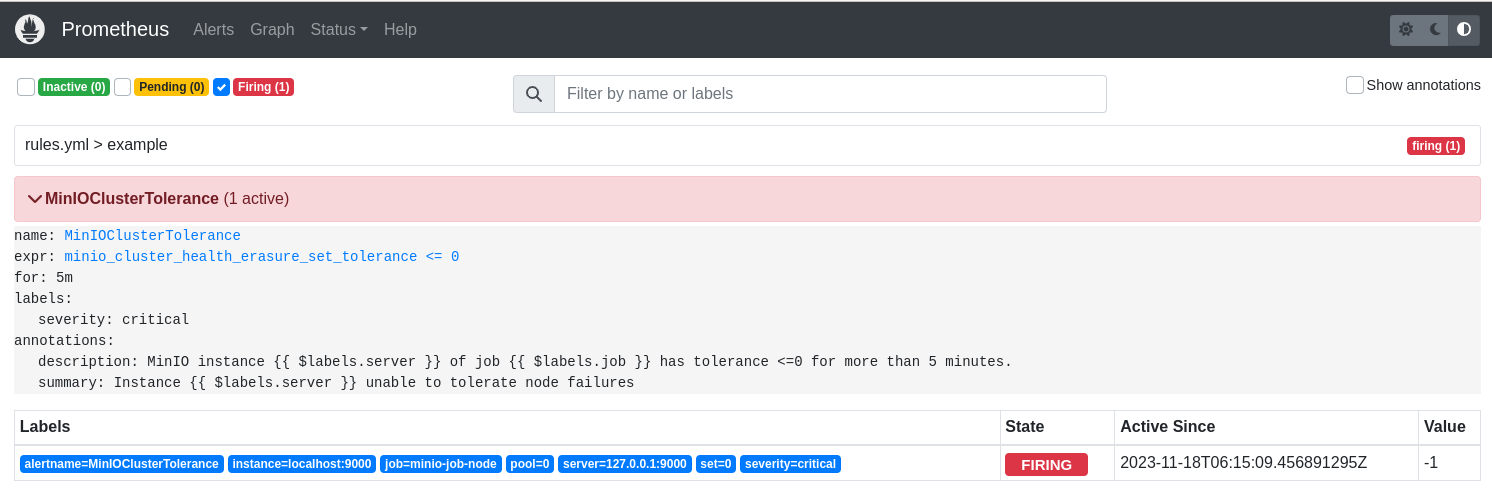
4. Wait for 5 mins (as alert is configured to be firing after 5 mins), and verify that you see an entry in webhook for the alert as well as in Prometheus console as shown below
|
|
|
|
```json
|
|
{
|
|
"receiver": "web\\.hook",
|
|
"status": "firing",
|
|
"alerts": [
|
|
{
|
|
"status": "firing",
|
|
"labels": {
|
|
"alertname": "MinIOClusterTolerance",
|
|
"instance": "localhost:9000",
|
|
"job": "minio-job-node",
|
|
"pool": "0",
|
|
"server": "127.0.0.1:9000",
|
|
"set": "0",
|
|
"severity": "critical"
|
|
},
|
|
"annotations": {
|
|
"description": "MinIO instance 127.0.0.1:9000 of job minio-job has tolerance <=0 for more than 5 minutes.",
|
|
"summary": "Instance 127.0.0.1:9000 unable to tolerate node failures"
|
|
},
|
|
"startsAt": "2023-11-18T06:20:09.456Z",
|
|
"endsAt": "0001-01-01T00:00:00Z",
|
|
"generatorURL": "http://fedora-minio:9090/graph?g0.expr=minio_cluster_health_erasure_set_tolerance+%3C%3D+0&g0.tab=1",
|
|
"fingerprint": "2255608b0da28ca3"
|
|
}
|
|
],
|
|
"groupLabels": {
|
|
"alertname": "MinIOClusterTolerance"
|
|
},
|
|
"commonLabels": {
|
|
"alertname": "MinIOClusterTolerance",
|
|
"instance": "localhost:9000",
|
|
"job": "minio-job-node",
|
|
"pool": "0",
|
|
"server": "127.0.0.1:9000",
|
|
"set": "0",
|
|
"severity": "critical"
|
|
},
|
|
"commonAnnotations": {
|
|
"description": "MinIO instance 127.0.0.1:9000 of job minio-job has lost quorum on pool 0 on set 0 for more than 5 minutes.",
|
|
"summary": "Instance 127.0.0.1:9000 has lost quorum on pool 0 on set 0"
|
|
},
|
|
"externalURL": "http://fedora-minio:9093",
|
|
"version": "4",
|
|
"groupKey": "{}:{alertname=\"MinIOClusterTolerance\"}",
|
|
"truncatedAlerts": 0
|
|
}
|
|
```
|
|
|
|
|