 Feng Ruohang
fd2ca1c6d2
Feng Ruohang
fd2ca1c6d2
README, README_ZH, SECURITY, COMPLIANCE, CONTRIBUTING, NOTICE,
code_of_conduct, the vulnerability and PR-etiquette documents, the GitHub issue
and pull request templates, and the docs/ tree all present Silo as the product.
The Grafana dashboards under docs/metrics/prometheus/grafana/ have their panel
titles and descriptions rebranded while every minio_* query, label and
expression is left alone, so existing alerts and recording rules keep matching.

The distinction the review demanded is applied per hit rather than by
search-and-replace:

- Product and command text becomes Silo and silo: install and run instructions,
  systemd examples, compose services, download links, badges.
- Protocol and interface text keeps MinIO: MINIO_* variables, minio_* metrics,
  x-minio-* headers, /minio/* routes, .minio.sys, arn:minio, and API field and
  error names.
- Attribution keeps MinIO and gains the fork's own: the AGPL obligations,
  original copyright, CREDITS and NOTICE stay, with the modification notice
  added alongside rather than replacing them.
- Historical and third-party references are left as facts, not rewritten for
  brand tidiness.

README and README_ZH each carry an explicit non-affiliation notice, document
the side-by-side package migration including the
/etc/systemd/system/silo.service.d/10-legacy-user.conf drop-in for keeping a
legacy UID/GID, and state that recursive chown is never performed. The trademark
attribution uses the policy's approved "based on MinIO technology" wording, not
the shortened form the policy rejects.

github.com/pgsty/minio links are left in place and labelled transitional. The
repository has not been renamed, and rewriting them now would produce documented
URLs that 404 until the cutover; they change in the cutover commit together with
the goreleaser release target, the OCI source label and the raw-content branch.

Co-Authored-By: Claude Opus 5 (1M context) <noreply@anthropic.com>
12 KiB
Bucket Versioning Guide 
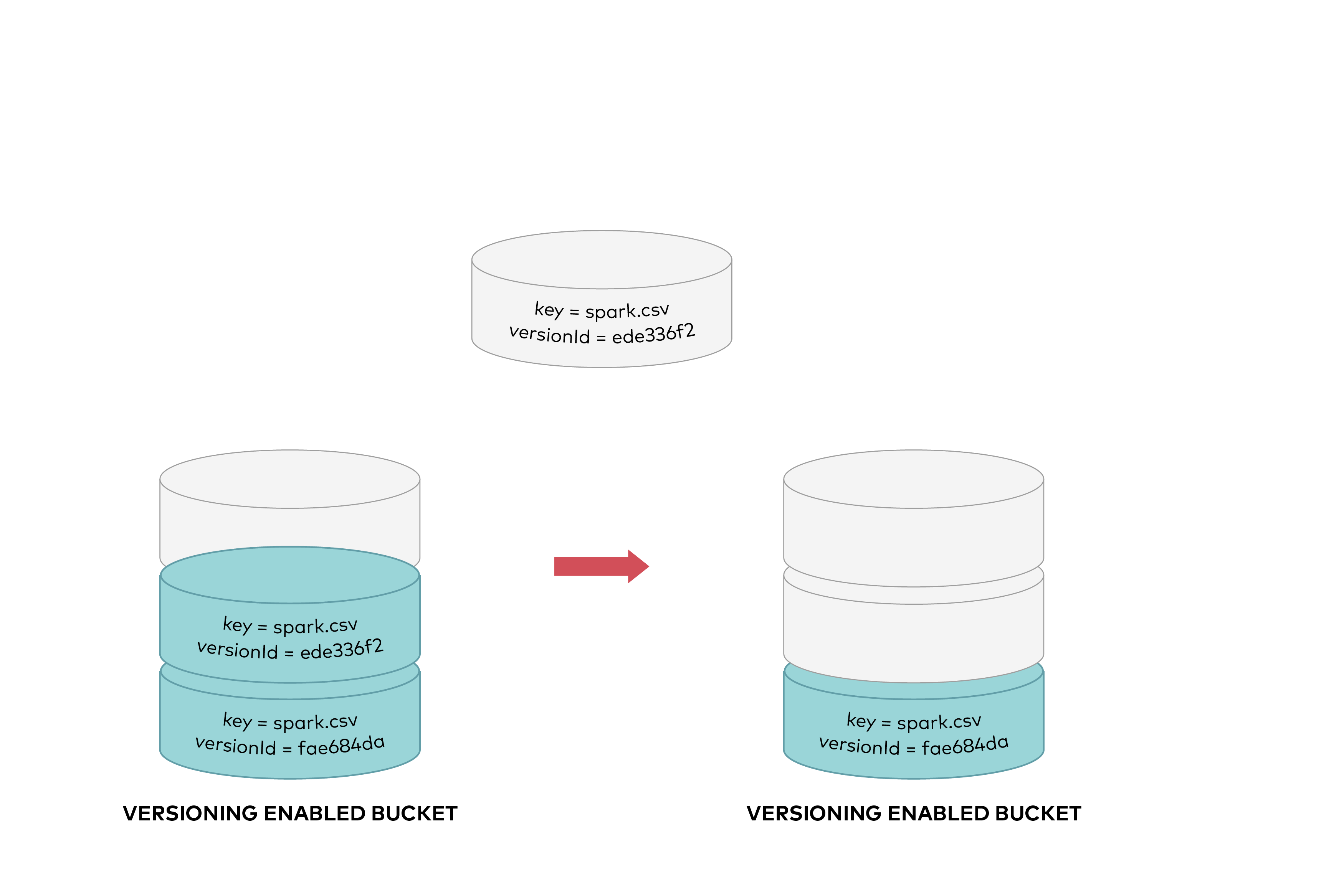
Silo versioning is designed to keep multiple versions of an object in one bucket. For example, you could store spark.csv (version ede336f2) and spark.csv (version fae684da) in a single bucket. Versioning protects you from unintended overwrites, deletions, protect objects with retention policies.
To control data retention and storage usage, use object versioning with object lifecycle management. If you have an object expiration lifecycle policy in your non-versioned bucket and you want to maintain the same permanent delete behavior when on versioning-enabled bucket, you must add a noncurrent expiration policy. The noncurrent expiration lifecycle policy will manage the deletes of the noncurrent object versions in the versioning-enabled bucket. (A version-enabled bucket maintains one current and zero or more noncurrent object versions.)
Versioning must be explicitly enabled on a bucket, versioning is not enabled by default. Object locking enabled buckets have versioning enabled automatically. Enabling and suspending versioning is done at the bucket level.
Only Silo generates version IDs, and they can't be edited. Version IDs are simply of DCE 1.1 v4 UUID 4 (random data based), UUIDs are 128 bit numbers which are intended to have a high likelihood of uniqueness over space and time and are computationally difficult to guess. They are globally unique identifiers which can be locally generated without contacting a global registration authority. UUIDs are intended as unique identifiers for both mass tagging objects with an extremely short lifetime and to reliably identifying very persistent objects across a network.
When you PUT an object in a versioning-enabled bucket, the noncurrent version is not overwritten. The following figure shows that when a new version of spark.csv is PUT into a bucket that already contains an object with the same name, the original object (ID = ede336f2) remains in the bucket, Silo generates a new version (ID = fae684da), and adds the newer version to the bucket.
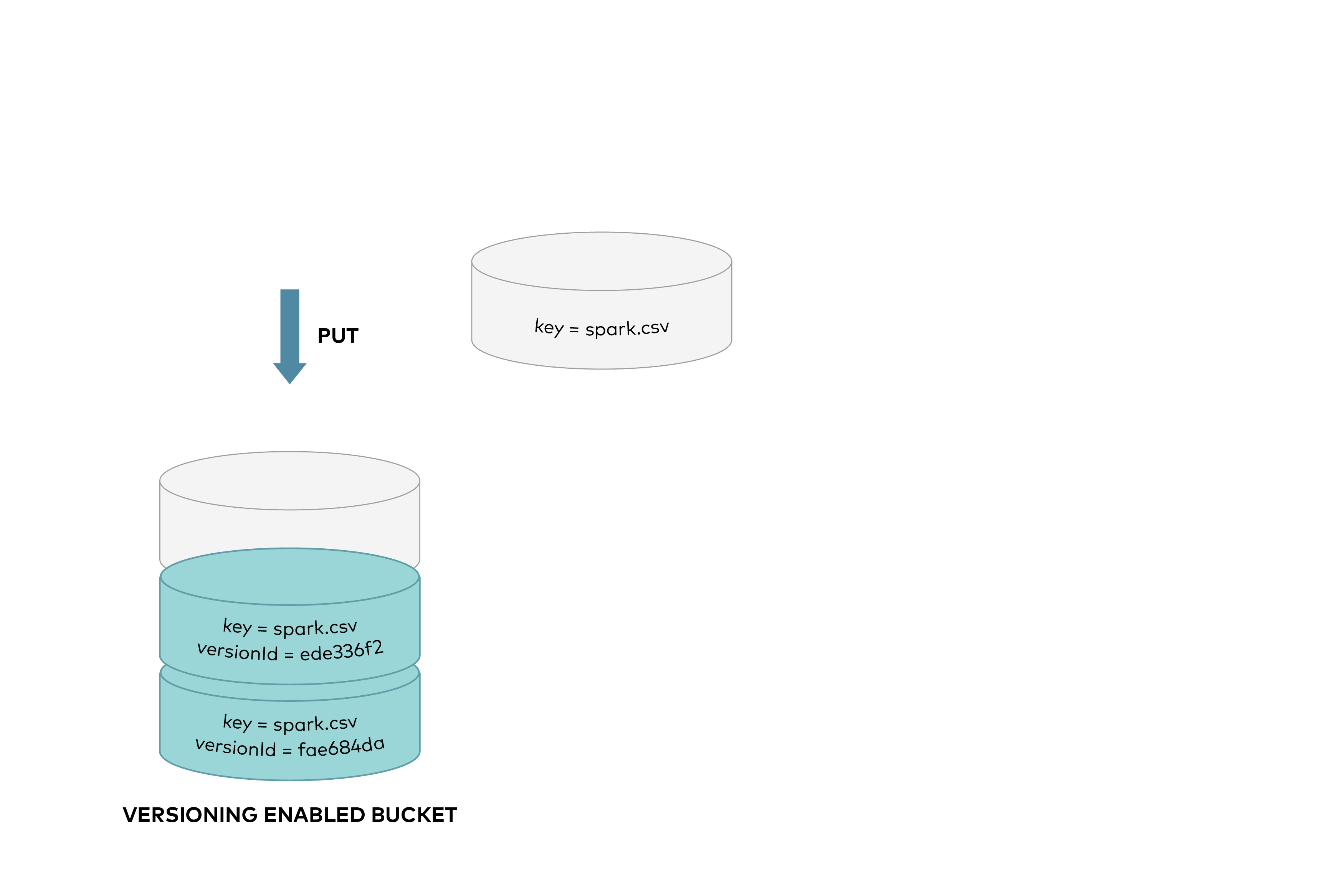
This protects against accidental overwrites or deletes of objects, allows previous versions to be retrieved.
When you DELETE an object, all versions remain in the bucket and Silo adds a delete marker, as shown below:
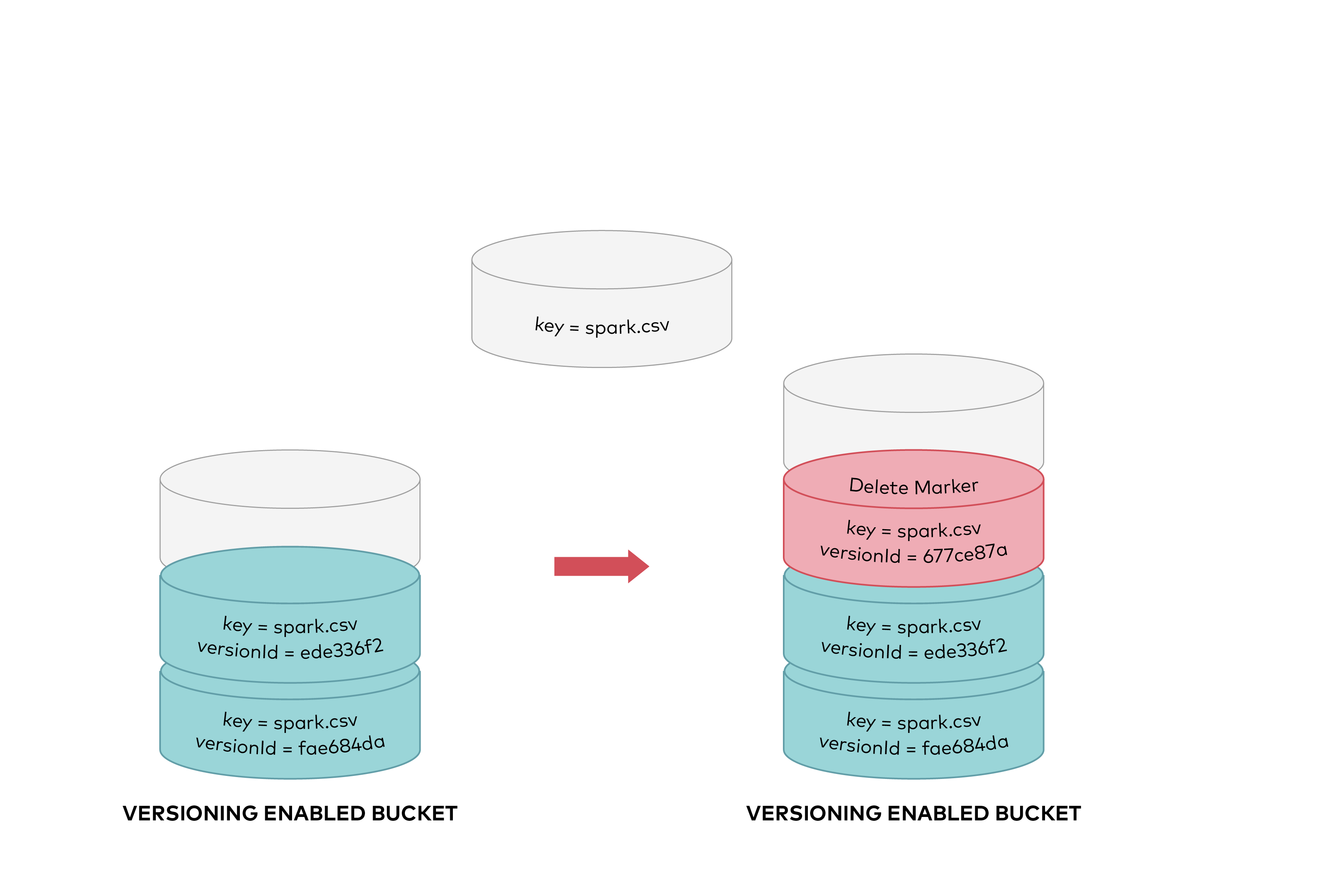
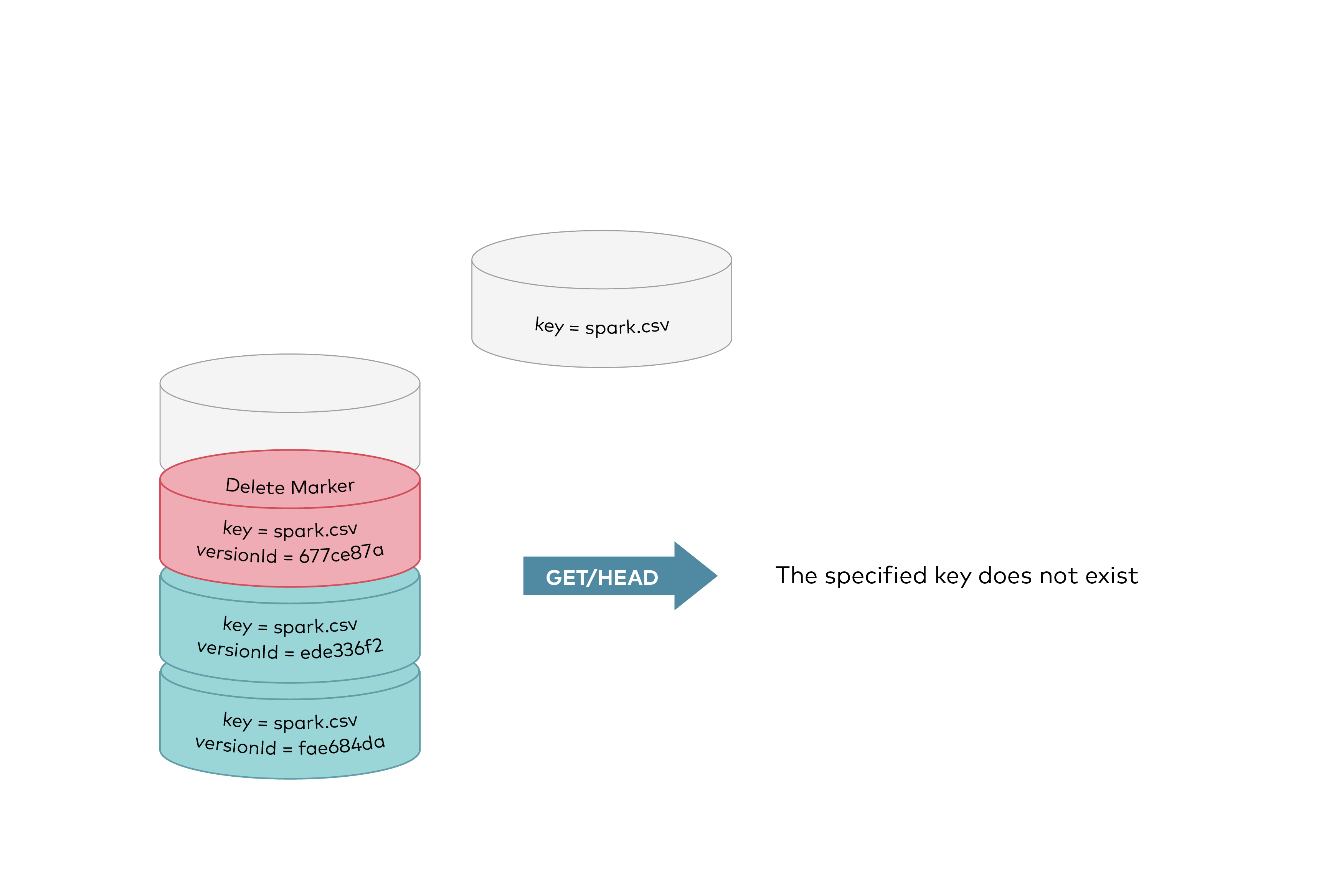
Now the delete marker becomes the current version of the object. GET requests by default always retrieve the latest stored version. So performing a simple GET object request when the current version is a delete marker would return 404 The specified key does not exist as shown below:
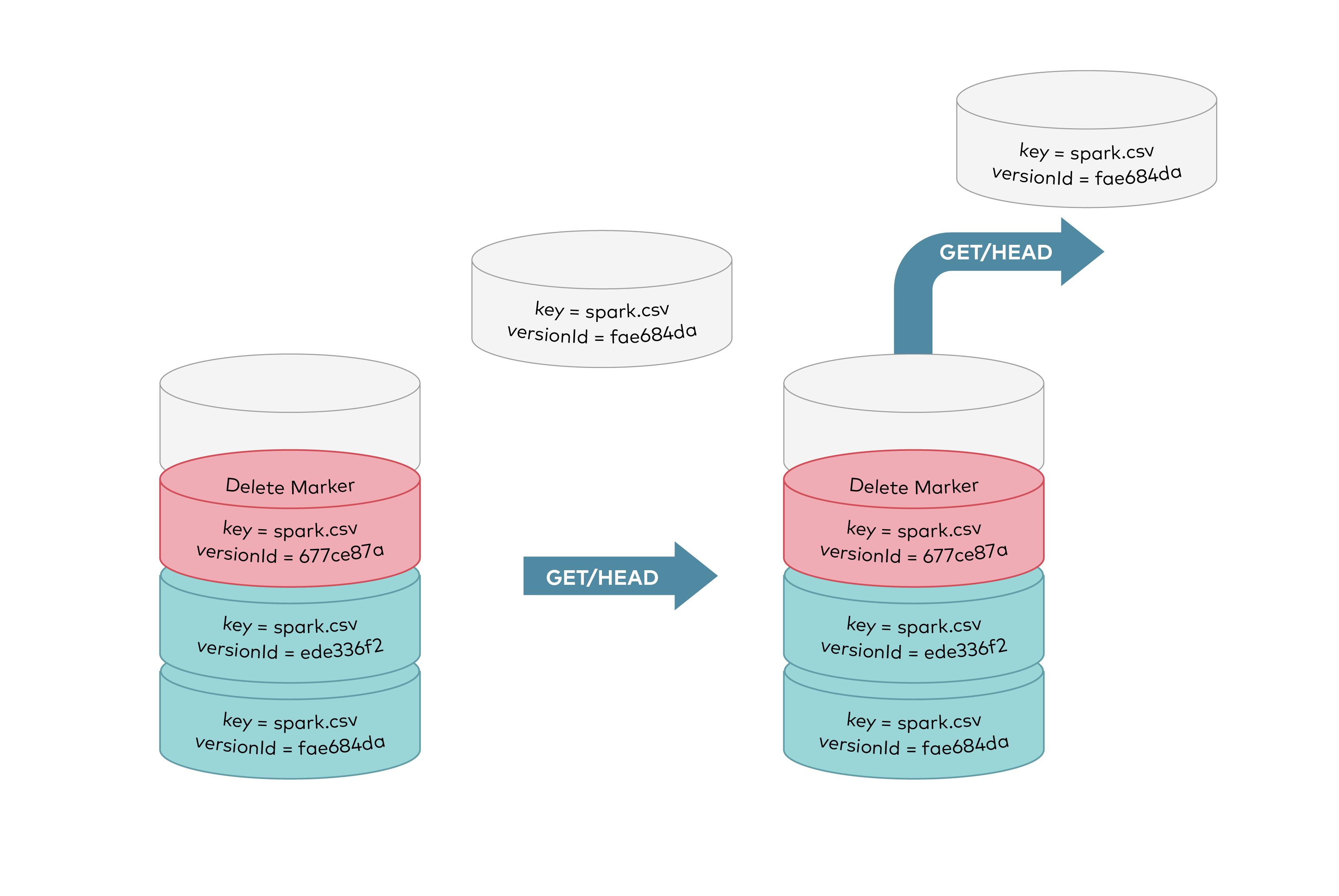
GET requests by specifying a version ID as shown below, you can retrieve the specific object version fae684da.
To permanently delete an object you need to specify the version you want to delete, only the user with appropriate permissions can permanently delete a version. As shown below DELETE request called with a specific version id permanently deletes an object from a bucket. Delete marker is not added for DELETE requests with version id.
Concepts
- All Buckets on Silo are always in one of the following states: unversioned (the default) and all other existing deployments, versioning-enabled, or versioning-suspended.
- Versioning state applies to all of the objects in the versioning enabled bucket. The first time you enable a bucket for versioning, objects in the bucket are thereafter always versioned and given a unique version ID.
- Existing or newer buckets can be created with versioning enabled and eventually can be suspended as well. Existing versions of objects stay as is and can still be accessed using the version ID.
- All versions, including delete-markers should be deleted before deleting a bucket.
- Versioning feature is only available in erasure coded and distributed erasure coded setups.
How to configure versioning on a bucket
Each bucket created has a versioning configuration associated with it. By default bucket is unversioned as shown below
<VersioningConfiguration xmlns="http://s3.amazonaws.com/doc/2006-03-01/">
</VersioningConfiguration>
To enable versioning, you send a request to Silo with a versioning configuration with Status set to Enabled.
<VersioningConfiguration xmlns="http://s3.amazonaws.com/doc/2006-03-01/">
  <Status>Enabled</Status>
</VersioningConfiguration>
Similarly to suspend versioning set the configuration with Status set to Suspended.
<VersioningConfiguration xmlns="http://s3.amazonaws.com/doc/2006-03-01/">
  <Status>Suspended</Status>
</VersioningConfiguration>
Silo extension to Bucket Versioning
Idempotent versions on directory objects
All directory objects such as objects that end with /, will only have one versionId (i.e null). A delete marker will never be created on these directory objects, instead a DELETE will delete the directory objects. This is done to ensure that directory objects even with multiple overwrites - do not ever need multiple versions in the first place. All overwrite calls on these directory objects are idempotent.
NOTE: Server side replication is supported for idempotent versions on directory objects.
Idempotent versions on delete markers
Duplicate delete markers are not created on Silo buckets with versioning, if an application performs a soft delete on an object repeatedly - that object will only ever have a single DELETE marker for all such successive attempts. This is done to ensure that repeated soft deletes do not ever need multiple versions in the first place.
NOTE: Server side replication is supported for idempotent versions on delete marked objects.
Motivation
PLEASE READ: This advanced behavior is intended for carefully evaluated versioned or replicated workloads. Validate its lifecycle and replication effects in a staging environment before enabling it in production.
Spark/Hadoop workloads which use Hadoop MR Committer v1/v2 algorithm upload objects to a temporary prefix in a bucket. These objects are 'renamed' to a different prefix on Job commit. Object storage admins are forced to configure separate ILM policies to expire these objects and their versions to reclaim space.
Solution
To exclude objects under a list of prefix (glob) patterns from being versioned, you can send the following versioning configuration with Status set to Enabled.
<VersioningConfiguration xmlns="http://s3.amazonaws.com/doc/2006-03-01/">
        <Status>Enabled</Status>
        <ExcludedPrefixes>
          <Prefix>*/_temporary</Prefix>
        </ExcludedPrefixes>
        <ExcludedPrefixes>
          <Prefix>*/__magic</Prefix>
        </ExcludedPrefixes>
        <ExcludedPrefixes>
          <Prefix>*/_staging</Prefix>
        </ExcludedPrefixes>

        <!-- .. up to 10 prefixes in all -->
</VersioningConfiguration>
Features
- Objects matching these prefixes will behave as though versioning were suspended. These objects will not be replicated if bucket has replication configured.
- Objects matching these prefixes will also not leave
nulldelete markers, dramatically reduces namespace pollution while keeping the benefits of replication. - Users with explicit permissions or the root credential can configure the versioning state of any bucket.
Examples using the MinIO Java SDK compatibility client
EnableVersioning() API
import io.minio.EnableVersioningArgs;
import io.minio.MinioClient;
import io.minio.errors.MinioException;
import java.io.IOException;
import java.security.InvalidKeyException;
import java.security.NoSuchAlgorithmException;

public class EnableVersioning {
  /** MinioClient.enableVersioning() example. */
  public static void main(String[] args)
      throws IOException, NoSuchAlgorithmException, InvalidKeyException {
    try {
      /* Local Silo endpoint for test and development. */
      MinioClient minioClient =
          MinioClient.builder()
              .endpoint("http://127.0.0.1:9000")
              .credentials("YOUR-ACCESS-KEY", "YOUR-SECRET-KEY")
              .build();

      /* Amazon S3: */
      // MinioClient minioClient =
      //     MinioClient.builder()
      //         .endpoint("https://s3.amazonaws.com")
      //         .credentials("YOUR-ACCESSKEY", "YOUR-SECRETACCESSKEY")
      //         .build();

      // Enable versioning on 'my-bucketname'.
      minioClient.enableVersioning(EnableVersioningArgs.builder().bucket("my-bucketname").build());

      System.out.println("Bucket versioning is enabled successfully");

    } catch (MinioException e) {
      System.out.println("Error occurred: " + e);
    }
  }
}
isVersioningEnabled() API
public class IsVersioningEnabled {
  /** MinioClient.isVersioningEnabled() example. */
  public static void main(String[] args)
      throws IOException, NoSuchAlgorithmException, InvalidKeyException {
    try {
      /* Local Silo endpoint for test and development. */
      MinioClient minioClient =
          MinioClient.builder()
              .endpoint("http://127.0.0.1:9000")
              .credentials("YOUR-ACCESS-KEY", "YOUR-SECRET-KEY")
              .build();

      /* Amazon S3: */
      // MinioClient minioClient =
      //     MinioClient.builder()
      //         .endpoint("https://s3.amazonaws.com")
      //         .credentials("YOUR-ACCESSKEY", "YOUR-SECRETACCESSKEY")
      //         .build();

      // Create bucket 'my-bucketname' if it doesn`t exist.
      if (!minioClient.bucketExists(BucketExistsArgs.builder().bucket("my-bucketname").build())) {
        minioClient.makeBucket(MakeBucketArgs.builder().bucket("my-bucketname").build());
        System.out.println("my-bucketname is created successfully");
      }

      boolean isVersioningEnabled =
          minioClient.isVersioningEnabled(
              IsVersioningEnabledArgs.builder().bucket("my-bucketname").build());
      if (isVersioningEnabled) {
        System.out.println("Bucket versioning is enabled");
      } else {
        System.out.println("Bucket versioning is disabled");
      }
      // Enable versioning on 'my-bucketname'.
      minioClient.enableVersioning(EnableVersioningArgs.builder().bucket("my-bucketname").build());
      System.out.println("Bucket versioning is enabled successfully");

      isVersioningEnabled =
          minioClient.isVersioningEnabled(
              IsVersioningEnabledArgs.builder().bucket("my-bucketname").build());
      if (isVersioningEnabled) {
        System.out.println("Bucket versioning is enabled");
      } else {
        System.out.println("Bucket versioning is disabled");
      }

    } catch (MinioException e) {
      System.out.println("Error occurred: " + e);
    }
  }
}